How to Connect Claude to Zoho Analytics Using MCP
- Last Updated : August 21, 2026
- 276 Views
- 5 Min Read
Claude is a capable AI assistant. It can reason about data, write SQL, and explain trends in plain English. But until recently, it had no way to actually see your Zoho Analytics data. You couldn't connect to your live workspace, pull your actual numbers, or act on anything.
That changes with the Zoho Analytics MCP Server.
MCP, or Model Context Protocol, is an open standard Anthropic introduced in late 2024. The idea behind it is straightforward: instead of every AI application building a custom integration for every external tool it needs to reach, you build to a common protocol once. Any MCP-compatible AI host can then connect to any MCP server using the same pattern. Anthropic describes it as a USB-C port for AI.
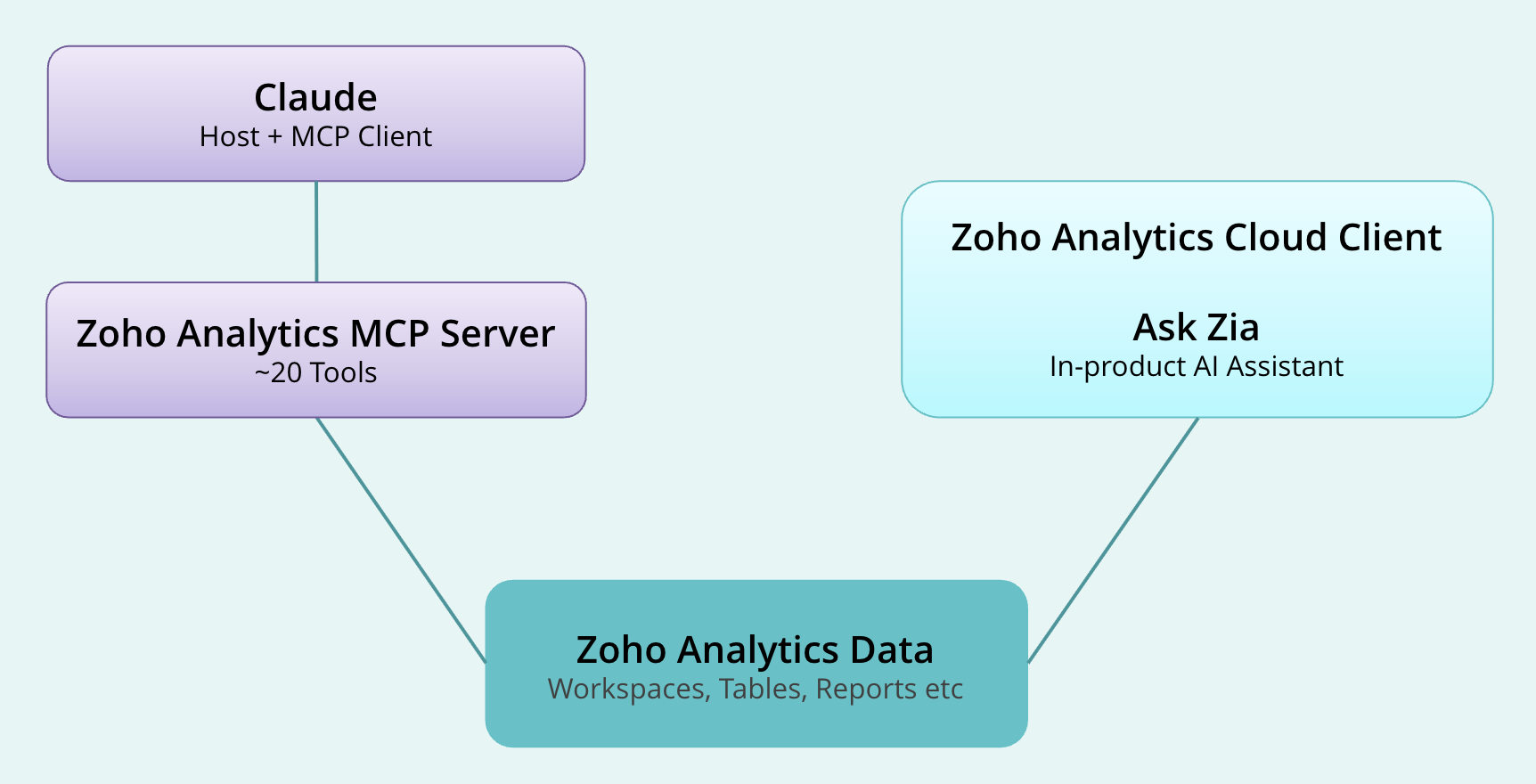
The Zoho Analytics MCP Server is Zoho's implementation of this standard. It's a middleware layer that sits between an MCP-compatible AI host and the Zoho Analytics V2 API. When you ask Claude a question about your data, Claude calls the server, the server calls the API, and the result comes back to Claude, which formats it into an answer. The server is open source, published at github.com/zoho/analytics-mcp-server, and currently in beta.
Because MCP is a standard, this isn't exclusive to Claude. Any MCP-compatible AI host — Cursor, VS Code with an MCP extension, or a custom agent you build yourself — can connect to the same server the same way.
What Claude can do with it
The MCP server exposes close to 20 tools. It isn't a read-only connector.
Query your data. Claude can run SQL SELECT statements against any workspace and return results. Ask it "what were my top five products by revenue last quarter?" and it finds the right workspace, reads the schema, writes the query, and gives you an answer.
Build reports. Claude can create chart, pivot, and summary reports directly inside your Zoho Analytics account — bar charts, line charts, scatter plots, and more.
Write data. Claude can add, update, and delete rows, create new tables and workspaces, and import data.
Explore your account. Discovery tools let Claude list workspaces, search views, and pull column-level schema details, so that it can navigate an unfamiliar workspace on its own before querying it.
Setting it up
Zoho Analytics supports three connection paths.
Claude Marketplace connector is the fastest option for Claude Desktop users on macOS or Windows. Go to Settings > Integrations, search the Marketplace for "Zoho Analytics MCP Server," and enter your OAuth credentials: client ID, client secret, refresh token, organization ID, and the server URLs for your data center region. No Docker or command line needed. Claude validates the credentials and the tools appear immediately.
Docker works across Claude Desktop, VS Code, and Cursor. Pull zohoanalytics/mcp-server:latest and add it to your host's MCP config with credentials as environment variables.
Remote HTTP is the right choice for teams. Use Zoho's managed hosting or self-host the remote image, and every member of your team connects to one shared server.
Note: The regional server URLs differ for our US, EU, India, Australia, Japan, and Canada data centers. Using the wrong one is the most common setup issue.
How this compares to Ask Zia
Ask Zia is Zoho Analytics' built-in AI assistant, available on Premium and Enterprise plans. It lives inside the product, interprets natural language questions, and returns visualizations. And it handles forecasting, anomaly detection, and automated insights too.
The MCP server is a different path entirely. When Claude answers a question about your data through MCP, Claude is doing the reasoning, not Zia. The MCP server gives Claude API-level access to your data; what Claude does with that access is up to Claude.
Think of it this way: Ask Zia is for people working inside Zoho Analytics. The MCP server is for AI agents working outside it.
A few things to keep in mind
Each MCP call uses Zoho Analytics API units. For typical use, this is negligible, but worth knowing if you're running automated agents at high frequency. Query results are also sent to Claude to generate the response, so consider your data governance position before connecting sensitive workspaces. The MCP server is in beta. Don't treat current tool names as stable for production workflows.
Zoho Analytics connects to 500+ data sources and offers 50+ visualization types. If you're not already on the platform, sign up for a free 15-day trial — no credit card required — and connect Claude to a workspace to see what it can do.
Frequently asked questions
Can Claude write to my Zoho Analytics data, or only read it?
Both. The MCP server includes dedicated tools for adding rows, updating records, and deleting rows, along with tools for creating new tables, workspaces, and reports. It's not a read-only connector. Before connecting to a production workspace, make sure your OAuth credentials are scoped appropriately for the level of access you intend to grant.
Do I need a Premium or Enterprise plan to use the MCP server?
The MCP server connects through the Zoho Analytics API, which has different availability and unit limits depending on your plan. It isn't gated by the same plan requirement as Ask Zia, which requires Premium or Enterprise. Check the Zoho Analytics pricing page for the API access details on your specific plan.
Does this work with AI tools other than Claude?
Yes. The Zoho Analytics MCP Server implements the Model Context Protocol standard, which means any MCP-compatible host can connect to it. Cursor, VS Code with an MCP extension, and custom agents built using the MCP SDK all work. The Docker and Remote HTTP paths in particular are not specific to Claude.
Is my data shared with Anthropic when I run a query?
The rows returned by a query are processed by Claude to generate the response. Anthropic's standard data handling policies apply to that content. If your organization has specific requirements around AI data processing, review Anthropic's usage policies or explore Anthropic's enterprise options, which include additional data controls.
Does this replace Ask Zia?
No. They solve different problems. Ask Zia is Zoho's own AI assistant built into the product for users who want natural language analytics without leaving Zoho Analytics. The MCP server is for external AI agents — Claude, Cursor, or a custom-built agent — that need to pull data from Zoho Analytics as part of a broader workflow. They're complementary.
Why do the regional server URLs matter so much?
Zoho Analytics runs separate data centers for different regions — US, EU, India, Australia, Japan, and Canada — each with its own authentication server URL and API URL. If the URLs in your configuration don't match the region where your Zoho Analytics account actually lives, the connection either fails or authenticates but returns empty results. Always verify these from the official MCP server documentation before setting up.
 Aravind
Aravind leads content and inbound marketing for Zoho Analytics, where he's focused on the embedded analytics and ISV segment. He's been writing about business intelligence, SaaS, and data products for Zoho since 2005, making him one of the longest-running voices in the Indian B2B SaaS content space. Connect with him on LinkedIn.