- HOME
- BI & Analytics
- Best 5 Sisense Alternatives to Consider in 2026
Best 5 Sisense Alternatives to Consider in 2026
- Last Updated : March 21, 2026
- 649 Views
- 10 Min Read
Sisense has established itself as a powerful business intelligence platform, especially for teams that need robust data modeling and embedded analytics capabilities. Its flexibility and ability to handle complex datasets make it a popular choice among data-driven organizations.
However, as business needs evolve, many teams start to feel the limitations of Sisense. Whether it's the steep learning curve, high total cost of ownership, or the reliance on technical expertise for everyday reporting. What works well for data teams doesn’t always translate into ease of use for business users.
At the same time, modern analytics tools have rapidly evolved. Today’s platforms focus on self-service analytics, faster implementation, and built-in AI capabilities, making it easier for teams to move from data to decisions without heavy dependencies.
If you're evaluating whether Sisense is still the right fit or exploring better options, this guide breaks down the best Sisense alternatives in 2026, along with their strengths, limitations, and pricing.
Which Sisense alternative should you choose?
| If you want... | Choose... | Why |
| AI-powered automations with affordability | Zoho Analytics | Zia AI drives insights at 60% lower cost than Sisense |
| Advanced visualization & storytelling | Tableau | Industry-leading dashboards, but requires higher budget & training |
| Microsoft ecosystem integration | Microsoft Power BI | Native Excel, SharePoint, Azure connectivity at enterprise scale |
| SQL-driven custom modeling | Looker | LookML flexibility for data teams with advanced requirements |
| Real-time, mobile-first BI | Domo | Cloud-native platform for fast-paced organizations |
| Lower-cost alternative | Zoho Analytics or Microsoft Power BI | Both offer transparent pricing without hidden enterprise fees |
| Fastest implementation | Zoho Analytics or Microsoft Power BI | No-code, drag-and-drop setup—productive in days, not months |
Why teams look for Sisense alternatives?
Sisense has earned its reputation as a powerful business intelligence platform. Its in-chip technology and advanced data modeling capabilities have made it a go-to solution for enterprises handling massive datasets. However, as organizations evolve and their BI needs shift, many teams discover that Sisense's strengths don't always translate into business value, especially when cost, ease of use, and modern AI-driven automation become critical factors.
The gap between Sisense's promise and its real-world fit has widened as competitors have innovated. While Sisense focuses on handling complex data, teams increasingly need tools that combine power with accessibility. Here's what's driving the migration:
High cost and hidden fees
Sisense's pricing structure creates a significant barrier for mid-market and growth-stage companies. Initial licensing costs are substantial, but the real expenses emerge during implementation and scaling. Premium support, custom integrations, and enterprise features add up quickly.
Steep learning curve and complex setup
Unlike modern BI platforms that emphasize self-service analytics, Sisense requires technical expertise at nearly every stage. Setup, customization, and maintenance demand SQL knowledge, data modeling expertise, and often professional services engagement.
Limited AI and automation features
While Sisense has added machine learning capabilities, they feel bolted-on compared to purpose-built AI-first platforms. Sisense lacks:
- Automated insight generation from raw data
- Conversational analytics for natural language queries
- Predictive intelligence that proactively surfaces trends
- Smart alerts that notify stakeholders of anomalies
Data integration challenges
Sisense supports multiple data sources, but integrating them seamlessly requires additional configuration and technical expertise. Unlike modern platforms with 500+ pre-built connectors and live query capabilities, Sisense often requires custom scripts and middleware.
Scalability and deployment limitations
Built primarily for large enterprises with dedicated BI teams, Sisense is less flexible for the diverse deployment needs of modern businesses. Mid-market companies need scalable solutions that work in cloud, on-premises, and hybrid environments—without enterprise-tier pricing.
That's why many teams explore modern alternatives that are faster to implement, more affordable, more AI-driven, and built for the way businesses actually work today.
What to look for in a Sisense alternative
When evaluating a Sisense replacement, focus on these capabilities:
- User-friendly interface and self-service BI
- AI-powered automation and insights
- Comprehensive data connectivity
- Advanced analytics and customization
- Collaboration and reporting at scale
- Enterprise security and governance
- Flexible deployment options
User-friendly interface and self-service BI
Why it matters: A platform must empower non-technical users to create their own reports without SQL knowledge or IT support.
Key features:
- Drag-and-drop report building
- Pre-built templates and content
- Intuitive visualization selection
- No-code data transformations
AI-powered automation and insights
Why it matters: Modern BI is proactive, not reactive. Look for platforms that automatically surface insights, generate reports, and predict trends—saving your team hundreds of hours annually.
Key features:
- Automated insight discovery
- Conversational analytics (ask questions in plain English)
- Predictive modeling without code
- Smart alert systems
Comprehensive data connectivity
Why it matters: Your data lives across dozens of sources. Modern platforms must connect to cloud data warehouses, SaaS applications, and legacy systems—without custom coding.
Key features:
- 500+ pre-built connectors
- Real-time and batch integration
- Live query capabilities
- API and webhook support
Advanced analytics and customization
Why it matters: Beyond dashboards, you need statistical analysis, forecasting, and custom metrics that reflect your business logic.
Key features:
- Advanced statistical functions
- Custom metric definitions
- Formula builders
- Forecasting and trend analysis
Collaboration and reporting at scale
Why it matters: BI tools serve entire organizations. Stakeholders need easy sharing, version control, collaboration, and scheduled distribution.
Key features:
- Permission-based access control
- Collaborative dashboards
- Scheduled report delivery
- Export to multiple formats
Enterprise security and governance
Why it matters: As BI becomes mission-critical, security and compliance can't be afterthoughts.
Key features:
- Row-level security
- Audit trails and governance
- Data encryption
- Compliance certifications (SOC 2, HIPAA, GDPR)
Flexible deployment options
Why it matters: One-size-fits-all deployment doesn't work anymore. Organizations need cloud, on-premises, and hybrid options.
Key features:
- Cloud-native SaaS
- Self-hosted on-premises
- Hybrid deployments
- Container support
How we evaluated these alternatives
We assessed each platform across seven critical dimensions, using consistent scoring methodology to ensure fair comparison. Our evaluation prioritized the factors that matter most to organizations migrating from Sisense.
| Criteria | Weight | Why it matters |
| Implementation speed | 25% | Faster adoption = faster ROI. Sisense often requires 3-6 months to full deployment; alternatives should cut this significantly. |
| AI capabilities | 25% | Key differentiator vs. legacy tools. Modern BI must automate insights and enable conversational analytics. |
| Integrations & data connectivity | 20% | Reduces manual work and eliminates data silos. Sisense requires custom coding for many integrations. |
| Ease of use & self-service | 15% | Empowers non-technical users to create reports independently, reducing BI team bottlenecks. |
| Reporting & collaboration | 10% | Enables team-wide decision-making with shared dashboards, scheduled reports, and version control. |
| Support & enablement | 5% | Critical during migration. Ensures smooth transition and ongoing user adoption. |
Scoring methodology
Each tool is scored on a 1-5 scale across all criteria:
- 5 = Industry-leading – Sets the standard; no competitors match this capability
- 4 = Strong – Delivers excellent value; competitive advantage in this area
- 3 = Adequate – Meets core requirements; functional but not differentiated
- 2 = Limited – Gaps exist; workarounds needed
- 1 = Weak – Significant shortfall; not a viable choice for this criterion
The best alternatives to Sisense
- Zoho Analytics - The best overall alternative: AI-powered, affordable, fastest implementation
- Tableau - To build beautiful, interactive dashboards with advanced storytelling
- Microsoft Power BI - For Microsoft ecosystem integration at scale
- Looker - For data teams needing SQL-driven custom modeling
- Domo - For real-time, mobile-first self-service BI
1. Zoho Analytics
Zoho Analytics combines the power enterprises need with the affordability and ease-of-use that Sisense lacks. Powered by Zia AI, it automates insights, generates reports, and enables conversational analytics, all at a lower cost than Sisense. Non-technical users can create business dashboards in minutes using a drag-and-drop interface, while data analysts have access to advanced SQL, custom functions, and 500+ integrations.
Key strengths
AI-powered insights with Zia AI
- Automated report generation saves 20+ hours/month per analyst
- Conversational analytics let users ask questions in plain English
- Predictive analysis surfaces trends before they become obvious
"The Ask Zia and Zia Insights features are so cool. I can ask for a specific agent name for their quarterly or monthly performance and get to see if their sales numbers are trending up or down, and from which geographic areas their sales are coming from. I can also dive into why they can't close deals in other areas and try to replicate the successful ones."
John Sheldon
Business Intelligence Manager, Renu Energy Solutions
Drag-and-drop interface requires zero coding
- Non-technical users create reports independently
- 50+ visualization types with smart recommendations
Explore visualization capabilities
Seamless integration with 500+ data sources
- Connect to cloud data warehouses (Snowflake, BigQuery, Redshift)
- Pre-built connectors to SaaS apps (Salesforce, HubSpot, Netsuite)
- Live query and real-time sync capabilities
Transparent pricing with no hidden costs
- Starting at $8 per user per month
- No additional charges for premium support
- All AI features included in base plans
Flexible deployment: Cloud, On-Premises & Hybrid
- Cloud-first SaaS for fast deployment
- Self-hosted on-premises for compliance
- Hybrid options for complex organizations
Enterprise-grade security by default
- Row-level security controls
- SOC 2, GDPR, HIPAA compliant
- Encryption at rest and in transit
Review security certifications
Limitations to consider
- Advanced customizations can take time
- Teams looking for highly pixel-perfect or heavily customized dashboard designs may find it limited
Who should choose Zoho Analytics
| Factor | Profile |
| Best team size | Businesses of all sizes |
| Best industry | SaaS, e-commerce, financial services, healthcare, education |
| Data maturity | Early to advanced (works for both startups and enterprises) |
| Key scenario | Organizations seeking self-service BI without technical complexity |
Pricing
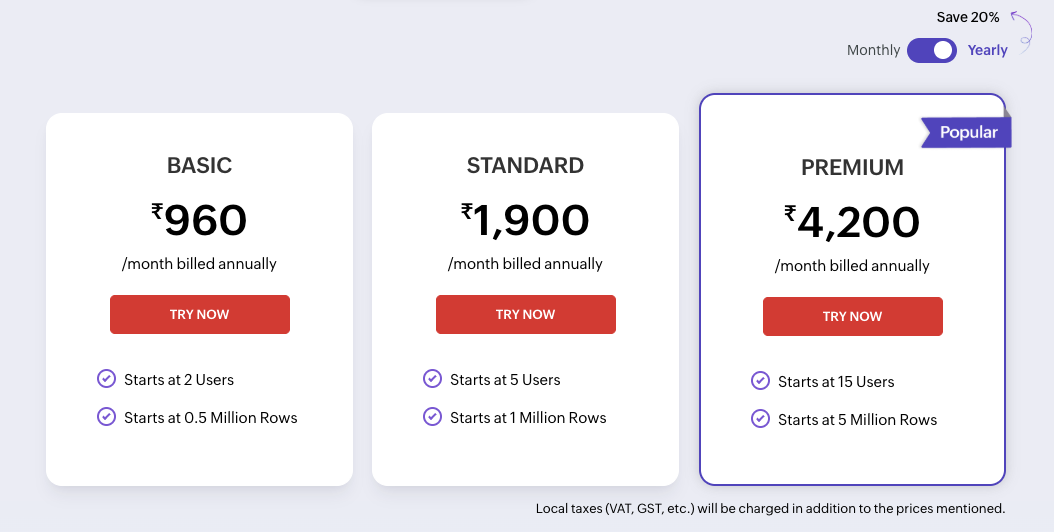
Source: Zoho Analytics
2. Tableau
Tableau is the industry benchmark for interactive data visualization and storytelling. It excels at helping organizations explore data visually and create compelling narratives. However, it requires more training than Sisense and carries higher pricing—best for enterprises with dedicated analytics teams. Compare Zoho Analytics and Tableau.
Key strengths
Industry-leading data visualization
- 30+ visualization types with advanced customization
- Interactive dashboards that adapt to user exploration
- Storytelling with data-driven narratives
AI-powered insights (Einstein Analytics)
- Automated pattern detection
- Predictive recommendations
- Natural language generation for insights
Enterprise-scale data connectivity
- 150+ pre-built connectors
- Can handle massive datasets
- Real-time and batch processing
Extensive customization and extensibility
- Custom calculations and table calculations
- R and Python integration
- Robust API for embedding
Strong community and ecosystem
- Largest BI community (100K+ users)
- Third-party extensions and plugins
- Abundant training resources
Limitations to consider
- Steep learning curve for non-technical users
- Higher pricing than modern alternatives
- Complex data preparation workflows
- Performance challenges with massive datasets
Who should choose Tableau
| Factor | Profile |
| Best team size | Large enterprises |
| Best industry | Finance, healthcare, consulting, government |
| Data maturity | Advanced (requires experienced analysts) |
| Key scenario | Organizations prioritizing stunning visualizations & analytics depth over ease of use |
Pricing
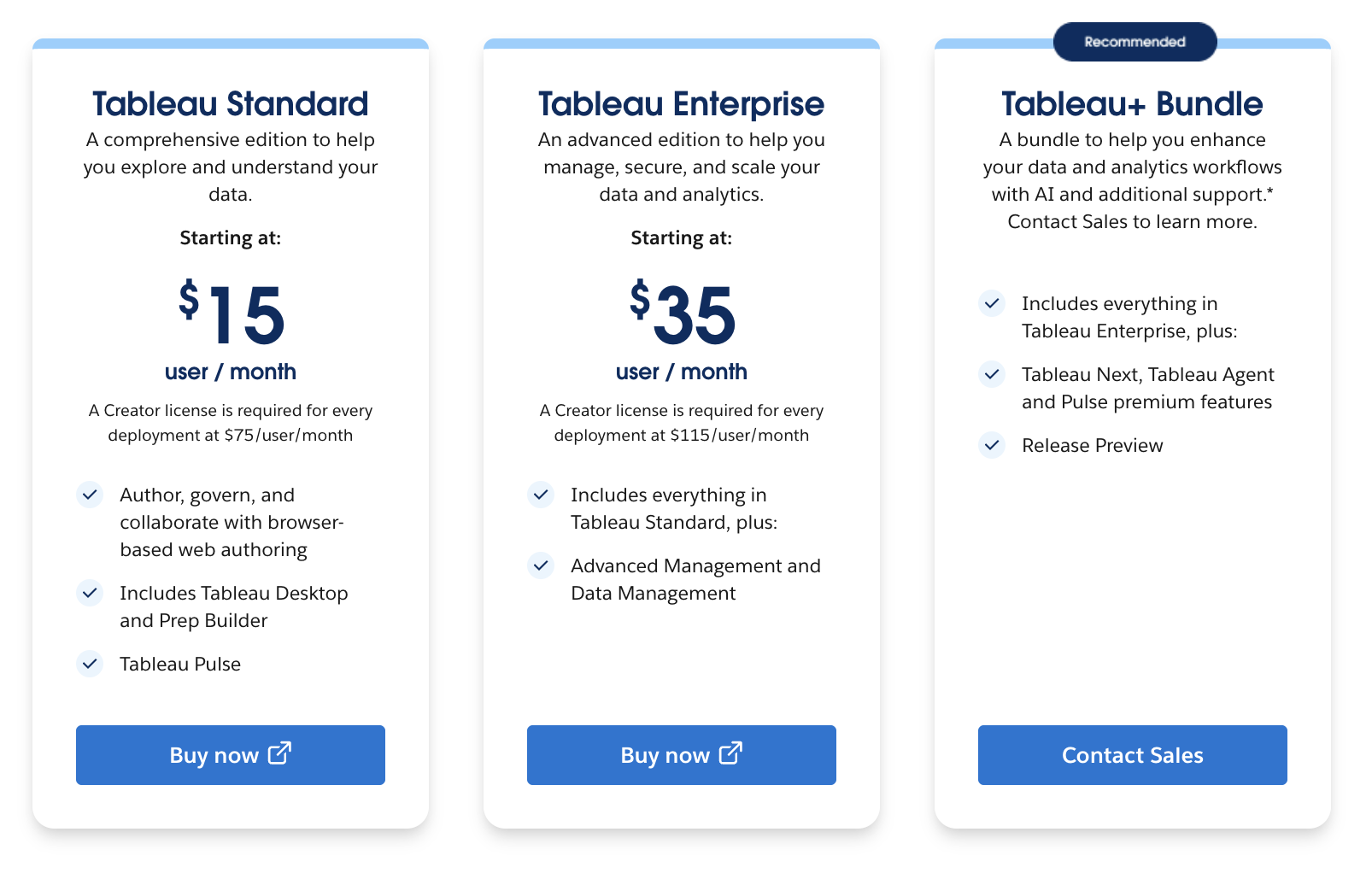
Source: Tableau
3. Microsoft Power BI
Power BI is the natural choice for organizations deeply invested in Microsoft technologies (Office 365, Excel, Azure). It delivers strong ROI for Microsoft-centric enterprises with transparent, affordable licensing and seamless integration with familiar tools. Compare Zoho Analytics and Microsoft Power BI.
Key strengths
Native Microsoft ecosystem integration
- Direct connections to Excel, SharePoint, Teams
- Azure data warehouse integration
- Single sign-on via Microsoft Entra ID
Cost-effective licensing aligned with Microsoft agreements
- $14/user/month (Pro) or $24/user/month (Premium)
- Included in many Microsoft 365 enterprise licenses
- Lower TCO for Microsoft-heavy organizations
Strong AI capabilities
- Power Query for data prep (with no-code transformations)
- Q&A natural language queries
- Quick Insights for automatic discovery
Flexible deployment
- Cloud (Power BI Service)
- On-premises (Power BI Report Server)
- Hybrid scenarios
Strong governance and security
- Row-level security (RLS)
- Conditional access policies
- Audit logging and compliance
Limitations to consider
- Performance challenges with large datasets
- Sclability requires Premium licensing
- Less intuitive for non-Microsoft organizations
- Limited collaboration features vs. modern platforms
Who should choose Microsoft Power BI
| Factor | Profile |
| Best team size | 50-5000+ employees |
| Best industry | Financial services, enterprise software, corporations with Microsoft agreements |
| Data maturity | Intermediate to advanced |
| Key scenario | Organizations with heavy Microsoft 365 and Azure investments seeking ROI |
Pricing
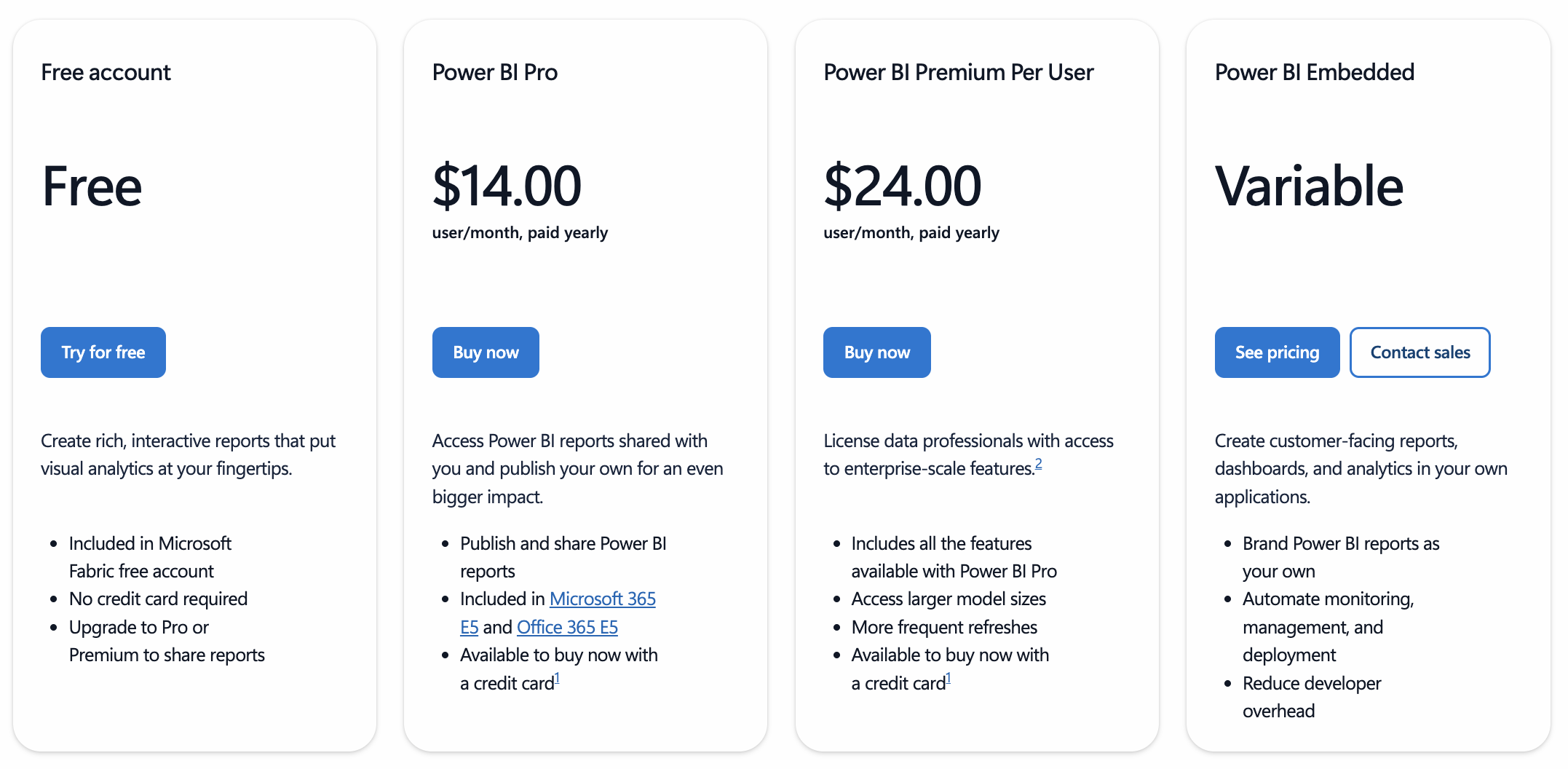
Source: Power BI
Make the smarter BI choice in minutes
Compare Tableau and Power BI side-by-side and see which BI tool best fits your business
4. Looker
Looker is built for data engineers and SQL-first organizations that prioritize custom data modeling over ease of use. If your team has strong data engineering capabilities, Looker's LookML language and Google Cloud integration deliver unmatched flexibility. Check out Looker alternatives.
Key strengths
Powerful SQL-based data modeling with LookML
- Define metrics and dimensions once, use everywhere
- Custom data logic without ETL tools
- Git-based version control for metrics
Native Google Cloud integration
- BigQuery integration with live queries
- Google Data Studio connectivity
- Google Cloud security and compliance
Embedded analytics for product teams
- Embed dashboards into SaaS applications
- Pixel-perfect styling for branded experiences
- Secure sharing with external users
Flexible and scalable architecture
- Handles massive datasets efficiently
- Horizontal scaling with distributed architecture
Limitations to consider
- Steep learning curve for non-SQL users
- Higher pricing than alternatives
- Less intuitive user experience
- Smaller community
Who should choose Looker
| Factor | Profile |
| Best team size | 100+ employees; data-driven organizations |
| Best industry | Technology, financial services, e-commerce |
| Data maturity | Advanced (strong data engineering teams) |
| Key scenario | Product teams needing embedded analytics; organizations prioritizing data lineage & custom metrics |
Pricing
No transparent pricing and has an enteprise licensing model.
5. Domo
Domo is purpose-built for organizations that need real-time, mobile-first BI without infrastructure complexity. It's cloud-native by default and focuses on fast insight delivery to mobile users and front-line teams. Check out Domo alternatives.
Key strengths
Cloud-native, fully managed platform
- No infrastructure or servers to manage
- Automatic scaling and updates
- Zero downtime deployments
Real-time data processing at speed
- Sub-second query responses
- Streaming data support
- Up-to-the-minute dashboards
Mobile-first design by default
- Dashboards automatically responsive
- Native iOS and Android apps
- Touch-optimized interactions
AI-driven alerts and automation
- Anomaly detection on metrics
- Smart alerts notify teams proactively
- Automated workflow triggers
No setup or IT required
- Fully SaaS, instantly available
- Plug-and-play data connectors
- Onboarding in days, not months
Limitations to consider
- Higher pricing tier
- Limited customization vs. competitors
- Smaller on-premises option
- Steeper learning curve for traditional BI analysts
Who should choose Domo
| Factor | Profile |
| Best team size | 100+ employees; fast-paced organizations |
| Best industry | Retail, e-commerce, manufacturing, telecommunications |
| Data maturity | Intermediate (good for teams prioritizing speed over complexity) |
| Key scenario | Organizations needing real-time mobile BI and operational dashboards |
Pricing
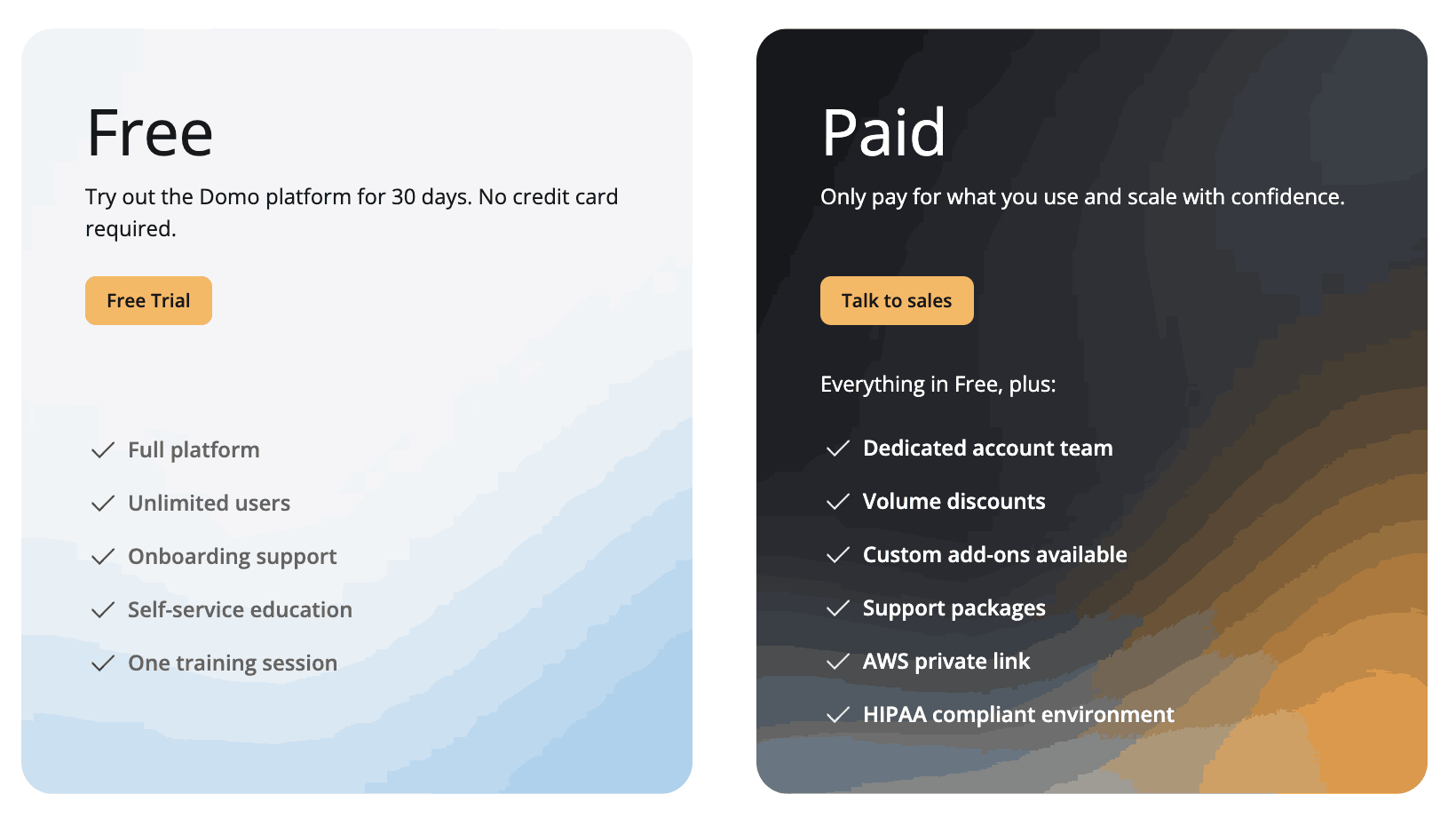
Source: Domo
Best Sisense alternatives compared
| Tool | Implementation time | AI strength | Integration | Ese of use | Pricing | Best for |
| Zoho Analytics | 1-2 weeks | Excellent (Zia AI) | 500+ connectors | Easiest (no-code) | $8 per user per month | Businesses of all sizes |
| Tableau | 3-6 months | Very strong | 150+ connectors | Moderate | $15 per user per month | Enterprises, data storytelling |
| Power BI | 2-4 weeks | Very strong | 150+ connectors | Moderate | $14 per user per month | Microsoft-centric enterprises |
| Looker | 4-8 weeks | Strong | 50+ connectors | Difficult | Custom pricing | Data engineering teams, embedded BI |
| Domo | 1-2 weeks | Excellent | 400+ connectors | Easy | Custom pricing | Real-time operations, mobile-first |
Final thoughts
The clear winner: Zoho Analytics
Why Zoho Analytics stands out as the best overall alternative:
If you're migrating from Sisense, Zoho Analytics delivers the fastest path to modern BI. It combines what your team loved about Sisense (power and flexibility) with what they needed it to do better (ease of use and AI-driven automation).
Sisense was built for enterprises with dedicated BI teams and massive data. Modern organizations need something different: a tool that empowers everyone, costs less, and automates the repetitive work analysts hate.
Why you should move now
Every month you stay with Sisense, you're paying premium licensing costs on a platform your team has outgrown. Meanwhile, competitors using Zoho Analytics are:
✓ Responding to business questions in hours, not days
✓ Enabling self-service analytics across the entire organization
✓ Spending AI-generated insights instead of hiring additional analysts
✓ Reducing BI tool costs while expanding analytics access
Keep it simple
Don't overthink this decision. Ask yourself:
- Do we have enough AI and automation?
- Are non-technical users creating their own reports?
- Is our licensing cost justified?
If you answered "no" to any of these, it's time to switch.
Zoho Analytics remains the top choice for businesses looking to maximize their data insights without complexity or high costs, so don't wait any longer(Know more about embedded analytics for SaaS). Sign up for a 15-day free trial or get a personalized demo today!
See the bigger picture and smarter insights with Zoho Analytics!
Common questions about Sisense alternatives
Why do teams replace Sisense?
The top reasons are:
- Cost - Licensing is expensive; premium support adds thousands annually
- Complexity - Setup requires technical expertise; non-technical users remain dependent
- Lack of AI - Modern competitors offer automated insights and conversational analytics
- Time to value - Implementation takes 3-6+ months; teams need faster ROI
- Scalability - Sisense pricing scales aggressively; alternatives offer better value
Which alternative is easiest to migrate to?
Zoho Analytics and Power BI are fastest:
- Zoho Analytics: 2-3 weeks, minimal retraining, free migration support
- Power BI: 3-4 weeks if you're already in Microsoft ecosystem
- Domo: 1-2 weeks (fully managed SaaS)
Tableau and Looker require 4-8 weeks and more extensive redevelopment.
Which option is most cost-effective long term?
Zoho Analytics offers the best ROI:
- Lowest per-user cost:
- No hidden fees
- Fastest time to value
- Lowest TCO
 Vinisha
Vinisha is a Marketing Analyst at Zoho Analytics with a strong passion for both marketing and data. She’s naturally curious about trends and loves diving into data to uncover what drives effective campaigns. She has a knack for simplifying complex information and presents insights in a relatable and engaging way that connects with audiences. Outside of work, she enjoys exploring the creative side of digital marketing.