We’d like to take this opportunity to give our best Happy New Year wishes from everyone at Zoho, and may all our users have a great 2012.
The first thing to look at is what positive changes we could bring this New Year for our customers to get things done faster with Zoho Projects. On a similar note, we worked on THIS most crucial and missing functionality in Zoho Projects. And of course it happens to be the most discussed and popular topic of our customer forums too.
Yes, you guessed it right. Presto ! Subtasks got integrated into Zoho Projects as part of the existing task management module.
Let us see more about sub tasks in Zoho Projects :
Create subtasks to stay focussed on what matters
Starting today, you’ll be able to create subtasks in a single click. For this, mouseover a particular task you can see a double-headed arrow, click Indent Button to indent the task, making it a subtask or click Outdent Button to outdent the task, making it a summary task in quick time.
Easily import sub tasks from MS project
Before you can only import tasks from your MPP/MPX file. After this update, now you can import tasks along with its sub-tasks i,e all your work break down structure is carried right from your MS project into Zoho Projects.
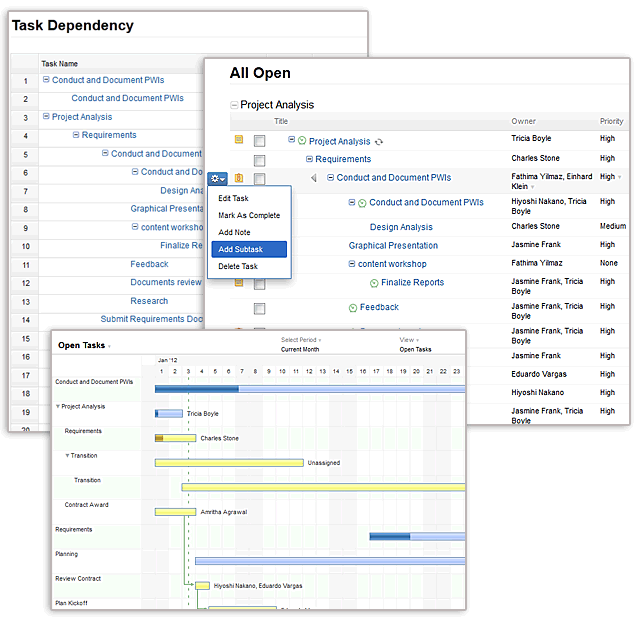
Gantt and dependency view gets better with subtasks
With this update, you can see sub tasks appearing right on your gantt chart. This gives you an easy way to view and print sub tasks from gantt view. Furthermore, you can find sub tasks in task dependency which lets you better organize your tasks in dependency view for an effective task management.
Finally, sub tasks as part of your templates
Just like normal tasks, you can capture the sub-tasks as part of your project as well as task template in Zoho Projects.
So how do you get started ? Easy ! Here’s the link to Subtasks and ofcourse a short video
What editions is sub tasks available?
Sub tasks are available for all Premium and Enterprise customers i.e., $299 & $599 annual plans and $35 and $80 monthly plans. It is also available for existing Valuepack 3 customers. See Plans and Pricing
Login to our Project Management Software, start exploring the subtasks and don’t forget to leave your feedback as comments here or mail us at support@zohoprojects.com
Coming up next is Task duration in hours. Stay Tuned !


@andres @nande @john Thanks a lot for your compliments. Please try sub tasks and let us know your views
ur mobile crm is very nice….
Please, Please consider making extracting user timesheet data easier. Fixing the API to be able to retrieve everyone’s time would be a great start. Run P/R and Billing every week is a huge headache with Project.
Thanks
Thanks for sharing you concern we’ve made a note of it and will provide a fix in one of our update.
Ditto! We spend a ridiculous amount of time running exports/reports to produce employee and project time reports. It would be great to have mass export/report capabilities, so that we can select a group of employees, a group of projects or all.
Thanks!
Great Feature! You people at ZOHO are making real progress. We like the way you are moving.
One request. Please make some over-haul in Usability in All areas! After each couple of iterations, Overall usability study required! So, do that after each month of each 3 months. it will keep things up in perfect way!
Allah Bless you people on delivering such a great platform for us!
Thanks a ton for your blessings..
. We’re working on the nuances of the product to make it more usable for customers. If you wish you can share your feedback anytime at support@zohoprojects.com
Nice job. One more question… please make visually represents length of an activity and time more smooth
Thanks. We will fix this for you and will keep you posted.
Great! I’m looking forward to trying out the subtask function.
Something else for an improvement, is the project dashboard. As it’s setup now, it’s a bit overwhelming to see, when there is a lot of changes made within projects, it ends up being pages in the dashboard. Is it possible to have the date have the slider functionality? So there would be a listing of dates and if I wanted to see what changes were made on a particular day, I would on click on the date. The slider, would drop down, to reveal what changes were made on that day for a particular area in the project. This would make it less overwhelming. Unless, it would change to weekly updates on the dashboard (with slider functionality?). This would even make it easier to read. Thanks!
Thanks for your suggestions. We’ll analyze the slider functionality option and will provide a better way of showing the stream of activities in dashboard.
Do try out sub tasks and let us know your views at support@zohoprojects.com.
Thanks for supporting this. Now my MS Project imports are much better.
I cant believe you implemented subtasks, i was waiting for this!
it’s not working for me in google chrome.
Stephen,
The Sub Tasks feature is working fine in all the browsers. This feature will be available for you only when your portal is in the Premium or Enterprise or Value Pack3 plan. You can check the plan details from the Upgrade/Billing section.
Congratulations !