What will I learn?
- What is team chat?
- The benefits of team chat for organizations
- Team chat vs. virtual meetings
- When chat works better than emails/meetings
- How to pick the perfect team chat app for your team
- How does team chat actually work?
- How do different teams use team chat in the workplace?
- Best practices for a productive team chat
- Things to avoid in team chats
- Wrapping up
Team chat
What is team chat?
Businesses always seek ways to improve communication and collaboration. When your teams connect, productivity improves and decisions are made faster. With remote and hybrid work becoming more common, collaboration needs to be easier and more flexible. Emails, meetings, phone calls, and video calls aren’t always the fastest or easiest options. When work moves quickly, teams don’t want to wait for a meeting or spend time writing long emails. They need a fast answer, a quick update, or a short conversation to keep things moving.
They need a tool that feels as easy as social media or instant messaging, but is designed for work and lets people connect right away, without any prior setup or formal invites. This is where team chat comes in. It’s basically instant messaging for work groups. Team chat tools let people collaborate in real time through quick messages and informal conversations. Teams can create channels, share updates, exchange files, jump into audio or video calls, and even share their screens—all in one place. For remote and hybrid teams, it’s especially helpful because it creates a virtual office where everyone can stay connected and in sync.
The benefits of team chat for organizations
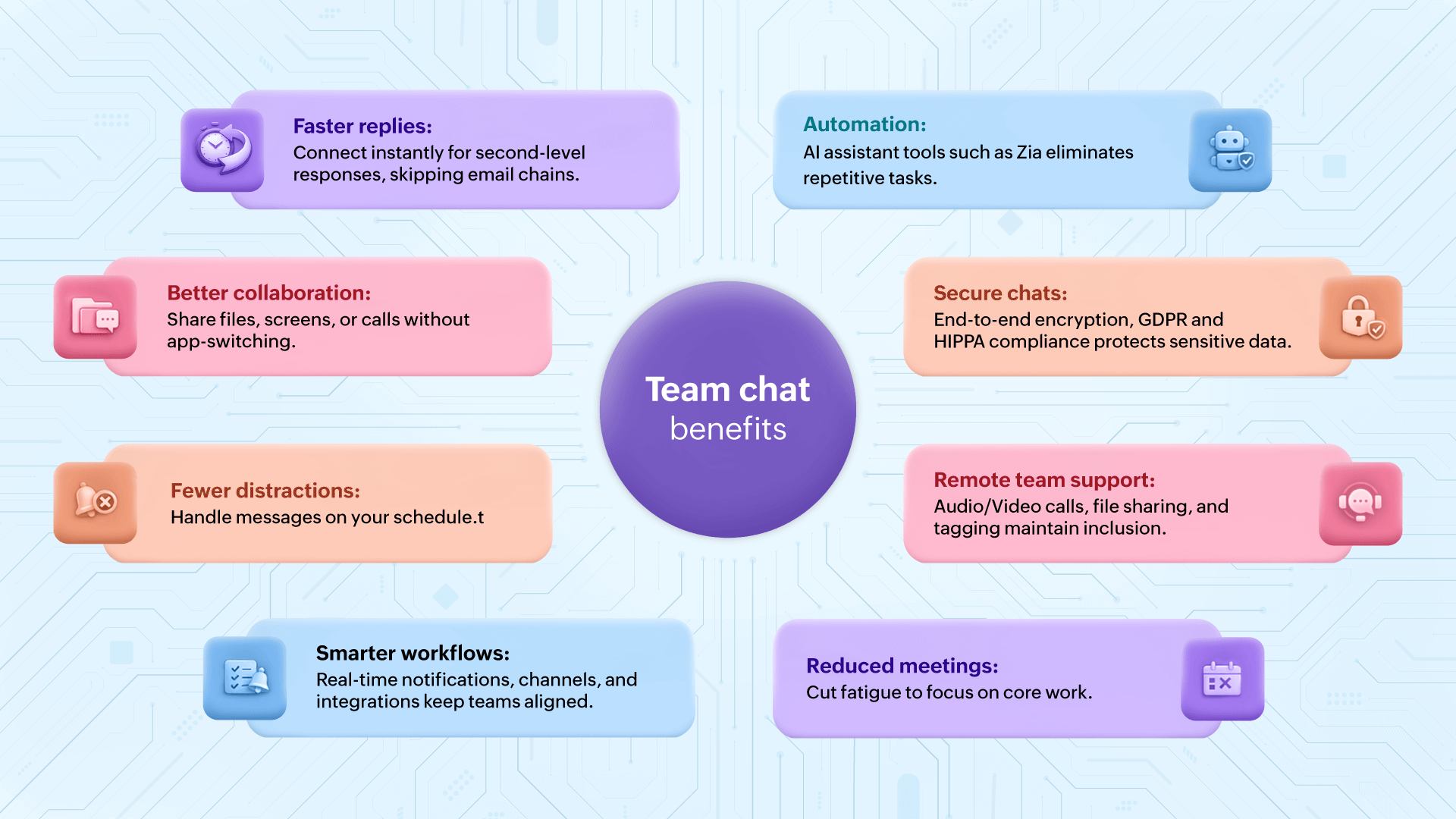
- Faster replies: Team members connect quickly and can get replies in seconds, without wading through long email threads.
- Better team collaboration: Members can share files, screens, or make calls in one spot. They don’t need to switch apps or wait for approvals to move forward.
- Smarter workflows: With instant notifications, channels, integrated apps, and collaboration features, teams stay aligned in real time and maintain consistency across processes.
- Fewer distractions and interruptions: Team chat apps allow teams to respond to notifications at their convenience without affecting their schedule.
- Automation: Automation tools in team chat apps help teams work faster by eliminating repetitive tasks and keeping everything in one place.
- Fewer unnecessary meetings: Having more meetings doesn’t means getting more work done. Team chats cut everyday meeting numbers and allow team members to focus on their work, without the distractions of unnecessary meetings.
- Secure communication: Many team chat apps, such as Zoho Cliq, offer end-to-end encryption to keep your business's sensitive information and conversations private and secure.
- Works best for remote and hybrid teams: Team chat features—such as video calls, screen sharing, tagging, and collaboration—support team communication beyond simple text.
Team chat vs. virtual meetings
Team chat and virtual meetings are both parts of modern digital collaboration. At first, they may seem similar because both help teams talk and work together. But they serve very different purposes. Virtual meetings bring people together when deeper and more focused connection is needed. These are more structured than team chat and usually have a clear agenda or goal. Meanwhile, team chat handles most everyday communication. It reduces interruptions and helps people work at their own pace.
Knowing when to use team chat and when to schedule a virtual meeting can save time, reduce stress, and help teams get more done. Many teams make the mistake of using meetings for everything. This leads to packed calendars, tired employees, and less time for real work. Use both in the right way, they can:
- Communicate faster.
- Reduce unnecessary meetings.
- Stay aligned.
- Work better across locations.
- Feel more connected.
Feature | Team chat | Virtual meeting |
| Best for | Sharing quick updates, ideas, files, or asking questions. | Deeper discussions, such as decision-making, brainstorming, training, presentations. |
| Time commitment | Not scheduled, happens naturally during work. | Scheduled, participants should join at the same time. |
| Flexibility | People can reply when they’re available. | Everyone should be present. |
| File sharing | Built into chat. | Usually happen during or after meetings. |
| Use in teams | Better for asynchronous work. | Good for live collaboration. |
| Energy level | Lightweight. | Can be tiring if overused. |
When chat works better than emails/meetings
Based on Market.Biz’s 2025 Workplace Chat and Messaging Statistics, about 70% of employees said that said that quick messaging saves them time compared with other communication modes such as voice calls and emails. Chat works especially well in these everyday situations:
- When they need quick answers to their queries or share updates.
- For fast QA sessions or getting quick feedbacks.
- To resolve issues quickly, such technical glitches or product-related questions.
- Sharing files and live updates with multiple team members.
- Reducing meeting fatigue with asynchronous communication.
- To keep conversations going without scheduling meetings.
- For casual team conversations that boost morale and build rapport.
- To help remote and hybrid teams stay connected and aligned.
How to pick the perfect team chat app for your team
When choosing the team chat app, select the one that matches your needs:
- Team size: If you have a growing team or multiple teams, you’ll need better search options and well-organized channels to connect easily and find messages fast. Tools such as Zoho Cliq make it easy to track conversations, even in large teams.
- User interface: Always look for something clean and simple that your team can start using right away. A friendly interface means less training and faster adoption across your organization.
- Suit of products: A team chat app works best for you when it connects with email, files, meetings, and tasks. This setup helps your teams stay focused without jumping between too many apps.
- Integration with other apps: Your chat app should connect smoothly with the tools you already use such as calendar, CRM, and other productivity apps. Zoho Cliq integrates with other Zoho and popular third-party apps, so updates, alerts, and workflows show up while you chat.
- Customization: The app should be customizable with your brand themes. It should also allow you to use a custom domain and business email address, and control access with role-based permissions, so everyone sees only what they need.
- Data security: In business conversations, security matters. Choose a platform with strong security, admin controls, and data protection so your team can chat with confidence.
- Remote teams: If your teams have more people working from different locations, coordinating between time zones and trying to figure out when everyone is online can be tough. Team chat apps should allow you to see their availability right in their profile instead of guessing.
- Mobile access: Work doesn’t always happen at a desk. A good mobile app lets your team stay connected, reply quickly, and share updates even when they’re on move.
- Budget: Pick a solution that fits your budget today and can grow with you tomorrow. Flexible plans help teams access better collaboration features without overspending.
How does team chat actually work?
Team chat is a practical collaboration tool to solve problems faster, keep work moving, and help teams feel more connected. If you’ve ever used IM apps or social media chat apps, you already understand the basics of team chat. The only difference is that team chat is built for team collaboration and work.
Getting started is simple. You sign up, invite your team, create a few channels (based on departments, ongoing projects, or different teams), and start chatting.
Start a conversation: You can talk to people by using direct chat (for one person) or channels (group chats).
Send messages the way you want to talk: Messages feel natural and casual, just like talking to someone in person. In addition to sending text messages, you can also use emojis or GIFs to keep things friendly.
Share files or make quick call: Start a quick audio or video call, or share your live screen right from the conversation if you want to explain something faster.
Use integrations and automation: Use other app integrations to work more efficiently. Automation helps you automate your routine tasks, summarize long conversations, and save time by reducing manual effort.
How do different teams use team chat in the workplace?
In every industry, team chat tools not only enhance overall communication but connects all teams across departments, improving their response time. Below are a few real-world examples of how different teams, such as customer service or marketing or product teams, use internal chat to share updates, resolve issues quickly, and collaborate on projects.
Customer support team solves issues faster
A customer support team was often juggling long email threads and delayed communication. Their replies were slower, issues started to pile up, and customers waited longer for answers. With team chat tools, the agents created a channel called #Support-urgent. When a high-priority request came in, they posted it there. Anyone available could see it, reply instantly, or @mention the right person. This helped support questions get answered in minutes and team members didn’t waste time forwarding emails back and forth.
Marketing team coordinates campaigns easily
In the middle of an upcoming product launch, the marketing team, with its remote members, struggled to keep everyone updated. They had to connect often to coordinate, but things got overwhelming as emails were buried, meetings got canceled, and confusion grew. In a team chat platform they created channels such as #Launch-Graphics, #Launch-Social. Each team shared files, gave feedback, and posted deadlines in the right channel. When something was ready for review, they tagged reviewers; this way approvals went faster and everyone on that team was clear about the ongoing work.
Product team keeps updates on track
A software product development team was working on a new feature. They had developers, designers, and technical writers on different schedules. Weekly meetings weren’t enough and decision making was slow. Now they use channels such as #Product-update and threaded discussions for each task. When a developer needs help, they post right there with screenshots or shared live screens and product managers make quick decisions without a meeting, keeping everyone in loop. The team was able to deliver the feature faster and with fewer delays.
Best practices for a productive team chat
Team chat works best when everyone follows a few simple habits. These small steps make a big difference in how clearly your team communicates and how fast work gets done.
Keep conversations organized
Create group chats, or topic-centric channels for dedicated discussions and quick task updates. Avoid unnamed or random group chats. They’re hard to search for and even harder to understand. Reply in threads to keep replies tied to one message. This way, side discussions don’t take over the main chat. Pin important messages, threads, and chats for easy access and better visibility.
Communicate clearly (and with kindness)
Text messages don’t carry tone the same way face-to-face conversations do. Use simple sentences. Be direct, but polite. A short reply can sound cold. So be mindful of how your words may land, use friendly language, and don’t be afraid to add warmth. A quick 😊 or 👍 can go a long way.
Keep your status updated for availability
Your status tells teammates if you’re available, busy, or away. It helps others know when to expect a reply and avoids interrupting someone who’s deep in focus or on a call. This small habit can show respect for everyone’s time.
Encourage transparency
Whenever possible, keep work conversations on open channels, because other people miss context in personal messages. Use mention tags to notify people directly, assign tasks to respective individuals, or set reminders in the chat. This brings transparency and eliminates confusion among members.
Use built-in collaboration tools
Team chat is more than just using text. You should use features such as file sharing, voice and video calls, screen sharing, threads, and @mentions so no one misses out on anything important.
Automate routine tasks
Al tools help you simplify conversations and make quick, informed decisions. It can be your writing assistant, summarizing unread messages and translating languages, helping you work smarter and save time.
Things to avoid in team chats
Just as important as best practices are the habits to avoid. These common mistakes can slow teams down or create frustration.
Too may messages/channels
Creating multiple channels or sending too many messages can overwhelm your team. People miss important updates because everything feels noisy. Create channels only when there’s a clear purpose, and archive the ones you no longer need.
Posting messages on the wrong channel
Sharing updates on the wrong channel confuses people and breaks the flow of work. Always double check the appropriate channel before posting.
Ignoring the “Do Not Disturb” status
When someone sets their status to “Do Not Disturb”, it means they’re busy or unavailable. Try not to ping them, unless it’s truly urgent. For regular chats, wait until they’re back online.
Using too many emojis or GIFs
Emojis and GIFs can make chats friendly, but too many can distract or feel unprofessional. Keep your work messages clear first, fun second.
Calling someone without a heads-up
Starting a direct call without a heads-up can interrupt work or catch someone at a bad time. Send a quick message first like, “Hey, can I call you?” It’s polite and saves awkward moments.
Wrapping up
Team chat does more than just keep everyone in loop. It brings clarity, speeds up decision making and helps teams move towards shared goals together. Today, workplaces are constantly evolving. AI tools are becoming part of everyday work. Remote and hybrid setups are now the norm. In the middle of all this, strong and smart communication is what keeps everything connected.The future belongs to the teams that communicate with clear intentions. Organizations that invest in smart communication tools, set up clear chat practices, embrace AI responsibly and encourage collaboration will stay ahead of the curve.