How to write test cases for manual testing faster using AI [including examples and templates]
start testing free- Key takeaways
- Introduction
- What is a manual test case?
- Why manual test cases still matter in
- How to write test cases for manual testing, step by step
- Standard test case format
- Why many test cases fail as teams scale
- The hidden cost of manual authoring
- Where AI fits in manual testing
- What AI can't replace
- How to prompt AI for better test cases
- How modern QA teams manage test cases efficiently
- Conclusion
Key takeaways
- Writing effective manual test cases is no longer just about documenting steps, it’s about creating clear, reusable, and execution-ready validations that uncover real defects.
- AI is transforming how QA teams create manual test cases by generating first drafts, suggesting missing edge cases, standardizing documentation, and accelerating test authoring thereby reducing repetitive documentation work.
- Despite the growth of automation, manual testing continues to play an important role in exploratory testing, accessibility validation, UX reviews, and real-world usability checks.
- Modern QA teams are increasingly using platforms like Zoho QEngine to reduce manual authoring effort through AI-assisted test case generation and centralized test management. Instead of starting with blank pages, teams can generate structured first drafts instantly using Zia, Zoho's AI-assistant refine them with human expertise, and focus more on delivering better software quality faster.
- The quality of AI-generated test cases depends heavily on prompt quality. Specific prompts with business rules, domain context, scenario types, and structured formatting produce more practical and execution-ready outputs.
- Modern QA teams succeed by combining AI-assisted efficiency with human-led quality validation and strategic testing practices.
Introduction
Writing a manual test case is easy. You already know the basics—an ID, test steps, preconditions, and an expected result.
But here’s the real question: Why do so many manual test cases still fail to catch the bugs they were written for? Often, it's not because the tester missed something. It's because the test case itself was flaky, unclear, incomplete, or not built for real execution conditions.
Plus, as products or business processes scale, complexity rises faster than testing capacity. New features, integrations, user roles, browsers, devices, and edge scenarios create a constant backlog of documentation work. Instead of focusing on exploratory testing, risk analysis, and quality strategy, experienced testers get pulled into authoring repetitive tasks.
This is where AI is changing the workflow. Instead of starting every test case from scratch, teams can now generate stronger first drafts, identify missing scenarios, improve coverage, and speed up documentation without lowering quality.
This guide is aimed at QA professionals, test leads, and growing teams who want to write manual test cases faster using AI while improving clarity, coverage, and overall testing efficiency. Throughout the guide, you’ll see how Zoho QEngine helps modern QA teams test faster and stay organized.
Let's get started with the fundamentals.
What is a manual test case?
A manual test case is a written set of inputs, preconditions, execution steps, and expected results that a human tester follows to verify whether a feature works as intended without using automation to run the test.
In simple terms, it tells the tester:
- What needs to be checked
- What data or setup is required
- What steps to perform
- What result should happen
A good manual test case removes guesswork. It helps different testers run the same validation consistently and report issues clearly.
Why manual test cases still matter in
Automation has grown rapidly in the last few years. AI-powered testing tools, low-code frameworks, self-healing scripts, and faster CI/CD pipelines now help teams run thousands of checks in minutes.
Automation is excellent at repeating known checks. It can confirm that a button works, an API returns the right response, or a checkout flow completes successfully. But what it can't fully replicate is human experience. It can't always judge whether a page feels confusing, whether navigation is frustrating, or whether a small visual issue reduces trust.
That is why manual test cases remain essential for areas such as:
- Exploratory testing, where testers investigate unexpected behavior
- UX validation, such as layout clarity, navigation flow, and ease of use
- Accessibility checks like keyboard navigation or screen reader experience
- One-time edge cases that aren't worth automating
- Visual and content reviews where context matters more than pass/fail logic
The best QA teams no longer look at manual testing and automation testing as competing choices. They use both strategically. Even in teams that heavily rely on automation, manual test cases still play a critical role. They often serve as the foundation for automated scripts later.
How to write test cases for manual testing, step by step
Step 1: Understand requirements deeply
Before writing anything, review user stories, product requirement documents (PRDs), acceptance criteria, release notes, business rules, dependencies, and edge cases.
Ask questions like:
- What happens if input is blank?
- What if a user loses connection mid-flow?
- Are there role-based restrictions?
- Does behavior differ by browser or device?
Strong test cases begin with strong requirement analysis.
Step 2: Define test scenarios first
List scenarios before creating individual cases.
For a login feature, scenarios may include:
- Valid login
- Invalid password
- Locked account
- Empty fields
- Password reset flow
- Session timeout
- Multi-device login behaviour
Scenarios help prevent blind spots and improve coverage.
Step 3: Choose a design technique
Use structured methods like:
- Equivalence partitioning for grouped inputs
- Boundary value analysis for limits
Example: Password length 8 to 20
Test:
- 7 characters
- 8 characters
- 20 characters
- 21 characters
Step 4: Write the ID, title, and preconditions
Example:
- ID: QE-LOGIN-008
- Title: Verify login fails after 5 invalid attempts
- Preconditions: User account active
This gives structure before writing steps.
Step 5: Write clear, actionable steps
Each step should describe one action.
Bad example:
Enter credentials and verify login page behavior.
Better example:
- Navigate to login page
- Enter valid email address
- Enter valid password
- Click the Login button
Compound steps hide where failures happen.
This is the stage where AI adds the most value. Instead of manually writing 8 steps, you can prompt an AI tool with "Test account lockout after 5 failed login attempts" and get multiple variations. You still review, edit, and refine, but the first draft takes seconds, not minutes.
Step 6: Define expected results precisely
Every expected result should map back to a requirement.
Requirement: Lock account message displays after 5 failed attempts.
Expected result: User account is locked after fifth failed login and warning message is displayed.
The more precise the result, the easier the validation.
Step 7: Add post-conditions and cleanup
Examples:
- Remove test record
- Reset password
- Log out session
This prevents environment pollution.
Step 8: Review for reusability
Ask whether the same setup or steps already exist elsewhere.
Can common flows be reused?
Examples:
- Login
- User creation
- Navigation to settings
- Search actions
With Zoho QEngine, teams can convert repetitive steps into reusable workflows and reduce duplication across suites.
Standard test case format
A consistent format improves readability and execution speed.
Use a structure like this:
| Field | Description |
|---|---|
| Test Case ID | Unique identifier |
| Title | What is being tested |
| Module | Functional area |
| Priority | High, Medium, Low |
| Preconditions | Required setup |
| Test Data | Inputs needed |
| Steps | Actions to perform |
| Expected Result | Intended outcome |
| Actual Result | Observed outcome |
| Status | Pass, Fail, Blocked |
| Comments | Notes or defects |
You can adapt this format in spreadsheets or dedicated test management platforms.
Why many test cases fail as teams scale
A test case may work well when your application has ten features. But it becomes harder when the product has hundreds of features, multiple integrations, several environments, and frequent releases. In many organizations, skilled testers spend hours translating user stories, acceptance criteria, and release notes into structured test cases. That work is necessary, but it often becomes a bottleneck.
For QA leaders, this creates three business problems:
1. Slower sprint velocity
When test cases are written manually from scratch each sprint, validation starts later. That compresses execution windows and increases release pressure.
2. Inconsistent quality standards
Different testers document cases differently. Some write highly detailed steps, others keep it minimal. Over time, this inconsistency creates confusion, rework, and execution gaps.
3. Missed risk coverage
Under time pressure, teams prioritize happy-path flows and skip negative paths, boundary conditions, and uncommon user journeys. Those are often where production defects hide.
The hidden cost of manual authoring
Let's take a scenario where a QA team of 10 testers spends 5 hours per week writing test cases. That equals:
- 50 hours weekly
- 200+ hours monthly
- 2,400+ hours yearly
That is strategic testing time being redirected into repetitive tasks.
Modern QA organizations are reducing authoring effort through tools like Zoho QEngine that provide AI-assisted test case generation and test management. Instead of starting with blank pages, teams generate first drafts instantly, then refine them with human expertise.
That changes the role of testers from document creators to quality decision-makers.
Where AI fits in manual testing
There's a common misconception that AI replaces testers. In practice, the opposite is true.
AI is most valuable when it handles repetitive, structured work so testers can focus on judgment, business context, and defect discovery.
Manual testing still depends on human thinking. AI simply accelerates the parts that consume unnecessary time.
Where AI adds immediate value
Converting requirements into draft test cases
AI can read user stories, acceptance criteria, PRDs, or release notes and generate structured manual test cases in seconds.
Example
Input
User can log in using email and password. Lock account after 5 failed attempts.
AI output
- Verify successful login with valid credentials.
- Verify invalid password error message.
- Verify account lock after 5 failed attempts.
- Verify password reset access after lockout.
Instead of writing from zero, testers can start with a usable first draft.
Expanding test coverage
AI is strong at suggesting additional scenarios teams may overlook, including:
- Boundary values
- Negative cases
- Permission issues
- Session expiry
- Browser behavior
- Error handling paths
This helps teams improve coverage without increasing planning time.
Standardizing documentation
AI can format cases consistently across teams using shared templates:
- Preconditions
- Steps
- Expected results
- Priority
- Module mapping
That consistency improves execution quality and reporting.
Accelerating regression readiness
When features change, AI can quickly regenerate impacted test cases or recommend updates based on modified requirements.
Flagging duplicate cases in a repository
AI can scan a test suite and identify cases that test the same scenario with different wording.
What AI can't replace
Domain-specific judgment
AI doesn't know your business rules, compliance requirements, or the edge cases that matter in your industry. A healthcare app needs HIPAA-aware test cases. A fintech app needs PCI-DSS validations. AI won't know this unless you explicitly tell it.
UX intuition
AI can't tell you whether a button placement feels awkward or whether a workflow is confusing for first-time users. That requires human testing.
Accessibility evaluation
Screen reader compatibility, keyboard navigation, and color contrast issues are things a human tester catches by using assistive technology. AI can generate accessibility test cases, but it can't execute them meaningfully.
Ethical and contextual edge cases
What happens if a user's name contains special characters? What if their address is a PO Box in a region where PO Box shipping isn't allowed? AI might miss these unless you prompt it with examples.
How to prompt AI for better test cases (with examples)
To get stronger outputs, include these five elements in your prompt:
1. Mention the feature clearly
Instead of saying "write login tests", say "write test cases for password reset flow with OTP verification".
2. Add business rules
Mention conditions like:
- "Lock after 5 failed attempts"
- "OTP expires in 2 minutes"
- "Premium users see priority shipping"
This helps AI generate realistic cases.
3. Ask for scenario types
Specify what coverage you need:
- Positive cases
- Negative cases
- Boundary values
- Role-based access
- Cross-browser checks
4. Request a format
Ask AI to structure results in a usable format, such as:
- Test Case ID
- Preconditions
- Steps
- Expected Result
- Priority
5. Mention your domain context
For better relevance, include industry details:
- Banking app
- Healthcare portal
- SaaS admin dashboard
- Ecommerce marketplace
Context improves test quality significantly.
AI prompts you can use to get started
The quality of AI-generated test cases depends heavily on the prompt you give. A vague request creates generic results. A detailed prompt creates test cases that are more practical, relevant, and execution-ready.
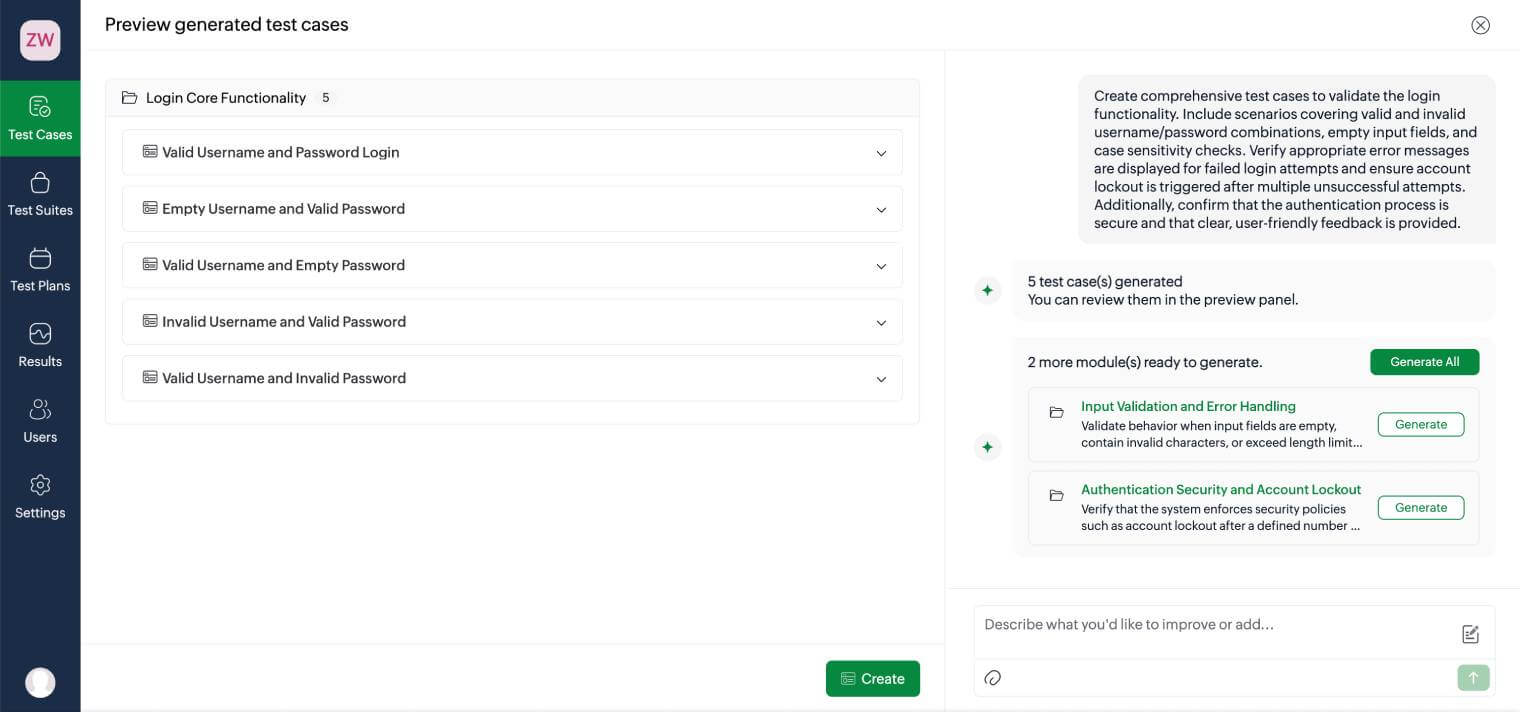
Example 1: Generate login feature test cases
"Create comprehensive test cases to validate the login functionality. Include scenarios covering valid and invalid username/password combinations, empty input fields, and case sensitivity checks. Verify appropriate error messages are displayed for failed login attempts, and ensure account lockout is triggered after multiple unsuccessful attempts. Additionally, confirm that the authentication process is secure and that clear, user-friendly feedback is provided."
Example 2: Generate checkout flow regression test cases
"I need regression test cases for an ecommerce checkout workflow. Create manual test cases covering guest checkout, logged-in user checkout, cart updates, coupon code validation, multiple payment methods, payment failures, invalid shipping address, session timeout during checkout, and order confirmation. Include desktop and mobile browser scenarios. Format the response with Test Case ID, Scenario Name, Test Steps, Expected Result, and Severity."
How modern QA teams manage test cases efficiently
As test suites grow, spreadsheets become harder to control.
Modern teams need:
- Centralized repositories
- Version control
- Fast search and filtering
- Shared ownership
- Requirement mapping
- Execution reporting
- Collaboration across QA and dev teams
- Reusable components
- Easy migration to automation
Zoho QEngine offers a unified, agentic test automation platform to help teams design, organize, and scale test cases more efficiently.
Conclusion
Well-written test cases help teams release faster, catch defects earlier, and reduce rework across every sprint.
If your current process feels cluttered, repetitive, or difficult to scale, it may be time to modernise how your team creates and manages tests.
Frequently asked questions
Why are manual test cases important?
Manual test cases help QA teams validate usability, accessibility, visual behavior, and exploratory scenarios that automation may miss. They also provide the foundation for future automated testing workflows and improve consistency across test execution.
How can AI help in manual testing?
AI helps QA teams generate draft test cases, identify missing edge cases, standardize documentation, and improve test coverage faster. Platforms like Zoho QEngine use AI assistants like Zia to simplify test case creation from prompts, requirements, or PRDs.
What are the best practices for writing manual test cases?
Some of the most important manual testing best practices include writing clear and actionable steps, validating both positive and negative scenarios, using boundary value analysis, mapping expected results to requirements, and reviewing test cases for reusability and scalability.
What are examples of manual test cases?
Common examples of manual test cases include login validation, password reset workflows, checkout testing, session timeout verification, form validation, role-based access checks, and error message validation.