

- HOME
- Expense Management
- Project expense tracking: The complete guide to budgets, approvals, and real-time overrun alerts
Project expense tracking: The complete guide to budgets, approvals, and real-time overrun alerts
Successful projects are not just measured their completion time, scale, or complexity of the deliverables, but by whether they're delivered within budget and at the expected level of profitability for an organization. Whether you're managing client implementations, construction projects, consulting engagements, marketing campaigns, software development, or internal initiatives staying within that budget is often harder than creating it.
Project expense tracking gives businesses a structured way to do this by attaching every dollar to a project the moment it's spent, comparing it to a budget in real time, and routing it to the right approver before it becomes a surprise. This guide walks you through the different types of project expenses businesses should monitor, the best practices for tracking budgets, and how to set up tags or cost codes, project budgets, approval routing, and overrun alerts.
What is project expense tracking?
Project expense tracking is the process of recording, categorizing, and monitoring every cost tied to a specific project, like labor, materials, travel, and vendor spend, against a defined budget. It gives project managers real-time visibility into overruns before they erode margin, and gives finance teams a clean, auditable trail for billing and reporting.
From a business standpoint, instead of viewing expenses at only the company level, organizations need to assign each expense to an individual project using identifiers like project ID tags, client names, departments, cost centers, and projects. They can even have multiple tags based on their structure to ensure every expense is accurately tagged and billed back to the client based on the nature of the expense.
Why project expense tracking matters
Project budgets are often influenced by expenses incurred across multiple avenues by employees from different departments. When these costs aren't linked to the right project, finance teams lose visibility into actual spending and, in-turn, shoots up the costs for projects. Effective project expense tracking enables organizations to control project budgets in real time, improve project profitability, forecast future project costs more accurately, and improve audit readiness.
What are the different types of project expenses?
All expenses cannot be treated the same way. To track costs accurately, measure profitability, and invoice clients correctly, businesses typically classify project expenses into two broad categories: direct expenses and indirect expenses. These expenses can then be further categorized as billable or non-billable, depending on whether the cost can be charged back to the client.
Direct expenses vs. Indirect expenses
Direct expenses are costs that can be directly attributed to a specific project. These expenses are incurred solely because the project exists and are easy to allocate to a project budget.
On the other hand, indirect expenses support the projects but cannot be tied exclusively to a single project. Instead, they are shared across multiple projects or the organization as a whole.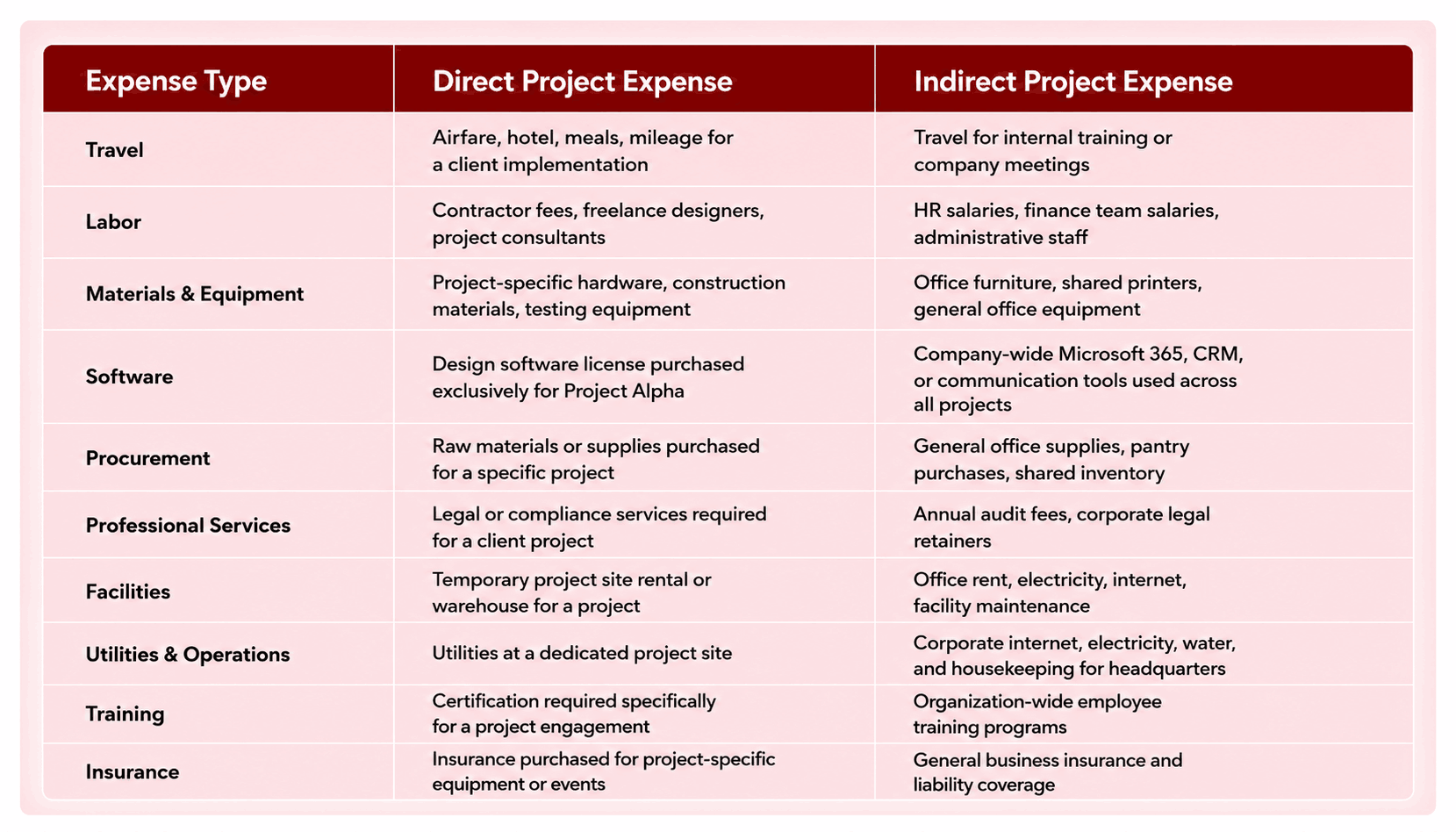
Billable vs. Non-billable project expenses
Within both direct and indirect expenses, businesses need to determine whether they are billable or non-billable.
Billable expenses are costs incurred on behalf of a client that can be invoiced back according to the project contract. Non-billable expenses are costs the business absorbs as part of delivering the project. While they contribute to project execution, they cannot be charged to the client.
Checkout our blog post, Billable expense income: What it means, how to track it, and why it matters, to learn more about billable expenses and how to measure ROI from billable expenses.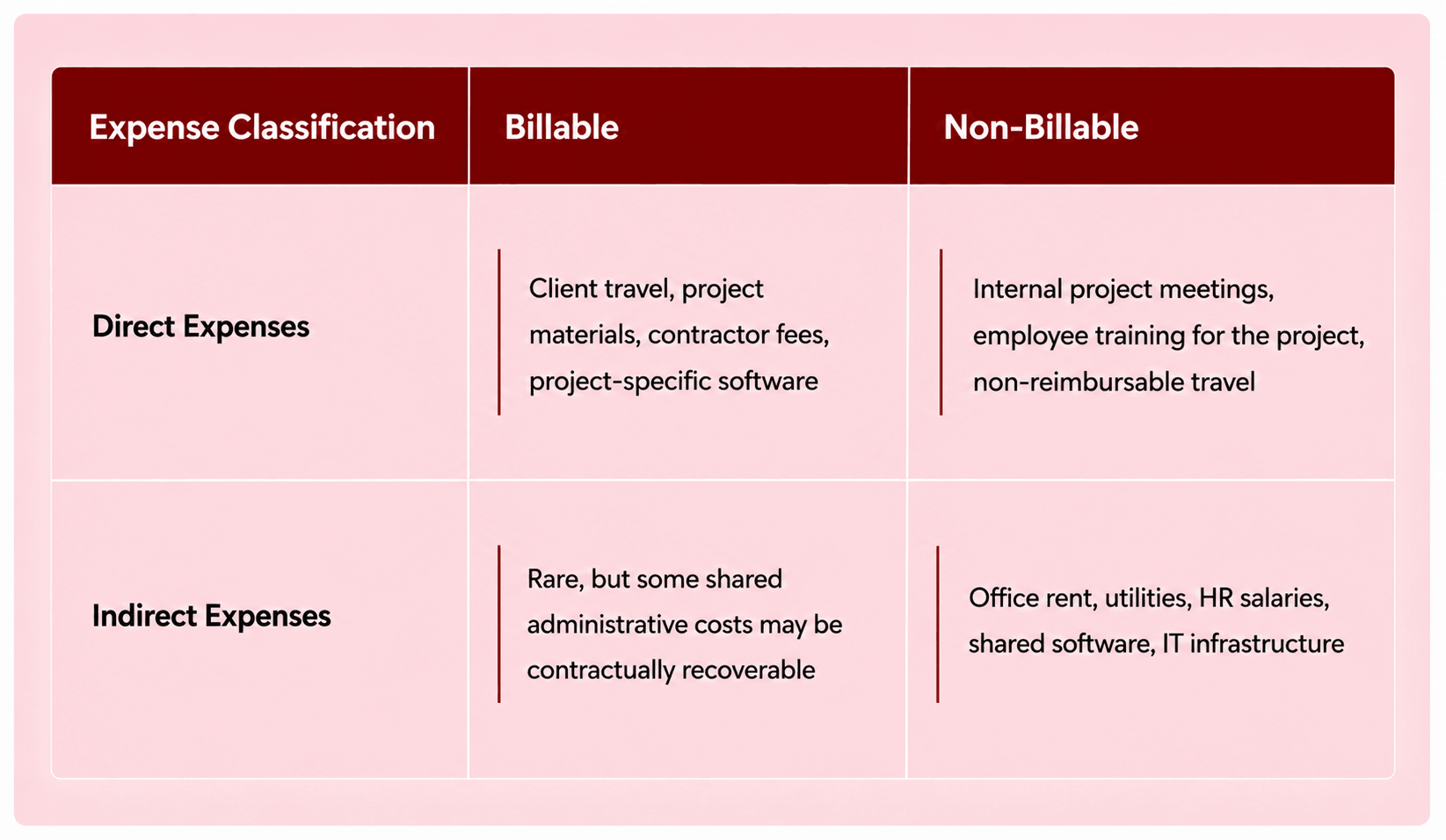
Core components of a project expense tracking system
An effective project expense tracking system goes beyond recording receipts. It combines budgeting, expense allocation, approvals, reporting, and automation to give finance teams and project managers complete visibility into project spending.
Project tags or cost codes
Every expense should be linked to the correct project using standardized identifiers such as project tags, cost codes, job numbers, or work breakdown structures
Project budgets
Every project should begin with a clearly defined budget that acts as the financial baseline throughout the project lifecycle.
Expense categories
Categorizing expenses provides deeper insight into where project funds are being spent. Checkout our blog post, 10 essential business expense categories every finance professional must know, to learn more about expenses categories.
Approval workflows
Project expenses should follow approval workflows that align with organizational policies and spending limits. Automated approval workflows reduce delays while ensuring spending remains compliant with company policies.
Budget vs. Actual reporting
One of the most valuable features of a project expense tracking system is comparing planned spending against actual costs.
Project reporting and analytics
Comprehensive reporting transforms expense data into actionable insights. These insights support better financial planning, forecasting, and strategic decision-making.
How to track project expenses: A step-by-step process
Successful project expense tracking isn't just about recording receipts—it's about establishing a repeatable process that ensures every expense is captured, approved, monitored, and analyzed throughout the project lifecycle.
Define the project budget
Before work begins, establish an approved project budget and allocate spending across key categories such as travel, procurement, labor, software, and contingency expenses. Having a defined budget provides the benchmark for measuring project performance throughout execution.
Create project tags or cost codes
Assign a unique project identifier to every project. This ensures every expense is automatically linked to the correct project.
Capture expenses in real time
Ensure employees to submit expenses as they occur, ensuring all the expenses are tagged with a project code, expense category, and whether they are billable or non-billable. Proper allocation eliminates manual corrections and ensures accurate project reporting.
Route expenses through approval workflows
Automated approval workflows ensure expenses are reviewed by the appropriate project stakeholders and are then passed to the finance teams for final approval followed by reimbursement or payment.
Monitor budget vs. Actual spending
As expenses are approved, compare actual spending against the approved project budget. Continuous monitoring enables teams to identify risks early and adjust spending before budgets are exceeded.
Configure budget alerts
Set automated alerts to notify project managers and finance teams when spending approaches the budget limit, high-value transactions are submitted, or a specific expense category exceeds its allocation. These alerts allow organizations to take corrective actions before costs impact project profitability.
Why does this process matter?
Following a structured project expense tracking process gives businesses real-time visibility into project finances instead of relying on retrospective analysis. By combining standardized project tags, clearly defined budgets, automated approvals, budget-versus-actual reporting, and proactive alerts, organizations can reduce manual effort, improve compliance, and protect project profitability.
With Zoho Expense, organizations can automate expense capture,track expenses based on projects, enforce spending policies, and gain complete visibility into project finances from a single platform. The result is better financial control, more accurate project reporting, and greater confidence that every project stays on budget while maximizing profitability.
Frequently Asked Questions
In standard expense management, the expenses are cross-verfied with the overall company's policies and budgets. With project expense tracking, the expense undergoes verification against the budget attached to that project
General expense tracking records all business expenses to manage overall company spending, reimburse employees, and maintain accurate financial records. Project expense tracking, on the other hand, assigns every expense to a specific project using project tags, cost codes, or job numbers. General expense tracking focuses on company-wide financial visibility; project expense tracking provides granular insights into the financial performance of individual projects.
Yes, project expenses can be billed back to clients if they are billable expenses and the project contract or service agreement allows for reimbursement. Expense management software like Zoho Expense helps organizations mark expenses as billable, associate them with the correct project, and generate accurate reports for seamless client billing.
 Neil Varshiney
A focussed marketer and seasoned Fintech writer helping finance professionals and business owners to find and help them evaluate the right tech stack to run their operations effectively.