- HOME
- Know Your Tech
- Beyond automation: How AI fits into Zoho Creator apps
Beyond automation: How AI fits into Zoho Creator apps
- Last Updated : December 30, 2025
- 712 Views
- 3 Min Read
This is a guest blog post by Xenios Xenofontos, CEO of Computercat, a UK-based Zoho Partner. In this piece, Xen explains how Zoho Creator’s built-in AI capabilities help businesses extend their applications with smarter automation, improved data handling, and more contextual workflows.
There’s a lot of noise around AI right now. Between hype and over-promises, it can be hard to see what actually helps teams do their work better.
Most businesses aren’t looking for grand AI transformations; they want fewer manual steps, cleaner data, faster decisions, and systems that work together without constant maintenance.
This is why Zoho Creator's approach to AI is genuinely interesting—it offers AI capabilities directly within the platform.
The result? You can move from idea to impact without spending weeks duct-taping different services together and hoping for the best.
How AI works inside Zoho Creator applications
Zoho Creator’s advantage lies in proximity. Your forms, data models, and workflows already live inside the same platform. This means the AI doesn't need a complex, error prone integration; it can quietly get to work within your existing applications immediately.
In practice, AI in Zoho Creator can:
Read and enrich information submitted through forms
Assist with classification, extraction, and validation
Trigger actions within existing workflows
Maintain traceability so outputs can be reviewed and refined
Because these capabilities are native to Creator, teams can experiment and iterate quickly, without the high upfront cost or long setup cycles typically associated with AI projects.
What’s available in the toolbox?
Creator offers several AI-powered features, supported by Zia, Zoho's homegrown AI. Below are some of our top picks and commonly used capabilities that address everyday business problems.
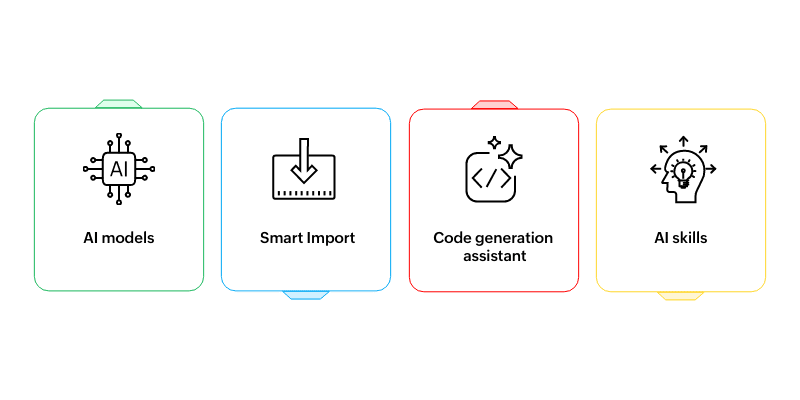
AI models
AI models can be embedded directly into your Creator apps as fields or workflow steps. They're commonly used for tasks like:
Extracting text from images, PDFs, or scanned documents
Identifying sentiment in customer comments
Highlighting key phrases in feedback
Tagging or classifying uploads automatically
These are tasks that would otherwise require multiple third-party services and custom integrations.
Smart Import
One of the biggest challenges in app building is poor-quality data, as data rarely arrives in a clean or structured format. Smart Import helps teams move from spreadsheets to custom apps by:
Standardizing inconsistent data
Detecting duplicates and anomalies
Identifying relationships between records
This helps you clean up and standardize everything before it reaches your app, and even spots relationships between forms.
Code generation assistant
For users building custom logic, Zia can assist by generating Deluge scripts based on a described outcome. This is particularly useful for:
Drafting workflow logic
Speeding up development for common patterns
Helping non-specialists implement business rules with confidence
The generated logic can be reviewed, edited, and refined before being used in production.
AI skills
When a workflow involves multiple steps or decisions, Creator allows you to define AI agents with clear instructions and access to specific tools.
These agents work best when given a focused scope, such as reviewing inputs, performing validations, or triggering follow-up actions, rather than open-ended tasks.
Choose the right capability
If you’re thinking about when to use these features, here’s a simple way to approach it:
AI models - When you want to enrich or interpret data at the point it enters your app
Smart Import - When moving from spreadsheets to structured application data
Code generation assistant - When you know what the workflow should produce and want help drafting the code to get there
AI agents - When a task spans multiple steps and requires controlled actions
Common pitfalls and how to avoid them
Now that we’ve covered what these capabilities do, it’s equally important to understand how to use them effectively. Most AI initiatives fail for predictable reasons:
Starting too big
Begin with a process you understand well. Show that it can be automated convincingly, and then expand. Small wins build confidence far more effectively than ambitious failures.
Using AI where simple logic is enough
Never use AI for parts of a workflow that can be easily automated with standard rules. Only use AI for steps that can’t be completed with simple rules and logic.
For example, use AI to extract data from an invoice, but rely on standard workflows to validate totals and calculations.
Not measuring outcomes
Choose one or two simple metrics, like response time, error rate, or hours saved, and track them from day one. Without measurement, it’s hard to know whether AI is improving a process or simply adding complexity.
A practical note from the field
In many cases, the biggest gains don’t come from AI alone, but from pairing it with better forms, clearer workflows, and well-structured data. When the underlying process is sound, AI helps systems go beyond automation and add meaningful intelligence.
 Zoho Creator
With over 20 years of experience, Zoho Creator is an AI-powered low-code development platform used to build custom business applications. It enables users to create powerful, scalable solutions with minimal coding expertise. Stay tuned for more insights on low-code and digital transformation.