Data Visualization
Data visualization is the process of representing data graphically in the form of charts or graphs. This helps users identify patterns and trends more easily than in their raw numerical form. Rather than processing rows of numbers, viewers can engage with a visual representation that communicates the same information more directly.
Data visualization supports data analysis and helps teams tackle complex problems with ease.
Types of data visualization
Different chart types are designed for different analytical purposes. Using the wrong chart for a given dataset can obscure the insight you're communicating.
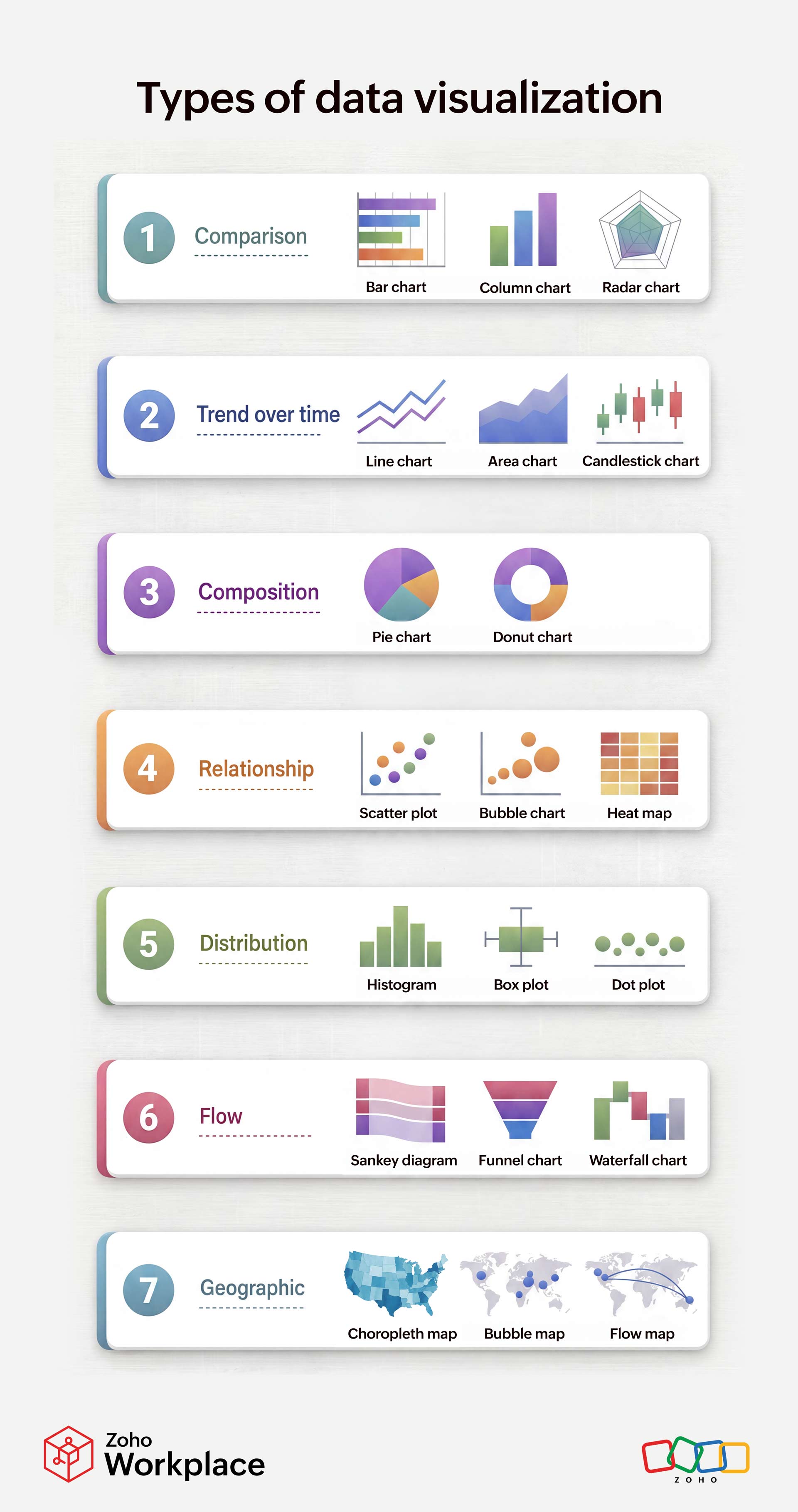
| Purpose | Chart types | When to use it |
| Comparison | Bar chart, column chart, radar chart | Comparing values across categories or multiple variables simultaneously |
| Trend over time | Line chart, area chart, candlestick chart | Showing how a value changes over time; candlesticks are specific to financial data |
| Composition | Pie chart, donut chart | Representing parts of a whole |
| Relationship | Scatter plot, bubble plot, heat map | Exploring correlations or patterns between two or more variables |
| Distribution | Histogram, box plot, dot plot | Showing how values are spread across a range; useful for spotting outliers |
| Flow | Sankey diagram, funnel chart, waterfall chart | Illustrating how quantities move through stages or how a cumulative value builds up |
| Geographic | Choropleth map, bubble map, flow map | Visualizing data tied to physical locations or regions |
Importance of data visualization
Helps process big blocks of data
Some datasets can be too large to analyze and interpret in their raw form. This can result in important information being buried or overlooked. Translating data into visual formats makes it manageable and helps teams process it accurately. A chart that summarizes ten thousand data points in a few seconds would take hours to interpret from a spreadsheet.
Helps identify trends and patterns
Data contains all the information in its raw form, but rarely reveals any structure on its own. Visual representations make recurring patterns, anomalies, and trends immediately apparent. A well-known historical example is John Snow's 1854 dot map of cholera cases in London. By plotting each case geographically, Snow identified a contaminated water pump on Broad Street as the source of the outbreak, an insight that couldn't have been reached from case lists alone. This helped the public health department respond swiftly.
Allows faster decision-making
When information is presented visually with clear labels and context, it helps decision makers reach the problem statement smoother and faster. A visual format reduces the cognitive load required to analyze the numbers and gives space to focus on the solution.
Allows for inter-disciplinary collaboration
Raw information and statistical outputs are often interpreted by specialists only. Charts and graphs translate technical information that helps even non-technical audiences understand, allowing for collaboration between teams.
Aids memory and communication
Information conveyed through visuals is significantly easier to remember than numerical tables. This makes charts and graphs valuable not only for analysis but also for presentations, reports, or any context where the audience needs to retain and act on information.
Data visualization best practices
While data visualization is important and useful, to reap the maximum benefits from it, it is important to follow certain best practices.
Define the purpose of the graph: Identify the story your chart aims to convey. A chart built without a clear purpose tends to include too much information and loses its message. Knowing your aim also helps you select the most appropriate chart type.
Prepare the data to be converted: Raw data often contains missing values, duplicates, and inconsistencies. Graphs or charts prepared using uncleaned data will mirror these inconsistencies. Ensure that the data you use is accurate, complete, and consistent before creating the visualization.
Provide context: Every chart you create should have a clear title describing what it shows: labeled axes with units, a legend and annotations that highlight key data points or explain any anomalies. These will help viewers interpret the data correctly without needing additional guidance.
Match the chart to the type of analysis: Use the chart type that is assigned for the analysis you're performing. Using a pie chart with twelve slices or a line chart connecting unrelated categories will create more confusion. You can use the guide below to match your data to the right chart type.
Clear and simple: Focus on the essential message and leave out the jargon or any additional information. This will create more confusion and distract from the core message.
Use the right color: Colors play an important role in conveying the meaning of the data. Use a consistent color palette across related charts. Limit the number of distinct colors to only what's necessary. Muted tones suggest neutrality, while bold, warm colors draw attention and can imply urgency.
Use appropriate scales: Label all units clearly, and ensure that the scales and axes used are accurate. Always start bar chart axes at zero unless there's a clear, disclosed reason not to. Truncated axes (axes that don't start at zero) can mislead viewers.
Make it interactive: Static charts show a fixed view of the data. Interactive elements—filters, hover tooltips, zoom controls, or dynamic date ranges—allow users to explore the data themselves and find insights. Prioritize interactivity, especially when the audience will be exploring the data, rather than simply receiving a finding.
Advantages of data visualization
- Data visualization helps spot trends, patterns or outliers in data that would otherwise be difficult to spot in a spreadsheet. Business tools often include an option to convert their data to visual formats. For example, Zoho Sheet available in Zoho Workplace helps you create intuitive charts with the data you add in you spreadsheet.
- Information in the form of charts or graphs is easier to share than raw data. This is more likely to be understood and retained by the audience. For example, a sales manager presenting quarterly revenue can share a single bar chart in a slide deck or email. This makes it easier to explain growth trends clearly to everyone, without attaching rows of raw numbers.
- Visual formats make data interpretable by non-technical audiences, removing the barrier of domain expertise. For example, an HR team tracking employee turnover rates can present a simple dashboard with color-coded charts, allowing executives and non-analysts to draw conclusions at a glance.
- Data presented visually is significantly easier to recall than numerical tables or written summaries. For example, a marketing team reviewing campaign performance is far more likely to remember that email open rates peaked in March when they see a clearly labeled line chart, compared to scanning the same figures buried within rows in a spreadsheet.
Disadvantages of data visualization
- Visual elements run the risk of misinterpretation if they're not presented correctly. A poorly designed chart can lead different viewers to reach different conclusions. To avoid this, it's always better to label the data and set a context to the visualization.
- Developing high-quality, accurate charts requires a certain level of technical expertise that cannot be afforded every time. This can make it difficult to adopt this model everywhere. Although visualization tools have broken down this barrier, it hasn't quite eliminated this completely.
- The charts and graphs are only as good as the data they're derived from. If the quality of the data isn't good, or if the data isn't correct, then the chart or graph is going to mirror that.
- Data visualization can merely represent that data and their relationship with each other. They don't explain the reason behind the co-relation. Without proper context, analyzing them can be tedious.
Data visualization tools
Business intelligence (BI) tools help analysts convert complex data into visual formats that help easier and informed decision-making. These tools focus on what happened and why it happened to provide businesses insights to make operational decisions. BI tools makes analysis easier by providing dashboards, KPIs, and various types of reports, among others.
With multiple tools at businesses' disposal, keeping the following factors in mind will help them choose the right tool for their needs.
- Ease of use: Some tools offer a simple interface that makes it easy even for novice analysts to navigate. In addition to that, some have extensive documentation and tutorials, making it intuitive to use.
- Scalable: The BI tool should be able to handle large sets of data if your business requires it.
- Customizable: The tool should be able to provide different types of charts or graphs with the flexibility to modify the design or layout to suit your brand voice.
- Cost efficient: The price offering of a tool should be justifiable in terms of the customer support they offer, competent features, and the overall value they add.