When do you need an online database?
If you're facing one of the challenges below while managing your data, it may be time to transition to an online database.
- 1
Scattered spreadsheet data
Spreadsheets are simple and familiar, so many teams start with them. However, as the amount of data grows and collaboration becomes increasingly essential, spreadsheets reveal their limitations.
- 2
Rigid traditional databases
Databases are powerful, but their rigid structure often requires a database administrator to set up, and you may need to write code to retrieve even basic information. They also lack built-in visualization, which makes it harder for users to interpret and act on the data.
- 3
Expensive sophisticated applications
Large teams with well-defined processes can benefit from function-specific applications. However, most organizations use only a fraction of the features available, but still pay exorbitant prices for sophisticated software. And if you are a small team, implementing dedicated software for each business need is a major challenge.
What are online databases?
Online databases are structured collections of information that can be created, stored, and managed on the web. Unlike traditional databases, which require servers and technical setups, online databases are hosted in the cloud and can be accessed through any browser.
They enable you to:
Organize information into structured tables.
Work from anywhere, on any device.
Share data with your team securely.
Search, filter, and analyze information with ease.
Types of online databases
Pro-code
Built for developers, these databases require knowledge of SQL or programming languages. They offer complete customization but demand high technical expertise.
Low-code
A mix of flexibility and simplicity. Low-code platforms offer drag-and-drop builders, while also allowing customization to a certain extent through coding.
No-code
Designed for everyone, no-code databases let you build connected, functional systems without writing a single line of code. They're intuitive, flexible, and perfect for business teams. This article focuses on the no-code category.
Why choose a no-code online database?
You can build a working database without coding.
They're more structured than spreadsheets and more cost-effective than specialized apps.
They're flexible enough to adapt to your process instead of forcing you into predefined workflows.
They're scalable and reliable as your business grows.
Key features of online databases
Structured data organization
Unlike spreadsheets—where you can enter anything anywhere—online databases use predefined field types, such as dropdowns and dates. This keeps data clean, consistent, and easier to interpret.
Customizable views
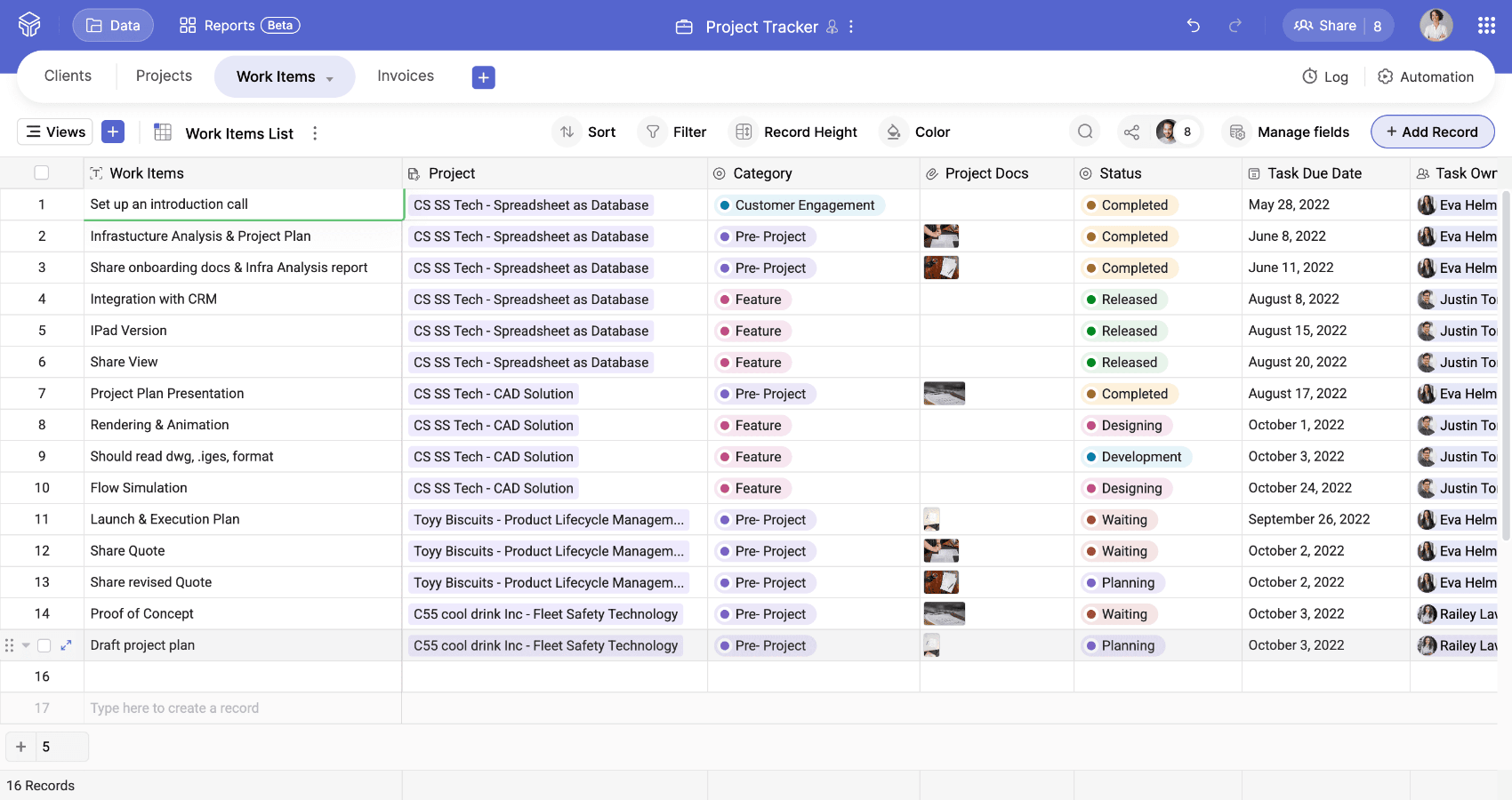
Along with the familiar grid view, you get views such as Kanban, calendar, gallery, and form, allowing you to visualize and manage data in the way that best suits your workflow.
No-code setup
It's easy to get started with online databases, as they have intuitive UIs and come with many supporting elements, like templates and AI assistance. Anyone can begin building in just a few clicks and start seeing value quickly.
Automated workflows and dashboards
Set up workflows to handle repetitive tasks, such as data updates and approvals. Create dashboards that update automatically as your data changes so you always have the insights you need at hand.
AI assistance
Modern databases include AI support. Describe your use case and AI helps you build the right structure in minutes, resulting in well-organized data.
Mobile experience
With mobile apps, you can stay connected to your business data from anywhere. From quick updates to approvals, everything is accessible on the go.
Zoho Tables as an online database
Zoho Tables is a spreadsheet-database hybrid that combines the simplicity of a spreadsheet with the power of a database. It's flexible enough to handle various business use cases, ranging from data storage to process tracking to workflow automation.
- 1
Storing and organizing data
Zoho Tables offers a wide variety of field types, from single-select for task stages to URLs for links and attachments for files. You can organize the data by grouping related information into tables and bases that scale with your data.
- 2
Creating different views
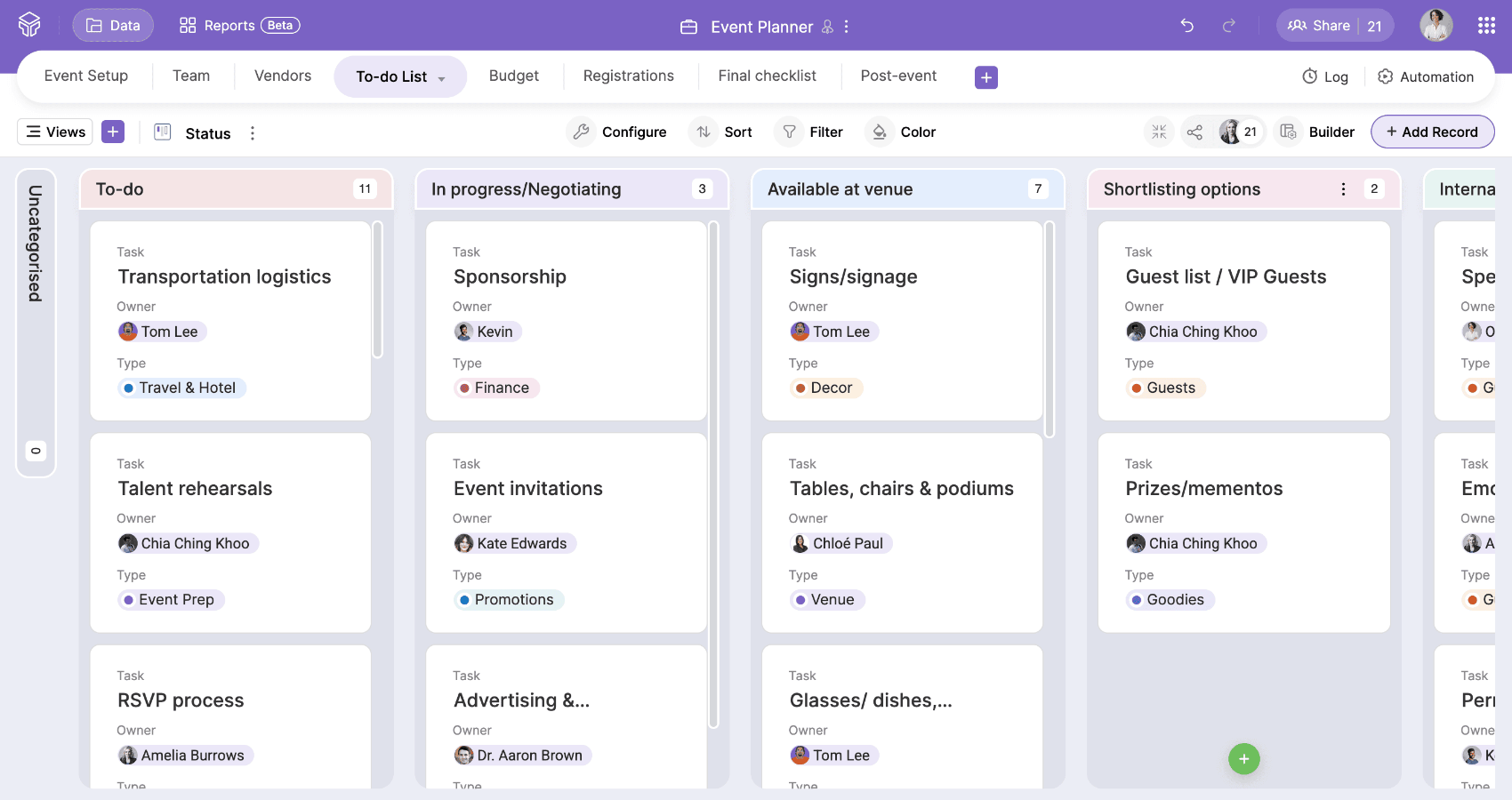
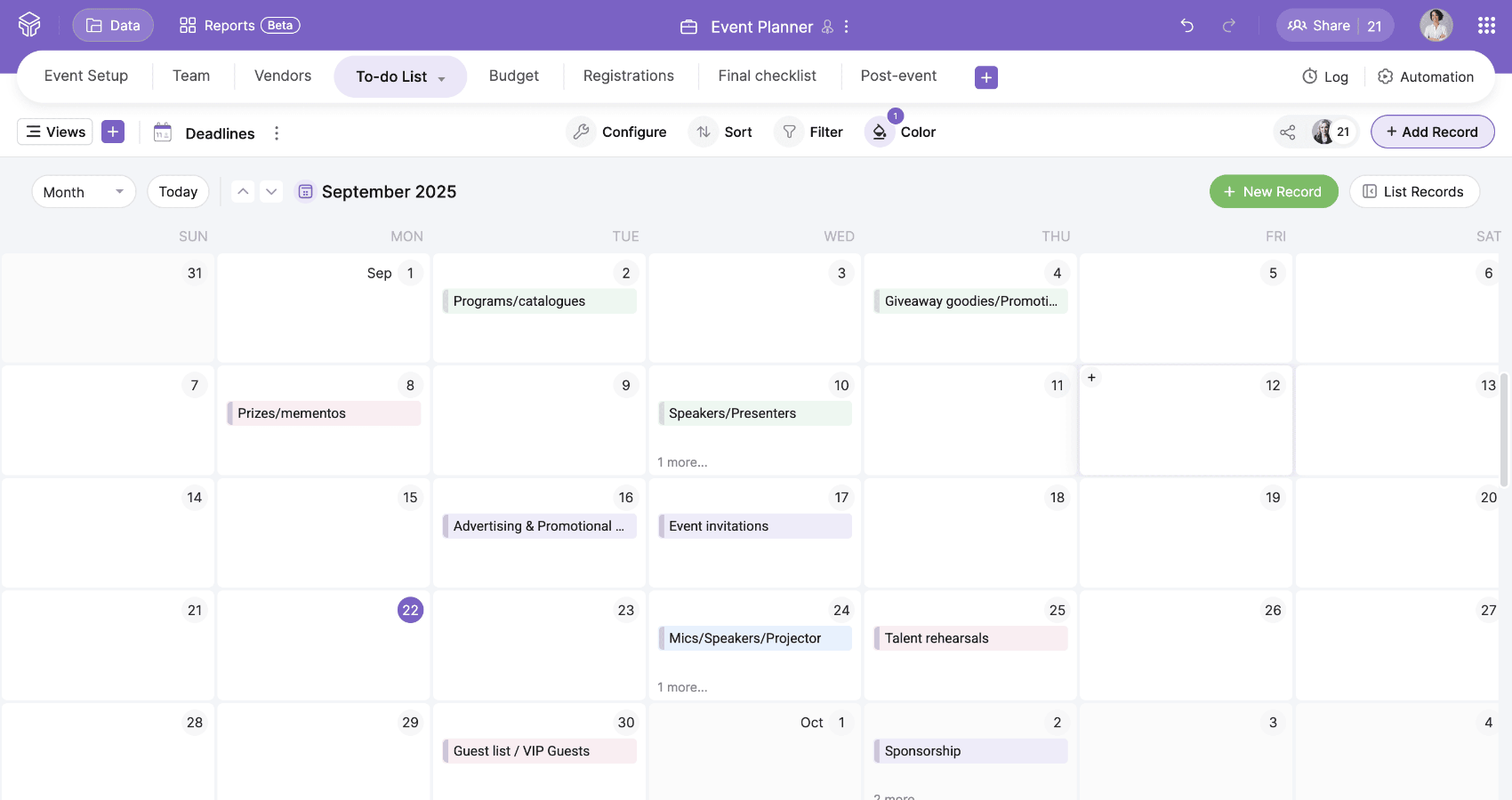
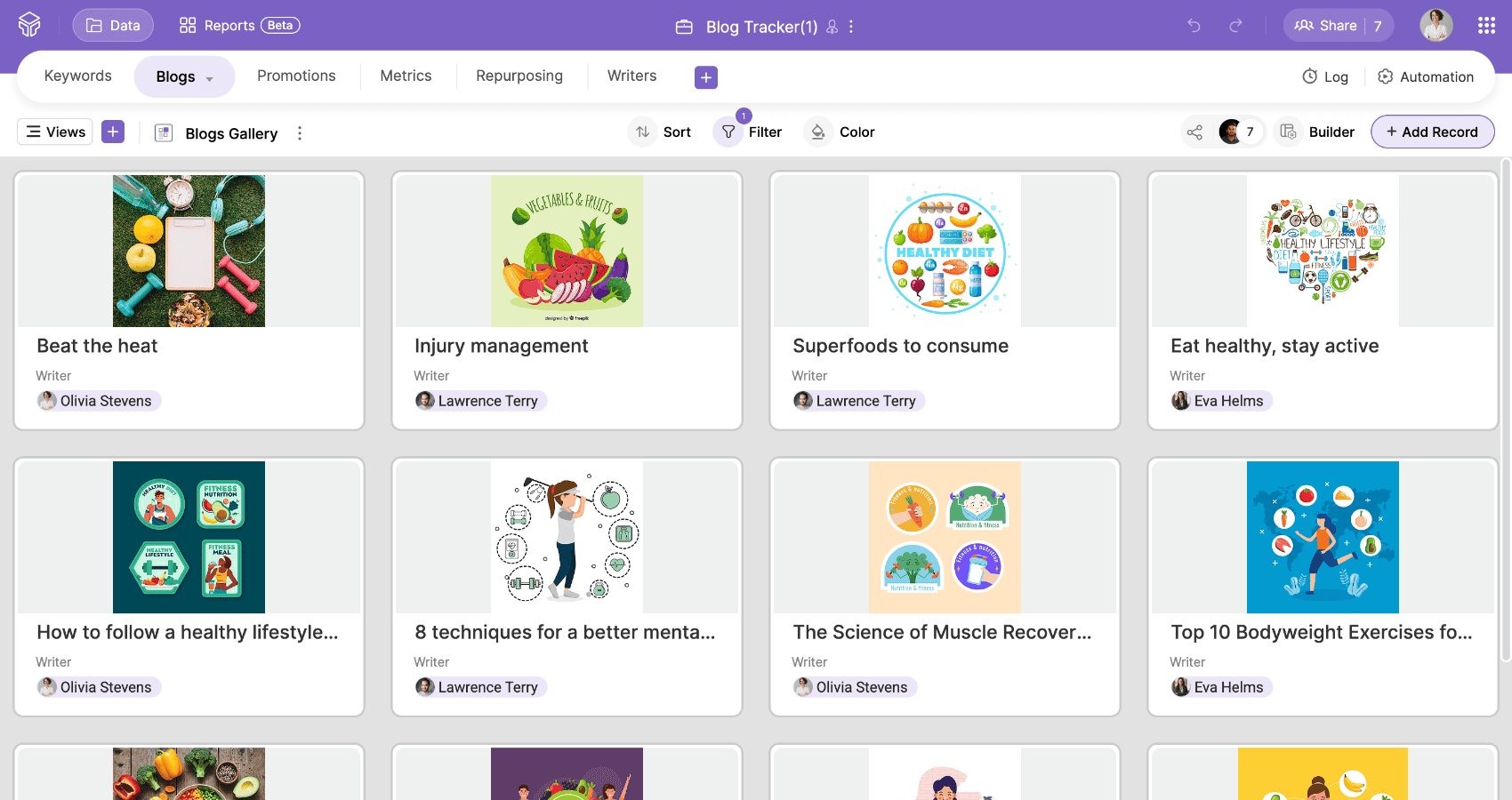
Switch between views to match your workflow:
Kanban for tracking progress
Calendar to stay on top of deadlines
Gallery for showcasing attachments
Forms for collecting inputs directly from your team or customers
- 3
Role-based sharing
Assign roles to control who can view, edit, or comment on data.
Viewers stay informed without editing.
Commenters leave feedback directly in context.
Data Maintainers update records while the setup stays intact.
Managers adjust views and automate workflows.
Additionally, personal views with filters enable teams to focus only on the data relevant to their work.

- 4
Automating manual updates
Automate routine actions such as sending notifications when a task is completed or when a lead cancels a subscription. Simple automations across processes save significant time in the long run.
- 5
Building dashboards
With a simple drag-and-drop builder, you can create dashboards that include elements such as charts, graphs, and KPIs, which update dynamically as your data changes, providing you with instant insights.

- 6
Mobile access
Zoho Tables' mobile app ensures you always have access to your data. Every solution you build on the web is also available on your phone, with mobile-specific features such as voice input, OCR scanning, and video playback in picture-in-picture mode.



How to get started
Predefined templates
Zoho Tables comes with over 65 predefined templates across various functions and industries. Select one that matches your use case, customize it, and begin working with your team immediately.
Import existing data
Already managing data in spreadsheets? Import your files directly into Zoho Tables and build upon them.
Create a base with AI
If you're starting fresh, Zoho's AI assistant can help. Share your use case, and Zia will automatically generate interconnected tables with sample data.
With Zoho Tables, you can build your own online databases and set up workflows around them without writing any code. Everything—from templates and imports to AI-assisted setup—is designed to help you get started quickly and efficiently.
Best of all: You can try all the features for free.