Why do you need Zoho Tables in your marketing technology stack?
Marketing work often gets scattered across spreadsheets, tools, and threads, making it hard to stay aligned across planning, execution, and tracking. Without clear links between campaigns, assets, and performance, teams struggle to connect the dots and get a complete view of what’s working. That’s where Zoho Tables comes in, giving you a structured, relational database where you can organize your marketing data, streamline marketing ops, and keep every part of your marketing workflow running smoothly, all in one place.
Our customers love us!
Watch videoZoho Tables gave us the balance between the flexibility of a spreadsheet and the structure of a project management tool, helping us keep our operations on track.
Reshma BudhiaCEO, Toss the Coin
Who is this for?
Marketing agencies work with multiple clients at once. Their work moves at a faster pace with shorter project life cycles, tight deadlines, and constant context switching across client briefs, calendars, and channels, from product launches and social media to paid ads, content strategy, and brand development. Because their reporting is tied to each client’s KPIs, agencies need a system that helps them juggle multiple calendars, manage deliverables efficiently, and maintain clarity across every client engagement.
How Zoho Tables helps marketing agencies scale
Behind every campaign is a steady flow of client briefs, expectations, and deliverables. For agencies handling multiple accounts, keeping this work organized and moving smoothly is a constant challenge.
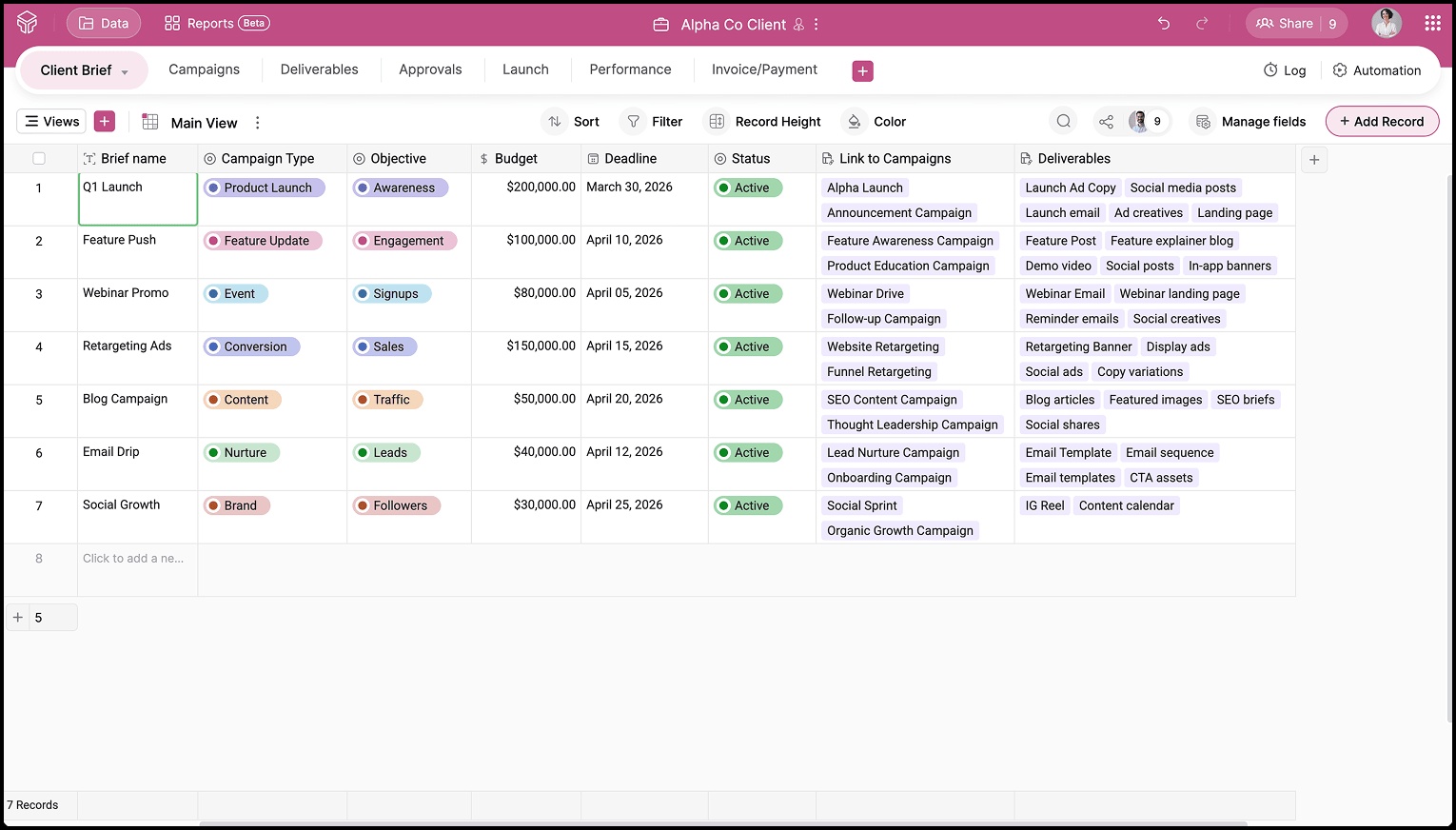
Keep briefs organized in Grid view while linking them clearly to the respective Campaigns table and Deliverables table.
- Client brief
- Plan
- Production
- Reviews and approvals
- Launch
- Report
Repeat for each client: Use separate bases, workspaces, views, and more to manage multiple accounts without chaos.
In-house marketing teams have deep familiarity with the company’s brand, product vision, and long-term goals, in addition to working on GTM strategy. Their work runs in predictable monthly and quarterly cycles, and they collaborate constantly with sales, product, and leadership to keep every channel aligned. Because their success is measured using internal KPIs, they need a central workspace that increases visibility, reduces duplicated effort, and helps them track performance and plan more predictably across all campaigns.
How Zoho Tables helps marketing teams scale
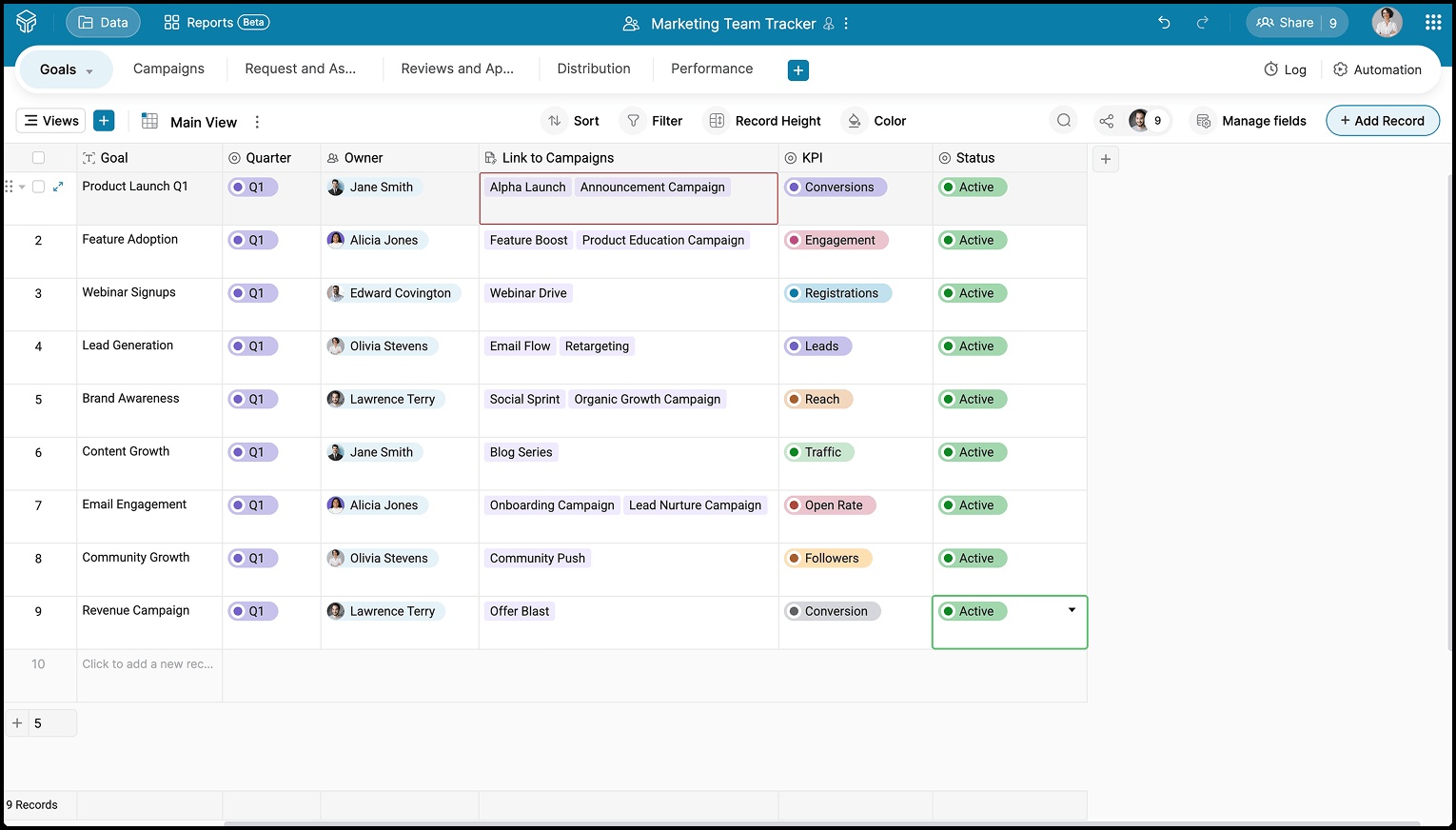
With Zoho Tables, you can capture goals in a structured table, link them to campaigns, and assign ownership so every initiative is tied back to a clear objective and nothing gets lost in meeting notes.
- Goals
- Planning
- Assets
- Reviews and approvals
- Distribution
- Tracking performance




Integrate with your marketing stack
Zoho Tables fits right into your existing marketing ecosystem, so you can keep your workflows connected without switching between tools.
Bring order to every campaign.
Get startedFrequently Asked Questions
How is Zoho Tables different from a regular spreadsheet?
Zoho Tables gives you the familiarity of a spreadsheet with the structure of a database, making it easier to organize campaigns, track assets, manage workflows, and collaborate in real time without losing data or version control.
Is the pricing similar for both marketing teams and marketing agencies?
Yes. The pricing is the same for both marketing teams and marketing agencies.
Can we collaborate with people outside our team or company?
Yes. You can share restricted views with clients, freelancers, or stakeholders, allowing them to review, comment, or approve without accessing everything in your workspace. With access-level permissions like Viewers and Commenters, you stay in control of what external collaborators can see and do.
Is Zoho Tables easy to onboard?
Yes. You can start with readymade templates for agencies and marketing teams, import existing spreadsheets, and customize workflows without needing technical help. With Zia, Zoho’s AI assistant, you can also generate entire bases with prebuilt tables, fields, and relationships with a simple prompt, helping you get started faster and organize your data effortlessly.
What kind of marketing workflows can I manage in Zoho Tables?
Zoho Tables helps you manage everything from campaign planning and content calendars to approvals, asset management, launches, and performance tracking, all in one place. With features like multiple views, automation, integrations, relational linking, and reports, you can connect every stage of your workflow and keep your team aligned from idea to execution.
Does Zoho Tables support automation?
Yes. You can automate reminders, status updates, approvals, handoffs, and notifications to keep campaigns moving without manual follow-ups.