Automating handwritten KYC document processing with Zoho RPA

- Problem statement
- How Zoho RPA helps
- What changed with Zoho RPA
- How Zoho RPA supports onboarding and compliance teams
- Ready to automate handwritten KYC processing?
Problem statement
Every day, operations teams receive KYC forms through email as part of customer verification and onboarding processes.
Many organizations have already digitized parts of their KYC process through online forms, customer portals, and eKYC platforms. However, KYC information often continues to arrive through a mix of channels, including handwritten scanned forms, PDFs, images, email attachments, branch submissions, shared folders, and other document-based workflows. Since the information is unstructured, teams must manually open each email, download the document, review the contents carefully, and enter the required details into the customer onboarding application built on Zoho Creator.
At lower volumes, the process may seem manageable, but as KYC submissions increase, teams spend more time handling documents, tracking emails, and updating records manually.
To keep customer records updated, operations teams typically need to:
- Monitor inboxes for incoming KYC forms
- Download attachments manually
- Open and review handwritten documents
- Extract customer details manually
- Enter the information into the onboarding application forms
- Validate records and correct entry errors
Because the information exists inside handwritten and unstructured documents rather than ready-to-use data fields, onboarding workflows become slower and more dependent on repetitive manual effort.
The result?
Important customer data remains trapped inside documents while onboarding and verification teams spend valuable time processing paperwork instead of moving workflows forward.
How Zoho RPA helps
Zoho RPA automates the entire workflow from document intake to record updates by combining inbox monitoring, intelligent document processing (IDP), and and automated onboarding record updates into a single end-to-end process.”
Here's how the automation works:
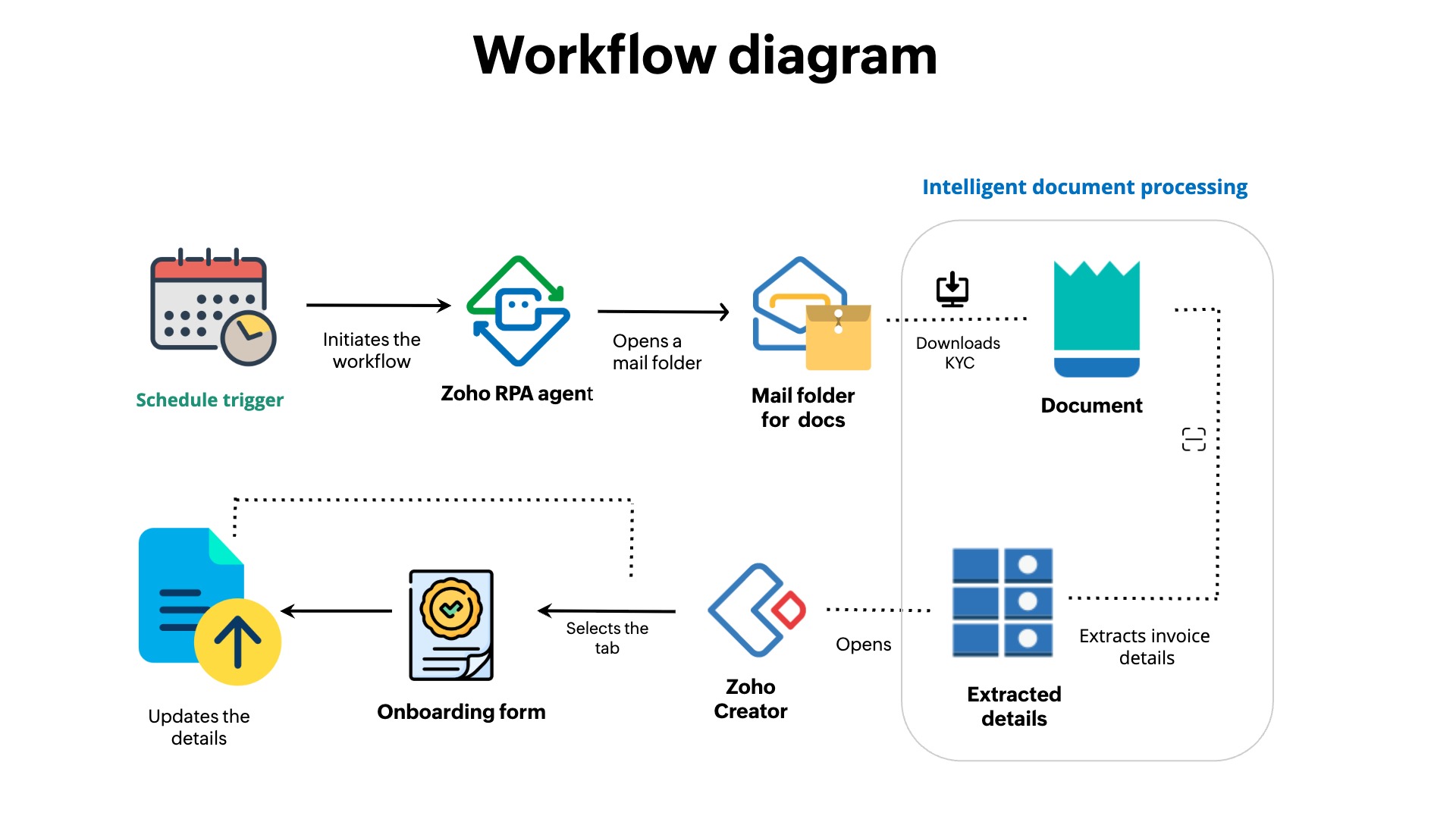
1. Zoho RPA monitors incoming KYC emails
RPA bots continuously monitor incoming emails and identify new KYC submissions automatically.
2. The bot downloads handwritten KYC forms
Once a new submission is detected, the bot downloads the relevant attachments and prepares them for processing.
3. Intelligent document processing extracts handwritten information
Using intelligent document processing, the system reads handwritten KYC forms and extracts customer details like names, addresses, ID numbers, dates of birth, and verification information.
4. Extracted information is validated and structured
Zoho RPA organizes the extracted data into a structured format so it can be used reliably across downstream workflows.
5. Zoho RPA updates the onboarding form automatically
The bot updates onboarding forms using the extracted KYC information without manual data entry.
6. Updated records become available instantly
Once processing is complete, onboarding and compliance teams can immediately access updated customer information inside the application.
What changed with Zoho RPA
| Before RPA | After RPA |
| Teams manually monitored inboxes for new KYC submissions. | Zoho RPA bots monitor incoming KYC emails automatically. |
| Customer information remained trapped inside handwritten forms and scanned attachments. | Intelligent document processing converts handwritten data into structured information. |
| Teams manually review documents and enter customer details. | Extracted information flows automatically into the forms. |
| Manual document handling increased the risk of missed fields and entry errors. | Standardized extraction improves consistency and accuracy. |
| Customer onboarding slowed down due to repetitive paperwork processing. | Updated records become available faster for onboarding and verification workflows. |
How Zoho RPA supports onboarding and compliance teams
- Faster onboarding workflows - Handwritten KYC forms are processed and updated automatically, reducing delays in customer verification workflows.
- Reduced manual dependency - Teams no longer spend hours downloading attachments, reviewing documents, and entering customer information manually.
- Improved data consistency - Intelligent document processing helps standardize extracted information and reduce common data entry errors.
- Structured data from handwritten documents - Customer information captured inside scanned forms becomes structured, searchable, and ready for operational use.
- Scalable document processing - The workflow can handle growing submission volumes without adding repetitive operational overhead.
Ready to automate handwritten KYC processing?
Zoho RPA automatically captures handwritten KYC data, extracts key information, and updates onboarding records without repetitive manual effort.
Want to see the workflow in action?