Mail Deletion and Retention Policy
Understanding Zoho Mail’s deletion and retention policies helps you manage your data effectively and prevent permanent data loss from the servers. This help page explains the timelines after which your organization’s emails are permanently deleted from Zoho Mail servers. Once deleted from the Zoho Mail's servers, the data cannot be recovered or restored by any means.
Note:
- If your organization is part of an active subscription plan (Mail Premium or Workplace Professional), the user’s email data will be retained in eDiscovery as per the archival policy configured by the administrator. Refer to our eDiscovery help page for more details.
- Emails deleted from the UI are moved to Trash and retained for 5–180 days, depending on the email’s received date and the Junk Cleanup Interval configured in Settings. Once this interval expires, emails in Trash are automatically and permanently deleted. Emails deleted from Trash are retained on our servers for 30 days; administrators can contact our support team to retrieve them within this retention period.
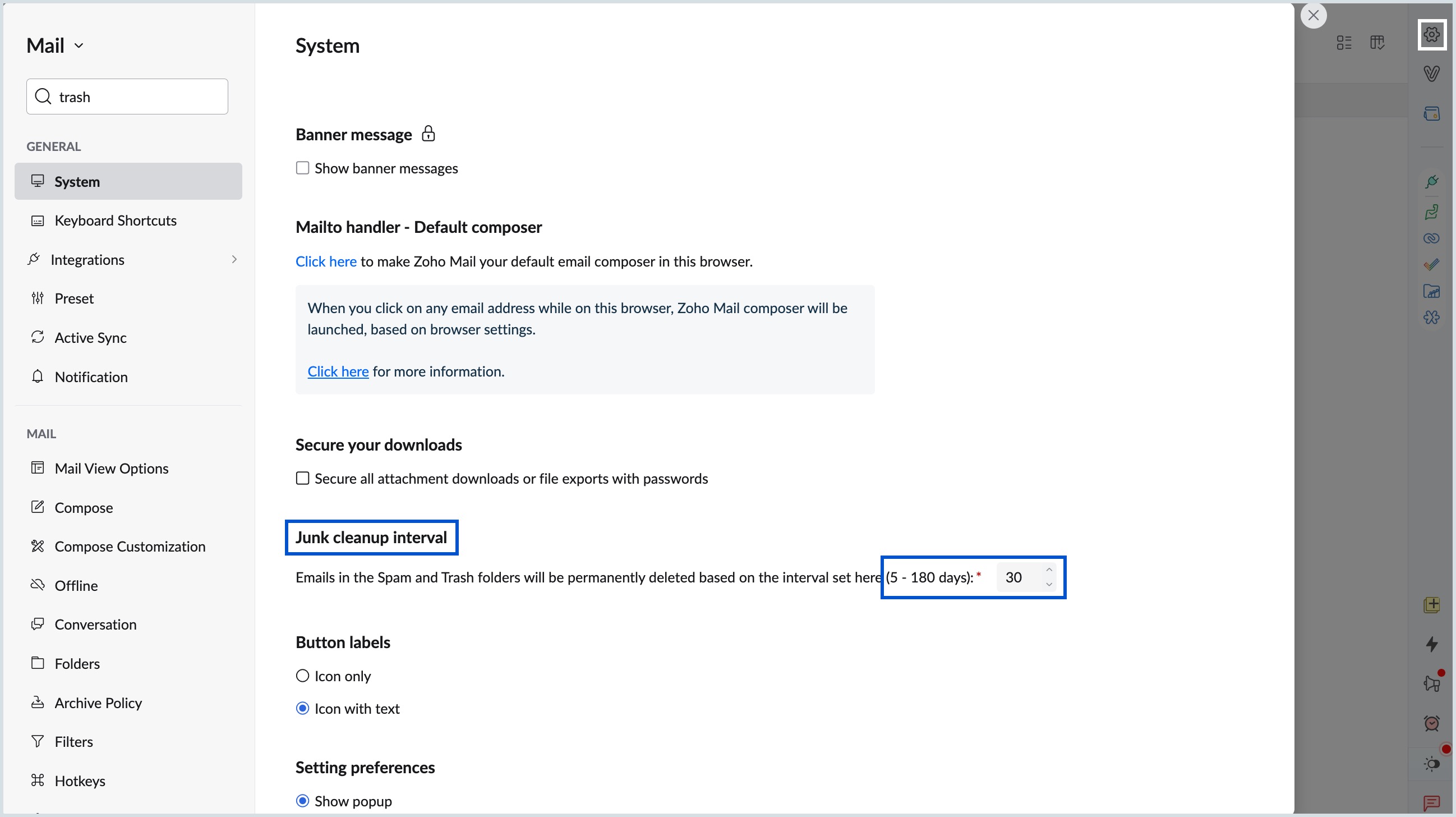
- Other user-level custom settings — such as Folders, Filters, Signature, and Out-of-office configurations — when deleted from the UI are permanently deleted and cannot be recovered, even by your administrator.
What is data deletion?
Data deletion refers to the permanent removal of account information, emails, and associated files from Zoho Mail servers.
There are two types of deletion:
- User-initiated: When a personal Zoho Mail account is closed by the user or when an account is manually deleted by a Super Administrator/Administrator, the data from the deleted account is retained on Zoho Mail servers for 30 days, after which it is permanently purged.
- System-initiated: Zoho Mail automatically deletes data when a personal Zoho Mail user remains inactive beyond the defined retention period.
What is data retention?
Data retention defines how long Zoho Mail retains data after an account or organization is deleted. The retention policy determines both the recovery window and the point at which data is permanently removed.
- Zoho Mail ensures data is retained as long as the user has an active subscription.
- Retention and deletion rules vary based on your organization's subscription type (Paid or Free).
How data retention works ?
Zoho Mail retains deleted data for a limited time, allowing recovery within a defined window. The retention period depends on:
- The account type (Individual or Organization).
- The subscription type (Paid or Free).
- The action (User deletion or Organization deletion).
Data retention for paid accounts
This table given below applies to users with a paid Zoho Mail subscription.
| Scenario | Triggered By | Account Status | Data Retention & Recovery |
| User account deletion | Super Administrator/ Administrator deletes a user's Zoho Mail account. | The account is deleted and is no longer accessible. | Data can be recovered for up to 30 days after the deletion date. |
| Organization deletion | Super Administrator deletes the organization. | All accounts and the organization are deleted. | All organization-specific data is permanently deleted after 30 days and cannot be recovered after this period. |
Data retention for free accounts
This section explains the policy for users with a free Zoho Mail account.
Free - Personal Account
| Scenario | Triggered By | Account Status | Data Retention & Recovery |
| User account deletion | User closes the Zoho Mail account. | The account is deleted and is no longer accessible. | Data can be recovered for up to 30 days after the deletion date. |
Free - organization-based account
| Scenario | Triggered By | Account Status | Data Retention & Recovery |
| User account deletion | Super Administrator/ Administrator deletes a user's Zoho Mail account. | The account is deleted and is no longer accessible. | Data can be recovered for up to 30 days after the deletion date. |
| Organization deletion | Super Administrator deletes the organization. | All accounts and the organization are deleted. | All organization-specific data is permanently deleted after 30 days and cannot be recovered after this period. |
Frequently Asked Questions (FAQs)
How do I recover deleted data?
If you are an administrator seeking to recover data from your deleted user accounts, or a personal user attempting to restore your account data, you can contact Zoho Support within the 30-day recovery window to request data restoration.What happens to my data if I don't renew my subscription?
If a subscription expires, your account will either be downgraded to the Free plan (if available in your region) or locked. In the case of a locked account, all incoming and outgoing emails will be blocked 15 days after the subscription expiry date.Is my data permanently deleted after 30 days?
Yes, once the 30-day recovery window has passed, the data is permanently deleted from Zoho Mail's servers and cannot be restored.
Note:
For more information on data deletion related to account inactivity, refer to the Inactive Accounts help page.