The thank you page is the last thing a respondent sees after submitting your form, and it's often the most overlooked part while building a form. A blank cursor and space crunch make it no easier. Zia, the AI assistant inside Zoho Forms, drafts an AI thank you page for you so you can focus on what to say next: the timeline, the next step, or the link your respondents need.
What should a good thank you page include?
The thank you page is small space with a big job. Done well, it closes the loop on the submission, reassures the respondent, and quietly sets up better data collection downstream. Here's what to put on the page if you want it to do more than just say thanks.
A clear confirmation that the submission went through
The first thing a respondent looks for after hitting submit is proof that it worked. A vague "Thanks!" leaves room for doubt, and doubt drives duplicate submissions and follow-up emails asking whether the form was received. Be specific and precise. Name the form, the action they just completed, and what will happen next. A line like "We've received your event registration for the design workshop on June 12" does more than acknowledge the click. Additionally, letting them have a copy of their submission also ensures they have a record of what they submitted. It confirms the data you captured back to them, which gives the respondent a chance to spot an error early, and improves the quality of the entries that reach your team.
A realistic timeline with what happens next
Nobody likes to be left hanging. Most respondents aren't done thinking about the form the moment they submit it. They want to know when they'll hear back, what they need to do next, and who to contact if something changes. A thank you page that answers those questions before they're asked reduces inbound support volume, and sets expectations that match your actual workflow.
Spell out the steps in plain language: when a confirmation email is sent, when a team member will reach out, what document to prepare, and what to do if they need to make a change. The clearer the path forward, the fewer half-finished follow-ups you'll have to chase.
Personalization that uses what they just submitted
Don't make your thank you page copy like a system message. Personal copy reads like a reply and creates an instant connect. The thank you page is the easiest place to use the values a respondent just entered - their name, their order number, the appointment slot they picked, the event date they registered for - because the data is already there. Pulling those values back into the acknowledgement does two things at once, it makes the message feel written for that person, and it gives them one more chance to verify their own entry. That second look is quiet quality control, and it costs you nothing once it's set up.
A record they can take with them
A respondent who walks away with no copy of what they submitted has nothing to refer back to. That gap turns into "can you resend that confirmation" emails, lost order numbers, and repeated form fills. Offering a downloadable summary of the submission solves the problem in one click. It also sets a professional tone for forms tied to applications, registrations, bookings, and purchases, where respondents expect a paper trail. The same logic applies to a link back to the form for a second entry, useful for order forms, event sign-ups, or any case where one respondent might submit on behalf of multiple people.
A measurable signal for the business
The thank you page is also the cleanest place to measure form performance. Every respondent who lands on it has completed a submission, which makes it the right trigger for conversion tracking, funnel analysis, and campaign attribution. Wiring up analytics or pixel tracking to the thank you page lets you tie form completions back to the campaigns and sources that drove them, so you can spend your acquisition budget on what actually converts. It's a small setup step that turns the thank you page from a polite send-off into a useful data point for the team running the form.
How does the AI thank you page work in Zoho Forms?
The thank you page is small real estate with outsized impact. It confirms submissions, reduces follow-up questions, and points respondents to whatever comes next. A few minutes of thought makes the page better, but most teams don't have those minutes. Zia gives you a usable draft, and Rich Text gives you room to make it personal. It's quick to setup, yet has more context than just saying thank you to people who fill your form.
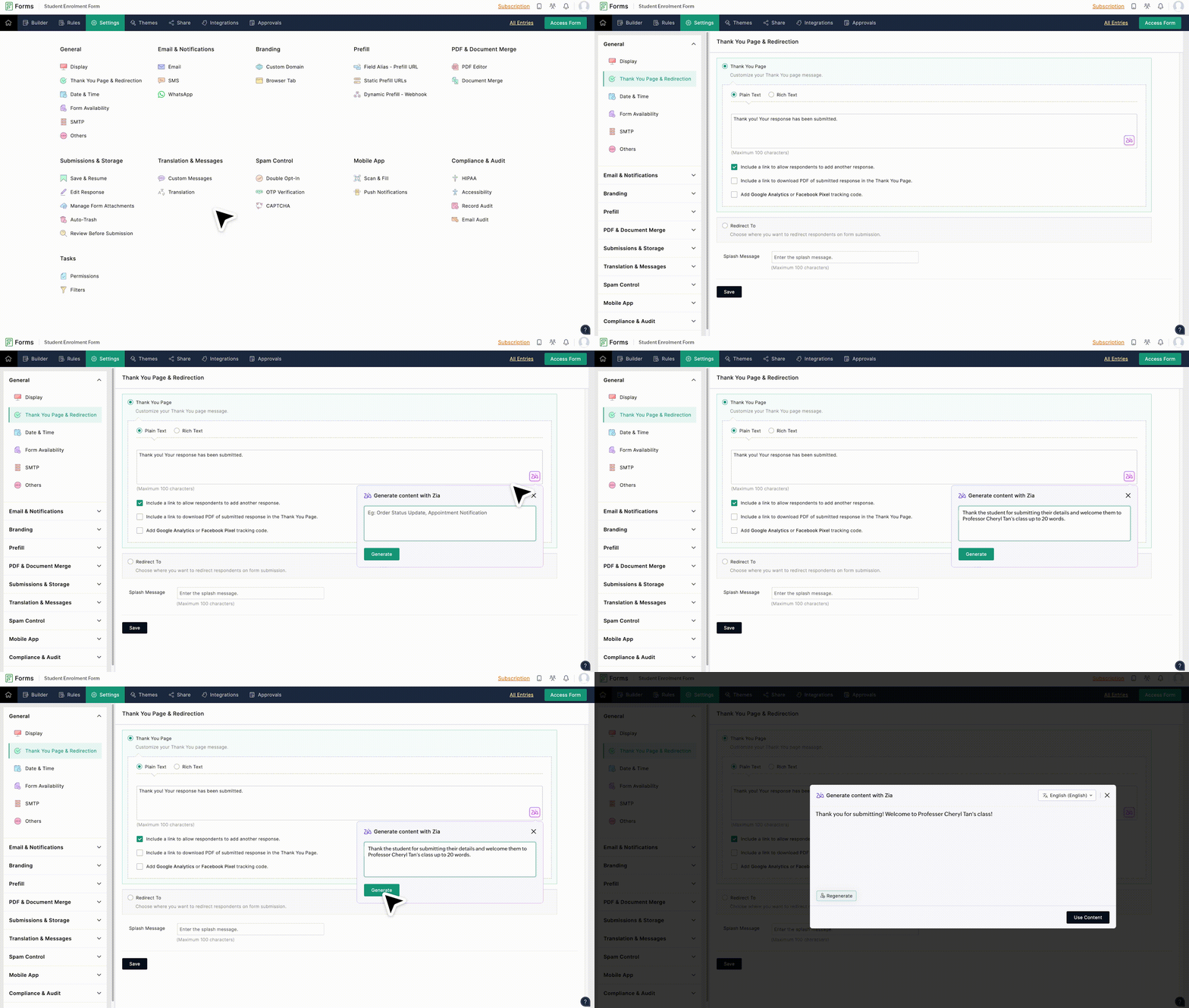
Skip the blank-page problem
Click the Zia icon in the Thank You Page settings, describe what you want the message to say, and Zia drafts it for you. Edit the wording, save, and the page is done. No more leaving the default "Thanks, your response has been submitted" on a registration form, a job application, or a customer order because writing a better version felt like a chore at the end of the build. The draft gives you something to react to, which is almost always faster than writing from scratch, especially when brevity is the key.
Merge fields to personalize each thank you message
In Rich Text mode, click the merge icon and pull values from the submission directly into the message: respondent name, order ID, event date, ticket type, appointment time. The Thank You page then reads as if it were written for that one person, not pasted from a template. For forms with a Subform, you can also include the Subform responses as a summary on the page. This is specially useful for order forms, multi-attendee registrations, or any submission where the respondent benefits from seeing a recap of what they just entered.
Clear thank you page to reduce follow-up emails
A clear, specific confirmation message reassures respondents the submission went through, especially on forms tied to a deadline or a payment. That alone reduces inbound support questions for registrations, job applications, insurance claims, and order forms. Specificity matters more than length: "Your application for the Q3 cohort has been received, and you'll hear back within 5 business days" closes the loop in a way a generic thank-you never does. Zia can draft this kind of message from a one-line prompt, and Rich Text lets you make it more concrete.
Tell respondents what happens next
A useful Thank You page does more than say thank you. Use Rich Text to spell out the timeline, embed a link to a follow-up form like a feedback survey, share a calendar invite, or point respondents to resources they'll need before the next step. Bullet points, tables, and links are all available in the editor, so the page can carry real information instead of a single line. Ask Zia to draft the message, then layer in the specifics like dates, next actions, contact details that turn a confirmation into a quick guide for whatever comes after.
Give respondents something to take with them
Toggle on the option to include a PDF download of the submitted response, and respondents leave with a copy of everything they filled in — useful for job applications, registrations, insurance forms, and any submission they may need to reference later. You can also include a link that lets respondents add another response, which suits surveys, repeat check-ins, or forms where one person submits multiple entries. Together, these two settings turn the Thank You page from a dead end into something the respondent can actually use after they close the tab.
Keep a track of conversions through Google Analytics and Meta Pixel
Add a Google Analytics or Meta Pixel code to track form conversions. This helps in analyzing how your forms are converting by mapping the tracking parameters to related fields within Zoho Forms. Create better audience engagement, optimize your campaigns, and formulate better campaign strategy by using tracking codes for your form's Thank You page.
How to setup
1. Open Thank You Page settings: In your form builder, go to Settings > General > Thank You Page & Redirection and choose Plain Text or Rich Text.
2. Generate the message with Zia: Click the Zia icon, describe what the thank you page should say, and the AI drafts a message that fits the context of your form.
3. Personalize and publish: Switch to Rich Text to add merge fields, links, or a PDF download option, then save. Respondents see your acknowledgement the moment they submit.
Sample prompts to generate a thank you page for your form
To get you started quickly, here are a few sample Thank You page prompts that we have curated. You can pick and use them as they are or change them according to your preference.
Event registration form: "Confirm registration for the May 24 product workshop. Mention the calendar invite is on its way."
Tone: Warm, informative
Job application form: "Acknowledge the application and let the candidate know the team reviews submissions within 7 business days."
Tone: Professional, reassuring
Customer support ticket: "Confirm the ticket was received and give an estimated first response time of 24 hours."
Tone: Direct, supportive
Newsletter signup: "Welcome the new subscriber and let them know the first issue lands every Tuesday."
Tone: Friendly, brand-forward
Product order form: "Confirm the order, mention a confirmation email with the receipt, and say shipping updates will follow."
Tone: Clear, transactional
Appointment booking: "Confirm the appointment and remind the respondent to arrive 10 minutes early."
Tone: Practical, polite
Feedback: "Thank the respondent for sharing feedback and let them know it shapes upcoming improvements."
Tone: Genuine, appreciative
Volunteer signup: "Welcome the new volunteer and let them know an onboarding email follows within two days."
Tone: Warm, community-driven
Lead generation form: "Thank the prospect for their interest and mention a sales rep will reach out within one business day."
Tone: Confident, professional
Donation form: "Thank the donor sincerely, confirm the contribution, and mention a tax receipt will be emailed shortly."
Tone: Heartfelt, formal
Workshop or course enrolment: "Confirm enrollment, share that course materials will be sent 48 hours before the session, and mention the platform link."
Tone: Helpful, organized
Contest or giveaway entry: "Confirm the entry and let the participant know winners are announced on the 30th via email."
Tone: Energetic, light
Refund or return request: "Acknowledge the return request and mention the team will process it within 3 to 5 business days."
Tone:Calm, reassuring
Medical intake form: "Confirm the intake form was received and let the patient know the clinic will call to schedule a consultation."
Tone: Respectful, reassuring
RSVP form: "Confirm the RSVP, share the venue address, and mention dress code details follow by email."
Tone: Warm, celebratory
FAQ
1. What is an AI thank you page?
An AI thank you page is the post-submission message shown to respondents, drafted by an AI assistant instead of written from scratch. In Zoho Forms, Zia generates the message based on a short prompt describing what you want the page to say.
2. How do I generate a thank you page with Zia in Zoho Forms?
In your form builder, go to Settings > General > Thank You Page & Redirection, select Plain Text, and click the Zia icon. Describe the message you want and Zia drafts it for you. You can edit the draft before saving.
3. Can I personalize the thank you page with each respondent's details?
Yes. Switch to Rich Text mode and insert merge fields that pull values from the submission, such as name, email, order number, or appointment date. Each respondent sees an acknowledgement that reflects what they entered.
4. Does Zoho Forms store the prompts I give Zia?
No. Content entered into Zia for generating messages is not stored or processed beyond the request. The drafted message lives only inside your form's thank you page settings.
5. What should a good thank you page include?
At minimum, confirm the submission and tell respondents what happens next. Helpful additions include a timeline, a link to a related form, a calendar invite, a confirmation number, or a PDF copy of their response. Match the tone to the rest of your form.
6. Can I redirect respondents instead of showing a thank you page?
Yes. Under Thank You Page & Redirection, you can redirect to the same form, another form like a feedback survey, or an external website. You can also pass form responses to the redirected URL using prefill values.
7. Is the AI thank you page feature free to try?
You can sign up for Zoho Forms for free and explore the AI Assistant features. AI usage runs on a credit system tied to your subscription plan, and additional credits can be purchased as an add-on if you need more.
8. Can I track conversions on my thank you page?
Yes. In Thank You Page settings, you can add Google Analytics or Meta Pixel tracking codes and map tracking parameters to count each completed form submission as a conversion goal.