Throw
Table of Contents
Overview
What is a throw statement?
The throw statement lets you explicitly stop script execution and raise a user-defined exception when your script encounters a condition that should prevent further execution. This is useful when application-specific validation or business rules fail, such as when a mandatory field is left empty or an entered quantity is invalid. Instead of allowing invalid data to continue through the script or relying on a generic runtime error, you can use throw to stop execution immediately and provide a meaningful reason for the failure.
An exception is a runtime condition that interrupts the normal flow of script execution because an error or an unexpected condition has occurred. Some exceptions are raised automatically by Deluge when runtime errors occur, such as division by zero or accessing an invalid list index. You can also explicitly raise your own exceptions using the throw statement when application-specific validation or business rules fail.
The throw statement raises a user-defined exception and transfers control to the nearest matching catch block, if one exists. The following section explains how this process works.
How throw works
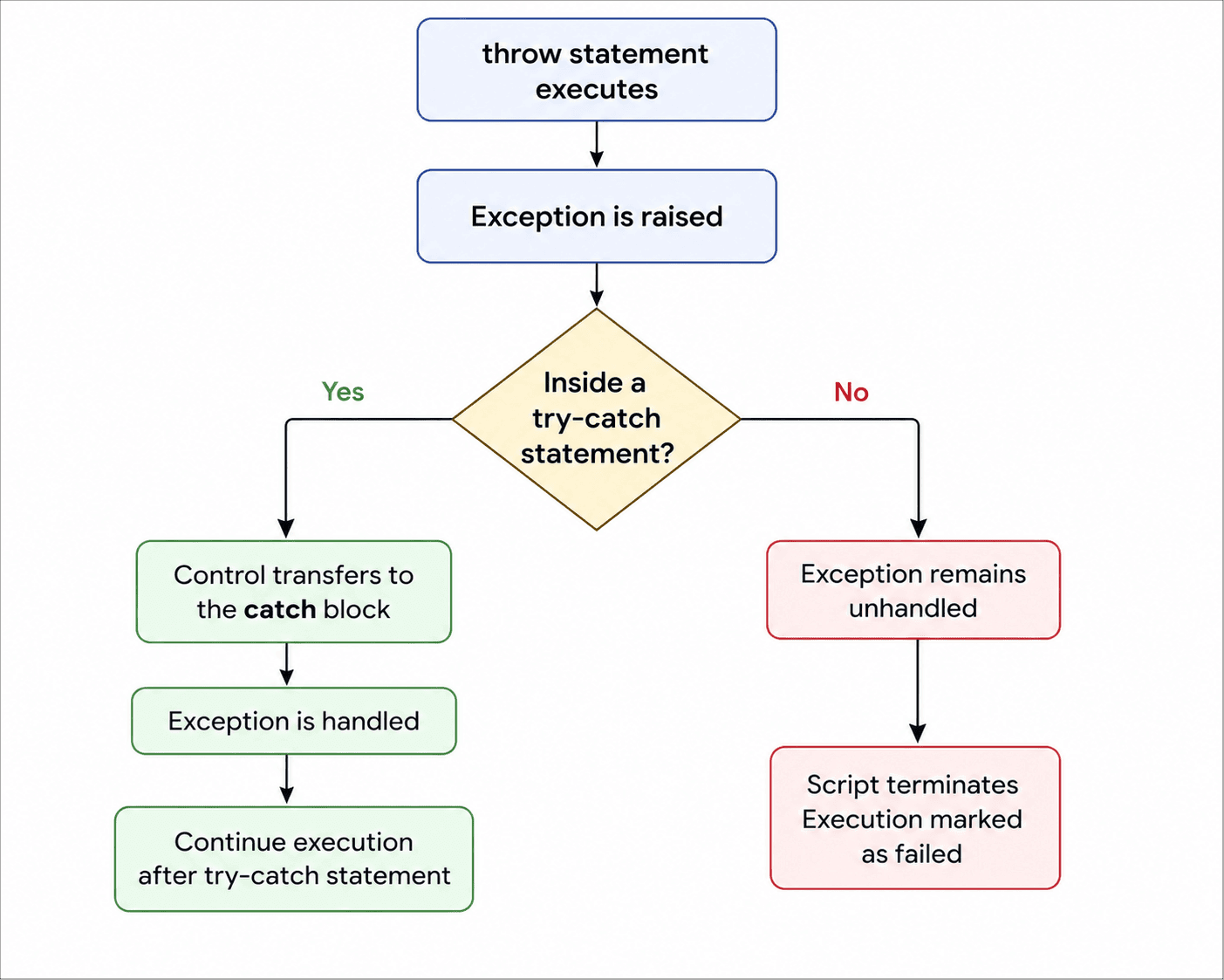
When the throw statement is executed, Deluge immediately stops the current execution and raises an exception with the specified information. Any statements that follow the throw statement in the same execution path are not executed.
Deluge then searches for a matching catch block to handle the exception.
- If a matching catch block is found, Deluge transfers control to that catch block, where the exception can be inspected, logged, or handled. After the catch block finishes executing, the script continues with the statements that follow the corresponding try-catch statement.
- If no matching catch block is found, the exception remains unhandled. Deluge terminates the script immediately, and the execution is marked as failed.
Note: When an exception is raised inside a function using the throw statement but not enclosed with a try-catch block, Deluge continues searching beyond the current function until it finds a matching catch block. This behavior is explained further in the Exception propagation section.
Syntax
throw<expression>;
The throw statement accepts an expression that describes the exception to be thrown. The expression can be of the following types:
| Expression Type | Purpose | Example |
| Text | Raises an exception using a text value as the exception message. The value can be specified directly or supplied through a Text variable. | "Email address is required." (or) errorMessage where errorMessage = "Email address is required."; |
| Map | Raises an exception using a map containing the mandatory message key and optional data key. The map can be specified directly or supplied through a Map variable. Note: The message key is mandatory. The data key is optional, and can contain any Deluge data type. | {
"message":"Validation failed.",
"data":
{
"field":"Email",
"value":input.Email
}
} |
| Exception variable | Re-throws a previously caught exception. | e |
Once the exception has been raised, Deluge skips the remaining statements in the current execution path and begins searching for a matching catch block.
Example
The following example validates the order quantity before processing the order. Since a quantity cannot be negative, the script raises an exception using the throw statement. The remaining statements in the try block are skipped, and control is transferred to the catch block. After the exception is handled, the script continues with the statement that follows the try-catch block.
try
{
    quantity = -5;
    if(quantity < 0)
    {
        throw "Quantity cannot be negative.";
    }
    info "Processing order...";
}
catch(e)
{
    info e.message;
}
info "Order validation completed.";
// Output:
//  Quantity cannot be negative.
//  Order validation completed.
Exception variable
When an exception is caught, Deluge makes the exception details available through the exception variable specified in the catch statement. For example, in catch(e), e is the exception variable. It stores the caught exception and provides information about the error that occurred. It can be used to inspect the reason for the failure or retrieve additional context supplied by the throw statement.
| Attributes | Description |
| <exception_variable>.message | The exception message. |
| <exception_variable>.lineNo | The line number where the exception was raised. |
| <exception_variable>.type | Indicates the origin of the exception.
|
| <exception_variable>.data | Additional information supplied through the data key. Returns null if no additional information was provided. |
Note: All exception variable attributes are read-only and cannot be modified.
Re-throwing an exception
An exception that has already been caught can be thrown again by passing the exception variable in a throw statement. This is useful when a catch block performs an intermediate task, such as logging the exception or releasing resources, but wants another enclosing try-catch statement to handle the exception.
Example
The following example validates whether the mandatory Email field is provided before creating a customer record. When the validation fails, the inner catch block records the failure in an audit log and re-throws the exception. The enclosing catch block then displays the validation message to the user.
try
{
    try
    {
        // Validate the mandatory Email field
        if(input.Email.isEmpty())
        {
            throw "Email address is required.";
        }
    }
    catch(e)
    {
        // Record the validation failure for auditing
        info "Audit Log: Customer creation failed.";
        // Allow the calling try-catch statement to handle the exception
        throw e;
    }
}
catch(e)
{
    // Display the validation message
    alert e.message;
}
Info: When an exception is re-thrown, its original properties are preserved. The enclosing catch block receives the same exception, including its message, line number, type, and any associated data.
Exception propagation
An exception thrown inside a function does not have to be handled within that function. If the function does not contain a matching try-catch statement, Deluge automatically propagates the exception to the script that called the function.
If the script that called the function contains a matching try-catch statement, the exception is caught and handled. Otherwise, the exception continues to propagate through each function in the execution flow until a matching try-catch statement is found.
If no try-catch statement handles the exception, the script terminates and the execution is marked as failed. This behavior makes the throw statement useful when validation or business logic is implemented in reusable functions. A function can raise an exception when it encounters an error or an invalid condition, while the caller decides whether to handle the exception or allow it to propagate.
Example
In this example, the exception is raised inside the validateOrder() function. Since the function does not handle the exception, Deluge passes it to the script that called the function. The exception is then caught by the catch block, where the validation message is available through e.message.
// Function that validates the order
void validateOrder(order)
{
    if(order.get("Quantity")< 0)
    {
        throw "Quantity cannot be negative.";
    }
}
// Script that calls the function and handles the exception
try
{
    // calling the function
    validateOrder(order);
    info "Order validated successfully.";
}
catch(e)
{
    info e.message;
}
Use case
Use case 1: Reserving stock when a deal is closed
When a sales representative closes a deal in Zoho CRM, the associated product must be reserved immediately to prevent it from being allocated to another order. This can be achieved by using a Deluge function that checks stock availability in Zoho Inventory and creates a Sales Order to reserve the required quantity.
The script retrieves the deal details, checks stock availability and reserves the stock if sufficient quantity is available and updates the CRM deal with the Sales Order ID and fulfillment status if the reservation is successful.
The script uses the throw statement to explicitly raise exceptions in the following situations:
- The requested quantity is greater than the available stock.
- The Sales Order cannot be created in Zoho Inventory.
The calling script catches these exceptions, logs the failure, and re-throws the exception so that it can be handled by another try-catch statement if required.
Explanation
The main script retrieves the Deal record from Zoho CRM and calls the reserveStock() function to reserve inventory for the associated product.
The reserveStock() function first checks whether the requested quantity is available in Zoho Inventory.
- If sufficient stock is not available, it raises a user-defined exception containing the item ID, requested quantity, and available stock. If stock is available, it attempts to create a Sales Order in Zoho Inventory.
- If the Sales Order creation fails, it raises another user-defined exception using a map containing the Inventory API response details. The map contains the exception message along with additional details, such as the requested quantity, available stock, and item ID. This allows the script that catches the exception to access these values while handling the failure.
The main script catches any exception raised by the function, records the failure for troubleshooting, and re-throws the exception. If no exception occurs, the script updates the CRM deal with the generated Sales Order ID and marks the fulfillment status as Stock Reserved.
Main script
string button.UpdateDealsReserveStock(String dealId)
{
    orgId = "**********";
    // your Zoho Inventory organization ID
    try
    {
        // Retrieve the Deal record from Zoho CRM
        deal = zoho.crm.getRecordById("Deals",dealId);
        so = standalone.reserveStock(deal.get("Inventory_Item_Id"),deal.get("Quantity"),orgId,deal.get("Customer_ID"));
        // Update the Deal with Sales order details
        updateMap = Map();
        updateMap.put("Sales_Order_ID",so.get("salesorder_id"));
        updateMap.put("Fulfillment_Status","Stock Reserved");
        res = zoho.crm.updateRecord("Deals",dealId,updateMap);
    }
    catch(e)
    {
        // Record the failure for troubleshooting
        info "Fulfillment failed at line "+e.lineNo+": "+e.message;
        // Re-throw the exception
        throw e;
    }
    return "";
}
Stock reservation function
string standalone.reserveStock(String itemId,Int qty,String orgId,String Customer_Id)
{
    // Reserves stock in Zoho Inventory for a CRM deal.
    // Returns the created sales order on success; throws on either failure mode.
    // 1. Read the item to check what's actually available
    item = zoho.inventory.getRecordsByID("items",orgId,itemId,"inventory_connection");
    available = item.get("item").get("available_stock");
    // Failure mode 1 - business rule: not enough stock to reserve
    if(available < qty)
    {
        throw {"message":"Insufficient stock to fulfill this deal","data":
        {"item_id":itemId,"requested":qty,"available":available}};
    }
    // 2. Create a Sales Order - this commits/reserves the stock in Inventory
    soData = Map();
    lineItem = Map();
    lineItem.put("item_id",itemId);
    lineItem.put("quantity",qty);
    soData.put("customer_id",Customer_Id);
    soData.put("line_items",{lineItem});
    response = zoho.inventory.createRecord("salesorders",orgId,soData,"inventory_connection");
    // Failure mode 2 - system side: Inventory rejected the create call
    // (Books/Inventory APIs return code 0 on success)
    if(response.get("code")!= 0)
    {
        throw {"message":"Zoho Inventory could not create the sales order","data":
        {"item_id":itemId,"inv_code":response.get("code"),"inv_message":response.get("message")}};
    }
    return response.get("salesorder");
}
Use case 2: Preventing changes on retired assets
Organizations manage IT assets such as laptops, printers, and servers throughout their lifecycle. A change request is created when an IT asset requires a planned change, such as a software upgrade or configuration change.
Assets marked as Disposed or Expired are no longer in active service and should not have new change requests. Hiding disposed or expired assets from the selection list is not always sufficient. An active asset may be selected first and then become disposed or expired before the change request is saved. Therefore, its current state needs to be validated before the change request is created.
The following function checks the current state of the selected asset. If the asset is Disposed or Expired, the throw statement raises an exception and prevents the change request from being created.
Explanation
The function receives the selected asset through the assetObj argument and retrieves its ID and current state.
If the asset is Disposed or Expired, the function uses the throw statement to stop execution. The exception provides a message explaining why the change request cannot be created and includes the asset ID and state as additional information.
If the asset is active, the function returns true, allowing the change request to be created.
bool validateAssetForChange(Map assetObj)
{
    // Retrieve the asset ID and lifecycle state
    assetId = assetObj.get("id");
    assetState = assetObj.get("state").get("name");
    // Ensure that the asset is still in active service
    if(assetState == "Disposed"||assetState == "Expired")
    {
        // Stop execution and reject the change request
        throw
        {
            "message":"This asset is disposed or expired. A change request cannot be raised against it.",
            "data":
            {
                "asset_id":assetId,
                "asset_state":assetState
            }
        };
    }
    // Allow the change request to be created
    return true;
}