Sales automation workflow examples
- Last Updated : May 28, 2026
- 173 Views
- 6 Min Read

If you're a sales manager or work in sales, chances are you've asked yourself some of these questions:
- Why do so many incoming leads go untouched each month?
- Why are sales teams' responses so slow?
- Why does it seem impossible to follow up with all interested prospects?
The answer to these questions may be sales automation. But you already know that. What you might need is a little help in getting started with sales automation.
The three types of workflows
Before we get into examples, let's explore three distinct types of workflows that are classified by different use cases and business scenarios:
- In rule-based workflows, the next step is determined by a pre-defined rule. For example, the rule might be to assign leads from Hawaii to Sales Rep A and assign leads from Texas to Sales Rep B. These workflows help automate complex decision-making processes.
- Sequential workflows feature multiple flows, each of which depends on the actions that precede it. For example, you might send a welcome mailer to a new lead on day one, and then send out the help documentation on day two if the first mail is opened, or offer support assistance if the first mail hasn't been opened.
- State machine workflows are non-linear workflows where the process can loop, jump backwards, or pause dynamically. For example, if a discount offer is rejected by the customer, you can automatically escalate the record to a senior manager.
In this blog, we'll explore a few practical workflow automation use cases. We'll also share sample workflows that you can implement right away.
Segment-based lead-nurturing workflow
So you have a set of leads in your CRM, but how do you get them into your sales pipeline? By putting them into a nurturing sequence.
But instead of putting all leads into one nurturing sequence, segment them accordingly:
- Industry (automotive, retail, life sciences, ecommerce, etc.)
- Size (micro, small or medium business, mid-market, large companies, or enterprise)
- Demographics (age, financial profile, interests, etc.)
- Lead source (web sign-ins, walk-ins, events, organic, paid leads, etc.)
Then craft personalized follow-ups for each segment.
Don't aim to nurture leads via automation all the way to a purchase; use automation to simply nudge them to the next stage.
Typically, leads go through multiple stages before they make purchases:
Problem unaware > Problem aware > Brand unaware > Brand aware > Interested > Pipeline > Deal won
You can consider leads in the first two stages "cold," the next two as "warm," and the rest as "hot." Regardless of the stage your leads are in, the objective is to get them to move from their current stage to the next.
Start with introductory content and gradually progress into content that educates and explains value. Once a customer is familiar with the brand, push personalized content (for example, blogs, use cases, or videos that solved challenges in similar industries). When leads show interest, win their trust with testimonials and industry-acclaimed recognition you've received.
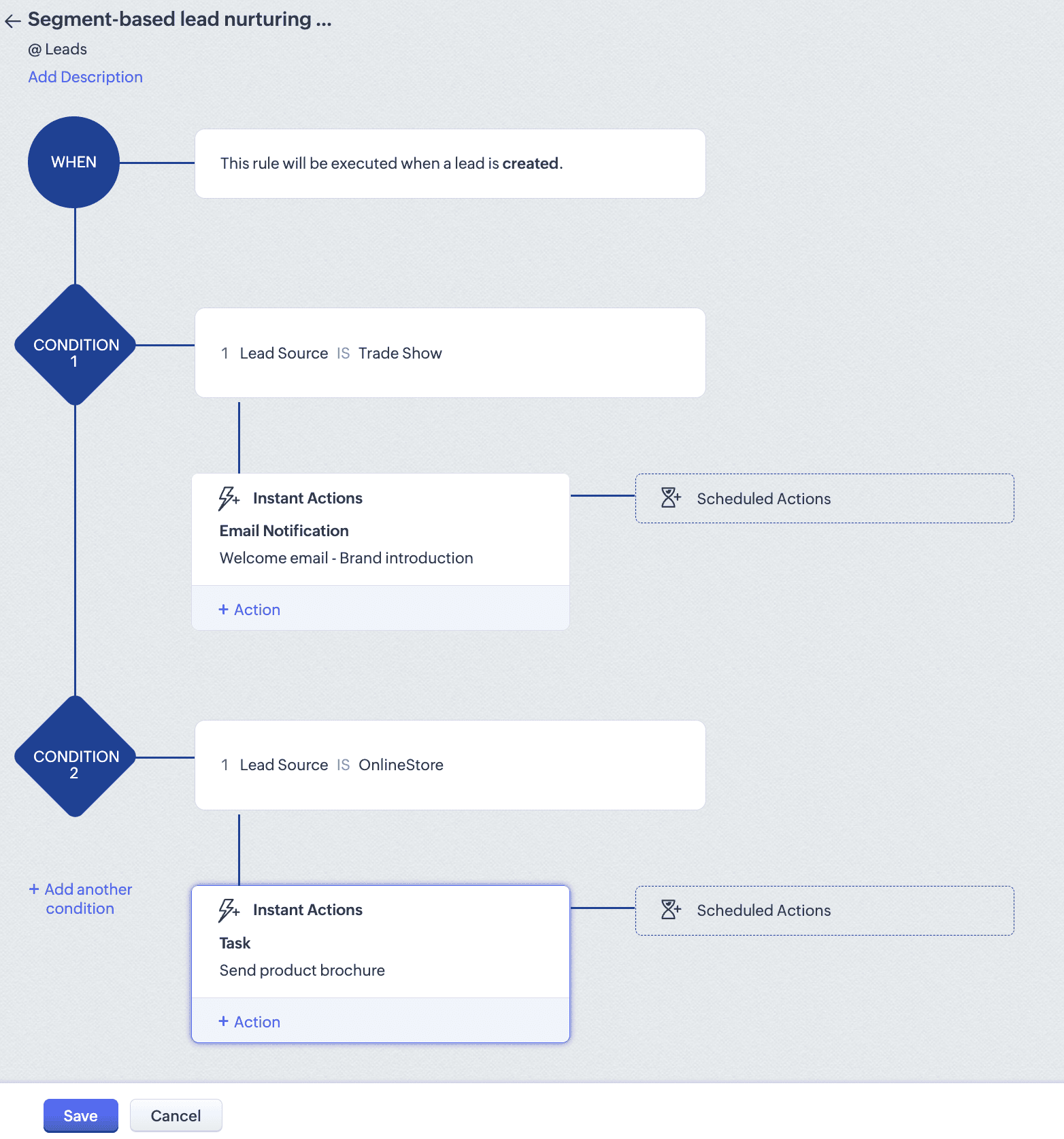
The screenshot below shows a workflow rule for lead source-based automation. You can set up similar workflows based on any relevant parameters.
Activity-triggered automation
Activity-triggered workflows help prospects feel seen, heard, and validated. Someone sent in a request for information? Automatically reply with a product brief. Someone abandoned items in their online shopping cart? Send them an email to check in on their status, and remind them of the items in their cart a few days later.
Activity-based automation can improve engagement rates and increase your brand's appeal. The objective of each cadence should be to inspire further action. Users or leads are often eager to take the first step, whether it's to sign up for a product, add items to the cart, download marketing collateral, comment on a social media post, or check out new features. However, the same users are hesitant to take the next step, either due to insufficient information, loss of interest, availability of alternate options, or lack of brand trust. Activity-based follow-ups help nudge action and get users to take the next step.
Identify common actions that indicate specific intent. For example, users downloading or browsing through generic marketing collateral such as blogs, ebooks, and webpages indicate casual intent. Whereas these users need to be nurtured a lot more to solidify their interest, users who download whitepapers, industry accolades, or analyst reports indicate more serious buying intent. These users need to be talking to your sales folks. Once you identify common behavioral traits, create content that caters to each bucket.
Customer onboarding automation
Customer onboarding doesn't always have to be an in-person event. For small to medium businesses, your onboarding team can set up detailed cadences via email, chat, WhatsApp, or any other preferred messenger service to help customers onboard faster.
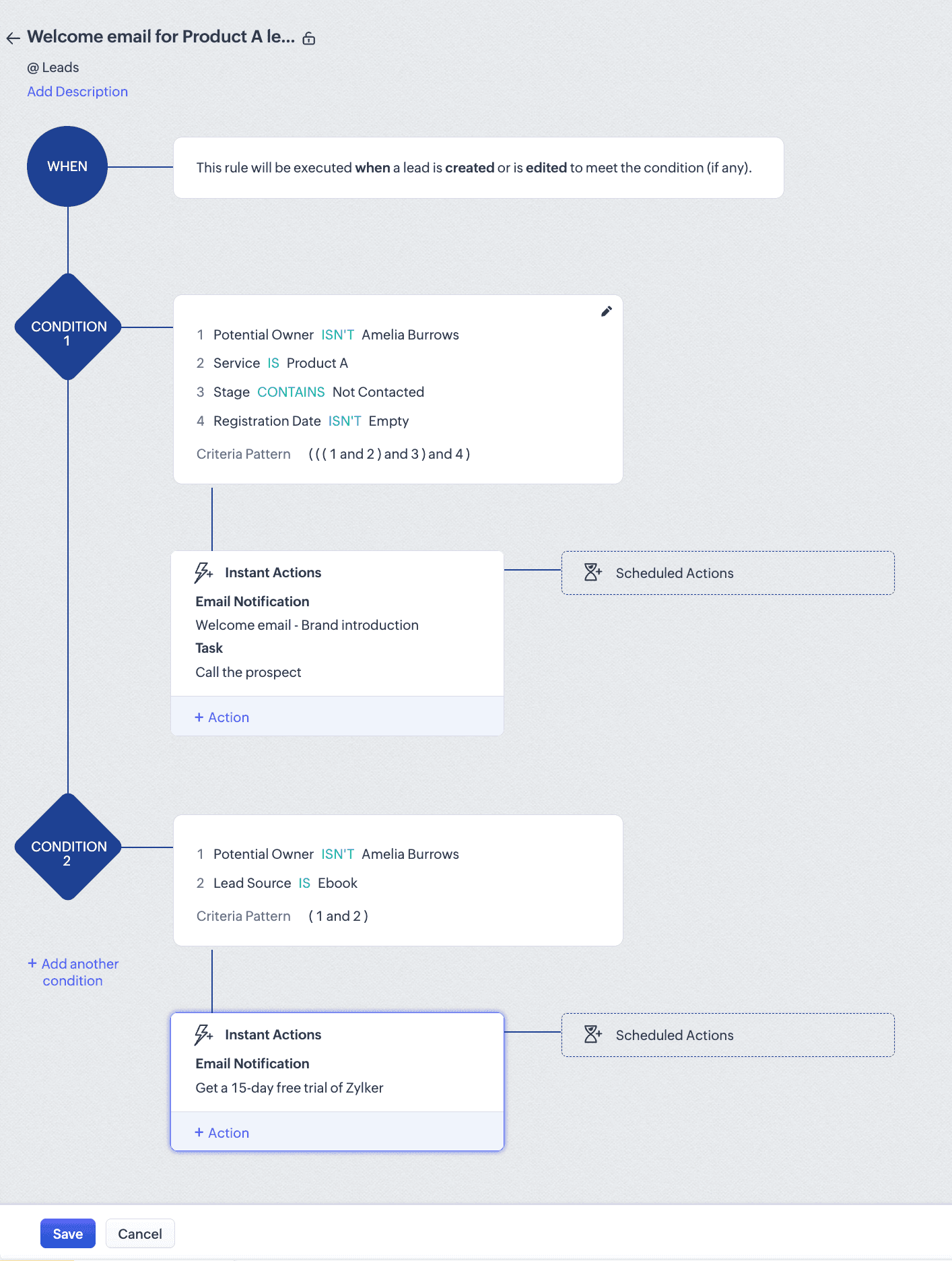
The screenshot below shows a sample cadence for Zoho CRM's new users:
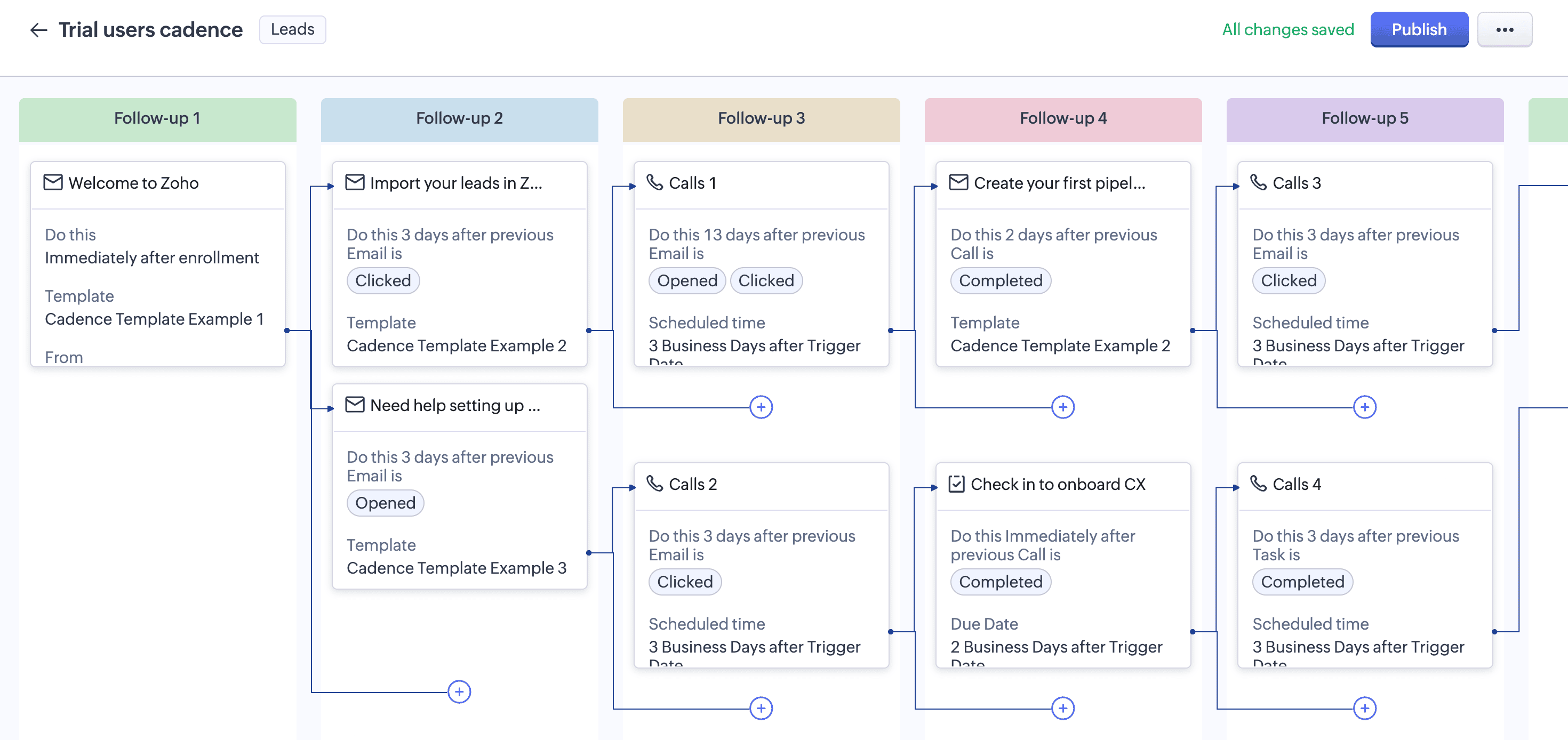
First, a welcome mailer is sent out for each new user. A second email goes out as soon as users import their leads into the CRM. For users who haven't imported their leads, a different email goes out, offering support services to set up their CRM. From this point on, trial users are split into two groups and each group is nurtured differently based on their in-app activity.
The onboarding team can build such cadences based on expected user behavior in the first few weeks after setup.
With regular and consistent follow-ups, the onboarding team can identify struggling users and offer their services to troubleshoot, provide support, educate, or guide users during the initial phase.
Automating support throughout the onboarding process reduces the workload for internal teams; this also ensures that users don't drop off or abandon your product when the initial learning curve gets a little steep.
Customer feedback request workflow
Collecting customer feedback doesn't have to be an elaborate affair involving several campaigns. Event-based workflow triggers can collect customer feedback after completion of specific events such as deals closed, onboarding completed, or support tickets resolved.
Here's a sample workflow that goes out six months after deal closure, seeking feedback on a software product. For FMCG products, you can schedule instant actions and seek feedback immediately after product delivery.
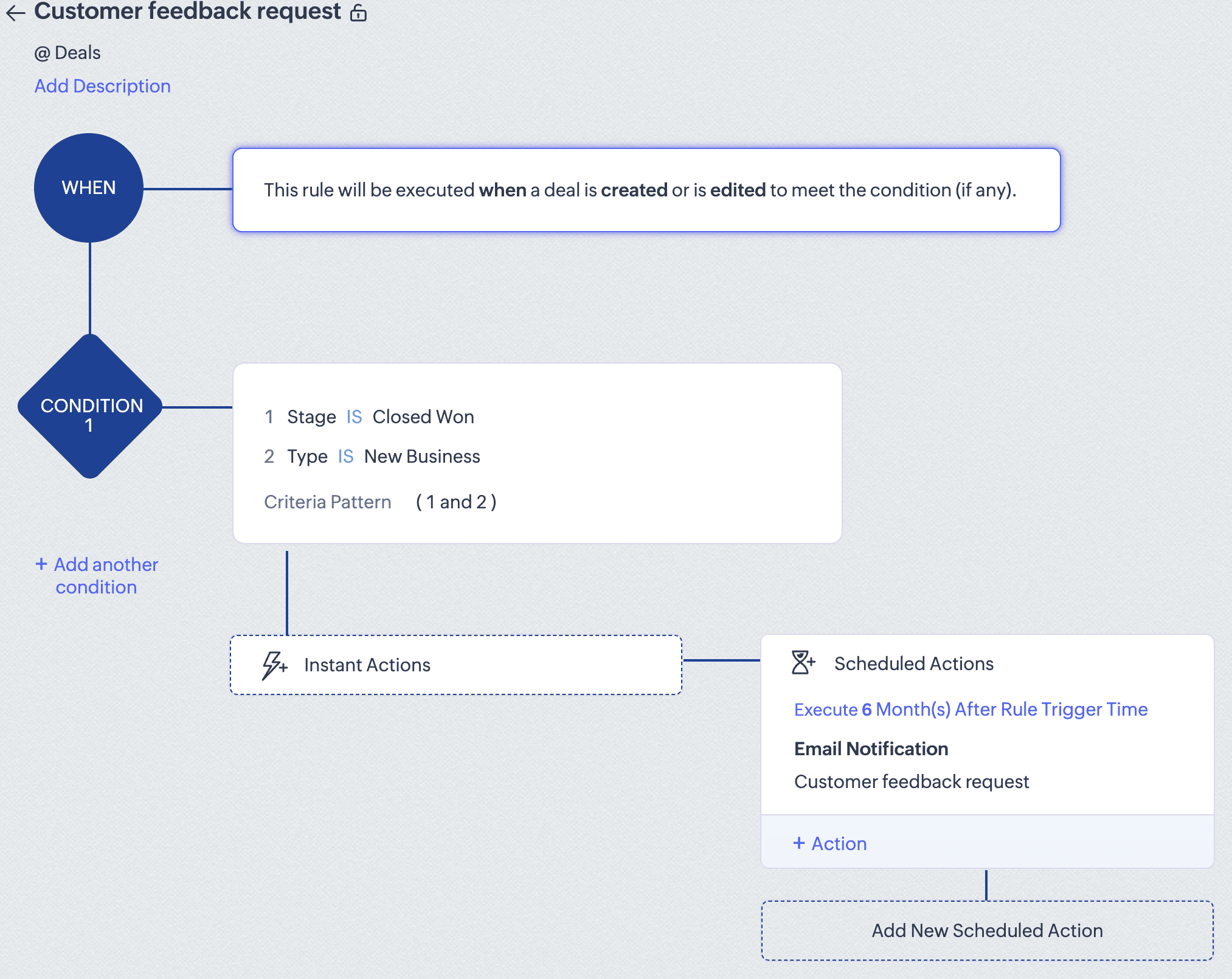
To accommodate user actions or responses to these emails, you can use Cadences in Zoho CRM and trigger customized emails based on responses from users.
Re-engagement campaigns
Prospects often choose to leave a brand for various reasons: product-need mismatches, a lack of sales follow-ups, budget issues, or management-level decisions. Prospects can also re-engage with a brand long after the initial engagement. Smart brands know that there's value in pursuing cold leads after a cool-off period. Send out a friendly nudge, pitch new developments in your products, present new technology advancements, and gently nudge prospects to come back to your brand.
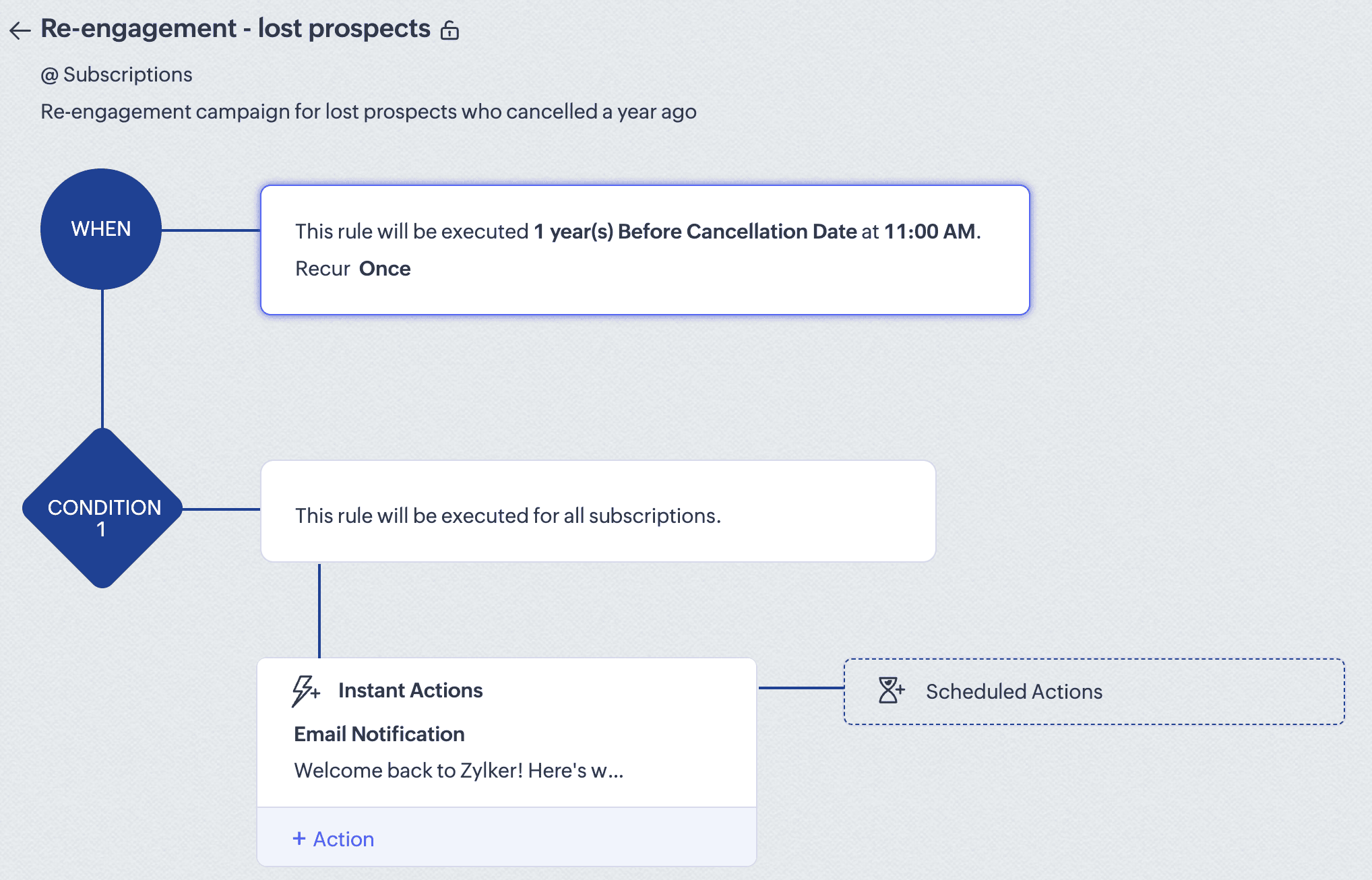
The screenshot above captures a sample automation workflow that re-engages with customers who have cancelled their subscriptions in the previous year.
Renewal campaign
Recurring revenue makes up a huge portion of any business's total revenue. But tasking your sales team to follow up with each customer—and getting them to pay up—can be a challenge. Instead, set up a workflow 90 days before renewals; schedule calls, messages, and emails, and gently hand-hold customers towards their renewal. If there are customers who don't wish to renew this year, a renewal campaign can indicate their disinterest, which can buy you time to win them over.
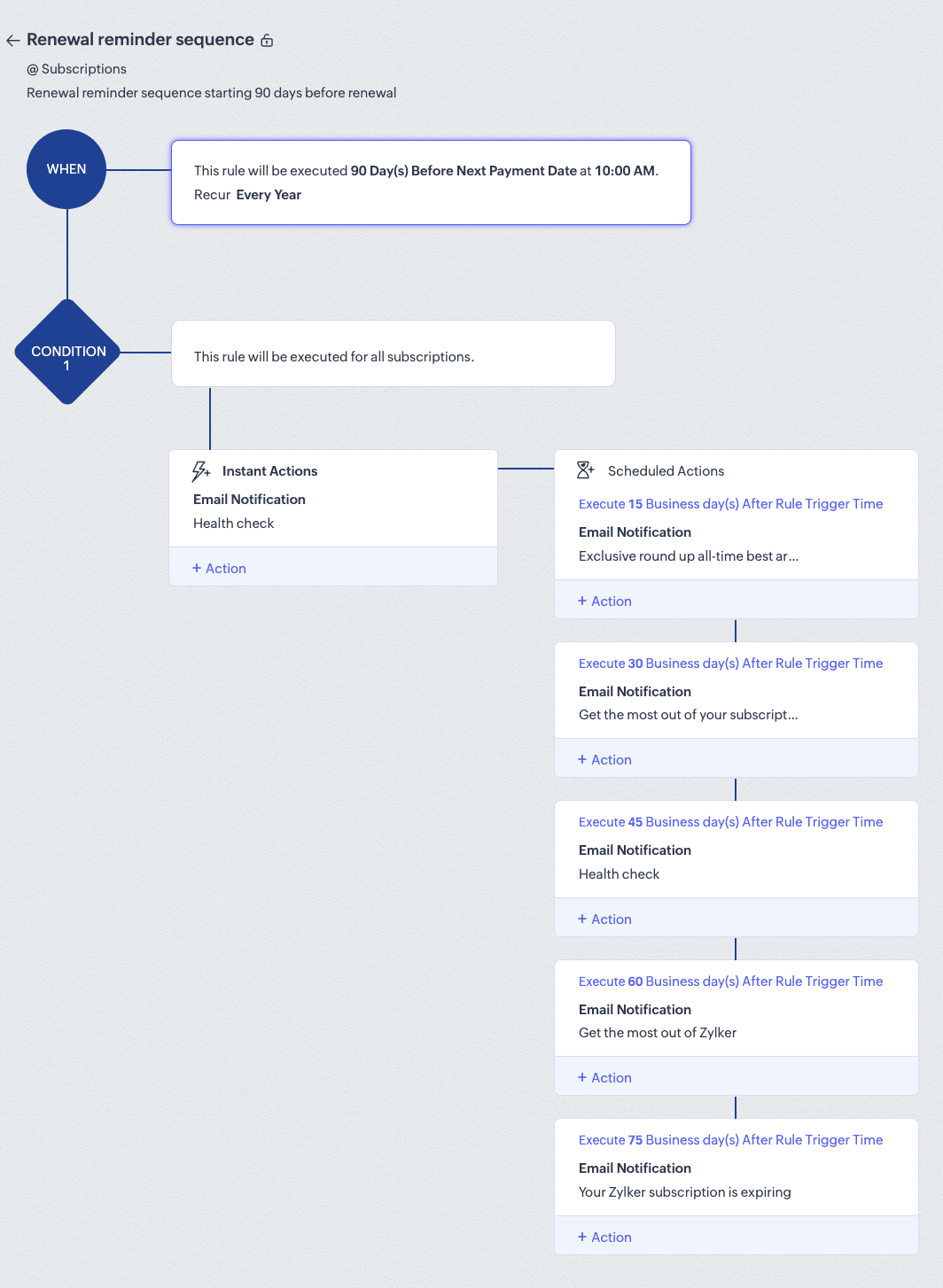
Here's a sample renewal campaign for a magazine subscription that starts three months before the next renewal date and stops at 15 days before the renewal date. The sales team can take over from day 15 and send out even more personalized mailers urging customers to renew their subscriptions by offering special discounts for long-term customers.
Cross-sell and upsell campaigns
For any business that sells multiple products, it's wise to set up a nurturing flow to cross-sell or upsell products and services. A simple use case is to upsell spare batteries when customers buy kids' toys, or to cross-sell convertible car seats to customers who purchased baby carriers a year ago.
Retention and loyalty programs
It's easier to retain a customer than get a new one. This is why airlines offer frequent flyer miles, stores give customers loyalty points with each purchase, and credit cards give out reward points.
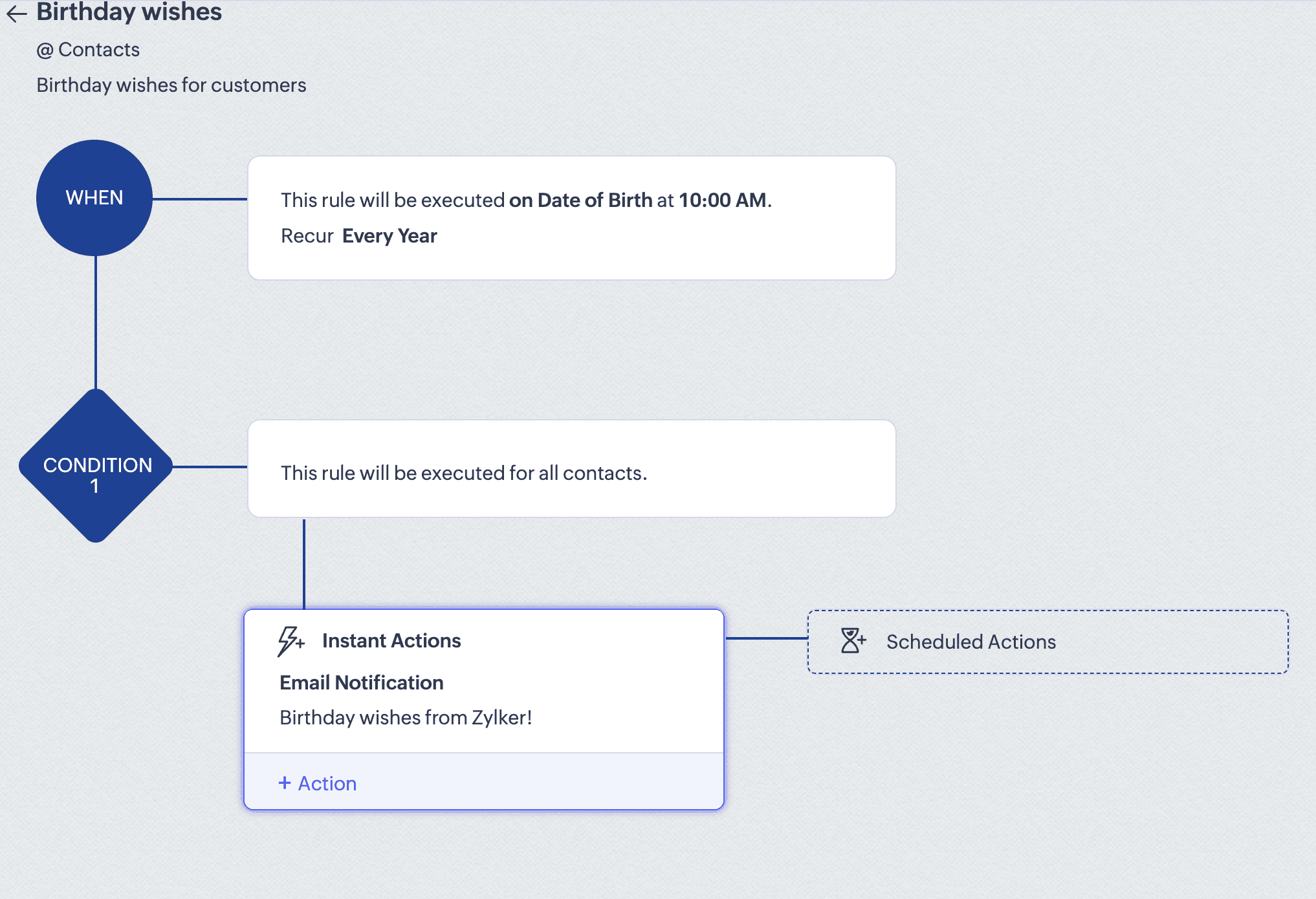
Excellent retention practices such as periodic, contextual follow-ups ensure that customers remain happy and never leave your brand. It often comes down to simple acts of expressing gratitude, like sending customers a birthday or a anniversary greeting, checking in on a customer after a property sale, setting up a personalized customer journey programs for post-sales follow-up, or automating surveys to collect feedback continuously.
Conclusion
Implementing these workflows can save your sales team a whole lot of time and improve efficiency. Imagine if your sales reps weren't worried about setting up meetings or sending out payment reminders; they'd have the time to call up or visit prospects who are interested in your brand.
By offloading the mundane, rote work, you can make the way for market-level growth. Because these workflows are built to handle and scale along with your business, you can turn these into tools for growth.