How to set up WhatsApp appointment booking
- What is WhatsApp appointment booking?
- Why use WhatsApp for appointment booking?
- How does WhatsApp appointment booking work?
- How to set up WhatsApp appointment booking
- Which industries use WhatsApp appointment booking?
- How to send appointment reminders via WhatsApp
Last updated on: 03/08/2025
WhatsApp is a convenient messaging platform for interacting and sharing updates with customers. Appointments are also increasingly scheduled over WhatsApp chats, helping businesses save time and provide a better booking experience.
With Zoho Bookings and Zoho SalesIQ, you can easily configure a WhatsApp bot to schedule appointments with your customers.
- Zoho SalesIQ helps you connect to your WhatsApp Business account (WABA) and set up the bot flow.
- Zoho Bookings integrates with Zoho SalesIQ to share different event types and appointment time slots for customers to choose from and schedule.
Key takeaways
- WhatsApp messages have a 98–99% open rate, compared to 20–21% for email, making it a more reliable channel for appointment confirmations and reminders.
- Customers can book, reschedule, or cancel appointments directly in a WhatsApp chat, without phone calls or forms.
- The booking bot runs 24/7, so customers can schedule outside business hours without staff involvement.
- Zoho Bookings and Zoho SalesIQ let you configure a WhatsApp booking bot without writing any code.
- WhatsApp appointment booking works across healthcare, salons, professional services, real estate, education, and more.
What is WhatsApp appointment booking?
WhatsApp appointment booking lets customers book appointments with a business directly through WhatsApp, without any back-and-forth. Customers can select an appointment type, choose a date and time, and schedule the appointment instantly.
Instead of calling a business or filling out a long form, customers can self-schedule in WhatsApp, making the booking process faster and more accessible than phone calls or email.
Why use WhatsApp for appointment booking?
WhatsApp grabs customers' attention faster and increases the likelihood of a response compared to email. This makes it an ideal channel for scheduling customer appointments.
By offering WhatsApp appointment booking, businesses can:
- Reduce back-and-forth coordination.
- Offer a smooth booking experience for mobile users.
- Reduce no-shows.
- Book appointments outside working hours.
- Make it easier for customers to follow up, cancel, or reschedule.
In a recent Meta-commissioned Kantar survey, of 11,056 consumers across 22 global markets, 73.3% of consumers reported that they prefer messaging when communicating with a business, while 72.4% are more likely to buy from brands that offer messaging.
WhatsApp also makes it harder for customers to ignore appointment-related messages. According to Infobip's 2026 survey, 88% of WhatsApp messages are read within five minutes of receipt, making it a faster and more reliable channel for time-sensitive communication, such as booking confirmations and reminders, than email or phone calls.
How does WhatsApp appointment booking work?
Whenever a customer responds to or initiates a conversation with your WhatsApp Business number, the appointment booking flow you configure triggers to help them book an appointment.
Here's what the booking process looks like:
How to set up WhatsApp appointment booking
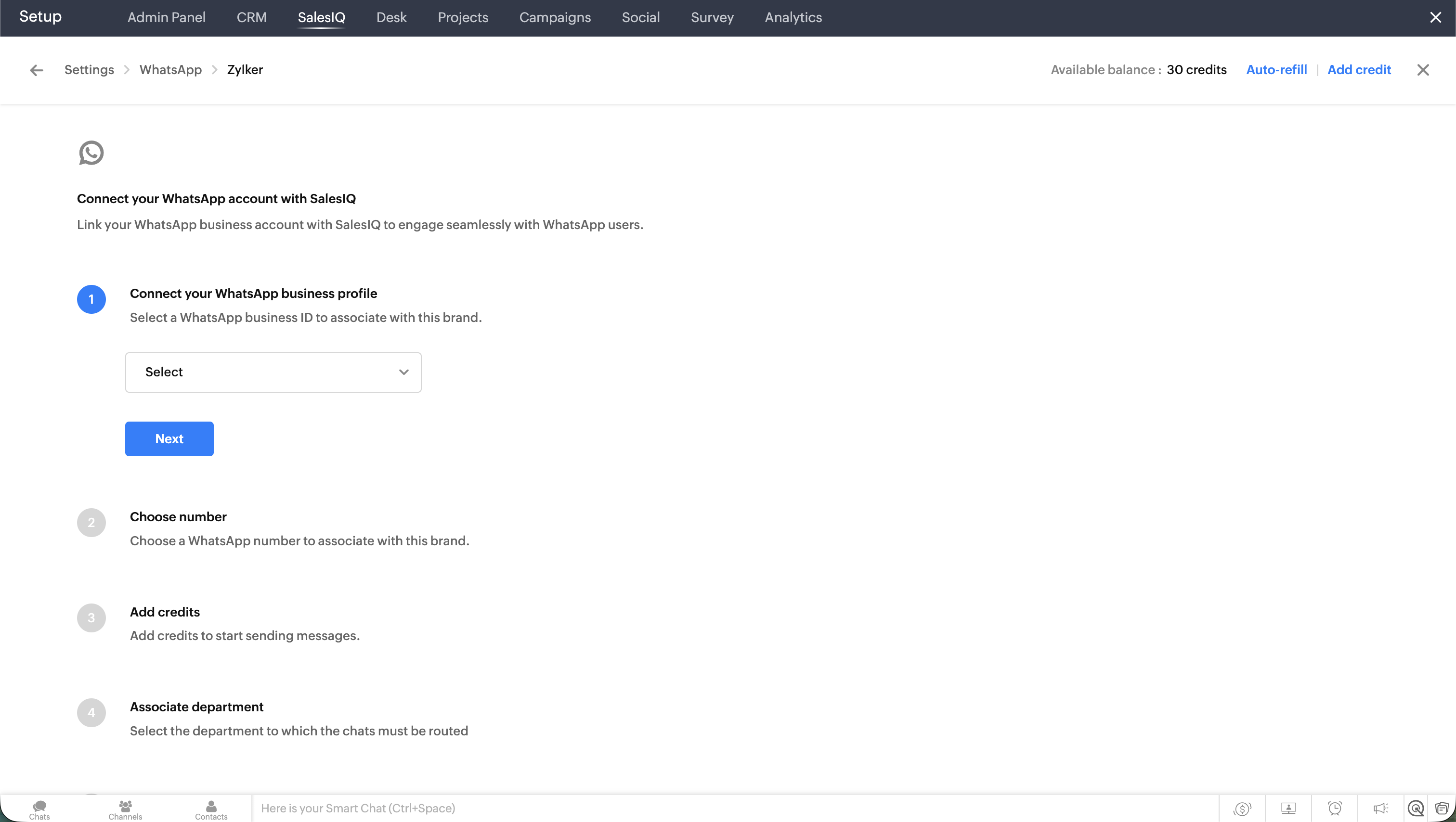
1. Connect your WABA account
In Zoho SalesIQ, link your WhatsApp Business number to start messaging customers.
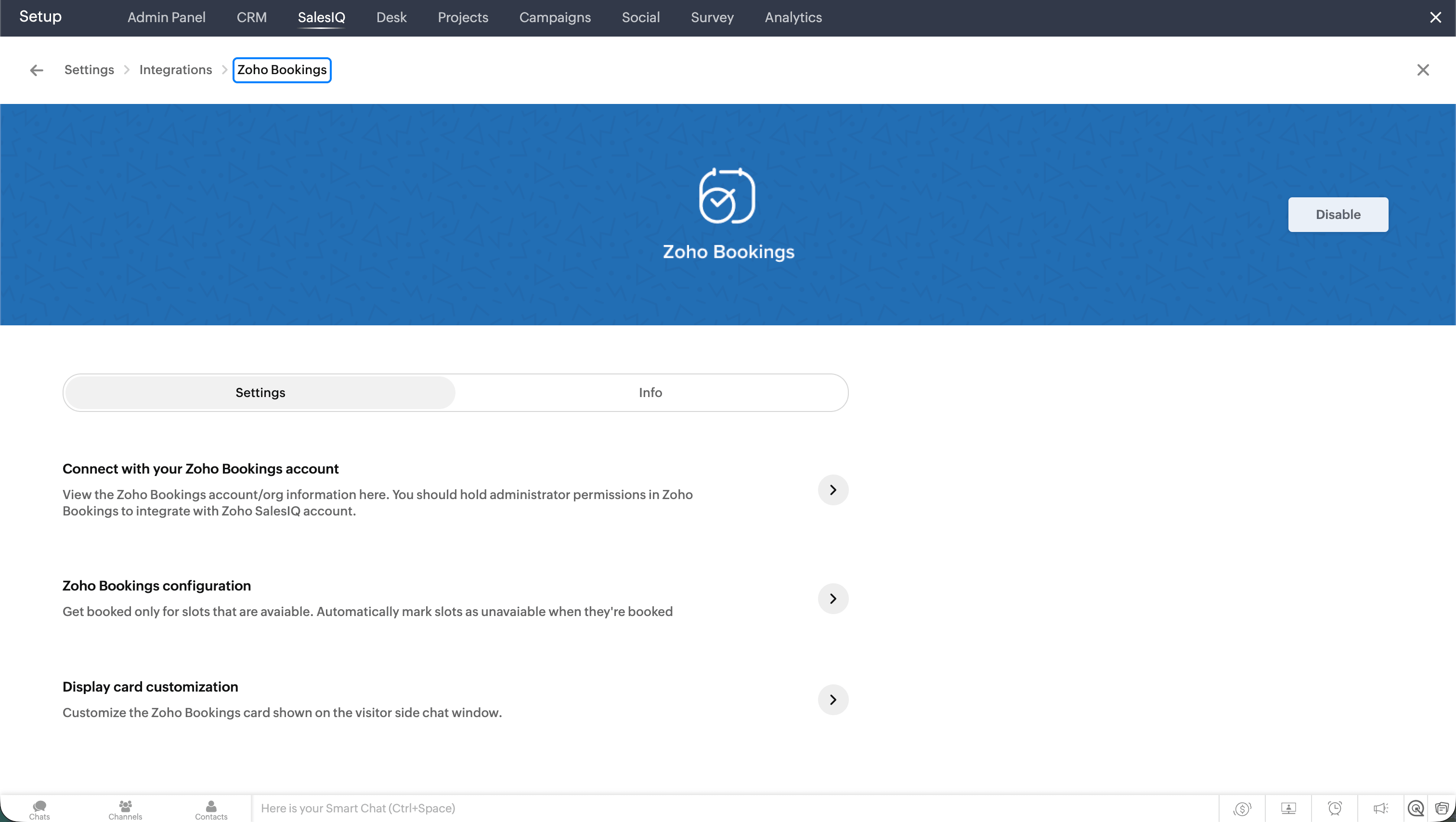
2. Set up the integration
Connect Zoho Bookings from the Integrations section in Zoho SalesIQ. During setup, choose the workspaces you want to map so SalesIQ can fetch your existing meeting types.
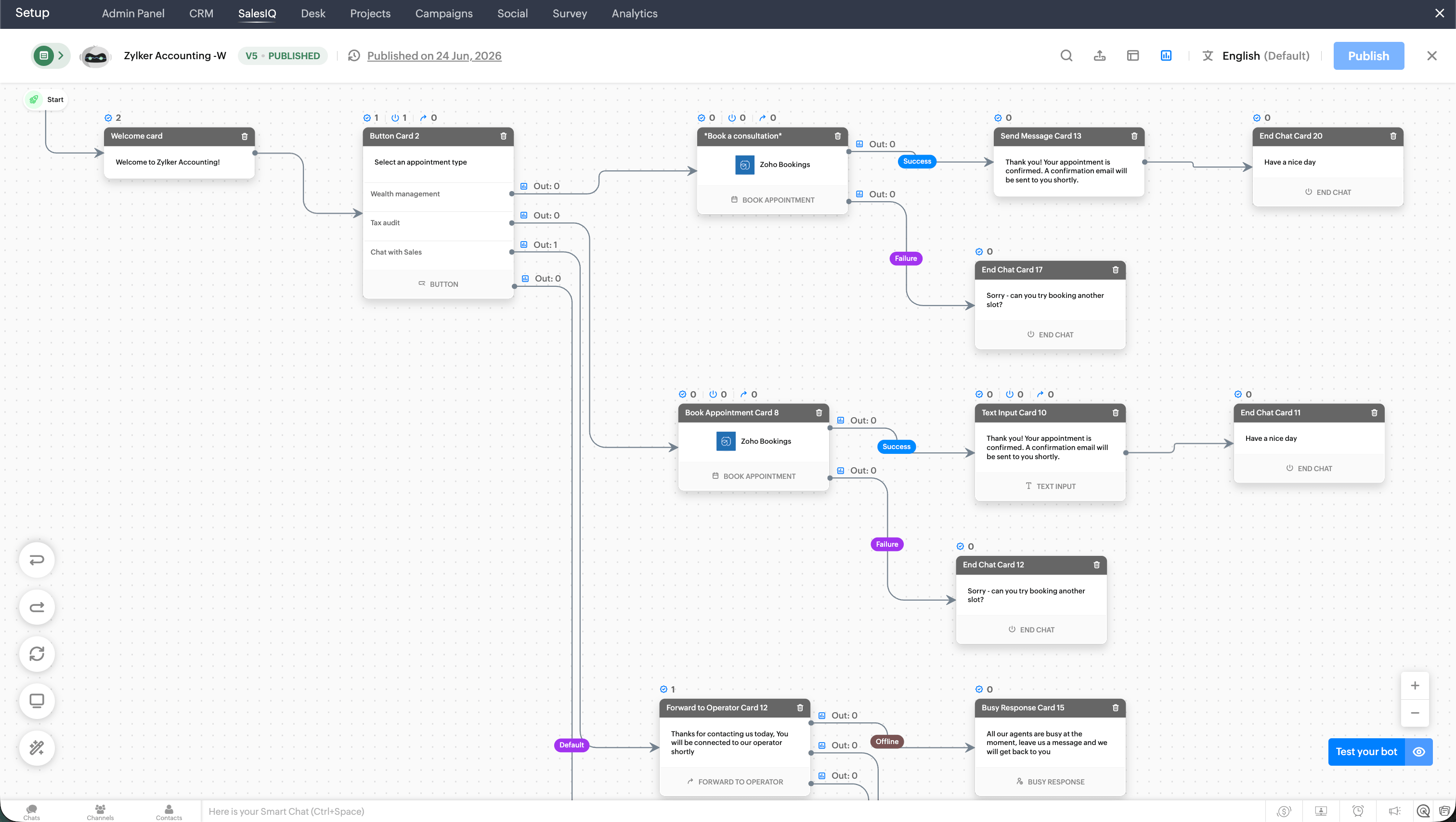
3. Create the bot using Zobot
Configure the bot using the codeless bot builder within Zoho SalesIQ. Add chat responses, the appointment types it offers, confirmation or error messages, operator handoff scenarios, and more.
Note: Ensure WhatsApp is enabled as a channel for bot deployment in the bot profile settings.
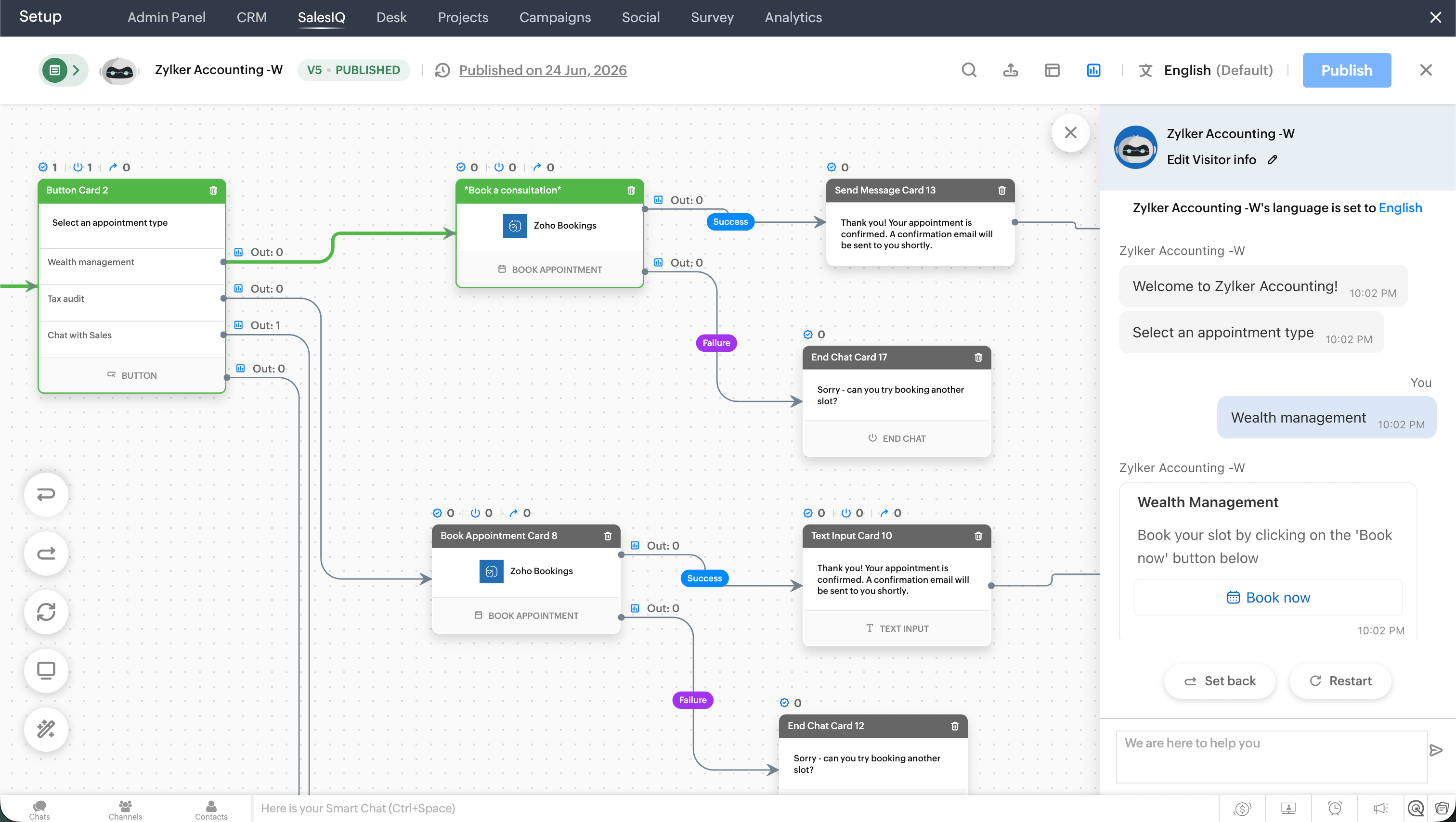
4. Test the bot before publishing
Test the bot within the builder module to ensure appointments are scheduled and that all other configurations work properly.
5. Publish the bot and start collecting appointments via WhatsApp
Publish the bot from the bot builder, and you're good to go. The next time someone sends a message to your connected WhatsApp number, the bot will take over and schedule appointments.

Which industries use WhatsApp appointment booking?
| Industry | Common appointment types | How WhatsApp appointment booking helps | Example use case |
|---|---|---|---|
| Healthcare clinics | Doctor consultations, follow-ups, lab tests, vaccinations | Lets patients book appointments, receive reminders, and reschedule without calling the clinic | A patient books a dermatology consultation through WhatsApp and receives a reminder the day before. |
| Dental clinics | Check-ups, cleanings, orthodontic visits, emergency appointments | Reduces missed calls and helps patients confirm or move appointments quickly | A patient confirms a dental cleaning appointment through WhatsApp instead of calling the front desk. |
| Salons and spas | Haircuts, facials, massages, bridal services | Helps customers choose a service, stylist, and available time slot from the same chat | A customer books a haircut with their preferred stylist through WhatsApp. |
| Education and tutoring | Demo classes, counseling sessions, parent-teacher meetings, and admissions calls | Helps parents and students schedule sessions without long email exchanges | A parent books a trial math tutoring class through WhatsApp. |
| Professional services | Legal consultations, accounting sessions, tax advisory, and business consultations | Allows clients to book time with the right expert and receive document reminders | A tax consultant lets clients book filing consultations through WhatsApp. |
| Real estate | Property visits, buyer consultations, site visits, rental inspections | Helps agents qualify leads and schedule property visits faster | A buyer books a weekend site visit with a real estate agent via WhatsApp. |
| Financial services | Loan consultations, insurance advisory, investment planning, and tax meetings | Helps customers schedule sensitive or high-value consultations conveniently | A customer books an insurance consultation through WhatsApp. |
How to send appointment reminders via WhatsApp
WhatsApp messages are more likely to be opened than messages on other channels, making it ideal for sending appointment-related updates to customers.
WhatsApp messages have a 98–99% open rate, compared to email's 20–21%, according to the Infobip survey. That means appointment confirmations and reminders sent via WhatsApp are far more likely to reach your customers than the same messages sent by email.
Zoho Bookings helps send confirmations and reminders via WhatsApp. Once your WABA configuration is complete in Zoho Bookings, you can create message templates in Meta and use them across different appointment types.
Here's a quick comparison of sending confirmation or reminders via WhatsApp, SMS, and email.
| SMS | |||
|---|---|---|---|
| Booking confirmation | Instant, in-chat | Instant, text only | Delivered to inbox |
| Appointment reminders | Automated, in-chat | Automated, short message | Automated, easy to miss |
| Rescheduling support | Easy through chat or link | Possible through a link | Possible through a link |
| Rich media support | Links, buttons | Mostly links only | Attachments, links |
| Best for | Quick confirmations and reminders | Last-minute reminders | Detailed appointment information |
Frequently Asked Questions
What happens if a customer messages outside business hours?
The WhatsApp bot runs 24/7, so customers can book at any time, even outside your working hours. The bot guides them through selecting an appointment type and time slot without requiring a staff member to be available.
Can customers book appointments directl on WhatsApp?
Yes. With WhatsApp appointment booking, customers can choose an appointment type, pick an available date and time, and confirm the booking directly inside a WhatsApp chat. This removes the need for phone calls, emails, or long forms, making the booking experience faster and more convenient for mobile users.
Do I need a WhatsApp Business account for appointment booking?
Yes, to set up appointment booking in WhatsApp for your business, you need to create a WhatsApp Business account.
Can customers cancel or reschedule appointments through WhatsApp?
Yes, you can share cancellation or rescheduling links through WhatsApp confirmations and reminders. This makes it easier for customers to move appointments without calling or waiting for a manual response.
Is WhatsApp appointment booking suitable for small businesses?
Small businesses benefit from WhatsApp appointment booking because it reduces the time spent on manual scheduling and follow-ups. Since most customers already use WhatsApp, there is no new app for them to download or learn, making it a low-friction option for businesses with limited staff and high appointment volumes.
Author's bio:

Elavarasan Product Marketer, Zoho Bookings
Elavarasan is a product marketer at Zoho Bookings with over six years of experience in content strategy and SEO. He has a deep interest in understanding users and brings that perspective to all of his marketing work. Elavarasan champions storytelling in his content, strongly believing that B2B marketing needs more emotion and a greater focus on customer education. Find Elavarasan on LinkedIn.