Appointment booking time slots
- What are time slots?
- What makes up a time slot?
- Different use cases for sharing time slots
- Comparison of time slot creation and management options
- How to create time slots with Zoho Bookings
Last updated on: 26/02/2026
Time slots function as the building blocks of your schedule. They help you plan out your day and avoid unforeseen conflicts, especially when booking appointments with others. There are various ways to offer time slots, and we’ll cover them all—along with their benefits—in this article.
Key takeaways:
- Time slots are pre-defined, bookable blocks of time that help structure your schedule and prevent clashes.
- A good time slot clearly defines the start and end times, total duration, what is bookable, the location, the rules, and how it's shared with others.
- You can share time slots manually, in a spreadsheet, via a calendar app, or through scheduling software. Manual options are harder to maintain and don’t scale well.
- With Zoho Bookings, you set up your availability once, apply scheduling rules, and then share booking pages or links so people can pick a slot and self-book without the back-and-forth.
What are time slots?
Time slots are pre-defined and dedicated time frames that are bookable. They can be offered manually, in a spreadsheet, through a calendar app, or via scheduling software like Zoho Bookings.
What makes up a time slot?
A time slot needs:
- A start time and an end time
- A duration (15 minutes, 30 minutes, etc.)
- A bookable element (a person, service, room, resource, etc.)
- An associated location (in-person or virtual)
- Specific rules (workflows, buffers, limits, etc.)
- A channel or medium for sharing with others (emails, SMS, website widgets, booking pages, chatbots, etc.)
Different use cases for sharing time slots
Sales meetings: Schedule discovery calls, product demos with prospects or customers.
Healthcare appointments: Book doctor visits, therapy sessions, or lab and diagnostic visits.
Education: Let students book time with professors, teaching assistants, or tutors without any back-and-forth.
Salons and spas: Let customers book their preferred services, stylists, and times in advance.
Service-based businesses: Schedule appointments for different services or assign specific service professionals (plumbers, electricians, HVAC professionals, etc.).
Workshops or group bookings: Collect multiple bookings across different batches or sessions.
Consultations: Book one-on-one sessions for legal, real estate, financial, or coaching services.
Resource bookings: Reserve shared resources, such as meeting rooms, locations, or equipment.
Comparison of time slot creation and management options
| Manual sharing (chat/email/phone) | Spreadsheets | Calendar app | Scheduling software like Zoho Bookings | |
|---|---|---|---|---|
| How it works | You create time slots and share them with others. Once bookings are confirmed, you handle the rest of the work. | You maintain a sheet with available slots and share the link. | You share your calendar availability as time slots. | Set your availability, and share available time slots through a booking link. People can pick a slot and self-schedule without any back-and-forth. |
| Ideal for | One-off meetings with a few people you know well. | Sharing availability for internal groups or teams where everyone edits one document. | Individuals and small teams that rely on straightforward calendar scheduling. | Customer-facing businesses and teams that frequently schedule appointments. |
| Setup effort | Minimal. Requires you to know your availability and share time slots. | High. Requires you to format columns, add time slots, and share with others. | Medium. You have to check calendars, create events, and share with others. | Minimal. One-time setup of availability, calendar integrations, rules, and booking pages. |
| Effort to keep updated | High. Every change needs a new message. | High. Need to edit cells and re-share for each new booking opportunity. | Medium. Manually move events and inform attendees if needed. | Low. You only need to update your availability or change appointment configurations, and all future slots are updated automatically. |
| Risk of double-booking | Very high | High. Especially if multiple people edit the same cells. | Medium. There is a chance of overlap between different events or schedules. | Very low. Zoho Bookings checks real-time availability and updates time slots in booking pages accordingly. |
| Time zone handling | Error-prone; easy to miscalculate. | Manually add a column for time zone conversions. | Calendar invite shows in the recipient's local time. | Very efficient; automatically converts time slots to the invitee's time zone to avoid confusion. |
| Time slot booking experience | Involves a lot of back-and-forth replies and delayed confirmations. | Manually finding slots and adding entries to the cells can be time-consuming. | Invitees can simply accept a calendar invite or schedule a time slot. | Seamless and quick. People can easily self-schedule for their preferred time slot. |
| Automation (reminders and follow-ups) | None | None | Reminders from the calendar app. | Built-in reminders, follow-ups, and workflows. |
| Visibility for teams | Scattered across chats and inboxes. | Time slots can be viewed in one shared sheet. | Viewed in respective shared calendars. | Central dashboard to view bookings across teams and locations. |
| Drawbacks | Creates time delays and causes confusion. | Easy for slots to become outdated; no automation. | Still relies on manual negotiation and invites. | Requires initial setup and a new tool to get used to. |
How to create time slots with Zoho Bookings
Creating time slots in Zoho Bookings is a one-time effort that lets you easily collect meetings or appointments.
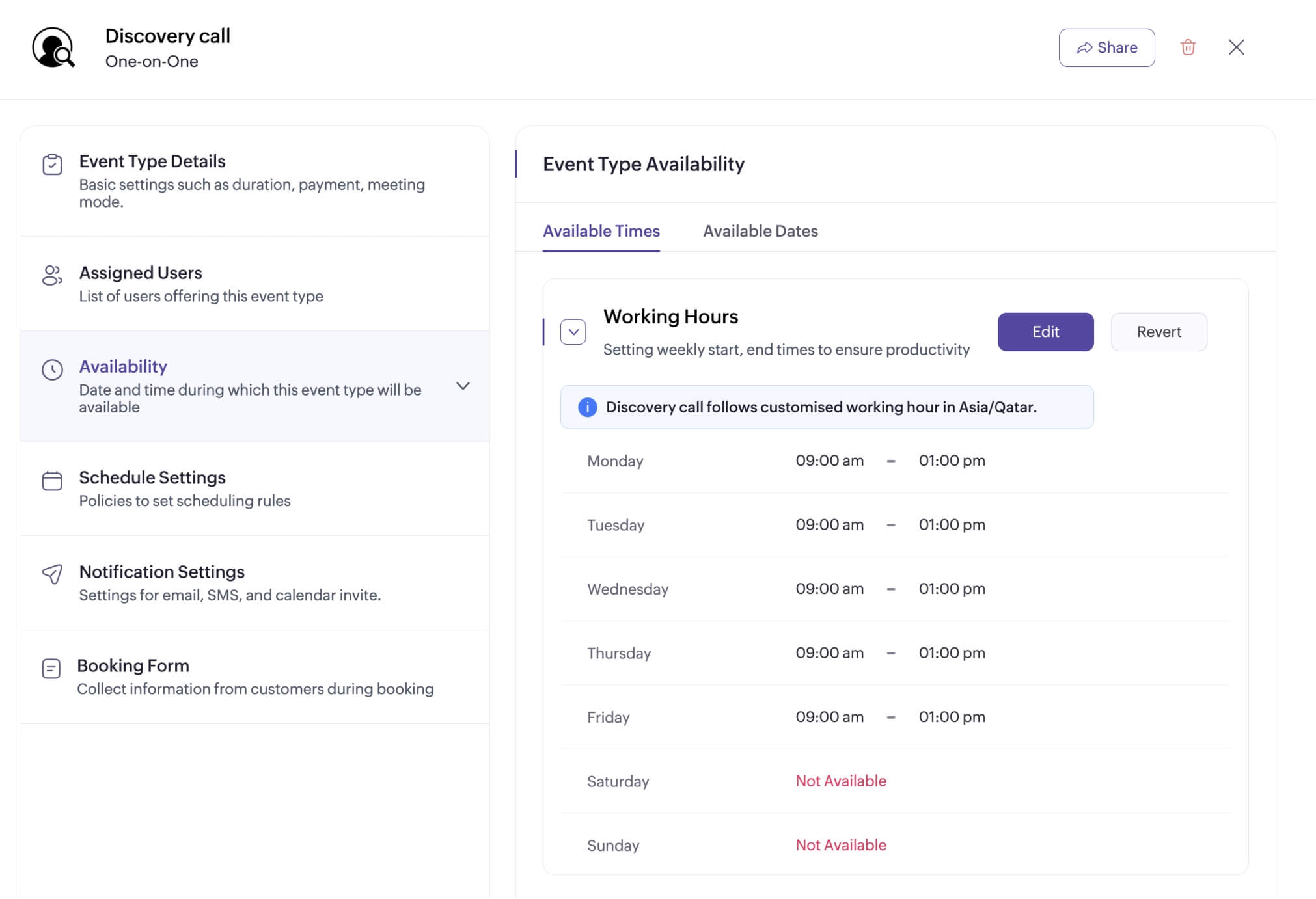
1) Set your availability
Set your available times to display your time slots accordingly on your booking page.
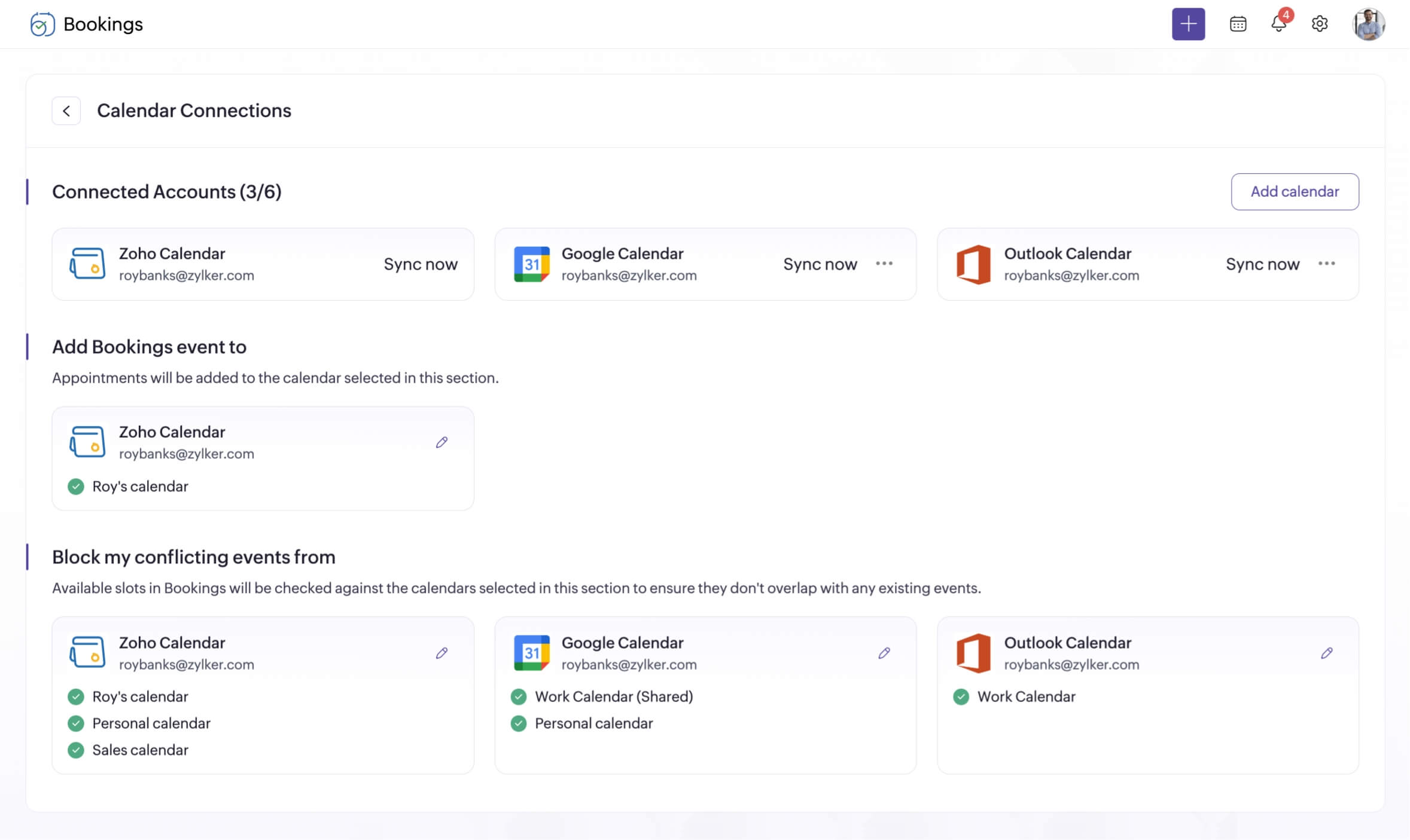
2) Sync your calendar
Sync with your external calendars (Google, Outlook, or Zoho) to avoid double-booking and automatically add new appointments.
3) Create an event type
Create a new event type for your business to collect appointments.
4) Configure scheduling rules
While your customers see only a block of time, several automations are layered behind each one. You can configure buffers, scheduling intervals, notifications, and more.

5) Customize and share booking pages
Once you've set everything up, you can share your time slots with customers or other stakeholders through your booking page. You can also fully customize the booking page to match your branding.
Ready to create time slots and simplify appointment scheduling for your business?
Get started with Zoho BookingsHow to share time slots with others
Once your time slots and booking page are created, you can share them with Zoho Bookings in multiple ways:
- Share unique booking page links with customers across various channels.
- Embed booking pages directly into your website as a website widget, a button, or as a hyperlink.
- Share a few preferred time slots directly via email.
- Share time slots via your web chat by integrating with Zoho SalesIQ.
Enhancing scheduling automation for your business
Zoho Bookings comes packed with powerful features that go beyond time slot creation, so your business can easily handle end-to-end appointment scheduling.
- Manage multiple teams or locations with workspaces.
- Connect with your preferred external calendars, video conferencing apps, and payment gateways.
- Create custom workflows for your appointments to automate reminders and payment schedules.
- Assign multiple staff members to simplify team scheduling.
- White label your booking pages with your branding.
- Create appointment limits and cancellation or rescheduling windows.
- Send notifications via WhatsApp or other SMS platforms.
- Collect information through different booking form fields.
- Completely customize your appointment notifications and reminders.
- Integrate with multiple Zoho and third-party apps.
Author's bio:

Elavarasan Product Marketer, Zoho Bookings
Elavarasan is a product marketer at Zoho Bookings with over six years of experience in content strategy and SEO. He has a deep interest in understanding users and brings that perspective to all of his marketing work. Elavarasan champions storytelling in his content, strongly believing that B2B marketing needs more emotion and a greater focus on customer education. Find Elavarasan on LinkedIn.