Appointment confirmation email templates
- Core elements of appointment confirmation emails
- Benefits of sending confirmation emails
- Appointment confirmation email templates
- Automate confirmation emails with Zoho Bookings
- Create unique appointment confirmation emails
Last updated on: 10/06/2026
Confirmation emails are a crucial part of the appointment booking journey. Without them, customers are left wondering if their booking actually went through, which can add unnecessary stress to their experience.
Key takeaways
- Appointment confirmation emails close the booking loop and reassure customers that their appointment is successfully scheduled.
- They reduce no-shows, avoid confusion, and improve customer experience while reinforcing your professionalism and credibility.
- A solid confirmation email should clearly include appointment details like the service or meeting name, date and time, duration, host, and location or meeting link.
- Always add an easy way to reschedule or cancel (via a booking link or email reply) so customers can modify appointments without friction.
- Appointment scheduling software like Zoho Bookings saves time by automating the booking process and the confirmation emails as well.
Core elements of appointment confirmation emails
A good appointment confirmation email varies based on the nature of your business and, of course, its branding and tone. However, there are a few essential elements that build authority and contribute to a clear message.
Appointment details: The confirmation email should include all relevant details, such as the appointment name, date and time, duration, host name, and the location or meeting links.
Sender email: Sending confirmation emails from your email domain helps build credibility and reduces the risk of landing in spam.
Cancellation or rescheduling details: Confirmation emails should also allow customers to easily cancel or reschedule their appointments. You can allow customers to make changes to their appointments through a booking link, or you can ask them to respond to your email with their change request.
Appointment information or instructions: Share relevant information or documents so customers arrive prepared for the appointment.
Branding and logo: Add your logo, font colors, and other elements that reflect your brand.
Calendar invite: If you're using appointment scheduling software like Zoho Bookings, the calendar invite and the option to let customers add the appointment to their calendars are automatically included in your emails. Otherwise, you can manually add a button or link that syncs the appointment with their calendar.
Benefits of sending appointment confirmation emails
Appointments are transactional and come with a commitment. A confirmation email keeps customers informed and offers many important benefits to your business, including:
- Reducing no-shows
- Saving time on internal coordination
- Avoiding confusion with clear communication about the appointment
- Helping your business showcase professionalism and build credibility
- Improving customer experience and satisfaction
- Establishing a communication channel for customers to modify appointments
Appointment confirmation email templates
1) Template 1: A generic one-size-fits-all template
Ideal for any business that wants a simple appointment confirmation email template
Sample template:
Subject: Appointment confirmed — [Service/Meeting Name] on [Date] at [Time] [Time Zone]
Hi [Customer Name],
Thanks for booking an appointment! Your confirmation details are below.
Details
- Service/Meeting: [Service/Meeting Name]
- Date: [Date]
- Time: [Time] ([Time Zone])
- Duration: [Duration]
- With: [Staff/Host Name]
- Location/Link: [Address or Meeting Link]
Need to make a change?
- Reschedule: [Reschedule Link]
- Cancel: [Cancel Link]
If you have any questions, reply to this email or reach out to us at [Phone/Email].
Thanks,
[Business/Team Name]
2) Template 2: The service professional confirmation template
Perfect for hair stylists, plumbers, photographers, or contractors in roles where no-shows directly impact business
Sample template:
Subject: See you on [Date]! [Appointment Confirmation]
Hi [Client Name],
Thanks for booking with [Business Name]! This is a quick note to confirm your service on:
Date: [Date] Time: [Time]
Service: [Name of Service (e.g., House Inspection)]
Arrival Instructions: [Example: Please arrive 5 minutes early to find parking in our designated parking area.]
Cancellation Policy: We value your business and ask that you provide [24/48] hours' notice for any cancellations. Late cancellations may incur a [amount] fee.
Thanks for choosing us!
[Your Name/Business Name]
3) Template 3: Paid appointment/deposit confirmation template
For businesses that collect payments from customers during appointment booking
Sample template:
Subject: Payment received — You're confirmed for [Service] on [Date]
Hi [First name],
Thanks for booking [Service]! Your appointment is confirmed.
Appointment details
- Date: [Date]
- Time: [Time] ([Time Zone])
- Location / Link: [Address or Video Link]
- Booked with: [Staff/Professional Name]
Payment confirmation
- Amount paid: [Amount]
- Payment method: [Card/UPI/Other]
- Transaction/Receipt ID: [Receipt/Txn ID]
Before you arrive: [Add a short prep line — e.g., "Please bring {X}" / "Arrive 5 minutes early" / "Test your video link in advance."]
Use this link to make changes anytime: [Cancel/Reschedule Link]
- Reschedule deadline: [X hours/days before]
- Cancellation policy: [Policy in one line]
- Refund details: [Refund terms in one line]
Need help or have a quick question? Just reply to this email and we'll get back to you.
See you soon,
[Your Name]
[Business Name]
[Phone/Support Link]
4) Template 4: Group session/class confirmation template
For education institutes or businesses that offer classes or workshops
Sample template:
Subject: Your spot is reserved: [Class name]
Hi [First name],
You're officially registered for [Class/Session name] 🎉 Your spot is confirmed.
Session details
- Date: [Date]
- Time: [Time] ([Time Zone])
- Duration: [Duration]
- Location/Link: [Address or Video Link]
- Instructor/Host: [Name]
What to bring / How to prepare
- [Item 1 or prep step]
- [Item 2 or prep step]
- [Optional: "Join 5 minutes early for check-in."]
How it works
- We'll start on time at [Time].
- For virtual sessions, please keep your mic on mute unless speaking.
- If you're running late: [late policy in 1 line].
Need to reschedule or can't make it? Manage your booking here: [Reschedule/Cancel Link] [Optional: "Spots are limited — please cancel early so someone else can join."]
Questions before the session? Reply to this email, and we'll help.
See you there,
[Your Name]
[Business Name]
[Phone/Support Link]
5) Template 5: Waitlist appointment confirmation template
Ideal for businesses with high demand that confirm appointments manually
Sample template:
Subject: You're on the waitlist for [Service]—here's what happens next.
Hi [First name],
Thanks for your interest in [Service] — you're now on the waitlist.
Here's what that means:
- Your appointment is not confirmed yet.
- If a slot opens up, we'll notify you at {Email/Phone}.
- Slots are offered on a first-come, first-served basis.
Your preference
- Service: [Service]
- Preferred date(s): [Date options]
- Preferred time(s): [Time options]
- Location/Mode: [In-person/Virtual]
Want the next available slot faster? You can also book the next open time instantly here: [Next available booking link] [Optional: "Tip: Choosing a wider time window increases your chances."]
When a spot opens up, we'll send you a message with a link to confirm your spot. Please confirm within [X hours] to secure it.
If anything changes, you can update your preferences here: [Update preferences link] or reply to this email with your best available times.
Thanks,
[Your Name]
[Business Name]
[Phone/Support Link]
Automate appointment confirmation emails with Zoho Bookings
It's a complete time sink if you're manually sending appointment confirmations to customers. Why? When you have apps like Zoho Bookings that automate appointment confirmation emails, sending them manually is redundant.
Zoho Bookings doesn't just automate confirmation emails; it actually fast-tracks your entire meeting lifecycle. With appointment booking pages and shareable time slots, you can quickly schedule appointments with customers.
Zoho Bookings then handles all other scheduling tasks like:
- Sending calendar invites
- Sending appointment confirmation emails
- Generating online meeting links for virtual appointments
- Sending SMS or WhatsApp notifications
- Sending rebooking, follow-up, or feedback emails or SMS workflows
- Pushing data to other apps with extensive integrations
Create unique appointment confirmation emails
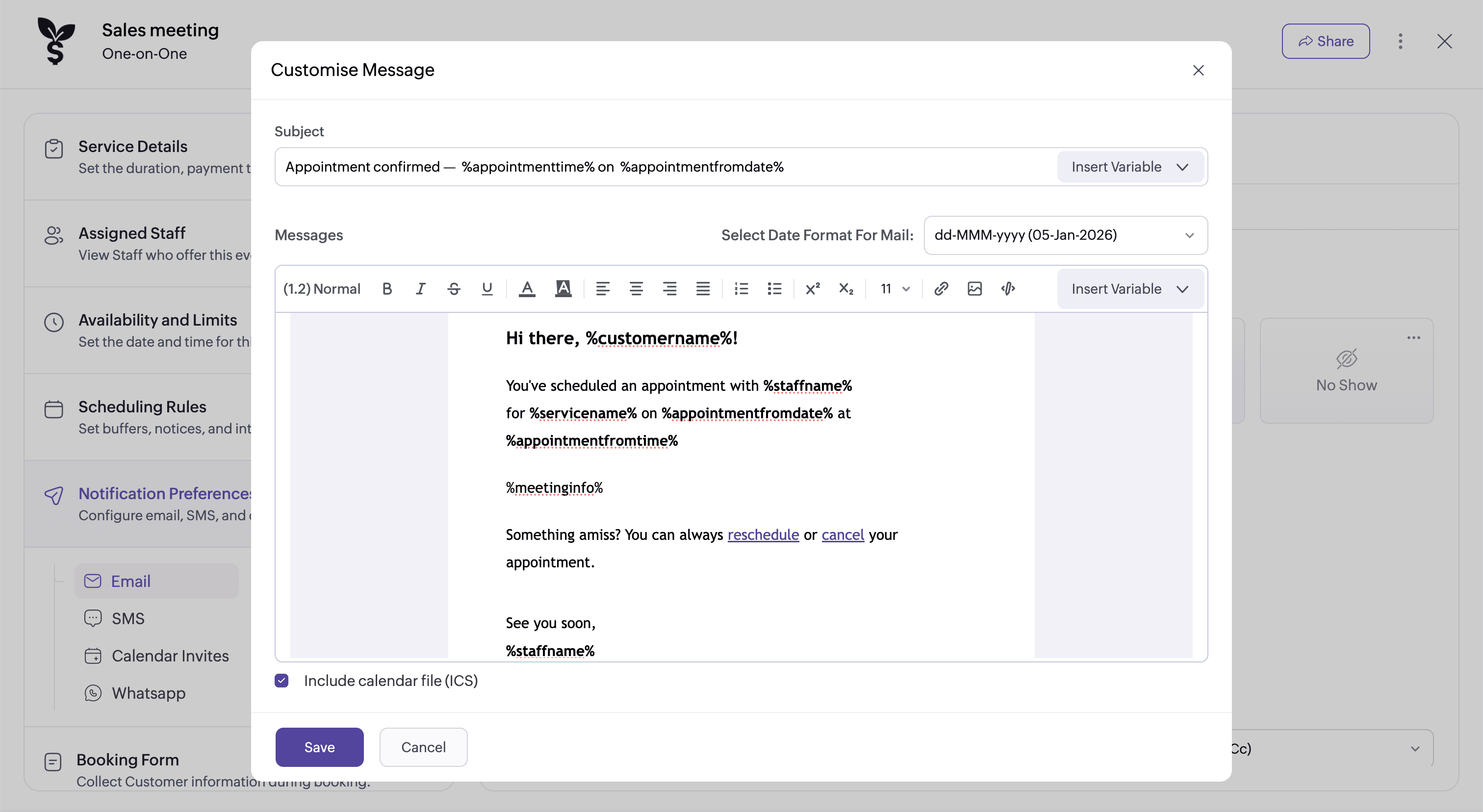
For each appointment type you create in Zoho Bookings, you can configure separate email templates. The templates can also be customized to match your branding preference. For example, if you're offering three different appointment types to customers, you can tailor the content or the overall look of the emails to each type.
Here are the different elements that you can tweak or add to your emails:
- The background color
- Images or logos
- Content
- "Add to calendar" buttons
- Font customizations
- Hyperlinks
- Appointment-related variables that fetch contextual information
- Sender address, Reply to, and CC
- HTML code to customize your template
Ready to upgrade your appointment scheduling process?
Get started with Zoho Bookings today to enhance scheduling automation for your business. It's time to put an end to the constant back-and-forth and time-consuming tasks that drain your productivity!
Author's bio:

Elavarasan Product Marketer, Zoho Bookings
Elavarasan is a product marketer at Zoho Bookings with over six years of experience in content strategy and SEO. He has a deep interest in understanding users and brings that perspective to all of his marketing work. Elavarasan champions storytelling in his content, strongly believing that B2B marketing needs more emotion and a greater focus on customer education. Find Elavarasan on LinkedIn.