• 16K

    Customers

  • 3M

    Users

Why agencies need branded client reporting

Agency team analyzing marketing data

❌ Clients asking “Can you send me the latest numbers?”When clients can’t access their own data, you become the bottleneck. Every update request pulls your team away from actual campaign work.

❌ Weekly dashboards copied into slide decksSomeone on your team is spending hours every week reformatting numbers into presentations. That’s data entry work.

❌ Data pulled from 10+ tools and platformsYour clients run Google Ads, Meta, email campaigns, and SEO all at once. Pulling numbers from each platform separately means more room for error and more time before anyone acts on it.

❌ Hours wasted formatting instead of optimizingThe time your team spends building reports is time not spent improving the campaigns inside them. Reporting should be a byproduct of good work, not the work itself.

Key features of a branded client reporting tool for agencies

Turn all your marketing data into real-time, interactive dashboards your clients can access anytime.

Connect your marketing stack

Stop logging into ten platforms every time a client asks for an update. Zoho Analytics connects your entire marketing stack and keeps everything in sync automatically.

  • Connect 30+ marketing tools including Google Analytics, Meta Ads, Google Ads, and Zoho Campaigns
  • Automated data sync means dashboards always reflect live numbers
  • Blend data across platforms to build cross-channel views no single tool can give you

Use pre-built reports and dashboards

New clients don't have to wait weeks for their first dashboard. Start with templates built around the metrics agencies already track, and customize from there.

  • 100+ pre-built reports and dashboards available per marketing tool
  • Ready-to-use templates for campaign performance, channel ROI, and audience metrics
  • Customize any template to match a specific client's goals or KPIs

Offer AI-powered insights

Clients want to know what's working, not just see the reports. Zoho Analytics answers that question automatically so every dashboard does more than display data.

  • Ask Zia answers natural language questions like "Which campaign had the best ROI last month?"
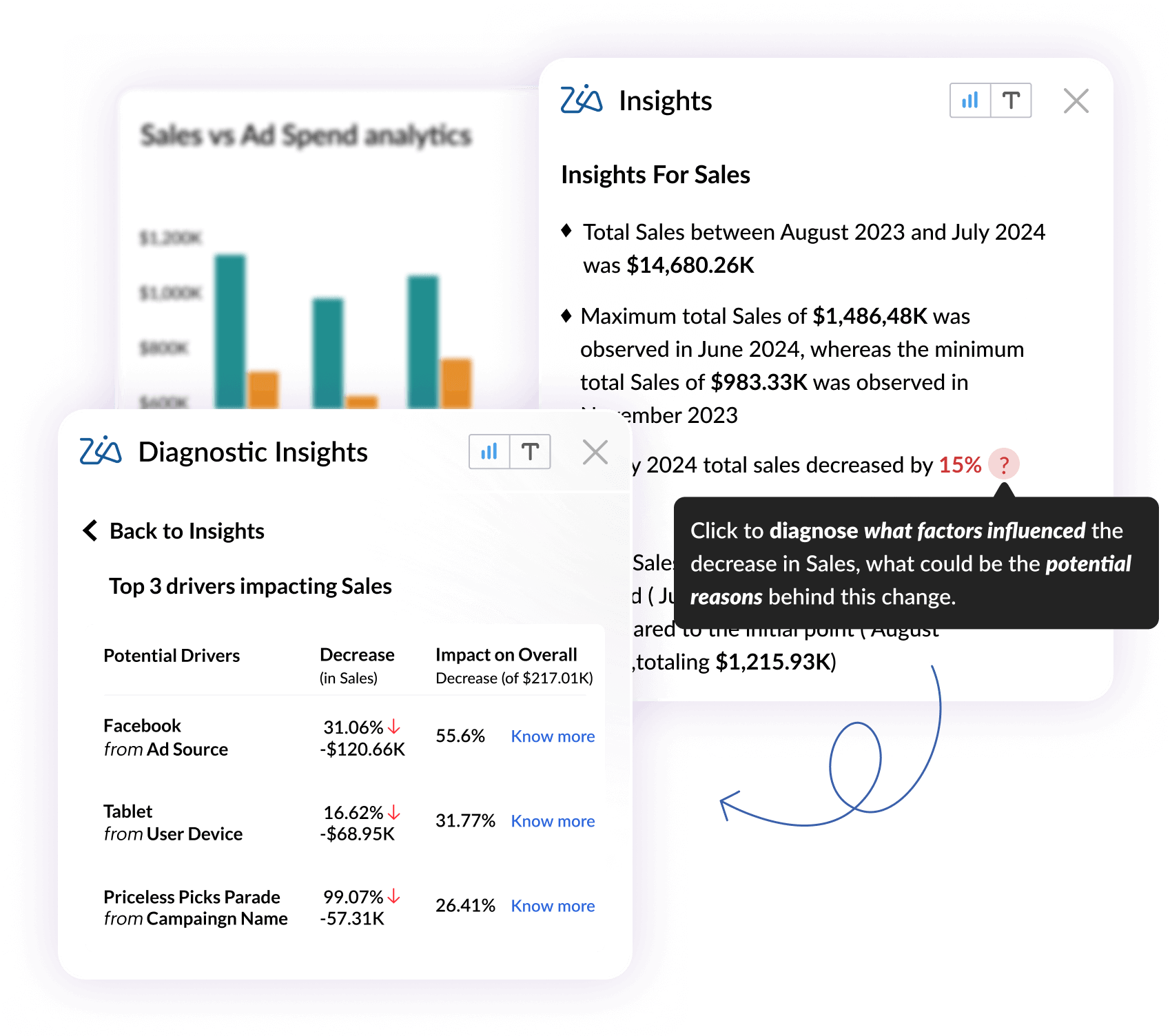
  • Zia Insights surfaces easy-to-read AI summaries on top of every report, so clients always have context alongside the charts
  • When a metric drops, Zia can diagnose why it happened and recommend what to do next

Collaborate easily

Client feedback shouldn't live in a separate email thread. Zoho Analytics keeps conversations tied to the data they're actually about.

  • Leave comments and annotations directly on charts and dashboards
  • Tag clients or teammates to flag specific data points that need attention
  • All context stays inside the report, so nothing gets lost in back-and-forth emails
Connect your marketing stack dashboardPre-built reports and dashboardsAI-powered insights dashboardCollaboration tools dashboard

What this means for your agency

Stop being trapped in the reporting cycle. Focus on what actually grows your business.

10+

Hours saved weekly

No more manual reporting, screenshot gathering, or slide deck formatting. Automated dashboards handle everything.

3x

Faster client onboarding

Template dashboards and automated processes ensure new clients will get their analytics faster than ever.

90%

Fewer client questions

When clients can access their reports anytime, they stop asking you for constant updates and reports.

And the best part? It's all under your brand

With Zoho Analytics' white-label portal, your clients will think you built this amazing analytics platform yourself.

Your logo & branding

Replace Zoho Analytics branding with your own logo, domain, and even email alerts.

Centralized management

Give clients secure login access to explore their dashboards anytime.

Automated reporting

Automate recurring reports and stop wasting hours on manual reporting.

How branded marketing analytics works for agencies

Most agencies are fully set up and reporting to clients within a month.

Step 1

Connect your data sources and explore the interface

Link your marketing tools like Google Analytics, Meta Ads, Google Ads, Zoho Campaigns, and more. Automated sync starts immediately, so your data stays current without any manual work on your end.

1
2
Step 2

Build dashboards for your first client

Use pre-built templates or build from scratch. Get one client's reporting fully set up, test it with real data, and use that as your baseline for everyone else.

Step 3

Replicate for your remaining clients

Clone your working dashboards and adapt them for each client. New clients get their reporting set up in a fraction of the time it took for the first one.

3
4
Step 4

Set up white-label branding and client portal access

Replace all Zoho branding with your own logo, domain, and colors. Give each client secure login access to their portal so they can check their numbers anytime, without having to ask you.

Connect 30+ marketing tools you already use

Zoho Analytics integrates with the platforms your agency relies on every day.

Search & SEO

Google Analytics 4, Google Universal Analytics, Google Search Console, Semrush

Advertising

Google Ads, Facebook Ads, Instagram Ads, YouTube Ads, LinkedIn Ads, Microsoft Advertising

Social Media

Facebook Pages, Facebook Competitive Analytics, Instagram Profile Insights, X (Twitter), X Competitive Analytics, YouTube Video Insights, LinkedIn Pages

Email & Marketing Automation

Mailchimp, Klaviyo, HubSpot Marketing, Zoho Campaigns, Zoho Marketing Automation

Event & Surveys

Eventbrite, Zoho Survey, SurveyMonkey, Alchemer, Zoho Backstage

Sales & Community

SalesIQ, Zoho Community Spaces

Hear from our happy customers

See all testimonials
Greg Szabo
Steve Dubane
Founder & CEO, Wingman Media

"Zoho Analytics created a tremendous amount of value for the agency, and takes our relationship with clients to the next level. The preparedness to integrate the data, build alluring visualizations, and its shrewdness have given us the ability to retain clients. The reporting is so substantial, so easy to do, and it has created stickiness for our business."

Jaideep Tibrewala
Christianne Bradley
Senior Marketing Manager, Los Angeles Times

"Zoho Analytics is an easy to use, affordable and powerful reporting tool. It is extremely robust and has helped our marketing team eliminate data redundancy which is common when using an Excel spreadsheet. We now have a single version of analytics for every one."

Stephen Shorter
Andrés Navarro López
Head of Performance and Data, BeRepublic

"Zoho Analytics is our first tool, and we've now started moving everything to Zoho. In a few months, every dashboard we do for our clients will be done in Zoho Analytics."

Ready to impress clients and save hours?

See exactly how Zoho Analytics can turn your marketing data into branded dashboards your clients will love. Book a free demo and we'll show you how agencies like yours are saving 10+ hours per week.

  • ★ No commitment required 
  • ★ 30-minute demo
  • ★ See it working with your data

Frequently asked questions

How long does it take to get started?

  • Most marketing agencies are fully set up in under a week. Connecting your tools and customizing your white-labeled portal is fast and requires little to no developer involvement.

Can I white-label everything?

  • Yes. Your portal will reflect your brand entirely, including logo, color scheme, domain, and email sender. There’s no visible mention of Zoho anywhere, unless you want it.

Can I manage reporting for multiple clients?

  • Absolutely. You can create separate workspaces for each client, manage access rights, and reuse dashboard templates.

Do I need a developer to embed or customize the portal?

  • No developers needed. Everything can be configured through a visual interface. Embedding dashboards or setting up a branded portal is simple and guided.

What about data security and privacy?

  • Zoho Analytics is fully compliant with GDPR and other major data protection frameworks. You have full control over who can see what, down to individual reports and data fields.

Can clients log in to view dashboards on their own?

  • Yes. You can give clients secure, role-based access to your white-labeled portal, so they always have the latest insights without having to ask you for a report.

Can I schedule recurring reports?

  • Yes. You can automate delivery of dashboards, charts, and even custom-written insights via email or Slack.

What kind of insights does the AI offer?

  • Zoho’s AI agent, Ask Zia, can answer natural language questions (like “Which campaign had the best ROI?”), highlight anomalies, and forecast future trends, helping you and your clients stay ahead.

What if I just want to test it out?

  • You can start with a free walkthrough. Our product experts will tailor the demo to your agency’s reporting needs.