Advanced Analytics for Recurly
The Advanced Analytics Connector for Recurly brings your subscription billing data into a unified analytics environment, enabling deeper visibility into revenue performance, customer lifecycle trends, and subscription health. By consolidating key metrics such as MRR, churn rate, customer retention, and subscription growth into dynamic dashboards, finance and product teams can monitor recurring revenue streams, identify churn patterns, and optimize pricing strategies in real time.
- Setting up the Integration
- Handling Data Synchronization Failure
- Managing Data Sources
- Data Modeling & Preparation
- Data Visualization/Analysis
- Sharing & Collaboration
- Help & Support
Setting up the Integration
A user with administrator privileges (Account admin, and Org admins) can configure the integration.
Follow the below steps to seamlessly import your Recurly data into Zoho Analytics:
- On the Zoho Analytics home page, click Import Your Data.
- Navigate to the Finance tab and select Recurly from the available data sources.
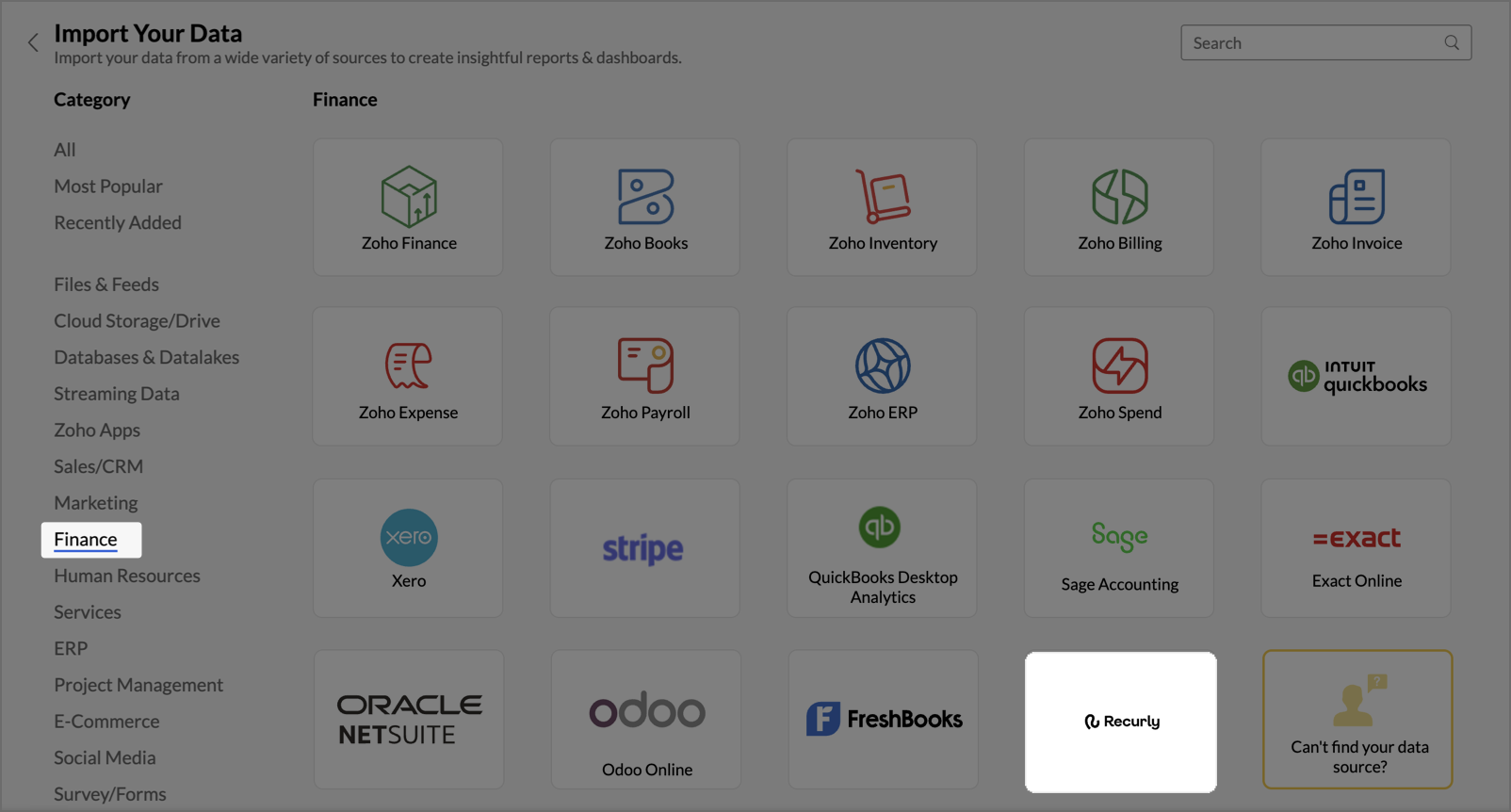
- The Step 1: Import from Recurly dialog will appear.
- Enter the Workspace Name and Workspace Description (Optional).
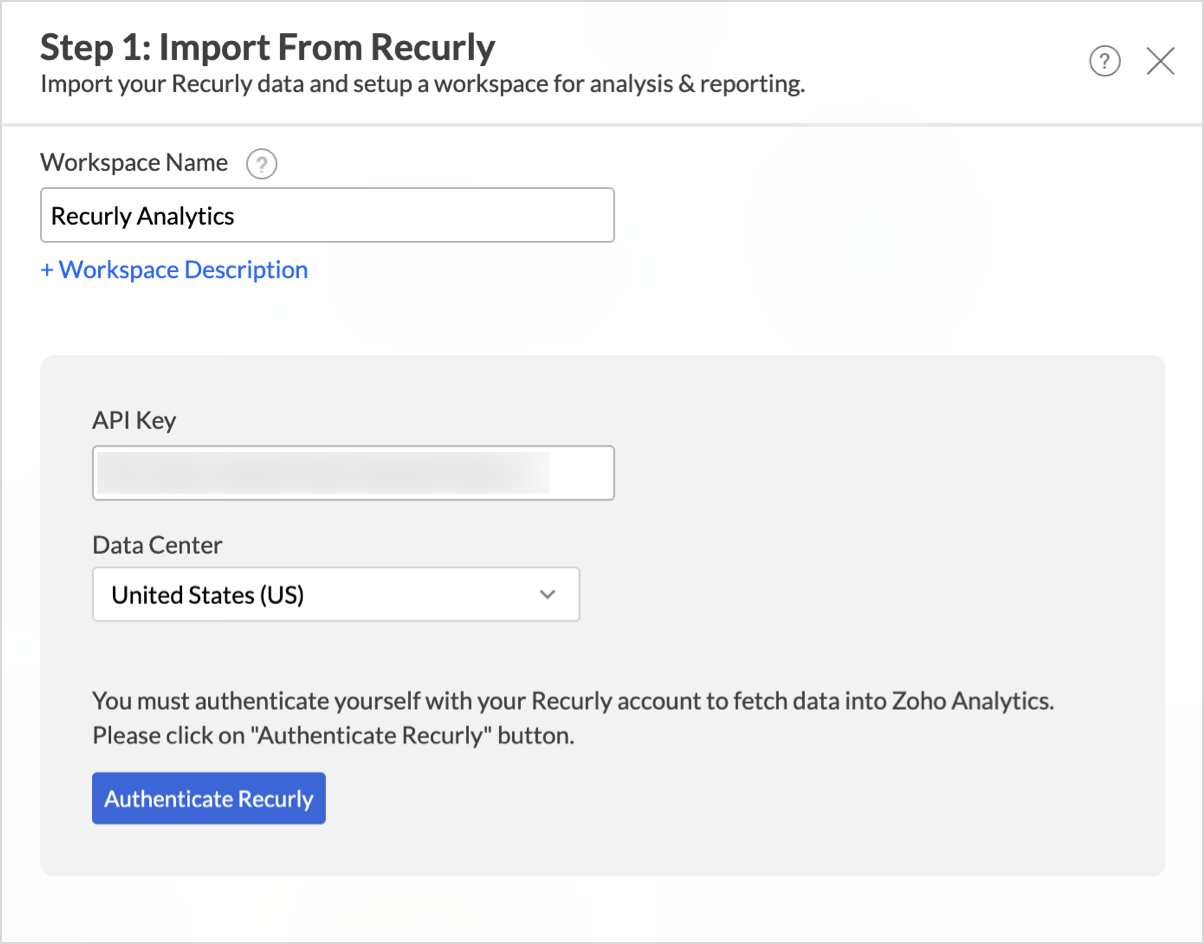
- Enter your Recurly API Key and select the appropriate Data Centre.
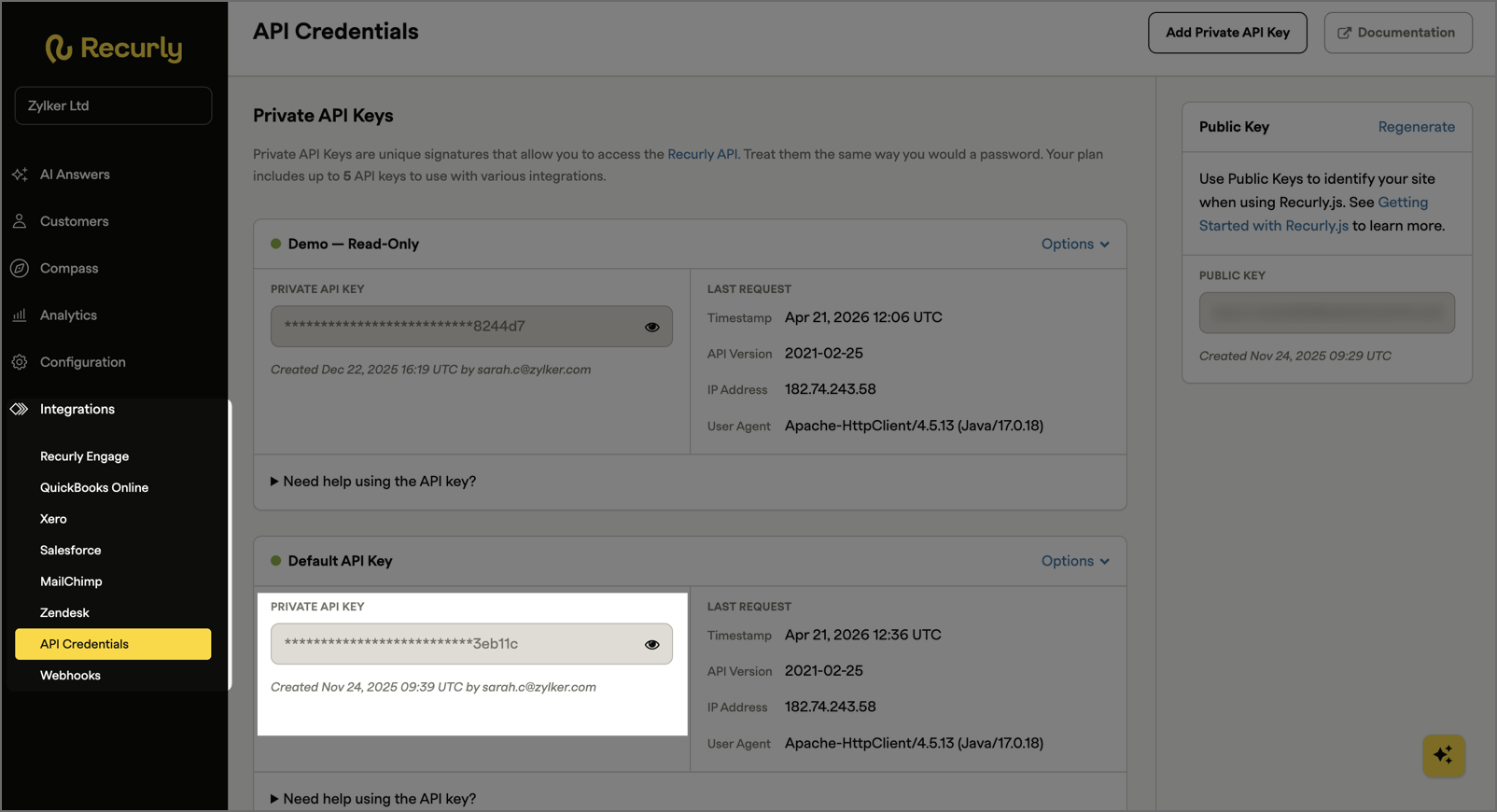
To obtain the API Key,- Log in to your Recurly account.
- Navigate to Integrations > API credentials from the left side menu.
- Click Authenticate Recurly.
- Once authenticated, select the Modules and Fields from which you intend to import data.
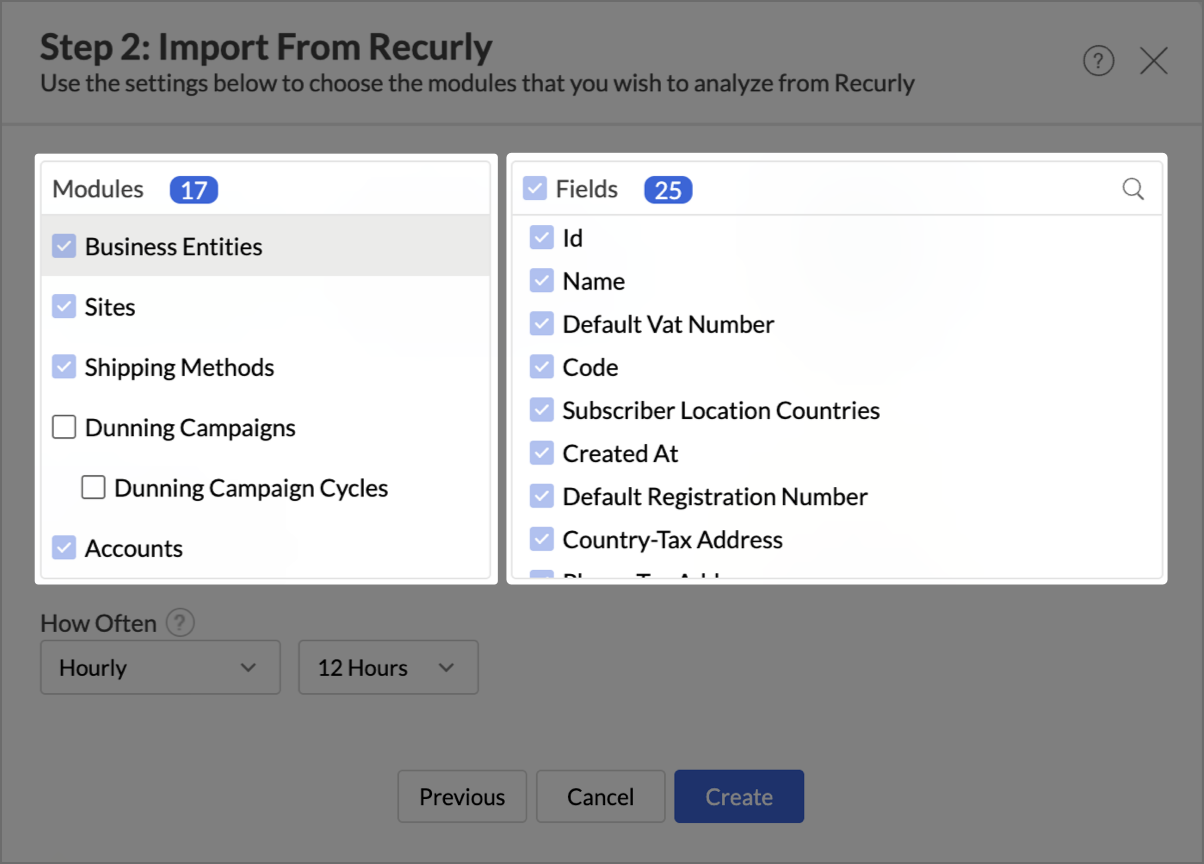
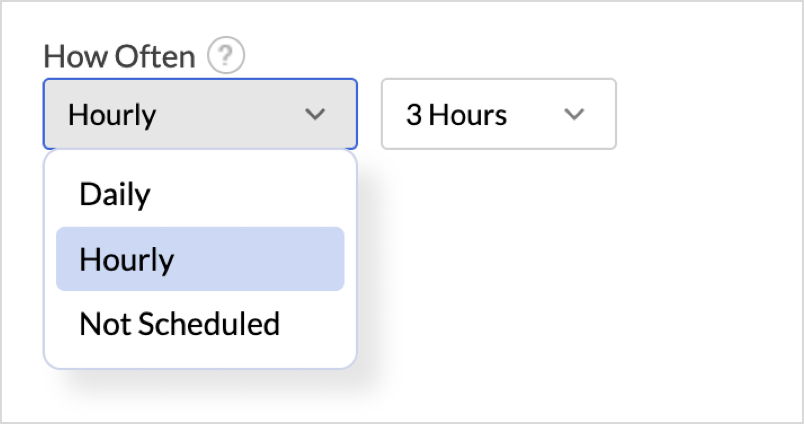
- In the How Often section, set up a schedule to import data at regular intervals. Refer to the Data Sync frequency section to learn more.
- Click Create.
The data import process will be initiated and may take a few minutes depending on the data being imported. You’ll receive an email and in-app notification once the initial data fetch is complete.

Note:
- The initial fetch might take a few minutes depending on the volume of the data to be imported. An email and an in-app notification will be sent, once the initial fetch is complete.
- The setup process can sometimes fail for a variety of reasons. In this case we request you to access the Data source tab and click the Retry link to import again. If the issue persists then write to support@zohoanalytics.com.
Modules & Fields (What are the modules and fields in Recurly that will be synchronized in Zoho Analytics Workspace?)
The below table lists the modules and fields that will be synced to Zoho Analytics.
Module | Fields |
| Business Entities | Id, Name, Default Vat Number, Code, Subscriber Location Countries, Created At, Default Registration Number, Country-Tax Address, Phone-Tax Address, City-Tax Address, Street1-Tax Address, Street2-Tax Address, Region-Tax Address, Postal Code-Tax Address, Origin Tax Address Source, Updated At, Country-Invoice Display Address, Phone-Invoice Display Address, City-Invoice Display Address, Street1-Invoice Display Address, Street2-Invoice Display Address, Region-Invoice Display Address, Postal Code-Invoice Display Address, Destination Tax Address Source, Object |
| Sites | Id, Mode, Features, Country, Phone, City, Street1, Street2, Region, Postal Code, Updated At, Subdomain, Created At, Deleted At, Object |
| Shipping Methods | Id, Accounting Code, Tax Code, Code, Updated At, Name, Created At, Deleted At, Object |
| Dunning Campaigns | Id, Code, Updated At, Name, Description, Created At, Deleted At, Default Campaign, Object |
| Dunning Campaign Cycles | Id, Applies To Manual Trial, Total Dunning Days, Updated At, Expire Subscription, Created At, First Communication Interval, Type, Version, Total Recycling Days, Send Immediately On Hard Decline, Fail Invoice |
| Accounts | Id, Has Future Subscription, Bill To, Preferred Locale, Code, Bill Date, Vat Number, Created At, Preferred Time Zone, Has Live Subscription, Has Paused Subscription, Updated At, Cc Emails, Dunning Campaign Id, Invoice Template Id, Exemption Certificate, Company, State, First Name, Email, Country, Phone, City, Street1, Street2, Region, Postal Code, Tax Exempt, Has Active Subscription, Last Name, Deleted At, Entity Use Code, Override Business Entity Id, Has Canceled Subscription, Parent Account Id, Has Past Due Invoice, Hosted Login Token, Object, Username, CustomFileld-1 |
| Shipping Addresses | Account Id, Id, Country-Shipping Addresses, City-Shipping Addresses, Vat Number-Shipping Addresses, Last Name-Shipping Addresses, Created At-Shipping Addresses, Updated At-Shipping Addresses, Phone-Shipping Addresses, Nickname, Company-Shipping Addresses, Street1-Shipping Addresses, Street2-Shipping Addresses, Region-Shipping Addresses, Postal Code-Shipping Addresses, First Name-Shipping Addresses, Email-Shipping Addresses, Object-Shipping Addresses |
| Billing Infos | Account Id, Billing Info Id, Country, Phone, City, Street1, Street2, Region, Postal Code, Vat Number, Last Name, Created At, Primary Payment Method, Valid, Updated At, Backup Payment Method, Company, First Name, billing_info_First Six, Account Type, Routing Number Bank, Cc Bin Country, Exp Month, Card Network Preference, Last Two, Exp Year, Account Reference, Card Type, Routing Number, Billing Agreement Id, Name On Account, Last Four, Gateway Token, Funding Source, Gateway Code, Payment Method Object, Payment Method Username, Billing Info Object |
| Account Acquisitions | Data Id, Account Id, Subchannel, Amount, Currency, Updated At, Acquired At, Channel, Campaign, Created At, Object |
| Subscriptions | Id, Converted At, Price Segment Id, Canceled At, Uuid, Renewal Billing Cycles, Paused At, Amount, Shipping Address Id, Shipping Method Id, State, Business Entity Id, Plan Id, Billing Info Id, Tax Inclusive, Tax, Unit Amount, Terms And Conditions, Activated At, Expiration Reason, Tax Rate, Tax Type, Tax Region, Add Ons Total, Subtotal, Trial Started At, Remaining Pause Cycles, Gateway Code, Active Invoice Id, Object, Created At, Current Period Ends At, Net Terms Type, Current Period Started At, Total, Po Number, Current Term Started At, Expires At, Updated At, Bank Account Authorized At, Currency, Net Terms, Total Billing Cycles, Remaining Billing Cycles, Quantity, Current Term Ends At, Revenue Schedule Type, Customer Notes, Started With Gift, Auto Renew, Mode, Collection Method, Trial Ends At, Account Id, CustomFileld-5 |
| Pending Change | Subscription Id, Pending Change Id, Quantity, Tax Inclusive, Revenue Schedule Type, Created At, Unit Amount, Deleted At, Next Bill Date, Updated At, Activate At, Plan Id, Object, Activated |
| Subscription Addons | Id, Subscription Id, Add On Id, Add Ons Quantity, Usage Calculation Type, Usage Percentage, Unit Amount Decimal, Add Ons Revenue Schedule Type, Add Ons Created At, Add Ons Unit Amount, Expired At, Add On Source, Add Ons Updated At, Usage Timeframe, Tier Type, Add Ons Object |
| Subscription Coupon Redemptions | Subscription Id, Discounted, Coupon Id, Created At, Coupon Redemptions Id, State, Object |
| Gift Cards | Id, Redeemed At, Deliver At, delivery Personal Message, delivery Email Address, delivery Method, delivery Gifter Name, delivery Last Name, Country-Delivery Recipient, Phone-Delivery Recipient, City-Delivery Recipient, Street1-Delivery Recipient, Street2-Delivery Recipient, Region-Delivery Recipient, Postal Code-Delivery Recipient, Delivery First Name, Canceled At, Created At, Recipient Account Id, Unit Amount, Product Code, Redemption Code, Gifter Account Id, Redemption Invoice Id, Balance, Updated At, Currency, Purchase Invoice Id, Delivered At, Object |
| Items | Id, External Sku, Code, Tax Exempt, Description, Revenue Schedule Type, Created At, Avalara Transaction Type, Deleted At, Accounting Code, Tax Code, Updated At, Avalara Service Type, Name, State, Harmonized System Code, Object, CustomFileld-2 |
| Item Currencies | Item Id, Tax Inclusive, Currency, Unit Amount |
| Plans | Id, Display Quantity, Cancel Url, Success Url, Bypass Confirmation, Code, Setup Fee Accounting Code, Allow Any Item On Subscriptions, Description, Created At, Trial Length, Interval Unit, Dunning Campaign Id, Updated At, Avalara Service Type, Pricing Model, Trial Unit, Trial Requires Billing Info, State, Total Billing Cycles, Tax Exempt, Revenue Schedule Type, Setup Fee Revenue Schedule Type, Avalara Transaction Type, Deleted At, Accounting Code, Tax Code, Auto Renew, Name, Vertex Transaction Type, Interval Length, Harmonized System Code, Object, CustomFileld-4 |
| Plan Currencies | Plan Id, Setup Fee, Price Segment Id, Tax Inclusive, Currency, Unit Amount |
| Addons | Id, Item Id, Plan Id, External Sku, Code, Usage Percentage, Created At, Updated At, Usage Type, Avalara Service Type, Default Quantity, State, Tier Type, Add On Type, Display Quantity, Usage Calculation Type, Revenue Schedule Type, Avalara Transaction Type, Optional, Deleted At, Accounting Code, Tax Code, Usage Timeframe, Measured Unit Id, Name, Harmonized System Code, Object |
| Addon Currencies | Add On Id, Unit Amount Decimal, Tax Inclusive, Currency, Unit Amount |
| Measured Units | Id, Updated At, Name, Description, Created At, State, Display Name, Deleted At, Object |
| Coupons | Id, Redeem By, Code, Unique Coupon Codes Count, Discount Type, Discount Percent, Discount Unit, Discount Trial Length, Created At, Expired At, Duration, Applies To Non Plan Charges, Updated At, Max Redemptions Per Account, Invoice Description, State, Redeemed At, Unique Coupon Code Code, Bulk Coupon Id, Unique Coupon Code Updated At, Unique Coupon Code Created At, Unique Coupon Code Id, Unique Coupon Code State, Unique Coupon Code Expired At, Bulk Coupon Code, Unique Coupon Code Object, Applies To All Items, Temporal Unit, Max Redemptions, Free Trial Unit, Applies To All Plans, Hosted Page Description, Redemption Resource, Free Trial Amount, Unique Code Template, Temporal Amount, Name, Coupon Type, Object |
| Coupon Currencies | Coupon Id, Discount Amount, Discount Currency |
| Coupon and Plan Mapping | Coupon Id, Plan Id |
| Coupon and Item Mapping | Coupon Id, Item Id |
| Price Segments | Id, Code, Object |
| Invoices | Id, Date-Currency Conversion, Tax In Cents-Currency Conversion, Rate-Currency Conversion, Currency-Currency Conversion, Subtotal In Cents-Currency Conversion, Source-Currency Conversion, Vat Number, Origin, Discount, Created At, Net Terms Type, Type, Uuid, Vat Reverse Charge Notes, Number, Po Number, Total, Balance, Updated At, Dunning Campaign Id, Previous Invoice Id, Net Terms, Currency, Due At, Dunning Events Sent, State, Shipping Address Id, Business Entity Id, Billing Info Id, Final Dunning Event, Country, Name On Account, Phone, City, Last Name, Company, Street1, Street2, Address Region, Postal Code, First Name, Closed At, Tax, Customer Notes, Used Tax Service, Subtotal After Discount, Terms And Conditions, Refundable Amount, Tax Info Rate, Tax Info Type, Tax Info Region, Subtotal, Collection Method, Paid, Account Id, Object |
| Invoice and Subscription Mapping | Invoice Id, Subscription Id |
| Invoice Line Items | Id, Invoice Id, Account Id, Plan Id, Item Id, Plan Code, Discount, Type, Uuid, Subscription Id, State, Legacy Category, Invoice Number, Previous Line Item Id, Taxable, Tax Exempt, Unit Amount Decimal, Tax Inclusive, Tax, Unit Amount, Bill For Account Id, Credit Reason Code, Rate, Tax Info Type, Region, Subtotal, Add On Code, Destination Tax Address Source, Object, Refund, External Sku, End Date, Item Code, Credit Applied, Origin, Description, Created At, Product Code, Updated At, Refunded Quantity, Currency, Shipping Address Id, Refunded Quantity Decimal, Start Date, Amount, Add On Id, Quantity, Proration Rate, Revenue Schedule Type, Accounting Code, Tax Code, Origin Tax Address Source, Quantity Decimal, Original Line Item Invoice Id |
| Transactions | Id, Invoice Id, Account Id, Original Transaction Id, Status Message, Voided At, Status Code, Vat Number, Initiator, Origin, Gateway Approval Code, Created At, Country, Phone, City, Last Name, Street1, Street2, Region, Postal Code, First Name, Type, Uuid, Customer Message Locale, Merchant Reason Code, Updated At, Currency, Refunded, First Six, Account Type, Routing Number Bank, Cc Bin Country, Exp Month, Card Network Preference, Last Two, Exp Year, Card Type, Routing Number, Billing Agreement Id, Name On Account, Last Four, Gateway Token, Funding Source, Gateway Code, Payment Method Object, Username, Amount, Customer Message, Name, Payment Gateway Id, Payment Gateway Type, Payment Gateway Object, Gateway Reference, Backup Payment Method Used, Voided By Invoice Id, Collected At, Gateway Message, Success, Gateway Response Code, Collection Method, Object, Status |
| Transaction and Subscription Mapping | Transaction Id, Subscription Id |
| Credit Payments | Id, Account Id, Refund Transaction Id, Original Invoice Id, Applied To Invoice Id, Original Credit Payment Id, Voided At, Amount, Created At, Uuid, Updated At, Action, Currency, Object |
Data Sync Frequency
Zoho Analytics offers flexible sync schedules to ensure that your data is always up-to-date for effective analysis. These schedules allow you to automate the process of updating your data, ensuring that your analyses are based on the latest information.
- 1 Hour (Enterprise plan only)
- 3 Hours
- 6 Hours
- 12 Hours
- Every day
Handling Data Synchronization Failure
Data synchronization can fail,
- If the data type of a field is changed in the Recurly Application.
- If the Modules and Field selected for analysis are deleted in the source application.
- If the user who configured the integration no longer has permission to access the modules.
In any of the above mentioned cases, the data sync will be paused. You will be notified via email and in- app notification with the exact reason for failure along with the solution.
To resolve the sync failure, delete or restructure the views, or restore the specific modules and fields from the source application. Refer to Data Sync failure and solutions article for more details.
Once you have made the changes, click the Sync now option in the data source tab to resume data sync. If the issue persists, contact support@zohoanalytics.com
Managing Data Sources
The Data Sources tab provides essential information to monitor and manage the integration setup. It also allows you to edit the settings as needed. Users with administrator privileges will be able to view and modify the connection settings.

Data Source Permalink
The Data Source Permalink helps you easily access the data source tab. Only the Organization Admin and Account Admin can make changes in the Data sources page, other users can know the synchronization details like whether the last data sync was successful or not, when the last data sync happened, when the next sync is scheduled to happen, etc. This link can also be pasted in dashboards so that everyone accessing the dashboard can know about the sync status.

Edit Setup
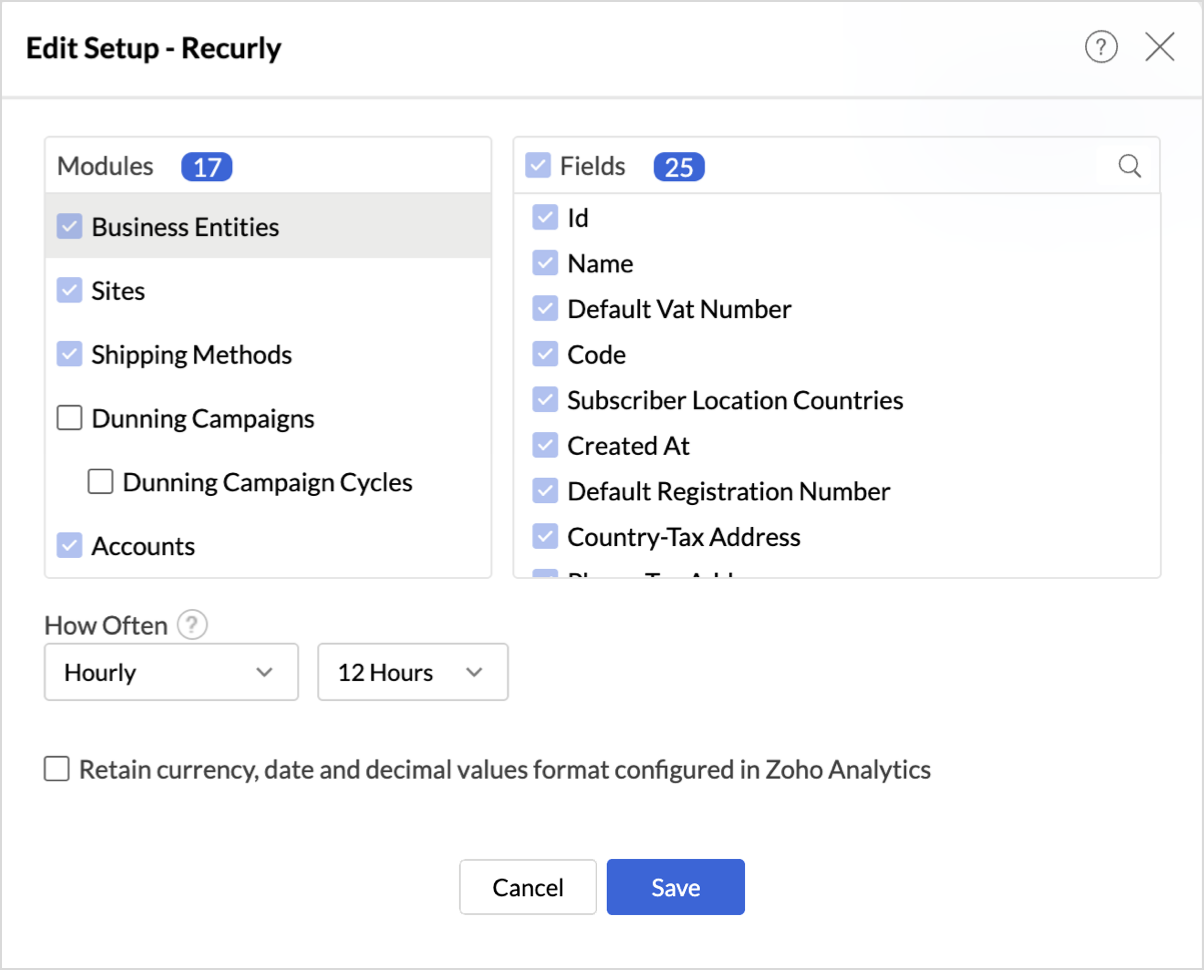
The Edit Setup tab allows you to add or delete modules or fields, change the schedule interval, and modify other settings specific to the business application.
To modify the settings,
- Click Data Sources > Edit Setup.
- The Edit Setup - Recurly dialog will open. Modify the settings as needed and click Save.
Re- Authenticate
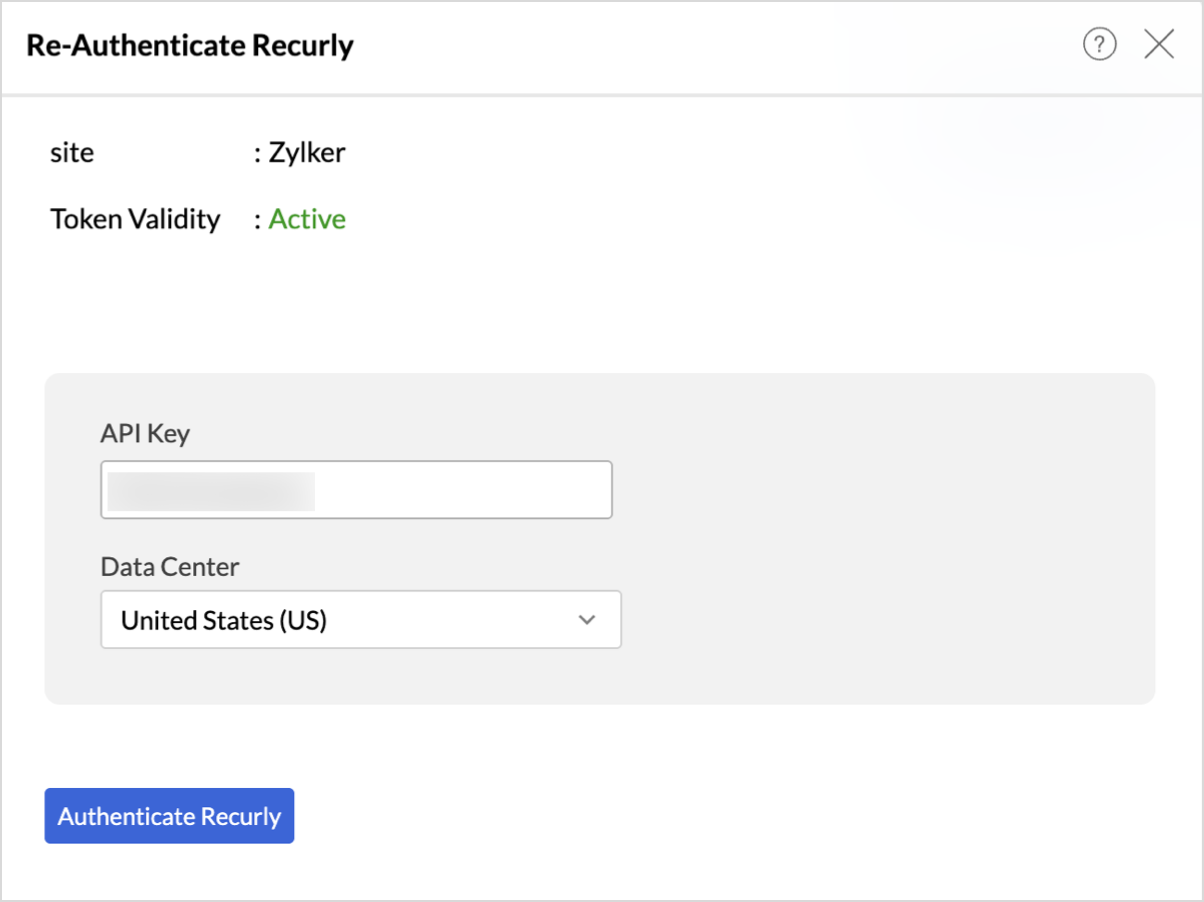
Re-authentication will be helpful when the API key or password is changed. In this case, the data sync will be paused, and the administrator who configure the connector setup must re-authenticate to resume the data sync.
To reauthenticate the setup,
- Click Data Sources > Re-Authenticate.
- The Re-Authenticate - Recurly dialog will open. Enter the credentials and click Authenticate Recurly.
Sync History
The Sync History tab provides details about the data sync for the last 45 days. A successful data sync is marked in green, and a sync failure is marked in red.
To view the Sync history,
- Click Data sources > Sync History.
- A calendar with the Sync History of the last 45 days will open. The date when the data sync has happened will be highlighted. Hover to view the number of times the data had got synced on a specific date.
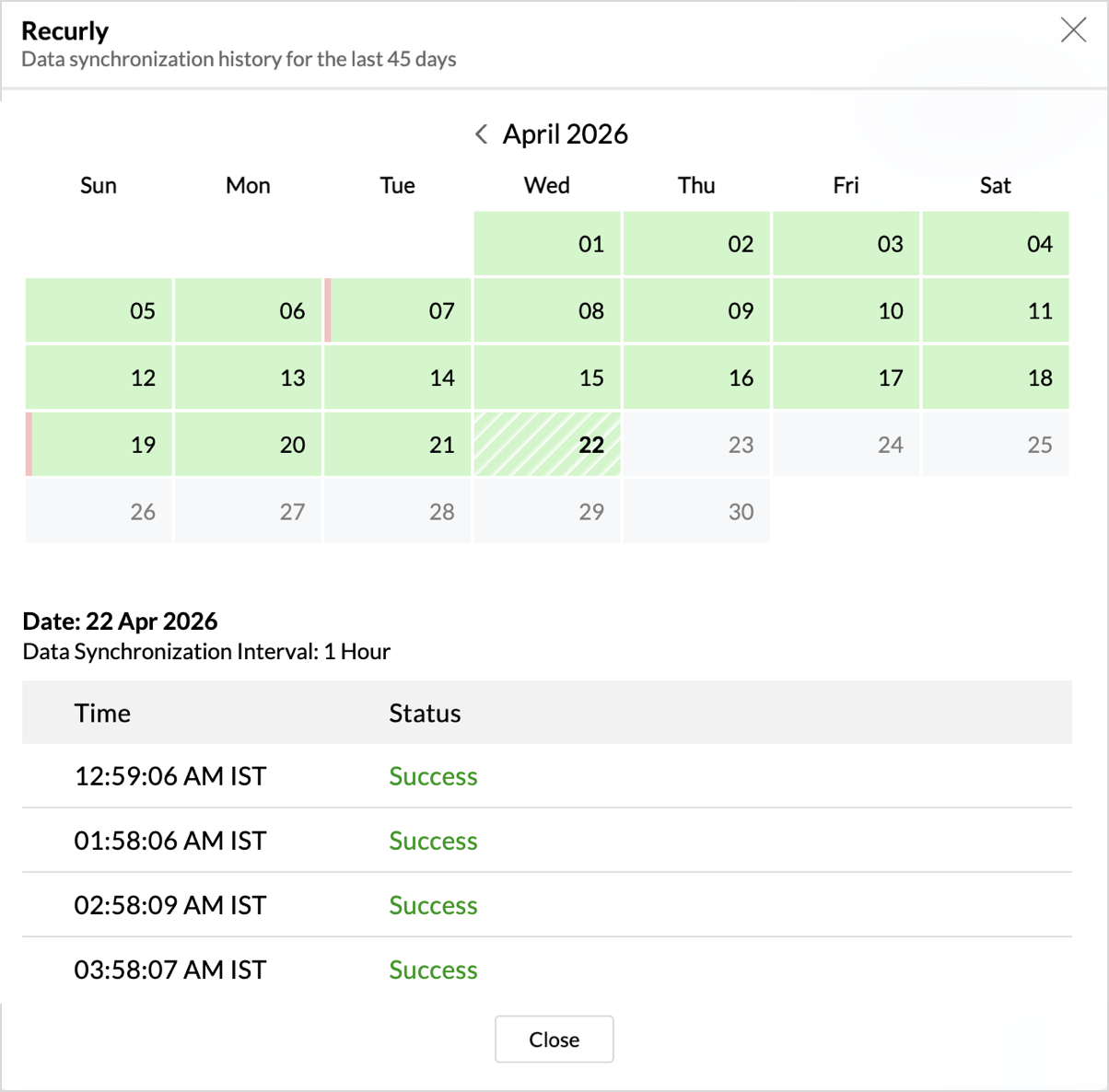
- Click the date to view more details.
- Time - Displays the time when the data is synced.
- Status - Shows whether the sync was a success or a failure.In case of failure, the reason will be displayed. Refer to this page to learn how to resolve the issue and avoid further failure.
Audit History
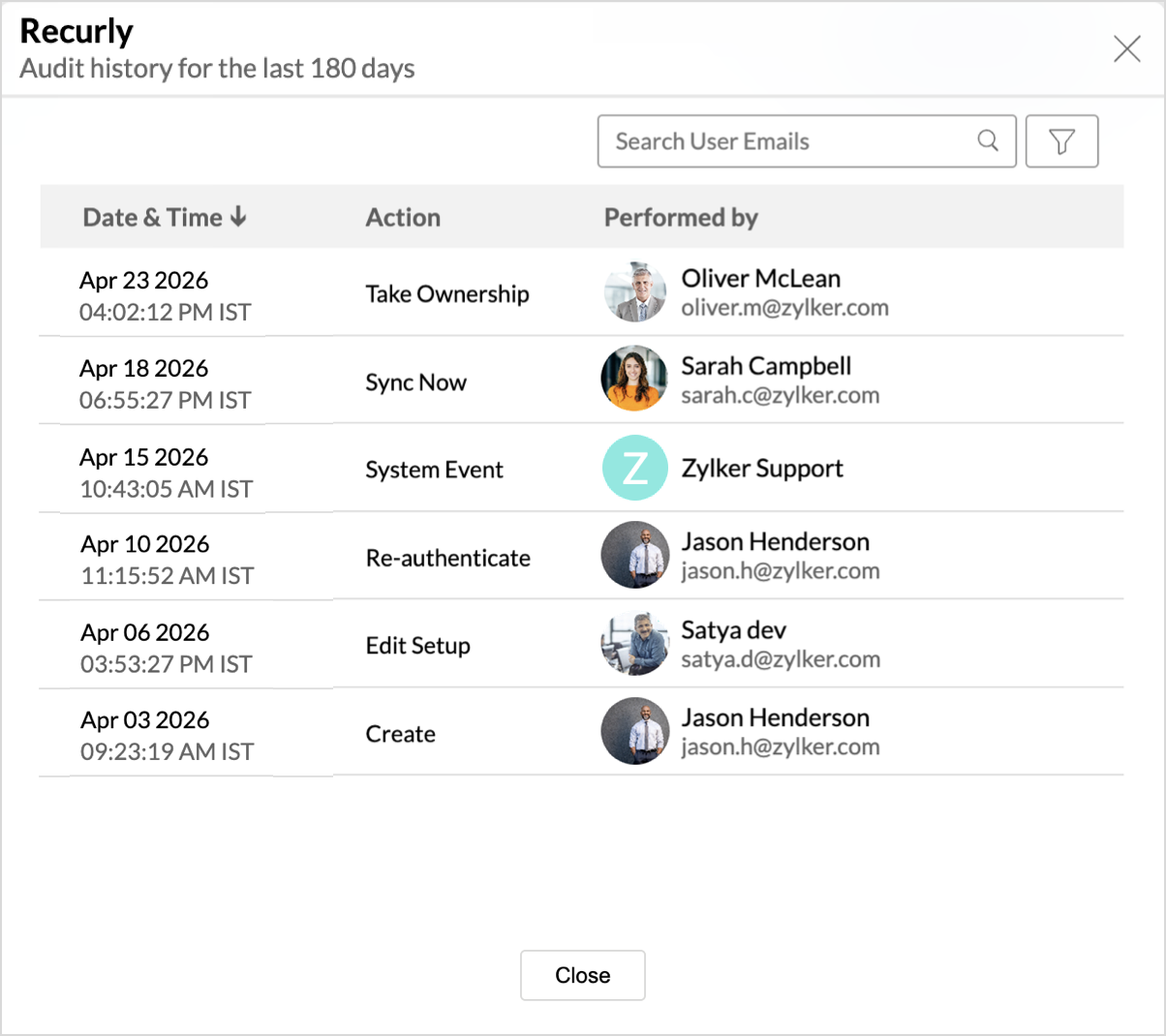
Zoho Analytics logs all the user activities and system events within the Recurly workspace. The following actions that are logged in Zoho Analytics,
- User Action: Create, Modules Added, Modules Removed, Fields Added, Fields Removed, Schedule Change and Entities Modified, Delete, Take Ownership, Re-authenticate, Sync Now, Retry.
- System Action: Plan upgrade or downgrade.
To view the audit history,
- Click Data Sources > Audit History.
- A dialog with the activities for the last 180 days will open.
Remove Data Source
Zoho Analytics allows you to remove the integration if needed. Removing the integration will suspend further data synchronization. The data tables and the reports will be available.
Click the Settings icon in the Data Sources tab, and select Remove Data Source from the drop-down menu.

Data Modeling & Preparation
Zoho Analytics allows you to combine data from various sources such as Files, Feeds, Databases and Business Applications for an in-depth analysis. Query Tables allows you to combine data from different tables to create reports.
While blending data from other data sources, Zoho Analytics automatically identifies similar columns and provides suggestions for lookups. Refer to the Joining Tables article for more details.
Data Visualization / Analysis
Chart Types in Zoho Analytics
The below table lists the range of visualizations supported in Zoho Analytics.
| Visualization | Types |
Bar | Stacked bar, Histogram, Horizontal bar |
Stacked Bar | Horizontal Stacked bar, 100% vertical and horizontal stacked bar |
Area | Area with markers, Smooth Area, Smooth area with Markers |
Line and Bar Combination chart | Bar with Line, Bar with Bubble, Bar with Scatter, Bar with Area, Area with Bubble, Line with Bubble and Custom Combination |
Bubble Chart | Bubble Pie, Packed Bubble, Word Cloud |
Stacked Area | Stacked area with markers, Smooth stacked area, Smooth stacked area with markers |
Map | Heat Map, Map Scatter, Map Bubble, Map Pie, Map Bubble Pie, Map Filled, Geo Heat Map |
Pie | Pie, Ring, Semi Pie, Semi Ring |
Tree map | Default View |
| Sankey | Default View |
Sunburst | Default View |
Race Chart | Default View |
Doughnut | Default View |
Matrix View | Pivot table |
Tabular | Summary and Tabular view |
Dashboards and KPI widgets | Single Numeric Widget, Dial Chart Widget Bullet, Chart Widget |
Sharing and Collaboration
- Share data and reports with your colleagues & friends with fine-grained permission
- Enable real-time commenting on a shared view to efficiently collaborate with your users
- Publish reports for wider consumption. Embed reports/dashboards within your websites, web applications, and blogs.
- Export, Email, and Print reports in a variety of formats.
- Use Zoho Analytics mobile apps (optimized for both IOS and Android platform) and access the reports and dashboards on the go.
Help & Support
We offer 24x5 technical support (Monday to Friday). In case if you need our assistance kindly do mail us your questions to support@zohoanalytics.com.
You can also reach out to us on our toll-free numbers.
United States: +1 (888) 900 9646
United Kingdom: +44 (20) 35647890
Australia: +61-2-80662898
India: +91 44 6965 6060