Open API Specification
The OpenAPI Specification (OAS) is a standard for describing RESTful APIs. WorkDrive APIs are documented using OAS to provide a clear, structured, and machine-readable representation of endpoints, including request and response schemas, authentication methods, and error handling.
Downloadable Specifications
All OAS files, including full and module-specific specifications, are available for download.
Using the OpenAPI Specification (OAS), developers can unlock a variety of automation and integration scenarios with Zoho WorkDrive APIs.
1. Custom File Management Applications
Build applications that allow users to upload files to specific folders in WorkDrive and manage access by sharing those files with other users or teams. This is useful for creating internal tools, client portals, or document management systems tailored to your business needs.
2. AI Agent Integrations
Integrate the OpenAPI specification with AI agents to enable intelligent document handling. For example, AI-powered workflows can automatically categorize, organize, or route files based on context, reducing manual effort.
3. Automated Document Workflows
Create seamless workflows between Zoho CRM and WorkDrive. For instance, when a new lead is created in Zoho CRM, a corresponding folder can be automatically created in WorkDrive. Any attachments added to that lead can then be uploaded to the designated folder, ensuring all related documents are organized in one place.
Supported Formats
The OpenAPI specifications are available in the following formats:
- JSON : Ideal for programmatic use and integration with automation tools
- YAML : Optimized for readability and easier understanding
Both formats are available for direct access and download from the API documentation.
Module-wise Specifications
In addition to the complete API specification, we provide module-wise OAS files. This allows developers to:
- Access APIs specific to individual modules
- Focus only on relevant endpoints
- Reduce complexity when working with large API sets
How can OpenAPISpecification can be used for AI Agents
Our OpenAPI specification is publicly available and designed to be AI-agent ready. External developers can plug our API directly into any LLM framework, AI agent, or automation platform ? enabling intelligent, conversational access to our services with minimal setup.
Every Endpoint Has Clear Intent
/api/v1/files:
    post:
        tags:
          - Files/Folders
          summary: Create Zoho format files
          description: This API enables the creation of Zoho-formatted files, including documents using Zoho Writer, spreadsheets using Zoho Sheet, and presentations using Zoho Show.
          operationId: Create_New_File
Rich Examples for Better AI Accuracy
requestBody:
    content:
      application/vnd.api+json:
          schema:
              example:
                  data:
                      type: files
                      attributes:
                          name: ExpensesSheet
                          service_type: zohosheet
                          parent_id: 0nk78318a1771da934f22939e4a00d8aab225
OpenAPI Specification available on GitHub
The OpenAPI Specification (OAS) for Zoho WorkDrive APIs is available in our GitHub repository. The specifications are organized by WorkDrive modules, with each module containing a dedicated OAS file that documents its APIs, including endpoints, HTTP methods, OAuth scopes, and request and response schemas.
For example, APIs related to files and folders are available in the file_folders.json file.
How to import Zoho WorkDrive OpenAPI Specification 3.0.0 into Swagger Editor
Developers can use these OAS files to build integrations such as custom file management applications and document workflow automations with external platforms. Tools like Swagger Editor and Redocly make it easy to import OAS files and generate interactive API documentation.
This guide explains how to import a Zoho WorkDrive OAS file into Swagger Editor .
1. Open the GitHub repository
Go to the GitHub repository and open the v1.0 directory. It contains a collection of OAS files categorized based on different WorkDrive modules.
2. Select the required OAS file
Choose the OAS file that matches your use case. For example, if you want to work with file and folder management APIs, select the file_folders.json file.
Each OAS file contains detailed API definitions, including:
- API endpoints
- HTTP methods
- OAuth scopes
- Request schemas
- Response schemas
3. Copy the raw file URL
Open the selected OAS file in GitHub. Click the Raw button, then copy the raw file URL by right-clicking the button and selecting Copy Link Address.
4. Import the OAS file into Swagger Editor
To visualize and explore the OAS file in an interactive API documentation format, use Swagger Editor (no sign-up required).
- Open Swagger Editor.
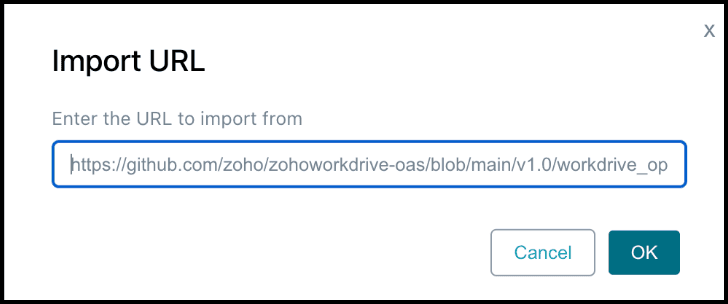
- Navigate to File > Import URL.
- In the Import URL pop-up window, paste the copied raw file URL in the Import URL field.
- Click OK.
5. View the API definition
After the import is completed successfully, Swagger Editor redirects you to the API Design Editor or API Definition page. From here, you can view, define, edit, and document your API using OAS.
© 2026, Zoho Corporation Pvt. Ltd. All Rights Reserved.