Deluge Integration: Workflow Logs
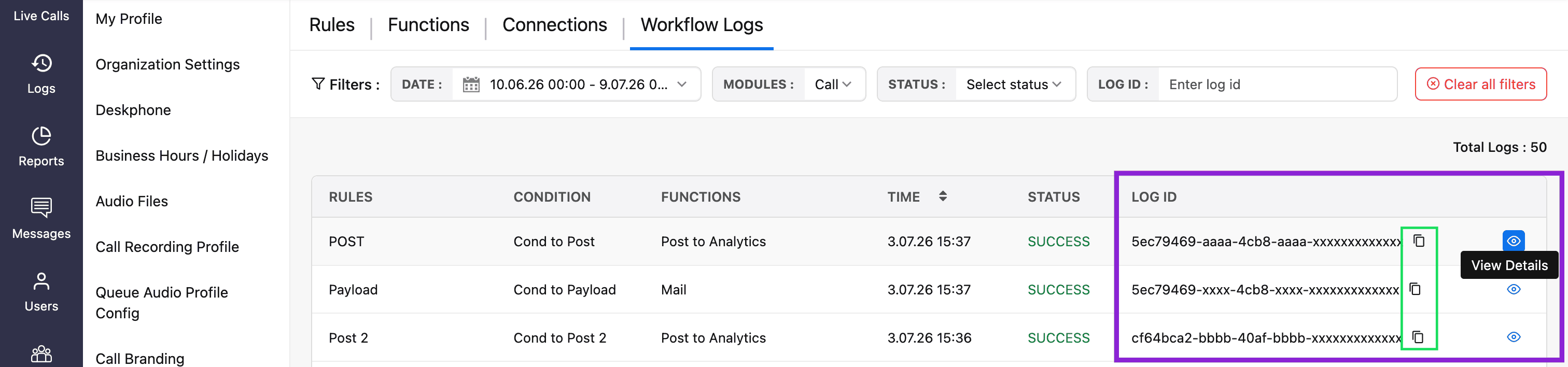
Once your workflow rules, connections, and Deluge functions are configured, you can monitor their execution from the Workflow Logs page. This page provides detailed information about each workflow execution, including when it was triggered, the process configuration (rules, condition, functions) that it was executed for, and whether the execution was a success or a failure.
Access workflow logs
Navigate to Settings → Workflow → Workflow Logs.
On Workflow Logs page, you can filter workflow logs using the following criteria:
Date Range: Required date and time range.
Module: Call, SMS, or Agent State.
Status: Success or Failure.
Log ID: Search for a specific log using its Log ID.

View workflow log details
The Workflow Logs page displays information about each workflow execution. You can also perform the following actions:
Copy a log ID: Click the Copy ID icon next to the required Log ID.
View log details: Click the View Details (eye) icon to open the complete log message and execution details.