More Action
With Zoho Voice, you can fine-tune your account experience with a few additional personalisation options. In this section, you can manage:
Notifications
Access all your Zoho Voice notifications directly within the app for a quick overview.
In the Notifications section, view updates like number associations, call recording profiles, queue associations/removals, and reminders such as monthly credit, low credit alerts. Stay informed with notifications about monthly credit deductions, missed calls, SMS updates, and more.
To view notifications:
- In your Zoho Voice account, click the Notifications icon in the top-right corner.

- From the dropdown, select the specific notifications you want to view, such as missed calls, business hours, low credit alerts, and more.
- To mark all notifications as read, click the Mark as Read icon. You can also Clear All notifications if required.
- View Zoho Voice announcements by clicking the Announcement icon located in the top-right corner, next to the Notification icon.
User Profile Menu
Manage your status availability and access support in one place:
- In your Zoho Voice account, click on your User Profile in the top-right corner.
Under Agent Status, set your availability.
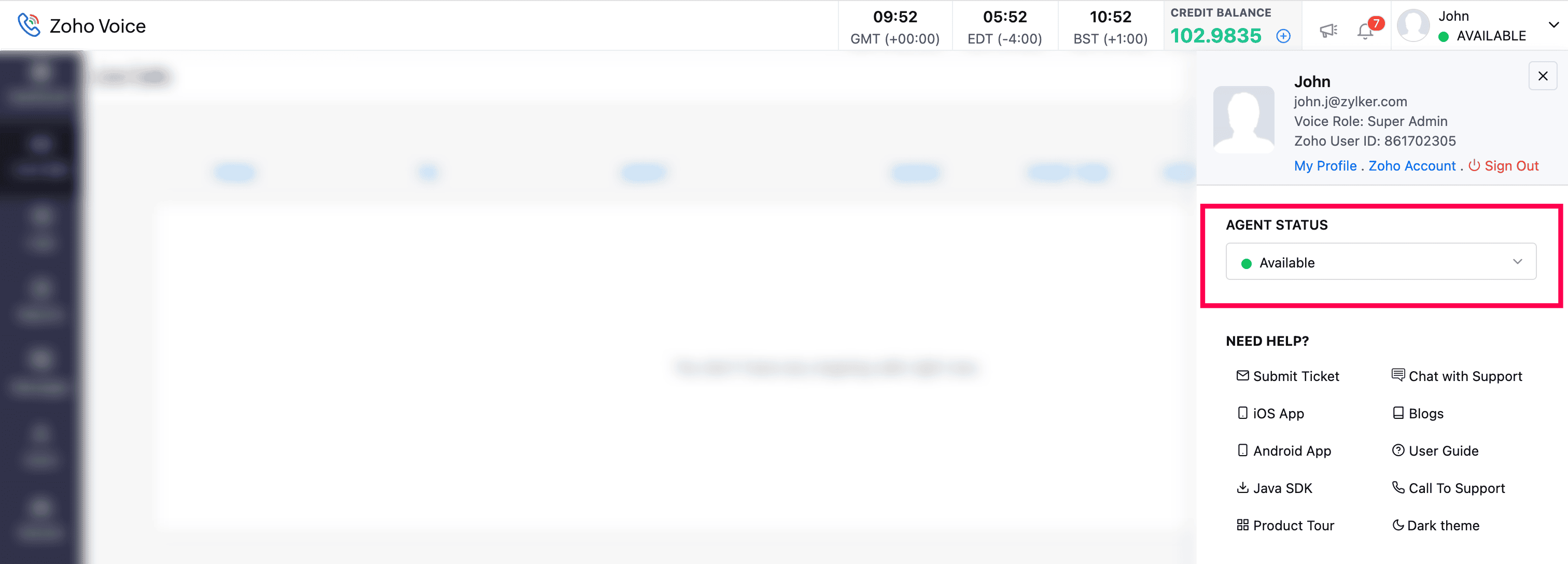
- Under Need Help, you can:
- Submit a Ticket: Request support from our team.
- iOS App: Download the ZDialer mobile app for iOS.
- Android App: Download the ZDialer mobile app for Android.
- Java SDK: Developers can download the Java SDK.
- Product Tour: Take a general tour of the product.
- User Guide: Access a detailed guide for using Zoho Voice.
- Chat with Support: Get instant answers by chatting with our support team.
- Blog: Explore our product blog.
- Call Support: Contact the support team for assistance with your queries.
- Switch Theme: Toggle between light and dark themes with one click.
