



Disable Sales Tax Automation
If you no longer want sales tax to be auto-calculated for your transactions, you can disable Sales Tax Automation in Zoho Books. Once done, the sales tax will no longer be auto-applied, and you’ll have to apply them to your transactions manually. To disable:
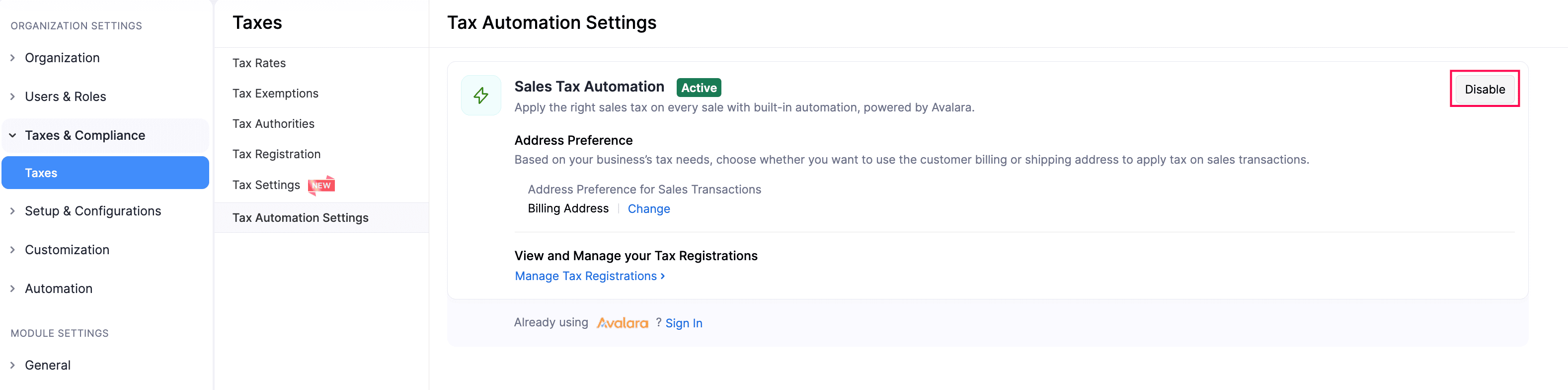
Go to Settings.
Select Taxes under Taxes & Compliance.
In the next page, click Tax Automation Settings in the Taxes pane.
Click Disable next to Sales Tax Automation.
In the confirmation pop-up, click Disable.
Sales Tax Automation will now be disabled in your Zoho Books organization.
 Yes
No
Yes
No
Thank you for your feedback!