

Challenges faced without a modern tool
Blogging has long been a powerful way to express thoughts, share knowledge, and build an audience—but if you're still relying on outdated tools to manage your blogs, it might be time for an upgrade. While they may seem manageable at first, these outdated approaches can lead to serious inefficiencies.
Handling a huge volume of data
Managing large volumes of data is a big hurdle to overcome—from keyword research and drafts to meta content and performance stats, blogging generates a wide range of data throughout the content lifecycle.
Without a structured system, you may face:
Difficulty in finding the right information at the right time
Trouble deriving meaningful insights from scattered data
Challenges in setting up repeatable, consistent processes
If your data remains unorganized, it can build up over time and eventually become a major bottleneck in your content workflow.

Juggling multiple tools
In traditional blog management, it's common to rely on a scattered set of tools, such as spreadsheets for tracking, emails for updates, chats for feedback, and separate platforms for scheduling or publishing.
This constant back and forth leads to:
Lost time and duplicated effort
Increased chance of missing context or updates
Less focus on high-impact creative tasks
Limited collaboration
Whether you're building a blog calendar, coordinating with designers, or aligning with SEO teams, you need a system that supports smooth teamwork.
Without the right setup, teams often face challenges like:
Scattered updates and feedback
Poor alignment on timelines and responsibilities
Inefficient collaboration, especially in hybrid or remote settings
When collaboration is fragmented, progress slows down and important details can slip through the cracks.
Lack of scalability
As your team grows, so does your content pipeline, data volume, and coordination complexity. Traditional methods often fall short in supporting this growth.
Without scalable systems in place, you may face:
Disjointed workflows that are hard to manage
Role confusion and dropped responsibilities
Longer onboarding time for new team members
Increased chances of delays and missed deadlines
Planning to scale early on helps you avoid future bottlenecks and ensures your team can grow without disruption.
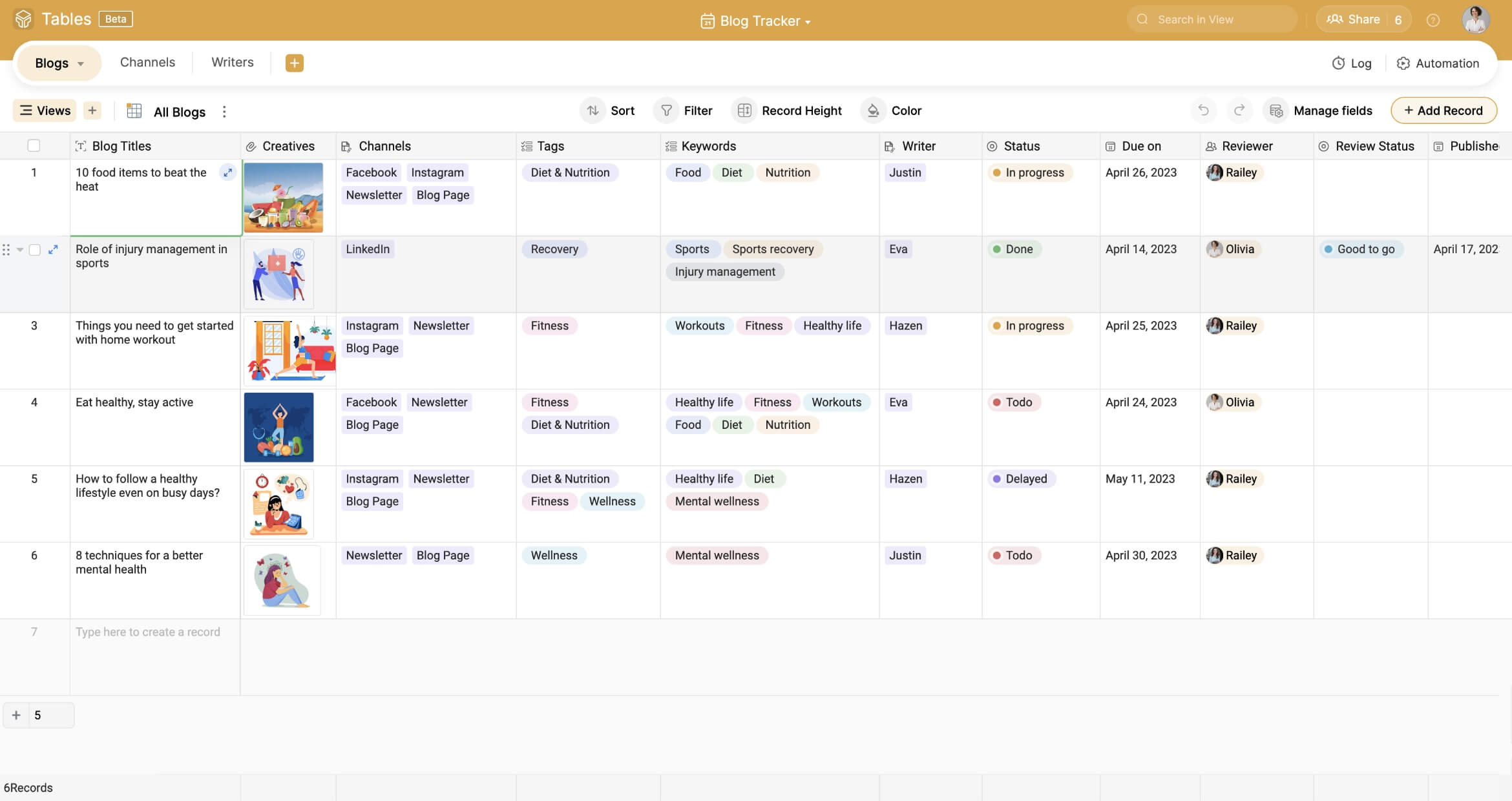
That’s where our blog tracker template comes in. It’s designed to help you plan, collaborate, review, and track all your blog metrics without the chaos. Let’s take a look at how it works in action.
How to maintain your blog calender using Zoho Tables
Planning your blogs
Successful blogs are the result of an effective plan; and planning typically starts with SEO research to identify target keywords. With our blog tracker template, you can store those keywords and related metrics inside the same base where you list your blogs. This keeps all information intact in one place, eliminating the need to search for it repeatedly across different tools or documents.

Writing your blog:
Once you've finalized your keywords, the next step is to come up with relevant titles and start writing. Our template allows you to list all your upcoming blog topics and assign them to individual writers by adding them as collaborators. This ensures accountability right from the beginning. The diverse set of field types also helps you track all relevant details about each blog. For instance, a single-select field can be used to track progress, and a date field can be used to keep the due dates in check at all times.

Review and approval
After the content is drafted, it's time for review. Instead of having endless private chats or email threads, you can streamline this process using our blog tracker template. You can easily add work files as links or attachments, add reviewers as collaborators, and automate notifications when a blog's status is moved to In Review.
Reviewers can add comments directly within each record and update its stage once approved. No more chasing feedback—just a clean, visible workflow for everyone involved.

SEO optimization
Publishing an article is more than just clicking "post." It involves pulling together final elements like meta descriptions, SEO titles, links, and images. Use this blog tracker template to track keyword usage, meta tags, image alt text, and internal/external links.
Scheduling and publishing
Stay ahead of your content calendar by adding scheduled publish dates to your blog records. Use dropdowns or status fields to indicate whether a blog is Scheduled, Published, or Rescheduled. If you post on multiple platforms (like LinkedIn or Medium), you can also log those locations. Thanks to our integration with Zoho Social, you can even automate this step by drafting a post directly from Zoho Tables to Zoho Social using an automation action. This ensures your content reaches the right audience at the right time without manual intervention.
Want to know more about how to build an extensive content calendar with Zoho Tables? Read here.
Promotion and distribution
Use this blog tracker template to record where and how each blog is promoted, whether it's social media, newsletters, or email campaigns. Add fields for UTM links or tracking URLs so you can measure campaign performance later.

Performance tracking
Once your blog is live, monitor its performance by tracking metrics such as page views, time on page, bounce rate, and conversions. You can even link this back to your keyword repository to see which terms bring in the most traffic.

Repurposing and updates
Great content doesn't need to be one and done. Use the template to identify blogs that can be updated or repurposed into other formats, like videos, carousels, or guides.

Bird’s-eye view
Who doesn’t love a report that brings everything together in one place? Zoho Tables makes it easy to build customized reports that serve different needs:
Track your team’s performance over time
Share important metrics with your management team
Showcase your content outcomes and timelines to clients

Everything on the go
What if you could manage your entire blog calendar right from your phone? The Zoho Tables mobile app makes that possible. Whether you're updating records on the move or managing your team remotely, you’ll have everything you need—right in your pocket.
The app helps you stay productive from anywhere. Features like OCR (optical character recognition) and voice recording even let you capture ideas without typing. Whether you’re in a meeting, commuting, or working from a café, your content workflows remain accessible and up to date.
AI magic
While this template is based on our team’s internal workflows and research, we understand that every team’s process is different. That’s why Zoho Tables gives you the flexibility to build custom solutions tailored to your specific needs from scratch.
Need a starting point? Just tell Zia, our AI assistant, what you're trying to build, and it will help you generate a base with the right structure, fields, and even connected tables. Zia can take your use case and turn it into a ready-to-use system in seconds.
Even better, if inspiration strikes while you're away from your desk, you can speak directly to Siri on your mobile device to build instant workflows. With AI-powered assistance, setting up your blog tracking process is faster, smarter, and more intuitive than ever. This blog tracker template helps reduce friction, increases team accountability, and puts an end to tool-hopping. Whether you're managing a solo blog or collaborating with a team, this setup supports every step of the process—from ideation and planning to publishing and tracking.