You can associate a partner with one or multiple services in your account by using a unique partner code.
How Partner Tagging works:
When a partner is tagged to a service, they earn commissions on every transaction made under that service. The commission structure may vary depending on factors like the type of service and subscription.
If a subscription payment is made using a partner's card, the partner is eligible for a reseller discount, which can help reduce costs for both the customer and the partner.
Steps to Tag a Partner:
Navigate to the Manage Subscription Page:
Open the product page: Navigate to any of the product page you have subscribed to.
Access Subscription Option: Click on the profile icon in the top-right corner of the page.
Select Manage Subscription: Click the Upgrade/Manage Subscription located below your Profile details.
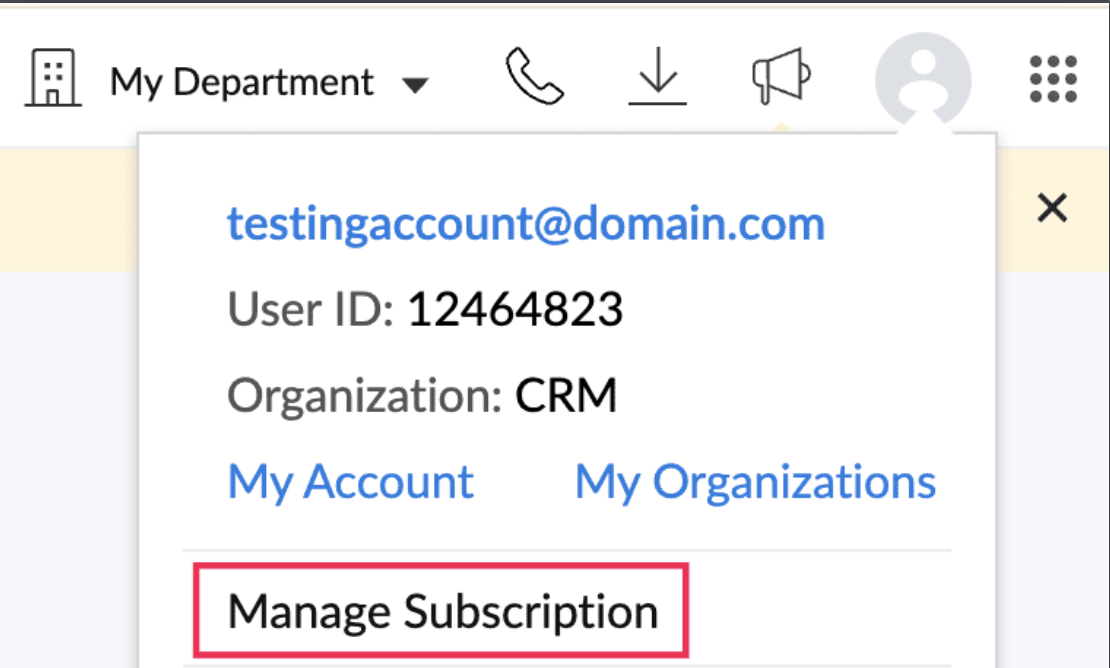
Select "Tag your Partner" - Click on the Tag your Partner option under Your Store Details.

Access your Services List
On the following page, you will see a comprehensive list of all services you've accessed and subscribed to.
Select Services
Choose the individual services or multiple services you wish to tag to a partner. You can also use the "Select All" button at the top for convenience to tag all available services at once.

Review Existing Partner Mappings
- We display a list of services that have already been tagged to a partner.

You also have the flexibility to change the partner if needed.

Check Pending Approvals
Services that are awaiting approval will be clearly marked. Additionally, you can view services where you are not the admin but are currently in use.

Tag the Partner
After selecting the service(s), click the "Tag the Partner" button to proceed.

Enter Partner Code
Enter the partner code you received from your partner, then click on the "Submit" button.

Confirm and Complete
Click on the "proceed" button to complete the process.

You will receive a confirmation message indicating that your partner mapping is complete.

Note: If you're tagging a "ME service" to your organization, you'll see a message indicating that the partner tagging will be completed once the partner team approves.

Changing a Partner:
If you need to change the partner for a particular service:
Locate the Service
Hover over the service that is already mapped to a partner.
Click on "Change Partner"
Select the "Change Partner" option.
Provide New Partner Code
Enter the correct partner code and provide a reason for changing the partner in the provided field. Click on the "Send Request" button.
Note: You must provide the new partner's code in order to complete the partner change.

Confirmation
You will receive a confirmation indicating that your request to change the partner has been received and will be processed by the respective team.
