
Set up webhooks in your Zoho Sign account to instantly sync your information with other apps. Your Zoho Sign webhooks can be managedby administrators through API calls or by accessing the API settings section.
What is a Webhook?
A webhook is an HTTP call back or push API created by users that automatically sends real-time notifications based on document actions to third-party software or websites.
Webhook benefits:
- Create automated workflows across applications
- Less resource-intensive than APIs
- Thorough documentation available
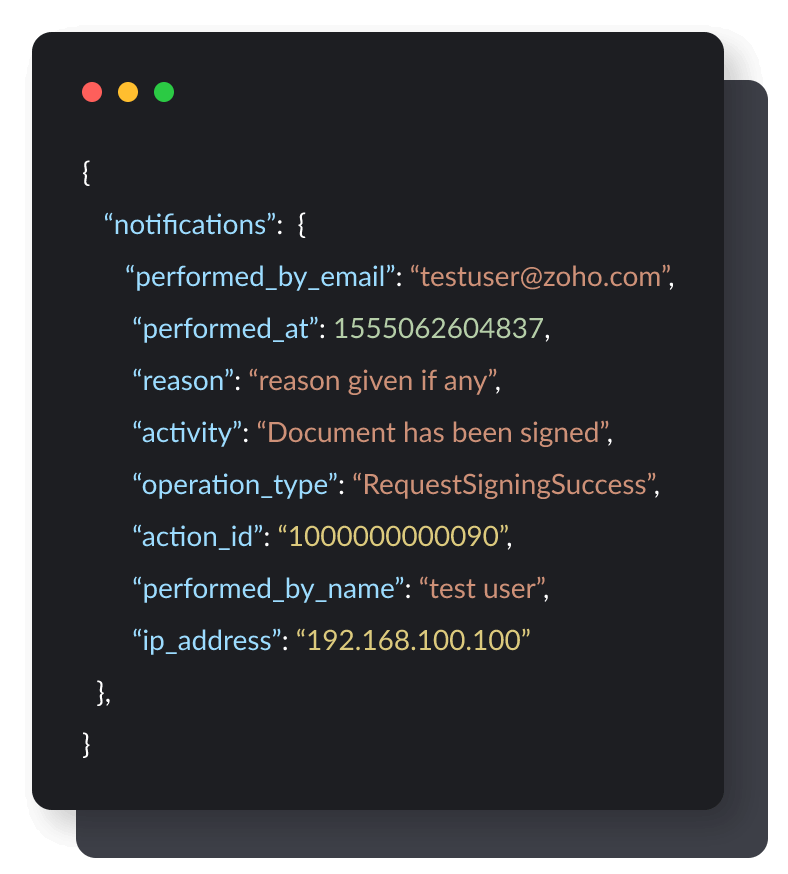
How to create a webhook
Webhooks in Zoho Sign can be created in three simple steps through the Zoho Sign web application or the Zoho Sign API.
Mention the HTTP URL in the callback URL option to receive information when a specific event or set of events are triggered.
02Add a name based on the webhook's intended purpose.
03Select the document actions you want to use as the trigger sending updated data to the URL.
Learn more about how to create a webhook in your Zoho Sign account.
Frequently asked questions:
Triggers are an event or a set of events you select. When these events occur, they cause the webhook to automatically send notifications to your Sign account.
You can delete a specific webhook by clicking the Delete option from the Actions menu. This will remove your webhook and end all notifications that webhook previously triggered.
Yes, you can edit the URL of a webhook you created by selecting the Edit option from the Actions dropdown menu.
There might be two reasons for a webhook to not work as intended. There may be a misconfiguration of the URL or parameters, or the server may not be reachable to push the webhook details.
Yes, though please note: Sign currently supports webhooks only for our enterprise plan.
No. All you have to do is create a webhook and use it accordingly.