Evaluating chatbot software in 2026 means cutting through AI hype to find a platform that genuinely fits your business—one that reduces workload, responds accurately, integrates cleanly with your stack, and scales without turning into a maintenance burden.
This AI chatbot software buying checklist is written for buyers, marketers, CX leaders, and IT teams who want clarity—not vendor jargon. By the end of this page, you should know what or how to evaluate, why it matters, and how to avoid costly mistakes while choosing an AI chatbot platform.
Key takeaways
- Governance beats buzzwords. Accuracy, confidence thresholds, and fallback logic matter more than which AI model a vendor claims to use.
- Your chatbot must fit your ecosystem from day one. CRM sync, support tool integration, and clean data flows are non-negotiable—not add-ons to configure later.
- The best chatbots improve continuously, not manually. Analytics, missed-intent tracking, and automated learning loops separate platforms that grow with you from those that create ongoing maintenance overhead.
Why chatbots are essential for businesses today
Chatbots have moved well beyond experimentation. In 2026, they're a core part of how modern businesses manage customer conversations across sales, support, and onboarding at scale.
Here’s why they matter in practical terms:
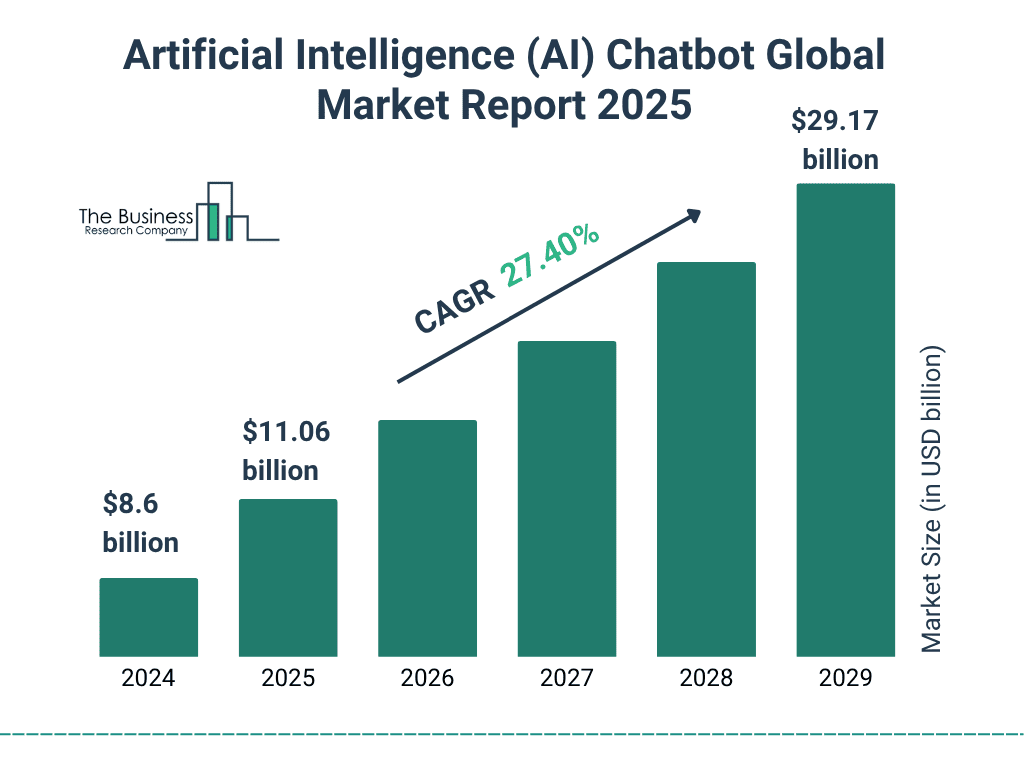
- Customers now expect near-instant responses 90% of customers consider an immediate response essential¹, with a growing majority expecting resolution in under 10 minutes. Agentic AI—autonomous agents that handle end-to-end interactions—is projected to power 40% of all enterprise service interactions² by the end of 2026, driving a 30% reduction in operational costs³ and an 85% improvement in first-response times⁴ compared to manual handling.
- Sales teams need smarter lead qualification Modern chatbots capture intent, ask qualifying questions in real time, and push high-quality leads directly into CRM systems—without waiting for a human to be available.
- Support teams are under pressure Most businesses face the same questions daily: pricing, availability, order status, appointment scheduling. Chatbots resolve these instantly, 24/7, without adding headcount.
- Cost efficiency at scale Businesses that deploy chatbots well commonly automate 40–70% of inbound conversations—reducing agent dependency while maintaining, or improving, customer experience quality.
- Better visibility into customer intent Unlike calls or email, chatbots generate structured, searchable data. You can see exactly what users are asking, where they drop off, and which conversations convert.
- Source: Business Research Company
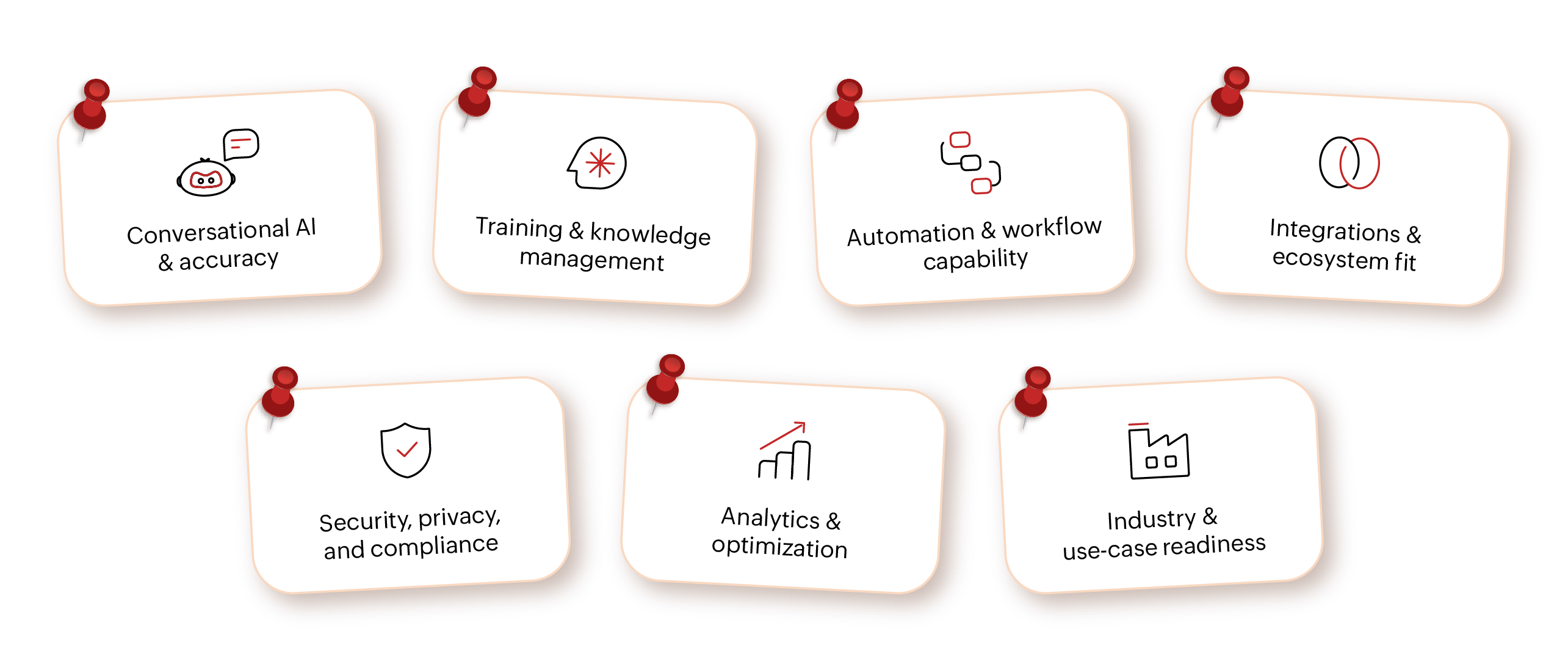
7-point chatbot buyer’s checklist for 2026
Use this checklist to evaluate platforms holistically—not just on AI marketing claims
1. Conversational AI and accuracy
Ask how reliably the chatbot answers—not just whether it uses AI.
Most vendors lead with AI claims; what matters is how safely and accurately that AI performs in real conversations.
What to evaluate
- Intent identification: Can the chatbot map different phrasings of the same question to the same answer? (E.g., "What's your pricing?", "How much does this cost?", "Do you have startup plans?").
- Context retention: Does it remember earlier parts of a conversation and answer in context—not generically?
- Empathetic responses: Does it acknowledge user intent or frustration, or just serve a generic reply?
- Confidence thresholds and fallback logic: Can you configure when the chatbot answers vs. when it hands off?
- Human handoff: When escalating, does the agent receive full conversation context?
In good chatbot software like Zoho SalesIQ, you can configure:
- Confidence scoring for AI responses
- Safe fallbacks like “Let me connect you to an expert”
- Human handoff when intent confidence drops
- Graceful escalation to humans
When the chatbot is unsure or confidence drops, it escalates the conversation to a human agent with full context instead of guessing.
Why this matters: Poorly governed AI can confidently give wrong answers, leading to misinformation, loss of trust, and brand risk.
2. Training and knowledge management
A chatbot is only as good as what it knows—and how easily that knowledge can be maintained.
What to evaluate
- Multiple knowledge sources: FAQs, help articles, PDFs, URLs, and internal documentation.
- Versioning and auditability: Track changes, ownership, and history.
- Non-technical ownership: Teams should update content without developer dependency.
- Learning over time: Improves from conversations and feedback loops.
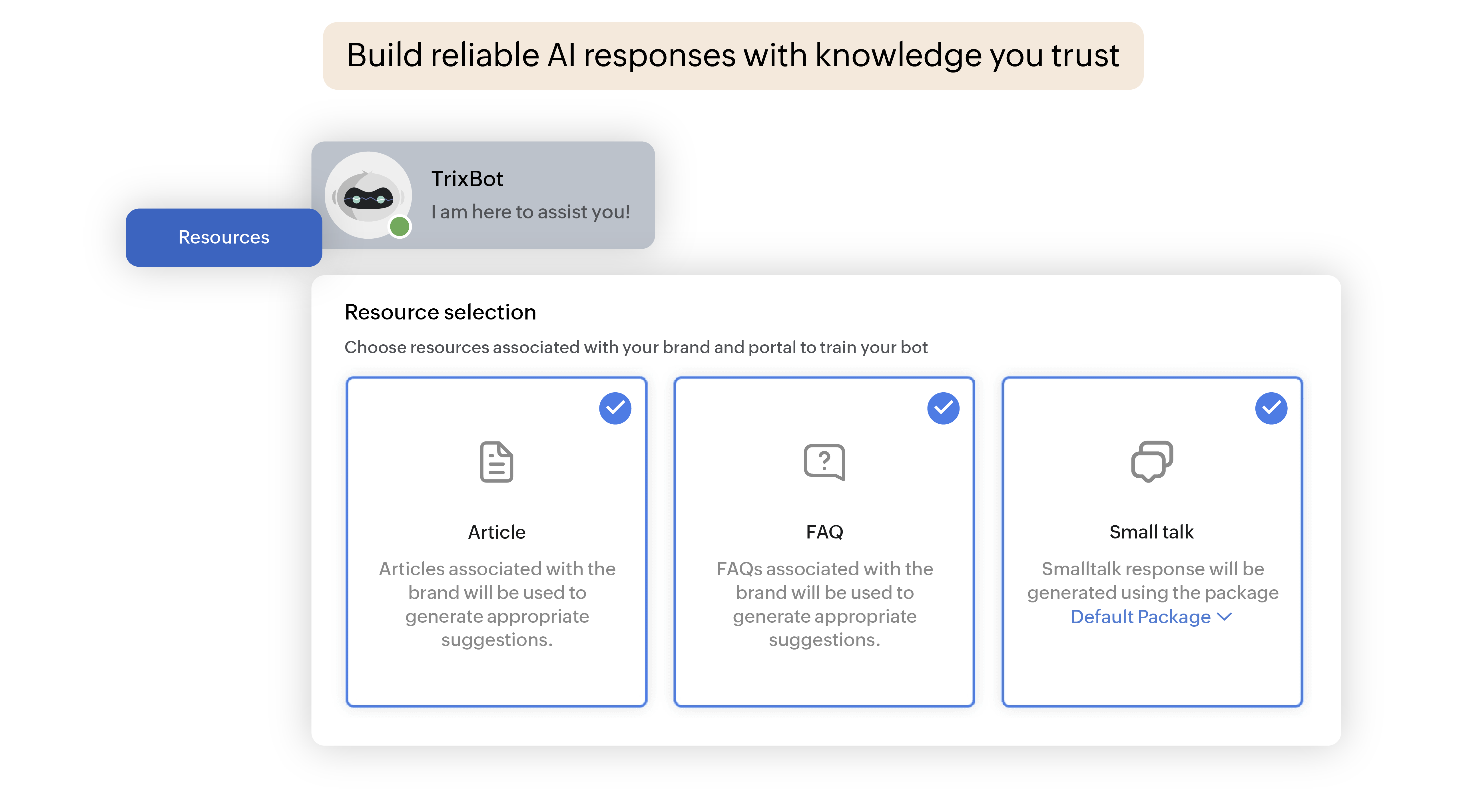
[Training a chatbot using approved knowledge sources such as FAQs, articles, and documentation—ensuring responses stay accurate, auditable, and easy to maintain without technical retraining.]
Red flag:If updates require technical retraining or redeployment, the chatbot won’t scale.
3. Automation and workflow capability
In 2026, chatbots shouldn’t just answer—they should act.
What to evaluate
- Visual, no-code builders: Easy flow creation without engineering support.
- Logic and branching: Conditional logic, variables, and decision trees.
- Backend actions: APIs, webhooks, CRM updates, and ticket creation.
- Context-aware handoff: Agents see full context during escalation.
Example: A chatbot qualifies a lead → checks eligibility → books a demo → creates a CRM lead → routes to a sales rep.
Without automation depth, chatbots become glorified FAQ widgets instead of business accelerators.
4. Integrations and ecosystem fit
This is where many chatbot projects fail—poor integration leads to disconnected tools.
What to evaluate
- Native CRM integration: Lead creation, field mapping, ownership assignment.
- Support and marketing compatibility: Help desks, campaigns, analytics tools.
- Open APIs: Support for custom workflows.
- Unified customer view: Shared context across teams.
Ask yourself:Will this chatbot reduce silos or create another disconnected tool?
5. Security, privacy, and compliance
Non-negotiable—especially for regulated industries or sensitive data.
What to evaluate
- Encryption at rest and in transit
- Role-based access control and audit logs
- Compliance with GDPR, ISO, SOC 2, HIPAA
- Clear data ownership and retention policies
2026 reality:Buyers reject platforms that treat compliance as an afterthought.
6. Analytics and optimization
You can't improve what you can't measure.
What to evaluate
- Conversation-level analytics (resolution, deflection, handling time)
- Drop-off and friction tracking
- Missed and unhandled intent analysis
- A/B testing for flows and responses
Good chatbots show insights. Great chatbots tell you what to fix next.
7. Industry and use-case readiness
Generic chatbots rarely perform well—evaluate real-world applicability.
What to evaluate
- Proven use cases in your industry
- Support for industry-specific terminology
- Custom workflows for sales, support, onboarding, automation
- Multilingual and regional support
Related read:
Zia Agents in SalesIQ: Autonomous AI agent capabilities
Dos and don’ts in chatbot development
AI chatbots: How they work, types, benefits, and how to create one
Essential chatbot features to look for in 2026
How to measure ROI for chatbots in 5 steps
Mistakes to avoid while validating chatbot software
Many chatbot implementations fail not because the technology is weak—but because the evaluation process is flawed. Before you finalize a chatbot platform, watch out for these common mistakes.
1. Judging the chatbot based on demos alone
Product demos are designed to impress—not to reflect real-world usage. Most demos use pre-trained intents, avoid ambiguous or incomplete questions, and skip edge cases and failure scenarios entirely.
What you should do instead: Test the chatbot with real customer questions from your website, support tickets, or sales inbox. Try incomplete, misspelled, or multi-part queries. Observe how the bot behaves when it doesn’t know the answer
Why this matters: A chatbot that performs well only in demos often breaks down the moment real users interact with it.
2. Ignoring long-term maintenance effort
A chatbot shouldn't become a full-time job. Watch out for platforms that require developer involvement for small content changes, manual retraining for every new topic, or separate workflows for each use case.
What to look for: Easy knowledge updates without full model retraining, analytics that surface missed intents automatically, and tools that let non-technical teams own the content.
Why this matters: If maintaining your chatbot feels heavier than handling chats manually, adoption will stall and ROI will vanish.
3. Overlooking CRM and data flow
A chatbot that doesn't sync deeply with your CRM becomes an isolated activity generator—not a revenue driver.
Validate: Does it create or update CRM records automatically? Are transcripts linked to contacts or leads? Can routing and ownership be assigned based on bot responses?
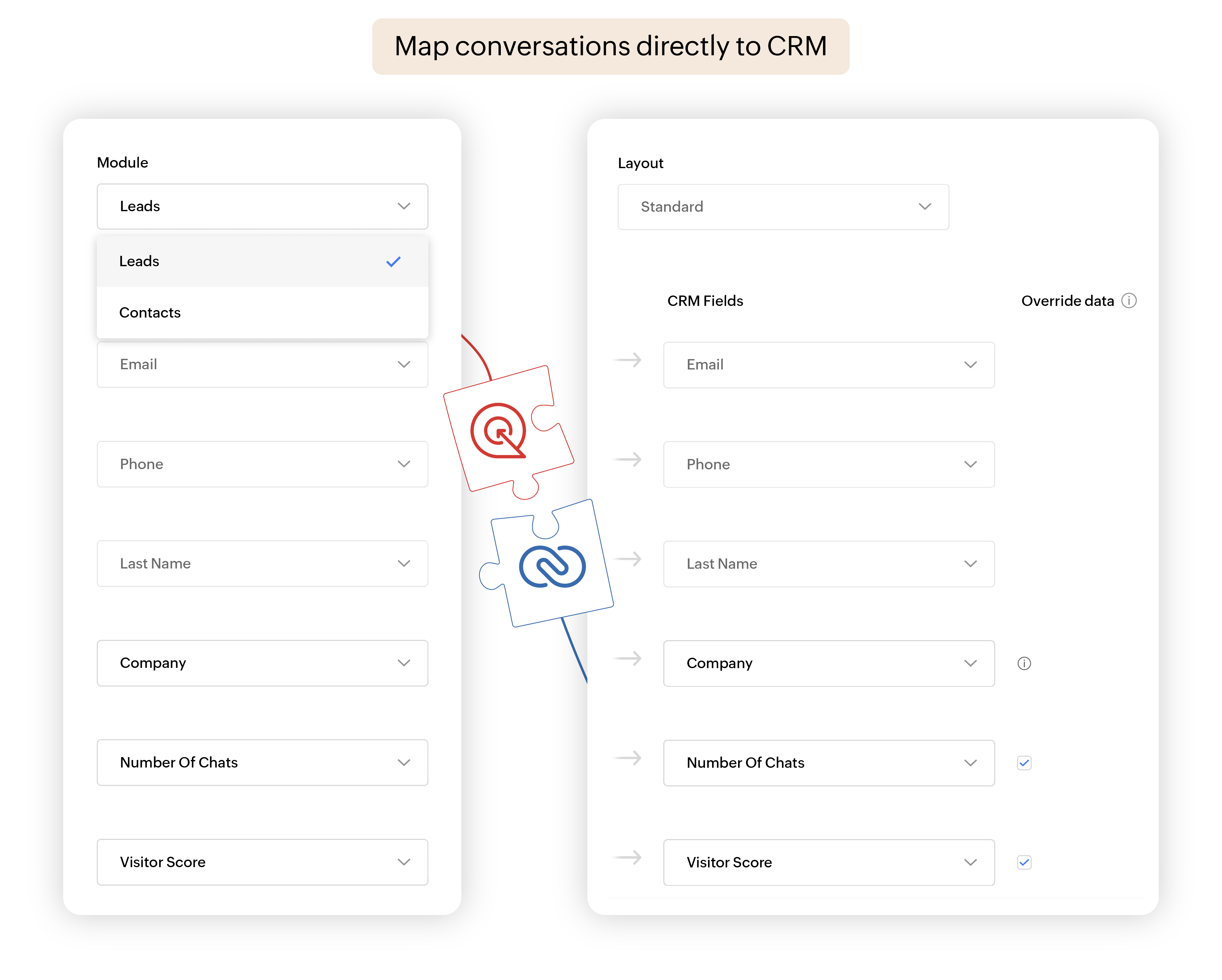
[Mapping chatbot conversation data directly to CRM fields, ensuring leads, context, and intent are captured accurately without manual follow-up.]
Why this matters: If leads and conversations don’t sync properly, your chatbot may generate activity but not measurable revenue.
4. Assuming AI automatically means accuracy
AI-powered doesn't automatically mean reliable. Without proper controls, AI chatbots can hallucinate answers, overgeneralize, or confidently state something incorrect.
Validate: Are responses limited to approved knowledge sources? Are confidence thresholds enforced? Is there a reliable fallback to human agents when confidence is low?
Why this matters: Inaccurate answers don’t just confuse customers—they damage trust, compliance, and brand credibility.
5. Treating escalation as an afterthought
Many teams optimize the bot flow but ignore what happens when automation ends.
Validate: Are escalation rules clear and configurable? Does the agent receive full context? Is escalation triggered intelligently—by confidence level, user request, or intent?
Why choose Zoho SalesIQ’s chatbot software?
Zoho SalesIQ offers a chatbot builder built for real business conversations—where accuracy, governance, and scale matter more than flashy demos. It’s designed for teams that want predictable outcomes.
Here’s what genuinely sets SalesIQ apart for chatbot buyers:
Built for speed and control
SalesIQ combines no-code and low-code bot building, so marketing and CX teams can launch quickly, while ops and IT teams still retain control over logic, data, and handoffs. You don’t have to choose between agility and governance.
AI that's accurate by design
AI responses in SalesIQ are grounded in approved knowledge sources, governed by confidence thresholds, and supported by configurable fallback rules. This directly addresses the hallucination risk that buyers rightly raise about AI chatbots—responses are controlled, auditable, and trustworthy.
Flexible AI integrations
SalesIQ supports integration with external AI providers and models, giving businesses the flexibility to extend capabilities where needed—without sacrificing governance, routing logic, or conversation context.
Native CRM and ecosystem integration—no middleware needed
SalesIQ works seamlessly with CRM and the broader ecosystem, so conversations don’t live in isolation. Leads, transcripts, intent data, and outcomes flow naturally into sales and support workflows—without manual syncing or middleware.
Automation that actually moves revenue
SalesIQ chatbots don't just answer questions—they qualify leads, route conversations intelligently, trigger CRM updates, and escalate to the right agent with full context. This makes SalesIQ effective for both sales acceleration and support deflection, not just basic Q&A.
Enterprise-grade security and compliance
SalesIQ is built with privacy and compliance in mind from day one—covering encryption, access controls, audit logs, and global compliance requirements. This is especially important for industries where chatbot mistakes carry legal or reputational risk.
Analytics that drive continuous improvement
Instead of guessing what’s working, teams get clear visibility into:
- Conversation outcomes
- Missed intents
- Drop-offs and friction points
- Opportunities to refine flows and content
This means your chatbot improves with usage, rather than requiring constant manual intervention.
Scales from small teams to large organizations
Whether you’re exploring chatbots for small business or rolling out automation across multiple teams and regions, SalesIQ is built to scale—without forcing you to rebuild your chatbot strategy every year.
Learn more about Zoho SalesIQ and explore how our chatbot software supports real-world business automation.
References
- ¹ HubSpot / Desk365 - 117 Customer Service Statistics for 2026
- ² Gartner - Gartner Predicts 40% of Enterprise Apps Will Feature AI Agents by 2026
- ³MarketsandMarkets - AI Agents Market Size and Latest Trends
- ⁴Zendesk - Zendesk CX Trends 2026 Report
- 5 Fluent Support AI Analysis 2026: AI in Customer Service: Key Statistics and Trends
FAQs on chatbot software buying checklist
How can I verify the chatbot won’t hallucinate or provide false information?
Look for platforms that limit AI responses to approved knowledge sources, enforce confidence scoring before answering, and include fallback logic that routes uncertain queries to a human agent rather than guessing.
How do I evaluate conversational quality beyond demos?
Test the chatbot using real questions from your own support tickets or sales inbox. Try incomplete, misspelled, or multi-part inputs—and pay close attention to how the bot behaves when it doesn't have a clear answer.
Can a chatbot handle industry-specific terminology and workflows?
Yes—if it supports custom training from your own documentation, configurable intent management, and workflow automation aligned to your processes. Ask the vendor for case studies from your industry, not just general references.
What indicates a chatbot will require constant manual training vs. one that improves automatically?
Watch for warning signs: needing developer involvement for small content updates, no analytics for missed intents, and no mechanism for learning from conversation history. Platforms with built-in feedback loops and intent gap analysis improve with usage—not constant manual work.
How long does it typically take to deploy a chatbot effectively?
Deployment timelines depend on complexity, but platforms with no-code builders and native integrations can go live in weeks rather than months—without heavy engineering investment. The more complex the workflow and integrations required, the longer the setup phase.