How to automate contract digitization and project creation with Zoho RPA
- Problem statement
- How Zoho RPA enables contract digitization automation
- Before vs after Zoho RPA
- Key benefits of Zoho RPA for contract management
- Ready to manage your contract documents?
Problem statement
Project management teams handle dozens of new contracts every day, and each contract contains essential details needed to set up a new project. Manually extracting this information slows teams down and makes smooth project onboarding a challenge.
Legal and vendor management teams usually receive contracts in different formats—PDFs, scanned images, and Word documents—that hold important details, such as client names, addresses, contract dates, project scope, and budgets. As the number of contracts increases, tracking all that information becomes overwhelming.
To create projects manually, the team has to:
- Continuously check folders for new contract files
- Open each contract one by one
- Review each document to identify critical information
- Enter the extracted details into the project management system
- Upload the original contract for reference
These repetitive steps consume significant time and energy.
The result? Project setup takes longer than it should. The team spends hours on routine data entry, and strategic work like planning, resource allocation, and client engagement often takes a back seat.
How Zoho RPA enables contract digitization automation
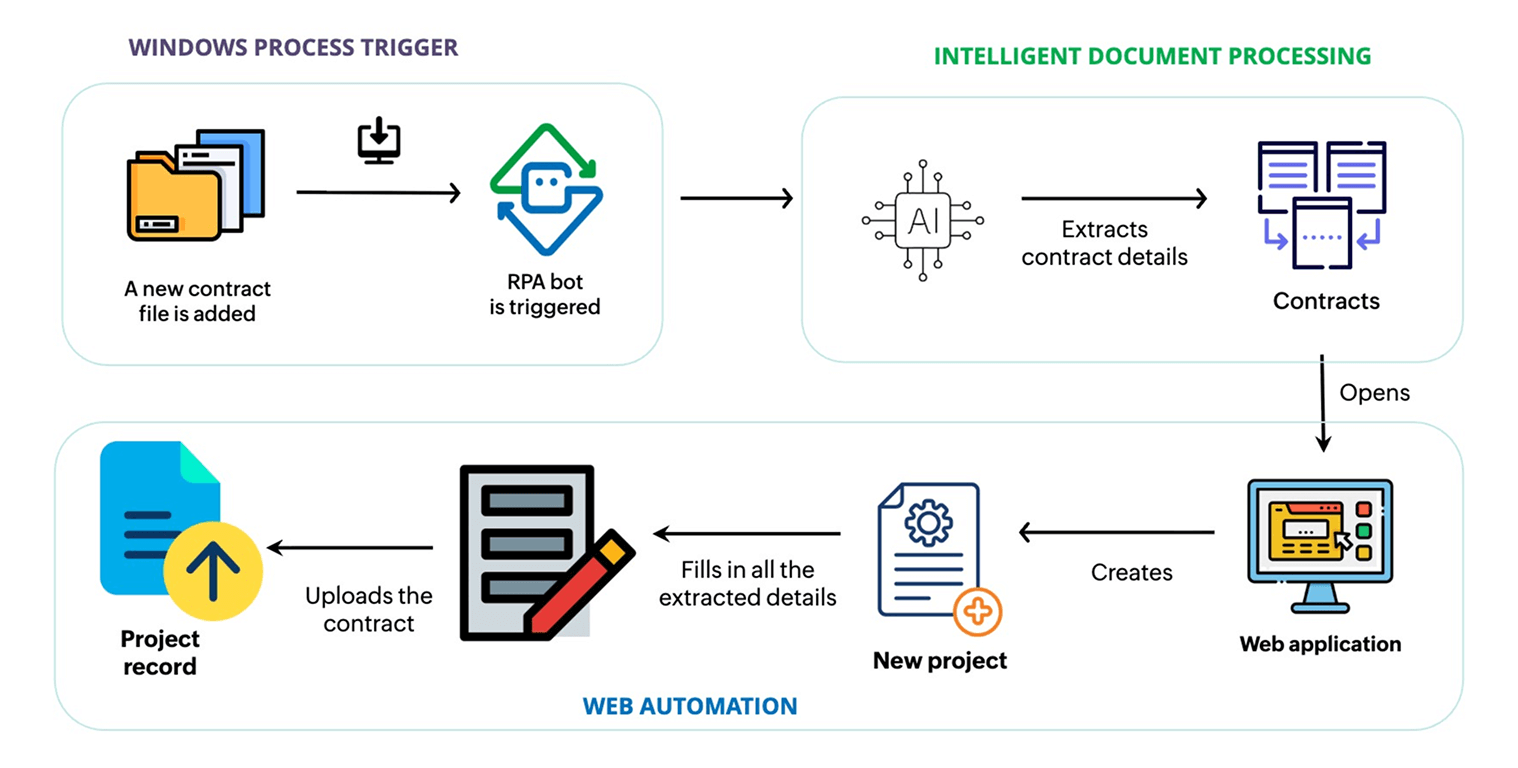
Automated folder monitoring
The bot keeps an eye on the folder where new contracts are uploaded. The moment a new file appears, the workflow starts. No one on the team needs to check for it manually.
AI-powered document extraction
Using Zoho’s AI-based intelligent document processing (IDP), the bot reads each contract and captures key details:
- Contract effective date
- Termination date and contract duration
- Client name and address
- Project budget and scope of work
Automatic project creation
The bot opens the project management app and creates a new project automatically. It then fills in all fields using the extracted data, saving hours of manual work and ensuring consistency.
Contract upload & organization
The original contract is uploaded directly into the project record, keeping all information organized and easy to access.
Watch Zoho RPA turn contracts into projects:
Before vs after Zoho RPA
| Before Zoho RPA | After Zoho RPA |
| Teams manually read contracts and enter project details. | The bot extracts contract data using AI-powered document processing and creates projects automatically. |
| Checking folders, opening files, and entering data takes hours. | Contracts are processed instantly as soon as they're added to the folder. |
| A high workload for repetitive tasks delays project setup. | Project setup is fast, consistent, and always up to date. |
| Teams spend less time on strategic work. | Teams can focus on planning, resource allocation, and client engagement. |
| Important details may be missed. | AI ensures all critical data is captured accurately. |
Key benefits of Zoho RPA for contract management
- Intelligent document processing – The AI reads contracts in any format and extracts all relevant data without manual effort.
- Faster project onboarding – Projects are created automatically, reducing setup time from hours to minutes.
- Consistent and accurate records – The bot ensures all project details are captured correctly and uploaded along with the contract.
- Scalable workflow – The bot handles multiple contracts and projects effortlessly, supporting growing teams without extra resources.
- Freedom for strategic work – Teams can focus on high-value tasks, such as planning, client communication, and project execution.
Ready to manage your contract documents?
Zoho RPA instantly creates projects using AI-powered document processing.
Want to see how it works?