


Functions

Functions in Zoho Books let you write small pieces of code to automate your business processes. Whether you want to provide a special discount on your customer’s invoice or add a late fee when an invoice becomes overdue, you can write the code using a Deluge script and link it to a workflow rule. The process is then automated for you.
Scenario: Let’s say you want to add a late fee to every invoice that becomes overdue. Instead of editing each invoice by hand, you can write a function with a Deluge script that calculates the late fee and adds it to the invoice. You then associate this function with a workflow rule that triggers when an invoice becomes overdue, so the late fee is applied automatically.
What is Deluge?
Deluge(Data Enriched Language for the Universal Grid Environment) is an online scripting language integrated with Zoho Creator. It enables users to add logic to the application, incrementally, making it more powerful and robust.
To learn about Deluge, see the Deluge Reference Guide.
To learn Deluge by writing code samples, see the Deluge code samples guide.
Create a Function
To create a function:
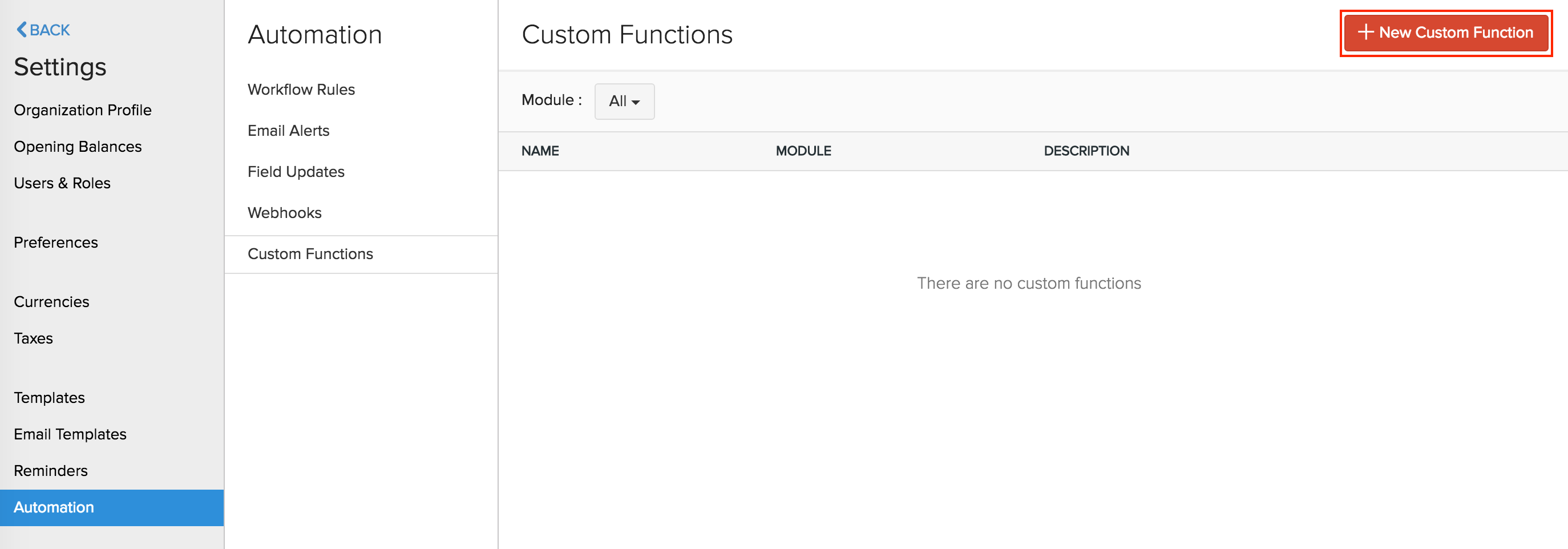
- Go to Settings on the top right corner of the page.
- Select Workflow Actions under Automation.
- In the Workflow Actions pane, select Functions.
- Click + New Function in the top right corner.
- On the New Function page:
- Enter a Name for your function and provide a small Description.
- Choose the Module for which you want to create the function.
- Choose the Programming Language in which you want to write the function’s code.
- If you chose Deluge as the programming language, click Proceed and type in or drag the parameters into the Deluge editor.
- If you chose a programming language other than Deluge, you need to enter the function’s code using the Zoho Finance CLI. You can use context methods to interact with platform features such as logging, caching, queues, file storage, scheduled execution, and third-party connectors.
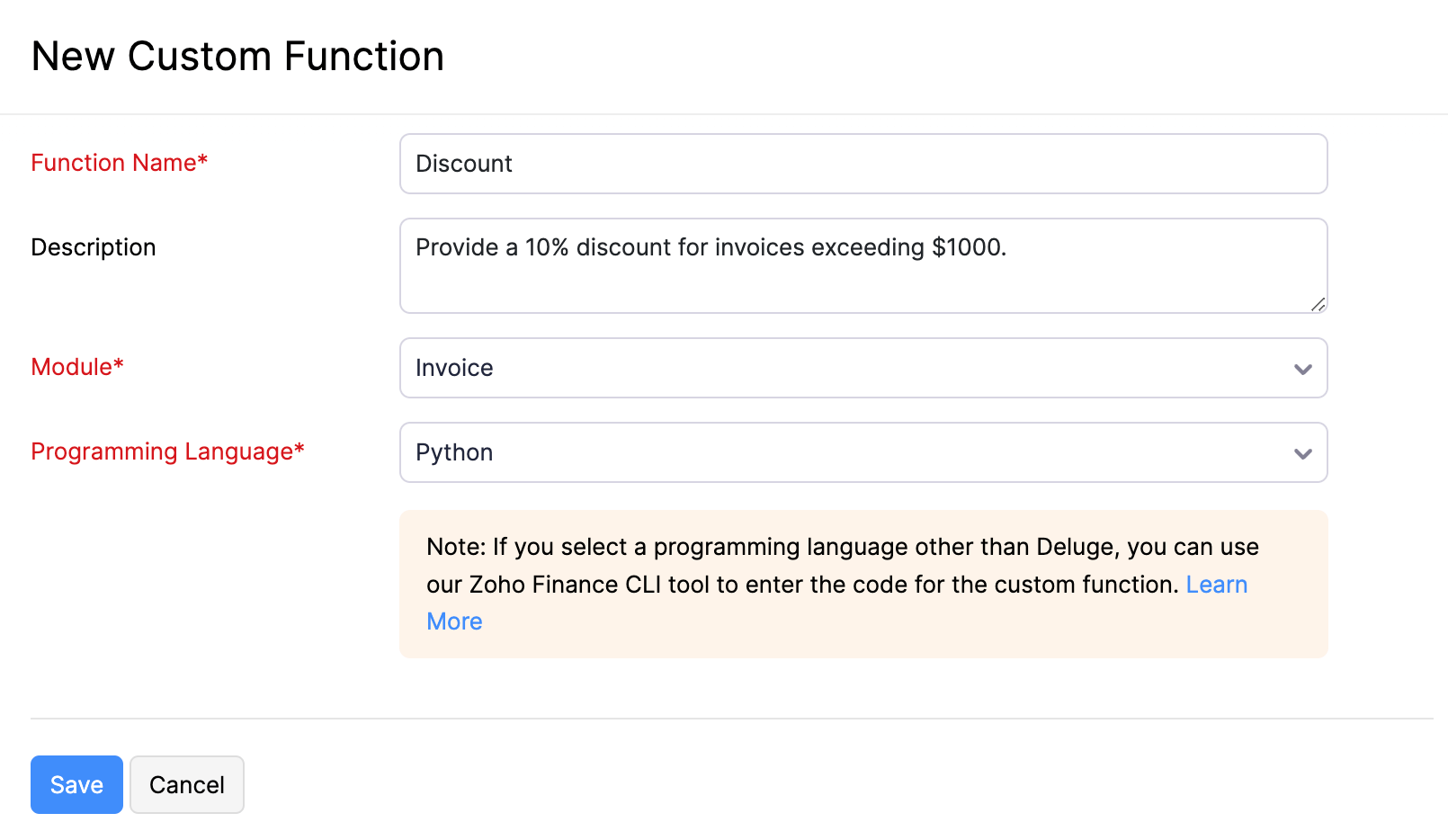
- Once done, click Save.
Custom Execution Status
When a custom function runs, the script can return a status code that explains what happened during execution. This helps the admin and the user understand why a workflow was executed, blocked, or partially executed.
To view or define these codes, click Custom Execution Status in the Deluge editor header. The following status codes are supported:
| Code | Meaning |
|---|---|
| 1000 | Success. The function executed and the workflow continues. |
| 1001 | Failure. The function executed but the workflow is treated as failed. |
| 1002 | Canceled. The workflow action was canceled by the function. |
| 1003 | Invalid input. One or more inputs to the function were not valid. |
| 1004 | Validation failed. A business validation inside the function did not pass. |
| 1005 | External service error. A call to an external service did not succeed. |
| 1006 | Permission denied. The function does not have the required permission to complete the action. |
| 1007 | Record not found. The record referenced by the function could not be located. |
| 1008 | Limit exceeded. A configured limit, such as API or Deluge component usage, was reached. |
| 1009 | Unknown error. The function failed for a reason not covered by the other codes. |
Note: To use custom execution status codes, your function should return a map that includes a status code and an optional message. The returned message is shown to the user when the workflow is blocked or fails.
View Deluge Components Usage
Custom Functions are built using Deluge components, and each component has a daily usage limit set by Zoho Books. To check how much of each component your organisation has used so far, click View Deluge Components Usage in the Deluge editor header.
The Deluge Components Usage (per Day) panel lists each component with its Total, Used, and Remaining counts for the current day. The components tracked are:
| Component | Description |
|---|---|
| invoke_url_api | Number of invokeurl calls made from your custom functions to external APIs. |
| webhook | Number of webhook calls triggered from your custom functions. |
| Number of emails sent from your custom functions using the sendmail task. |
Connections
Connections let you authenticate calls from your Deluge script to Zoho services and third-party applications without storing credentials inside the script. To manage connections used by your custom functions, click Connections in the Deluge editor header. You can create new connections, edit existing ones, and use them inside your script using the standard Deluge connection syntax.
Associate Functions with Workflow Rules
The functions you create should be associated with workflow rules so that they are triggered automatically when the required conditions are met. To associate functions with workflow rules:
- Go to Settings.
- Select Workflow Rules under Automation.
- Click + New Workflow Rule in the top right corner.
- Enter the necessary details. See Workflow Rules.
- Under Actions, choose Functions as the Type and select the function you want to associate with the workflow rule.
- Click Save.
Now, whenever the criteria is met, the workflow rule will be triggered, which in turn will trigger the function.
Default fields
As of now, functions support Users, Organisation, Quotes, Invoices, Sales Orders, Purchase Orders, Customers, Recurring Invoices, Expenses, Bills, Recurring Bills, and Items modules.
These modules will have the following fields from which you can get the necessary parameters for your function.
User
The user field supports the following parameters:
| Key Fields | Description |
|---|---|
| name | Name of the user |
| zuid | ZUID of the user |
Organization
The organisation map supports the following fields:
| Key Fields | Description |
|---|---|
| organisation_id | Your organisation ID |
| name | Organisation name |
| time_zone | Time zone of your organisation |
| language_code | Organisation’s language |
| date_format | Your organisation’s date format |
| currency_id | Currency ID |
| currency_code | Currency code |
| currency_symbol | Currency symbol |
| address | Organisation address |
| phone | Organisation’s contact number |
| fax | Fax number |
| website | Organisation URL |
| Email address | |
| portal_name | Portal name of your organisation |
Sample map:
{
	"time_zone": "Asia/Calcutta",
	"language_code": "en",
	"currency_id": "7605000000000099",
	"phone": "99999999999",
	"fax": "check",
	"website": "",
	"email": "charles@zylker.com",
	"address": {
		"zip": "624001",
		"country": "India",
		"city": "New Delhi",
		"street_address2": "Block 15",
		"street_address1": "6/35 Garden Lane,",
		"state": "Delhi"
	},
	"organisation_id": "12345678",
	"name": "Zlyker Industries",
	"date_format": "dd MMM yyyy",
	"currency_symbol": "Rs.",
	"portal_name": "zylkerindustry",
	"currency_code": "INR"
}
Quote
The quote map supports the following fields:
| Key Fields | Description |
|---|---|
| quote_id | Quote ID |
| quote_number | Your quote number |
| date | Quote date |
| reference_number | Reference number of your quote |
| status | Status of your quote |
| customer_id | ID of the customer who is assigned to the quote |
| customer_name | Your customer’s name |
| currency_id | Currency ID |
| currency_code | Currency code |
| currency_symbol | Currency symbol |
| exchange_rate | Exchange rate involved in the quote |
| expiry_date | Expiry date of the quote |
| discount_amount | Discount amount |
| discount | Discount |
| shipping_charge | Shipping charge entered in the quote |
| adjustment | Adjustments |
| sub_total | Sub total of the quote |
| total | Quote total |
| tax_total | Total tax amount in the quote |
| billing_address | Billing address of the customer |
| shipping_address | Shipping address of the customer |
| notes | Notes |
| terms | Terms and conditions |
| custom_fields | Quote custom fields |
| salesperson_id | ID of the salesperson |
| salesperson_name | Name of the salesperson |
Sample map:
{
	"total": "12000.0",
	"terms": “checking",
	"quote_id": "7605000000320001",
	"date": "2016-06-03",
	"quote_number": "EST-000026",
	"shipping_address": {
		"zip": "94588",
		"country": "USA",
		"address": "4910 Hopyard Rd",
		"city": "Pleasanton",
		"state": "CA",
		"fax": “Fax Number”
	},
	"salesperson_name": “Salesperson”,
	"adjustment": "0.0",
	"currency_symbol": "Rs.",
	"salesperson_id": "7605000000336089",
	"currency_code": "INR",
	"shipping_charge": "0.0",
	"custom_fields": [
		{
			"customfield_id": "7605000000190011",
			"is_active": true,
			"show_in_all_pdf": false,
			"value_formatted": "Check-6",
			"data_type": "autonumber",
			"index": 1,
			"label": "auto number",
			"show_on_pdf": false,
			"value": "Check-6"
		}
	],
	"currency_id": "7605000000000099",
	"exchange_rate": "1.0",
	"status": "invoiced",
	"sub_total": "12000.0",
	"customer_name": “Customer”,
	"discount_amount": "0.0",
	"discount": "0.0",
	"tax_total": "0.0",
	"reference_number": “Ref number”,
	"notes": "Looking forward for your business.",
	"expiry_date": "2016-06-03",
	"customer_id": "7605000000258011",
	"billing_address": {
		"zip": "94588",
		"country": "USA",
		"address": "4910 Hopyard Rd",
		"city": "Pleasanton",
		"state": "CA",
		"fax": "Fax Number"
	}
}
Invoice
The invoice map supports the following fields:
| Key Fields | Description |
|---|---|
| due_date | Invoice due date |
| payment_expected_date | Expected payment date for the invoice |
| reference_number | Reference number of the invoice |
| customer_id | Customer ID |
| customer_name | Name of the customer who is assigned to the invoice |
| currency_id | Currency ID |
| currency_code | Currency code |
| currency_symbol | Currency symbol |
| exchange_rate | Exchange rate involved in the invoice |
| discount_amount | Discount amount involved in the invoice |
| discount | Discount involved in the invoice |
| shipping_charge | Shipping charge entered in the invoice |
| adjustment | Adjustments |
| sub_total | Sub total of the invoice |
| tax_total | Total tax amount in the invoice |
| total | Total amount |
| balance | Balance |
| price_precision | Number of Decimal places |
| billing_address | Billing address of the customer |
| shipping_address | Shipping address of the customer |
| notes | Notes |
| terms | Terms and conditions |
| custom_fields | Invoice custom fields |
| salesperson_id | ID of the salesperson |
Sample map:
{
	"total": "0.0",
	"payment_terms": "0",
	"terms": “Checking”,
	"price_precision": "2",
	"payment_expected_date": "2016-06-31”,
	"date": "2016-06-30",
	"shipping_address": {
		"zip": "94588",
		"country": "USA",
		"address": "4910 Hopyard Rd",
		"city": "Pleasanton",
		"state": "CA",
		"fax": "Fax Number"
	},
	"balance": "0.0",
	"adjustment": "0.0",
	"currency_symbol": "Rs.",
	"salesperson_id": “7605000000336089”,
	"currency_code": "INR",
	"shipping_charge": "0.0",
	"custom_fields": [
		{
			"customfield_id": "7605000000336081",
			"is_active": true,
			"show_in_all_pdf": false,
			"value_formatted": "INV-8",
			"data_type": "autonumber",
			"index": 1,
			"label": "AutoNumber",
			"show_on_pdf": false,
			"value": "INV-8"
		},
		{
			"customfield_id": "7605000000351027",
			"is_active": true,
			"show_in_all_pdf": true,
			"value_formatted": "01 Aug 2016",
			"data_type": "date",
			"index": 2,
			"label": "Date",
			"show_on_pdf": true,
			"value": "2016-08-01"
		}
	],
	"currency_id": "7605000000000099",
	"exchange_rate": "1.0",
	"status": "draft",
	"sub_total": "12000.0",
	"customer_name": “Customer”,
	"invoice_number": "INV-000087",
	"discount_amount": "12000.0",
	"discount": "100.00%",
	"tax_total": "0.0",
	"reference_number": “checking”,
	"due_date": "2016-06-30",
	"invoice_id": "7605000000369043",
	"notes": "Thanks for your business.",
	"customer_id": "7605000000258011",
	"billing_address": {
		"zip": "94588",
		"country": "USA",
		"address": "4910 Hopyard Rd",
		"city": "Pleasanton",
		"state": "CA",
		"fax": "Fax Number"
	}
}
Sales Order
| Key Fields | Description |
|---|---|
| date | Sales Order date |
| tax_total | Total tax amount in the sales order |
| zcrm_potential_id | ID of the potential in Zoho CRM |
| discount_amount | Discount amount involved in the sales order |
| salesorder_id | Sales order ID |
| discount | Discount |
| shipment_date | Date on which shipment is made |
| billing_address | Billing address of the customer |
| line_items | Line items |
| currency_code | Currency code |
| total | Total amount |
| delivery_method_id | Delivery method ID |
| terms | Terms and conditions |
| delivery_method | Method of delivery |
| shipping_address | Shipping address of the customer |
| exchange_rate | Exchange rate involved in the sales order |
| currency_symbol | Currency symbol |
| custom_fields | Sales order custom fields |
| quote_id | Quote ID |
| reference_number | Reference number of the sales order |
| salesperson_name | Name of the salesperson involved |
| salesperson_id | ID of the salesperson involved |
| shipping_charge | Shipping charge entered in the sales order |
| salesorder_number | Your sales order number |
| sub_total | Sub total of the sales order |
| zcrm_potential_name | Name of the potential in Zoho CRM |
| adjustment | Adjustments made |
| customer_name | Name of the customer who is assigned to the sales order |
| customer_id | ID of the customer who is assigned to the sales order |
| currency_id | Currency ID |
| status | Status of your sales order |
Sample map:
{
	"date": "2016-05-23",
	"tax_total": "0.0",
	"zcrm_potential_id": "",
	"discount_amount": "1200.0",
	"salesorder_id": "7605000000295003",
	"discount": "10.00%",
	"shipment_date": "2016-05-23",
	"billing_address": {
		"zip": "94588",
		"country": "USA",
		"address": "4910 Hopyard Rd",
		"city": "Pleasanton",
		"state": "CA",
		"fax": "Fax Number"
	},
	"line_items": [
		{
			"bcy_rate": 12000,
			"line_item_id": "7605000000295011",
			"quantity": 1,
			"item_id": "7605000000259147",
			"tax_name": "",
			"description": "",
			"discount": 0,
			"item_total": 12000,
			"item_custom_fields": [
			],
			"tax_id": "",
			"is_invoiced": true,
			"item_order": 0,
			"tags": [
			],
			"stock_on_hand": "",
			"unit": "",
			"rate": 12000,
			"tax_type": "tax",
			"name": "Moto",
			"tax_percentage": 0
		}
	],
	"currency_code": "INR",
	"total": "10820.0",
	"delivery_method_id": "7605000000461053",
	"terms": "Terms & Conditions",
	"delivery_method": "Door Delivery",
	"shipping_address": {
		"zip": "",
		"country": "",
		"address": "",
		"city": "",
		"state": "",
		"fax": ""
	},
	"exchange_rate": "1.0",
	"currency_symbol": "Rs.",
	"custom_fields": [
		{
			"customfield_id": "7605000000321009",
			"is_active": true,
			"show_in_all_pdf": true,
			"value_formatted": "Text",
			"data_type": "string",
			"index": 1,
			"label": "Text",
			"show_on_pdf": true,
			"value": "Text"
		}
	],
	"quote_id": "7605000000405047",
	"reference_number": "Reference",
	"salesperson_name": "Arun",
	"salesperson_id": "7605000000135003",
	"shipping_charge": "10.0",
	"salesorder_number": "SO-00002",
	"sub_total": "12000.0",
	"zcrm_potential_name": "",
	"adjustment": "10.0",
	"customer_name": "Arun",
	"customer_id": "7605000000101007",
	"currency_id": "7605000000000099",
	"status": "invoiced"
}
Purchase Order
The purchase order map supports the following fields:
| Key Fields | Description |
|---|---|
| date | Date of the purchase order |
| delivery_address | Delivery address |
| tax_total | Total tax amount in the purchase order |
| delivery_org_address_id | ID of delivery org address |
| purchaseorder_id | Purchase order ID |
| expected_delivery_date | Expected delivery date |
| billing_address | Billing address of purchase order |
| line_items | Line items in the purchase order |
| currency_code | Currency code |
| total | Total of the purchase order |
| delivery_customer_id | Delivery customer ID |
| exchange_rate | Exchange rate involved in the purchase order |
| currency_symbol | Currency symbol |
| custom_fields | Purchase order custom fields |
| ship_via_id | ID of mode of shipping |
| vendor_name | Name of the vendor |
| reference_number | Reference number of your purchase order |
| purchaseorder_number | Purchase order number |
| delivery_date | Delivery date |
| vendor_id | Vendor ID |
| sub_total | Sub-total of the purchase order |
| ship_via | Means of shipping |
| attention | Attention |
| crm_owner_id | ID of Zoho CRM owner |
| currency_id | Currency ID |
| status | Status |
Sample map:
{
	"date": "2016-07-11",
	"delivery_address": {
		"zip": "94588",
		"country": "USA",
		"address": "4910 Hopyard Rd",
		"city": "Pleasanton",
		"state": "CA",
		"fax": "Fax Number"
	},
	"tax_total": "0.0",
	"delivery_org_address_id": "7605000000054013",
	"purchaseorder_id": "7605000000378500",
	"expected_delivery_date": "",
	"billing_address": {
		"zip": "94588",
		"country": "USA",
		"address": "4910 Hopyard Rd",
		"city": "Pleasanton",
		"state": "CA",
		"fax": "Fax Number"
	},
	"line_items": [
		{
			"bcy_rate": 1000,
			"line_item_id": "7605000000378504",
			"quantity": 1,
			"item_id": "7605000000298021",
			"tax_name": "",
			"description": "",
			"item_total": 1000,
			"tax_id": "",
			"item_order": 0,
			"tags": [

			],
			"unit": "No",
			"account_id": "7605000000000403",
			"rate": 1000,
			"tax_type": "tax",
			"account_name": "Advertising And Marketing",
			"name": "Moto G Turbo Edition",
			"tax_percentage": 0
		}
	],
	"currency_code": "INR",
	"total": "1000.0",
	"delivery_customer_id": "",
	"exchange_rate": "1.0",
	"currency_symbol": "Rs.",
	"custom_fields": "[]",
	"ship_via_id": "7605000000461053",
	"vendor_name": "Mr. Vendor",
	"reference_number": "Reference",
	"purchaseorder_number": "PO-00006",
	"delivery_date": "2016-07-11",
	"vendor_id": "7605000000112009",
	"sub_total": "1000.0",
	"ship_via": "Door Delivery",
	"attention": "Arun",
	"crm_owner_id": "",
	"currency_id": "7605000000000099",
	"status": "billed"
}
Customer
The customer map supports the following fields:
| Key Fields | Description |
|---|---|
| owner_id | ID of associated owner |
| billing_address | Billing address associated to customer |
| source | Source of the customer |
| contact_id | Contact ID |
| payment_terms | Payments terms associated to customer |
| currency_code | Currency code |
| language_code | Language code |
| contact_type | Type of the contact |
| Twitter info | |
| zcrm_contact_id | ID of the contact in Zoho CRM |
| shipping_address | Shipping address associated to customer |
| pricebook_id | ID of pricebook associated |
| contact_name | Name of contact |
| website | Website of contact |
| owner_name | Name of contact owner |
| currency_symbol | Currency symbol |
| zcrm_account_id | ID of Zoho CRM account |
| custom_fields | Custom fields associated with customer |
| Facebook info | |
| pricebook_name | Name of pricebook associated |
| primary_contact_id | ID of primary contact |
| company_name | Name of the company |
| contact_salutation | Contact salutation |
| crm_owner_id | ID of CRM owner |
| currency_id | Currency ID |
| payment_terms_label | Payment terms label |
| status | Status |
Sample map:
{
	"owner_id": "",
	"shipping_address": {
		"zip": "94588",
		"country": "USA",
		"address": "4910 Hopyard Rd",
		"city": "Pleasanton",
		"state": "CA",
		"fax": "Fax Number"
	},
	"source": "user",
	"contact_id": "7605000000197147",
	"payment_terms": "0",
	"currency_code": "INR",
	"language_code": "en",
	"contact_type": "customer",
	"twitter": "",
	"zcrm_contact_id": "",
	"billing_address": {
		"zip": "94588",
		"country": "USA",
		"address": "4910 Hopyard Rd",
		"city": "Pleasanton",
		"state": "CA",
		"fax": "Fax Number"
	},
	"pricebook_id": "",
	"contact_name": "Arun",
	"website": "www.zoho.com",
	"owner_name": "",
	"currency_symbol": "Rs.",
	"zcrm_account_id": "418070000000135001",
	"custom_fields": [
		{
			"customfield_id": "7605000000063049",
			"is_active": true,
			"show_in_all_pdf": false,
			"value_formatted": "1234",
			"data_type": "number",
			"index": 1,
			"label": "Unpaid Invoices",
			"show_on_pdf": false,
			"value": "1234"
		}
	],
	"facebook": "",
	"pricebook_name": "",
	"primary_contact_id": "7605000000197149",
	"company_name": "Zoho",
	"contact_salutation": "",
	"crm_owner_id": "",
	"currency_id": "7605000000000099",
	"payment_terms_label": "Due on Receipt",
	"status": "active"
}
Recurring Invoice
The recurring invoice map supports the following fields:
| Key Fields | Description |
|---|---|
| end_date | End date of the recurring invoice profile |
| tax_total | Total tax amount in the recurring invoice |
| discount_amount | Discount amount involved in the recurring invoice |
| repeat_every | Repetition period of recurring invoice profile |
| discount | Discount involved in the recurring invoice |
| taxes | Taxes associated with the recurring invoice |
| billing_address | Billing address of the customer |
| line_items | Line items in the recurring invoice |
| payment_terms | Payments terms associated to customer |
| currency_code | Currency code |
| last_sent_date | Date of the last sent invoice |
| total | Total amount |
| recurrence_name | Name of the recurring invoice profile |
| shipping_address | Shipping address of the customer |
| next_invoice_date | Date of the next invoice to be sent |
| recurrence_frequency | Frequency of the recurring invoice profile |
| recurring_invoice_id | ID of the recurring invoice profile |
| contact_persons | Contact persons involved in recurring invoice |
| start_date | Starting date of the recurring invoice profile |
| exchange_rate | Exchange rate involved in the recurring invoice |
| currency_symbol | Currency symbol |
| custom_fields | Recurring invoice custom fields |
| salesperson_name | Name of the sales person involved |
| salesperson_id | ID of the sales person involved |
| shipping_charge | Shipping charge entered in the recurring invoice |
| sub_total | Sub-total of the recurring invoice |
| adjustment | Adjustments made |
| customer_name | Name of the customer involved |
| customer_id | ID of the customer involved |
| status | Status of the recurring invoice profile |
Sample map:
{
	"end_date": "2016-10-15",
	"tax_total": "0.0",
	"discount_amount": "1.0",
	"repeat_every": "2",
	"discount": "1.00%",
	"taxes": "[]",
	"billing_address": {"zip":"","fax":"","address":"","state":"","country":"","city":""},
	"line_items": [{"tags":[],"tax_name":"","tax_type":"tax","item_custom_fields":[],"product_type":"service","line_item_id":"348960000000103013","discount":0,"unit":"","item_order":0,"rate":100,"item_id":"","description":"%(d)%-%(m-2)%-%(y)%","name":"","quantity":1,"tax_id":"","tax_percentage":0,"item_total":100}],
	"payment_terms": "0",
	"currency_code": "GBP",
	"last_sent_date": "",
	"total": "200.0",
	"recurrence_name": "1",
	"shipping_address": {"zip":"","fax":"","address":"","state":"","country":"","city":""},
	"next_invoice_date": "",
	"recurrence_frequency": "months",
	"recurring_invoice_id": "348960000000103005",
	"contact_persons": "[]",
	"start_date": "2016-01-07",
	"exchange_rate": "1.0",
	"currency_symbol": "£",
	"custom_fields": [{"value_formatted":"EST-001","index":1,"is_active":true,"data_type":"string","show_on_pdf":false,"value":"EST-001","show_in_all_pdf":false,"label":"Quote Number","customfield_id":"348960000000056001"},{"value_formatted":"15 Oct 2016","index":2,"is_active":true,"data_type":"date","show_on_pdf":false,"value":"2016-10-15","show_in_all_pdf":false,"label":"Date","customfield_id":"348960000000056003"},{"value_formatted":"true","index":3,"is_active":true,"data_type":"check_box","show_on_pdf":false,"value":true,"show_in_all_pdf":false,"label":"Invoice Factoring","customfield_id":"348960000000056079"},{"value_formatted":"£100.00","index":4,"is_active":true,"data_type":"amount","show_on_pdf":true,"value":100,"show_in_all_pdf":true,"label":"Amount","customfield_id":"348960000000060003"},{"value_formatted":"10%","index":5,"is_active":true,"data_type":"percent","show_on_pdf":true,"value":10,"show_in_all_pdf":true,"label":"Percentage","customfield_id":"348960000000060005"}],
	"salesperson_name": "Arun N",
	"salesperson_id": "348960000000111001",
	"shipping_charge": "100.0",
	"sub_total": "100.0",
	"adjustment": "1.0",
	"customer_name": "iArun",
	"customer_id": "348960000000051041",
	"status": "expired"
}
Expense
The expense map supports the following fields:
| Key Fields | Description |
|---|---|
| date | Date |
| payment_mode | Mode of payment |
| custom_fields | Expense custom fields |
| vendor_name | Name of the vendor involved |
| is_billable | Billability of the expense |
| line_items | Line items in the expense |
| project_name | Name of the project involved |
| reference_number | Reference number of the expense |
| currency_code | Currency code |
| total | Total |
| project_id | ID of the project involved |
| vendor_id | ID of the vendor involved |
| sub_total | Sub-total on the expense |
| customer_name | Name if the customer involved |
| customer_id | ID of the customer involved |
| expense_id | Expense ID |
| currency_id | Currency ID |
Sample map:
{
	"date": "2016-10-08",
	"payment_mode": "Cash",
	"custom_fields": "[]",
	"vendor_name": "Vendor",
	"is_billable": "true",
	"line_items": [{"tags":[],"tax_name":"Standard Rate","item_order":1,"tax_type":"tax","account_id":"348960000000000400","description":"Notes","tax_amount":16.67,"product_type":"goods","tax_id":"348960000000044037","line_item_id":"348960000000184015","tax_percentage":20,"item_total":83.33,"account_name":"Office Supplies"}],
	"project_name": "",
	"reference_number": "12345",
	"currency_code": "GBP",
	"total": "100.0",
	"project_id": "",
	"vendor_id": "348960000000051033",
	"sub_total": "83.33",
	"customer_name": "Accounts",
	"customer_id": "348960000000111017",
	"expense_id": "348960000000184003",
	"currency_id": "348960000000000103"
}
Bill
The bill map supports the following fields:
| Key Fields | Description |
|---|---|
| date | Date on the bill |
| bill_id | ID of the bill |
| purchaseorder_ids | ID of the purchase order involved |
| tax_total | Total tax amount in the bill |
| exchange_rate | Exchange rate involved in the bill |
| currency_symbol | Currency symbol |
| custom_fields | Bill custom fields |
| due_date | Due date of the bill |
| vendor_name | Name of the vendor involved |
| billing_address | Billing adress |
| line_items | Line items in the bill |
| payment_terms | Payments terms associated to vendor |
| payment_expected_date | Expected payment date |
| reference_number | Reference number of the bill |
| currency_code | Currency code |
| total | Total on the bill |
| bill_number | Bill number |
| payment_made | Payment made for the bill |
| balance | Balance amount |
| recurring_bill_id | ID of the recurring bill profile |
| vendor_id | ID of the vendor involved |
| sub_total | Sub-total on the bill |
| status | Bill status |
Sample map:
{
	"date": "2016-10-12",
	"bill_id": "348960000000193039",
	"purchaseorder_ids": "[]",
	"tax_total": "0.0",
	"exchange_rate": "1.0",
	"currency_symbol": "£",
	"custom_fields": "[]",
	"due_date": "2016-10-15",
	"vendor_name": "Vendor",
	"billing_address": {"zip":"","fax":"","address":"","state":"","country":"","city":""},
	"line_items": [{"tags":[],"tax_name":"","project_name":"","tax_type":"tax","account_id":"348960000000000412","customer_name":"","is_billable":false,"product_type":"goods","line_item_id":"348960000000193047","invoice_number":"","sku":"","purchaseorder_item_id":"","account_name":"Credit Card Charges","unit":"1","item_order":0,"rate":33000,"bcy_rate":33000,"item_id":"348960000000087031","description":"","project_id":"","name":"refrigerator","tax_id":"","quantity":1,"invoice_id":"","tax_percentage":0,"customer_id":"","item_total":33000}],
	"payment_terms": "3",
	"payment_expected_date": "",
	"reference_number": "1",
	"currency_code": "GBP",
	"total": "33000.0",
	"bill_number": "Bill-001",
	"payment_made": "0.0",
	"balance": "33000.0",
	"recurring_bill_id": "",
	"vendor_id": "348960000000051033",
	"sub_total": "33000.0",
	"status": "open"
}
Recurring Bill
The recurring bill map supports the following fields:
| Key Fields | Description |
|---|---|
| end_date | End date of the recurring bill profile |
| tax_total | Total tax amount in the recurring bill |
| exchange_rate | Exchange rate involved in the recurring bill |
| custom_fields | Recurring bill custom fields |
| repeat_every | Repetition period of recurring bill profile |
| taxes | Taxes involved in the recurring bill |
| vendor_name | Name of the vendor involved |
| line_items | Line items in the recurring bill |
| payment_terms | Payments terms associated to vendor |
| currency_code | Currency code |
| last_sent_date | Date of the last sent bill |
| total | Recurring bill total |
| next_bill_date | Date of the next bill |
| recurring_bill_id | ID of the recurring bill |
| recurrence_name | Name of the recurring bill profile |
| vendor_id | ID of the vendor involved |
| sub_total | Sub-total on the recurring bill |
| recurrence_frequency | Frequency of the recurring invoice profile |
| payment_terms_label | Payment terms label |
| status | Status of the recurring bill profile |
| start_date | Starting date of the recurring bill profile |
Sample map:
{
	"end_date": "2016-10-15",
	"tax_total": "0.0",
	"exchange_rate": "1.0",
	"custom_fields": "[]",
	"repeat_every": "1",
	"taxes": "[]",
	"vendor_name": "Vendor",
	"line_items": [{"tags":[],"tax_name":"","account_id":"348960000000000403","tax_type":"tax","product_type":"goods","line_item_id":"348960000000193067","account_name":"Advertising And Marketing","unit":"","item_order":0,"rate":900,"bcy_rate":900,"item_id":"348960000000051011","description":"","name":"Item","quantity":1,"tax_id":"","tax_percentage":0,"item_total":900}],
	"payment_terms": "0",
	"currency_code": "GBP",
	"last_sent_date": "2016-10-12",
	"total": "900.0",
	"next_bill_date": "",
	"recurring_bill_id": "348960000000193061",
	"recurrence_name": "RB-001",
	"vendor_id": "348960000000051033",
	"sub_total": "900.0",
	"recurrence_frequency": "weeks",
	"payment_terms_label": "Due on Receipt",
	"status": "expired",
	"start_date": "2016-10-12"
}
Item
The item map supports the following fields:
| Key Fields | Description |
|---|---|
| item_id | Item ID |
| custom_fields | Item custom fields |
| item_type | Type of the item |
| tax_name | Name of the tax involved |
| purchase_rate | Purchase rate of the item |
| zcrm_product_id | ID of the product in Zoho CRM |
| tax_id | ID of the tax involved |
| unit | Unit of the item |
| account_id | Sales account ID |
| purchase_account_name | Name of the purchase account |
| purchase_account_id | Purchase account ID |
| tax_type | Type of the tax involved |
| rate | Sales rate of the item |
| account_name | Name of the sales account involved |
| name | Name of the item |
| tax_percentage | Percentage of tax involved |
| pricebook_rate | Pricebook rate |
| sku | SKU of the item |
| status | Status of the item |
Sample map:
{
	"item_id": "348960000000051011",
	"custom_fields": [{"value_formatted":"100","index":1,"is_active":true,"data_type":"decimal","show_on_pdf":true,"value":100,"show_in_all_pdf":true,"label":"Profit","customfield_id":"348960000000134003"}],
	"item_type": "sales_and_purchases",
	"tax_name": "",
	"purchase_rate": "900.0",
	"zcrm_product_id": "1665395000000205001",
	"tax_id": "",
	"unit": "1",
	"account_id": "348960000000000388",
	"purchase_account_name": "Advertising And Marketing",
	"purchase_account_id": "348960000000000403",
	"tax_type": "",
	"rate": "1000.0",
	"account_name": "Sales",
	"name": "Item",
	"tax_percentage": "0",
	"pricebook_rate": "1000.0",
	"sku": "SKU",
	"status": "active"
}
A few example explaining how these fields would help in fetching the necessary parameters:
Example 1:
To fetch quote id, use:
quoteid = quote.get("quote_id");
Example 2:
To fetch your organisation name, use:
orgid = organisation.get("name");
Example 3:
To fetch a user’s name and ZUID, use:
username = user.get("name");
zuid = user.get("zuid");
To learn more about how to use Deluge scripts for writing functions, see the Deluge Reference Guide.
To learn more about different scenarios where functions could be useful, see the Function Scenarios page.
Edit Functions
If you want to update the details of a function, you can edit it. Here’s how:
- Go to Settings on the top right corner of the page.
- Select Workflow Actions under Automation.
- In the Workflow Actions pane, select Functions.
- Hover over the function you want to edit, click the dropdown to the right, and select Edit.
- Make the necessary changes and click Save.
Filter Functions
You can find functions easily by filtering them by the module for which they were created. To filter functions:
- Go to Settings on the top right corner of the page.
- Select Workflow Actions under Automation.
- In the Workflow Actions pane, select Functions.
- Under Module, select a module from the dropdown. The functions created for the selected module will be displayed.
Delete Functions
Warning: Deleting a function is permanent and cannot be undone. If the function is associated with a workflow rule, the workflow rule will not be executed.
If you no longer require certain functions, you can delete them. Here’s how:
- Go to Settings on the top right corner of the page.
- Select Workflow Actions under Automation.
- In the Workflow Actions pane, select Functions.
- Hover over the function you want to delete, click the dropdown to the right, and select Delete.
- Confirm your action by clicking Delete in the pop-up.
 Yes
Yes