

- HOME
- Expense Management
- What is expense management software? Benefits and features explained
What is expense management software? Benefits and features explained
Expense management is the process of capturing, verifying, approving, reimbursing, and auditing the expenses employees incur on behalf of the business, so that every penny the business spends is accounted for. Automating this process is the purpose of expense management software, which streamlines the entire employee expense reporting cycle, increasingly with AI doing the repetitive work, and helps businesses track and control employee spending.
This guide covers the full expense management process — what it is, why it matters, the five steps involved, how manual and automated approaches compare, common challenges, and best practices — along with the capabilities, benefits, features, and use cases of expense management software.

What is expense management?
Expense management is the end-to-end process of handling employee-initiated business spending. It covers the expenses employees incur while doing their jobs that the company either reimburses or settles through corporate cards. Typical examples include flights, hotels, and meals on business trips; mileage for client visits; client entertainment; per diems; petty cash purchases at branch offices; and small tools or subscriptions bought out of pocket.
Every expense follows the same lifecycle regardless of company size. A policy is set, money is spent, the expense is reported, someone approves it, the employee is reimbursed or the corporate card transaction is reconciled, and finance reviews the record. Expense management software streamlines this entire expense reporting lifecycle by capturing receipts, enforcing policies, routing approvals, reconciling corporate card transactions, and increasingly using AI to automate repetitive tasks such as receipt data extraction, expense categorization, policy checks, and duplicate detection. This helps businesses improve accuracy, reduce manual effort, and gain better control over employee spending. This guide explains what expense management is, why it matters, the five steps involved, how manual and automated approaches compare, common challenges and best practices, along with the capabilities, benefits, features, and use cases of expense management software.
Expense management vs. expense tracking
Expense tracking records what was spent. It is one component of expense management. Expense management covers the full lifecycle, including setting policies, enforcing them during expense submission, routing approvals, processing reimbursements, reconciling corporate card transactions, and auditing expenses. A company can track expenses accurately and still manage them poorly.
Expense management vs. spend management
Expense management covers employee-initiated business spending such as travel expenses, out-of-pocket purchases, and corporate card transactions. Spend management is broader. It includes all company spending, including procurement, vendor payments, contracts, accounts payable, and, in many organizations, broader purchasing controls. Expense management is a subset of spend management.
Why does expense management matter?
Cash flow
Employee expenses are high-volume, low-value transactions scattered across employees, corporate cards, and locations. Until an expense is reported or a corporate card transaction is imported, it remains an unaccounted business expense that finance may not have complete visibility into. When expense reports are submitted weeks late, cash flow forecasts become less accurate, month-end close takes longer, and budget overruns often surface only after the money has been spent.
Compliance
Tax authorities require documented proof, including receipts, amounts, dates, and a valid business purpose, before business expenses can be deducted or reimbursed under applicable tax rules. In the US, reimbursements are generally tax-free under an accountable plan only if expenses are properly substantiated. In VAT and GST jurisdictions, reclaiming input tax typically depends on retaining valid tax invoices and supporting documentation for eligible business expenses. A complete, accurate expense trail is also one of the first things internal and external auditors review during an audit.
Fraud
Expense reimbursement fraud — inflated claims, duplicate submissions, personal purchases disguised as business, is a fixture of the ACFE’s Report to the Nations research: the 2024 edition found it in roughly 13% of occupational fraud cases, with a median loss of $50,000 per scheme. The newly released Occupational Fraud 2026: A Report to the Nations puts the median occupational fraud loss at $104,000 per case and finds the typical scheme runs 12 months before detection, and the longer fraud runs, the more it costs: schemes caught within six months cost a median $40,000, while those running five-plus years exceed $1.1 million. Weak controls make it easy: when approvers rubber-stamp reports and no one matches receipts to transactions, small padding becomes a habit.
Employee experience
Every out-of-pocket business expense is effectively an interest-free loan from the employee to the company until reimbursement is made. When reimbursements take weeks, employees end up financing business expenses with their personal funds or credit cards. Slow, unpredictable reimbursement reduces employee trust, creates financial stress, and discourages timely expense reporting. Fast, transparent reimbursement is one of the simplest ways finance teams can improve the employee experience.
The expense management process: 5 steps
Expense management follows a continuous cycle. Insights from audits and spending patterns help businesses refine their policies over time, making the process more efficient and compliant with every iteration.
Step 1: Set the expense policy
An expense policy establishes the rules that guide every stage of the process. It should clearly define which expenses are reimbursable, spending limits by category, employee role, or trip, applicable per diem rates, receipt requirements, submission deadlines, approval workflows, and reimbursement timelines. For higher-value expenses such as flights, conferences, or international travel, requiring pre-approval helps prevent unnecessary spending before costs are incurred. The policy should also be simple and easy to understand so employees can follow it consistently.
Step 2: Employee submits the expense
After making a business purchase, the employee captures the receipt, ideally at the time of purchase, categorizes the expense, assigns it to the appropriate project, department, or client if needed, adds the business purpose, and submits it as part of an expense report. This stage has the biggest impact on data quality, as missing receipts, incorrect categories, or manually entered amounts can create issues later in the approval and reimbursement process.
Step 3: Approval
Managers or designated approvers review submitted expenses to ensure they comply with company policy, are supported by the required documentation, and serve a legitimate business purpose. Many organizations use multi-level approval workflows, where routine expenses require a single approval while higher-value claims or policy exceptions are routed to additional approvers. Finance teams then validate expense categories, receipts, and accounting details before approving the expenses for reimbursement or reconciliation.
Step 4: Reimbursement
Once approved, eligible out-of-pocket expenses are reimbursed through payroll or direct bank transfer within the organization's committed reimbursement timeline. Corporate card expenses follow a different process. Instead of reimbursing employees, finance teams reconcile each card transaction by matching it with the corresponding receipt and approved expense record. In both cases, expenses are accurately coded and recorded in the accounting system, ensuring reliable financial reporting and a smoother month-end close.
Step 5: Audit and review
The process concludes with an audit and review of expense data. Finance teams look for duplicate claims, policy violations, unusual spending patterns, and potential fraud while analyzing expenses by department, project, category, or employee. Common metrics include reimbursement turnaround time, policy compliance rate, cost per expense report, and the proportion of spending made using corporate cards versus employee out-of-pocket payments. These insights help businesses refine their expense policies, improve controls, and make the next expense management cycle more efficient.
Manual vs. automated expense management
Both manual and automated expense management follow the same core process, from capturing receipts to auditing expenses. The difference lies in how each step is handled. Manual processes rely on spreadsheets, paper receipts, emails, and repetitive data entry, while expense management software automates routine tasks, enforces policies, speeds up approvals, and gives finance teams real-time visibility into employee spending.
| Stage | Manual process | Automated process |
| Receipt capture | Paper receipts collected and stored; losses are routine | Photo at point of spend; OCR extracts the data; digital archive |
| Report creation | Employee re-keys data into spreadsheets (~20 minutes per report, per GBTA) | Auto-generated from scanned receipts and card feeds |
| Policy checks | Approver memory and manual lookups; violations slip through | Policy engine flags or blocks violations at submission |
| Approvals | Email chains and follow-ups; days to weeks | Auto-routed with reminders and mobile approval; hours to days |
| Reimbursement | Batch cycles; employees can wait past the next payroll | Queued on approval and paid within a published SLA |
| Error rate | 19% of reports contain errors; $52 and 18 minutes to correct each (GBTA) | Validation at entry; ~65% fewer errors (Aberdeen Group) |
| Fraud detection | Spot checks after the money is paid | Duplicate detection and receipt-to-transaction matching before payment |
| Visibility | Finance sees spend after month-end | Real-time dashboards and budget alerts |
| Cost per report | ~$58 (GBTA) | ~30% lower processing costs (Aberdeen Group) |
Top expense management challenges
Lost receipts
Receipts are often lost between the time an expense is incurred and when it is reported. Missing receipts can lead to delayed reimbursements, rejected claims, or employees choosing not to submit smaller expenses. Encouraging employees to capture receipts at the point of purchase using a mobile app creates a digital record immediately and reduces the risk of missing documentation.
Slow approvals
Expense reports often remain pending when approvers are traveling, unavailable, or managing competing priorities. Delayed approvals slow reimbursements, reduce employee satisfaction, and limit finance teams' visibility into current business spending. Automated approval workflows, delegation rules, reminders, and mobile approvals help keep the process moving without unnecessary delays.
Policy violations
Many policy violations are unintentional. Employees may not be familiar with company policies, or the guidelines may be difficult to find and understand. Discovering violations after reimbursement creates additional work for finance teams and can require recovering ineligible reimbursements. Clear expense policies, combined with automated policy checks during expense submission, help prevent issues before they reach the approval stage.
Manual errors and duplicate claims
Manually entering expense data increases the likelihood of incorrect amounts, duplicate submissions, missing information, and currency errors. According to GBTA research, 19% of expense reports contain errors, creating additional work for finance teams. AI-powered receipt capture, automatic data extraction, duplicate detection, and receipt-to-card transaction matching reduce manual entry and improve data accuracy.
Lack of real-time visibility
When expense data is submitted in batches, finance teams often lack an up-to-date view of employee spending. This makes it harder to monitor budgets, forecast cash flow, identify unusual spending patterns, or negotiate better vendor agreements based on actual spending trends. Real-time dashboards, spend analytics, and budget alerts provide finance teams with timely insights to make better financial decisions.
Expense management best practices
- Keep your expense policy simple and accessible. Employees are more likely to follow a policy that is concise, easy to understand, and readily available. Wherever possible, surface policy guidance within the expense submission process instead of relying on a separate document.
- Capture receipts at the point of purchase. Encourage employees to photograph receipts as soon as they make a business purchase. Capturing receipts immediately reduces the risk of lost documentation and improves the accuracy of expense reports.
- Enforce policy compliance during submission. Automated policy checks help identify missing information, spending limit violations, or non-compliant expenses before they reach the approval stage. Addressing issues early is faster and easier than resolving them after reimbursement.
- Set clear reimbursement timelines and meet them consistently. Employees should know when to expect reimbursement for eligible out-of-pocket expenses. A predictable reimbursement process improves employee satisfaction and encourages timely expense reporting.
- Audit expense reports regularly. Review a representative sample of expense reports each reporting cycle, with additional attention to higher-risk categories such as mileage, entertainment, cash expenses, and duplicate claims. Regular audits help identify policy violations, reduce fraud risk, and strengthen internal controls.
Review spending data regularly. Analyze expense trends by department, project, category, and vendor to identify cost-saving opportunities, refine budgets, update per diem rates where applicable, and negotiate better supplier agreements.
While these best practices can be followed using manual processes, maintaining them consistently becomes much easier with expense management software. Automation helps organizations enforce policies, reduce manual effort, improve accuracy, and gain real-time visibility into employee spending.
What is expense management software?
Expense management software is an application that helps businesses track and control employee expenses through automation. Most expense management software on the market is equipped with technology such as optical character recognition (OCR) that captures and converts receipts to expenses. Many also automate the approval processes and help companies reimburse faster.
Artificial intelligence now does much of this work end to end. AI reads receipts at line-item level, categorizes expenses, and audits them for anomalies, and the industry is moving toward "touchless" expense reporting, where reports are created automatically from card transactions and scanned receipts, checked against policy, and routed for approval before an employee touches them. Newer agentic AI systems go a step further: rather than only flagging exceptions, they investigate discrepancies, match receipts to transactions, and escalate only genuine judgment calls to a human. This lets businesses and employees leave the entire expense management process to the software while they focus on their core activities.
Businesses with sales teams that frequently travel, companies with multiple branches managing petty cash expenses, and on-site employees working on customer billable services are some that would benefit highly from expense management automation. Depending on the nature of your business and the complexity of your expenses, you must choose the right expense management software to maximize ROI.
Why is expense management software important?
If you are a part of a business that requires tracking business expenses incurred by employees, you know that manually collecting expenses, creating a report, checking for company policies, submitting a report, fixing errors, and following up for approvals until a reimbursement is issued is a long, arduous process—one that most employees hate and often dread.
According to a GBTA Foundation survey conducted with HRS, 49% of employees believe setting up expense reports is a pain point, while 54% find entering expense data, and 55% report attaching the receipts to be issues when processing expense reports. As an administrator or approver, you are required to check every expense detail filled by the submitter, and verify, approve, or correct errors for the numerous reports submitted. This process is riddled with manual errors, fraudulent activities, and often proves to be highly time-consuming. This makes manual expense management a high-risk and costly business activity.
Expense management software helps businesses overcome these challenges with automation that minimizes human intervention. Receipt scanning technology digitally scans receipts and extracts data to fill in the details of your expense to ensure every expense is an accurate reimbursement request.
Automation engines run configured company policies across all expense requests. They help check out-of-policy expenses and raise notifications to ensure businesses have complete control over fraudulent expenses while maintaining policy compliance and budget adherence. Increasingly these checks are AI-driven: models learn what normal spending looks like for a role, region, or vendor and surface the claims that quietly don’t fit.
Automatic submission of expense reports at strict intervals is another feature that businesses leverage, especially for traveling sales teams. As sales employees scan or upload invoices from their travels throughout the month into the software, a quick automated report collects all auto-converted expenses into a report and submits the same to the designated approver, saving admins and employees substantial time lost in follow ups and report creation.
An Aberdeen Group report titled, "Expense Management Study: The Convergence of Mobile, Cloud, and Artificial Intelligence," states automated expense management saves companies 30% in expense processing costs, reduces errors by 65%, and lowers report approval times by 50%, proving the substantial impact of expense automation.
Key benefits of using expense management software
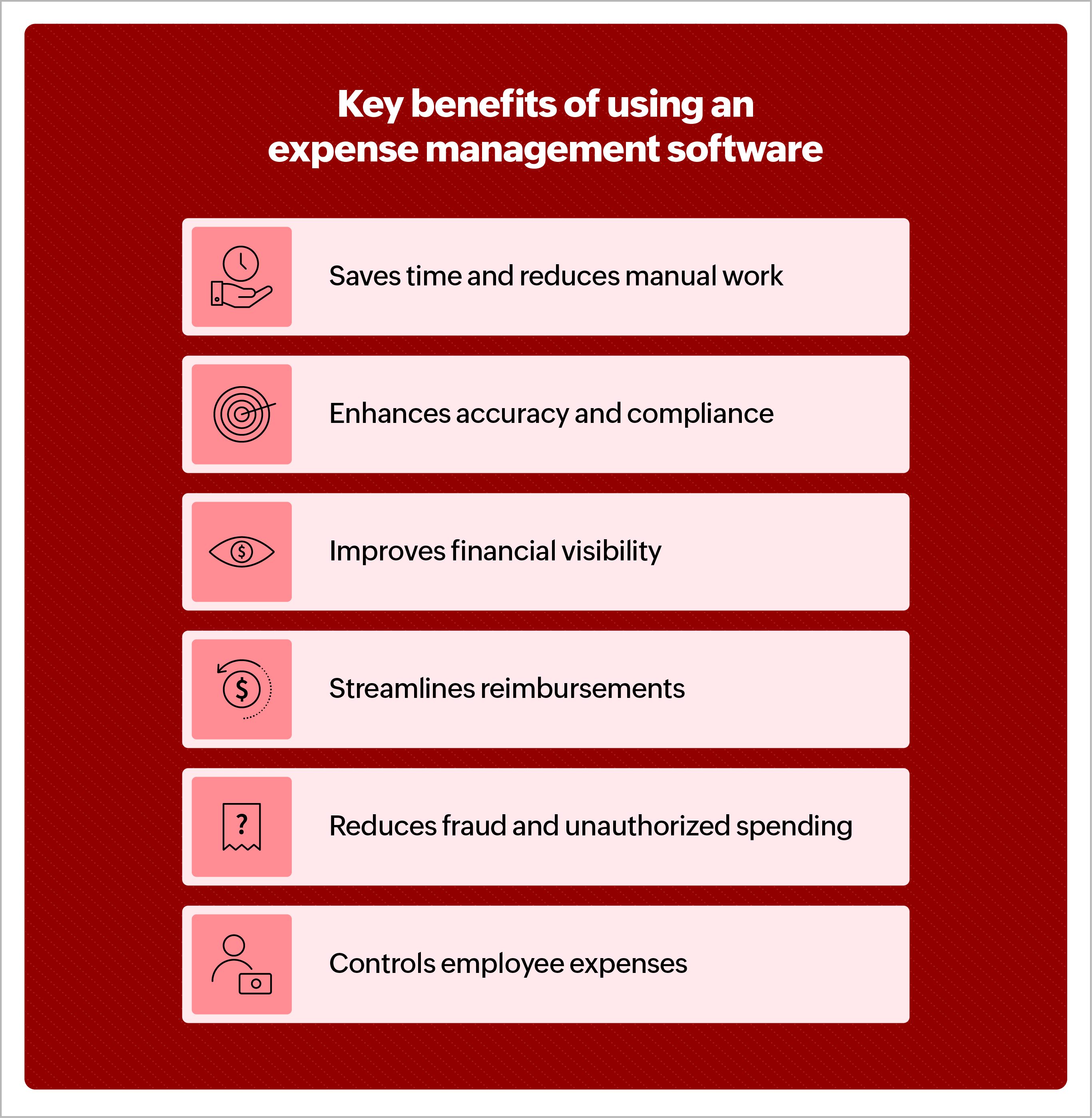
Saves time and reduces manual work
Employees take, on average, 20 minutes to complete one expense report and 18 minutes to correct one expense report. The average cost of processing an expense report is around $58, and 19% of manual expense reports are riddled with errors, which take about $52 to correct. These stats, published by the GBTA, help understand the value that automation brings to an organization that manages expense reports manually.
Enhances accuracy and compliance
Rule engines, workflows, and policies allow businesses to customize expense management software according to their company’s requirements. This helps ensure continuous automated audits and approvals that highlight and restrict out-of-policy expenses, ensuring accuracy and compliance.
Improves financial visibility
With automated expense conversion of credit card transactions and easy expense receipt scanning, employee expense data is captured and tracked in real time. This gives businesses complete visibility to assess their real-time expense utilization, which can be used to course-correct the company’s budgets and forecasts. Reports, notifications, and alerts allow administrators to keep track of budget utilization and make decisions for future expenses. AI-driven analytics push this further — from reporting what was spent to forecasting what will be, so budgets are set on projected spend rather than last year’s totals.
Streamlines reimbursements
With automation, the time saved in back-and-forth communications ensures faster processing of employee expenses, leading to faster reimbursements. These, in turn, ensure high employee satisfaction and positive motivation. With all the data available in one place, approvers and administrators can verify and process expense reimbursements quickly, and integrated accounting software ensures books are closed on time, every time.
Reduces fraud and unauthorized spending
With complete dependency on audit engines and scanning technologies, expense management software ensures fraudulent practices such as duplicate invoices, mismatched expense and receipt amounts, blocked merchant expenses, and more are automatically weeded out from the system. Company policy limits on expense categories configured in the app can automatically block or warn over-the-limit spends and control expenses. AI strengthens this layer: computer vision can spot altered or reused receipt images, and anomaly detection catches duplicate or out-of-pattern claims that rule-based checks miss.
Controls employee expenses
Employee expense management software with budget modules and category-level, user-level, or department-level spend limits ensures complete control over employee expenses. Many software solutions offer affiliated corporate cards that allow businesses to configure built-in limits so admins can control spend before it is incurred.
Medium-sized businesses with 100–500 employees
Medium-sized businesses are usually growing businesses with the majority of their challenges relating to the uncontrollable growth rate. These growing pains are usually because of resource crunch during high demand. From prioritizing to streamlining, businesses in this stage focus on improving productivity with the existing workforce.
An expense management platform that can automate your business's current workflow and expedite the process so admins can manage more in the same time is your solution. Look for applications that allow customizations without restricting scalability or complicating the process.
Businesses depend on software providers for prompt inquiry resolutions and customer service when required. As a mid-sized business, you are bound to process a large amount of expenses in short time periods requiring quick help and service in case of errors or downtime. Ensure the expense management provider offers robust customer service and uptime guarantee.
Must-have features of expense management software
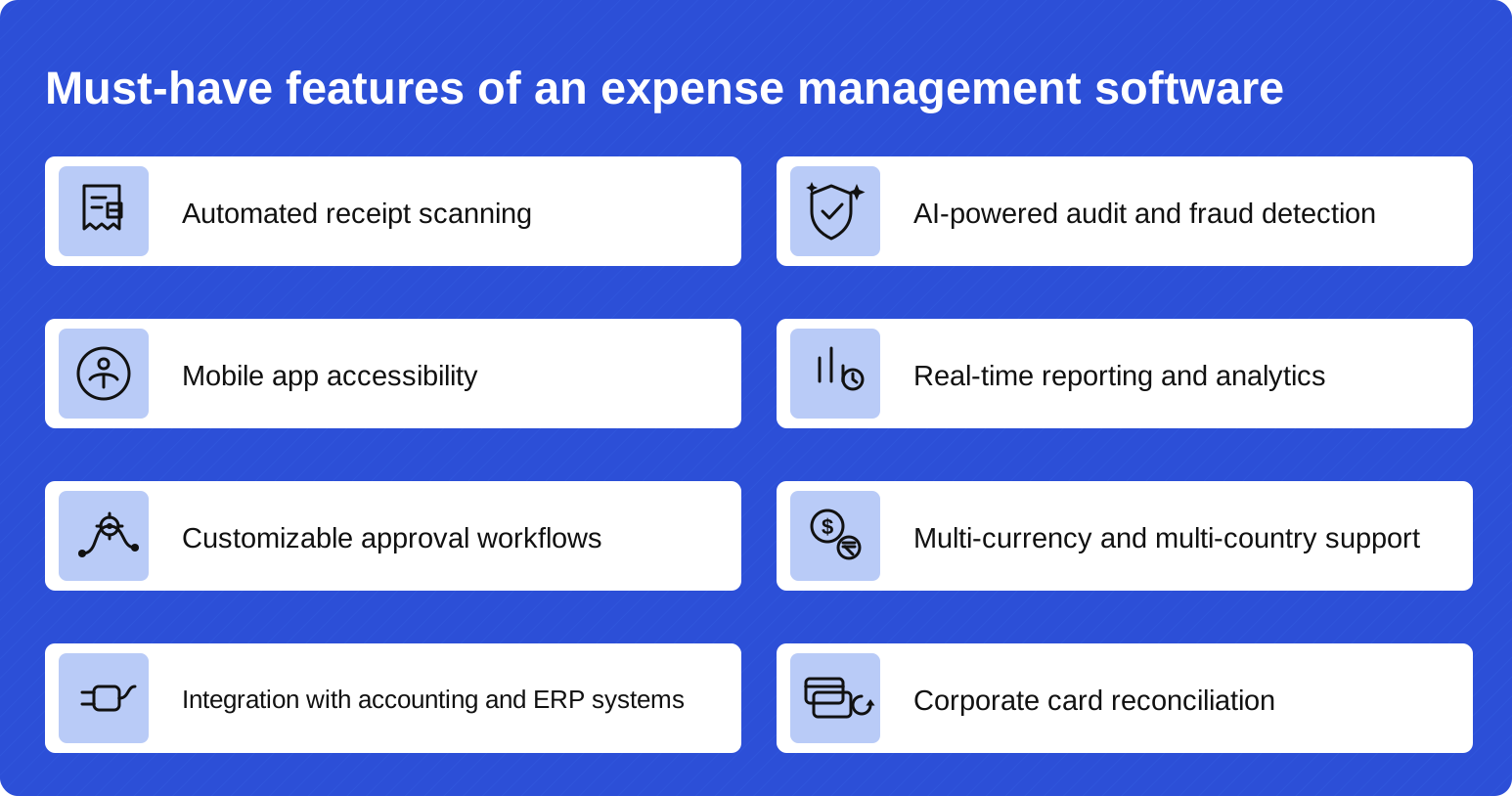
Automated receipt scanning
One of the most fundamental requirements of expense management software is the ability to simplify receipt-to-expense creation. Optical character recognition (OCR) technology has been the go-to option for all software on the market. OCR has since been elevated to AI-powered data extraction — reading line items, taxes, and currencies, auto-categorizing the expense, and flagging receipts that look altered or duplicated.
AI-powered audit and fraud detection
Rule-based checks catch what breaks policy; AI audit catches what merely looks wrong. Modern platforms score every expense against historical spending patterns, detect duplicate or manipulated receipt images, and route only genuine exceptions to human reviewers. As report volumes grow, this is the feature that keeps audit coverage at 100% without growing the finance team.
Mobile app accessibility
With most expenses being incurred out of the office while on-the-go, mobile app accessibility is a must. Employees travelling often store receipts and lose them before they report the expenses, leading to considerable losses. A mobile app helps employees upload receipts on the spot, easing the capturing process while also ensuring real-time expense visibility for the company. For applications that support mileage tracking and reimbursement, GPS tracking through mobile apps helps track and record mileage accurately for faster and smoother reimbursements.
Real-time reporting and analytics
As employees raise expense requests in real time, from receipt scanning and credit card transaction fetching to mileage tracking, all business expenses are created in the application instantly, giving administrators live visibility into employee spending.
You can also gain financial insights through analytics, either included within the expense management application or integrated with advanced analytics applications. This allows businesses to run frequent reports that help forecast expenses, make budgeting decisions, negotiate vendor terms, and more.
Customizable approval workflows
Approval automation allows businesses to route approval requests faster and eliminate multiple back-and-forth communication for a streamlined process. Although every business has a unique approval workflow that changes based on locations, departments, projects, and the like, custom workflows should be configurable in your expense management tool to ensure approvals can be automated for all business use cases.
Multi-currency and multi-country support
With employees now traveling across countries to build global businesses and hedge local market volatility, it is necessary that all expense management software have multi-currency, and multi-country support. Global businesses require the application to run in multiple languages, calculate foreign exchange on expenses, follow local regulatory requirements, and even allow multiple policies to be configured based on where the employees are based.
Integration with accounting and ERP systems
Employee expense management does not stop at employee reimbursements and expense reporting; it starts with an updated employee database and ends with the reconciliation of business accounts. From synced employee information to closing accounting books, software solutions need to calculate and report accurate entries of employee expenses to reconcile the balance sheet and comply with regulatory requirements.
Some of the more popular ERP and accounting applications such as SAP, Oracle, Zoho Books, QuickBooks, and Xero have out-of-the-box integrations with expense management applications making this a breeze. Make sure your expense management application integrates with your accounting and ERP systems.
Corporate card reconciliation
Corporate cards issued by the company, increasingly including virtual cards created per trip, project, or budget — allow employees to spend from the company’s money instead of their own, eliminating the need for reimbursements. This gives employees the flexibility and ease to spend when necessary. Expense management applications that connect corporate cards can simply fetch the transaction data into the system and automatically convert it to an expense. Employees can simply snap a photo of their invoice and add it to the expense; the software reconciles the expense with the transaction to create and process the expense.
How can you choose the best expense management software for your business?
With a variety of options available in the market, choosing an expense management platform is similar to going through the generic buying decision making process: Need recognition > Information search > Evaluation > Purchase decision > Post-purchase activity. While the process is similar and self-explanatory, the criteria to evaluate the options differ from one business to another. Some common factors to consider when shortlisting options are features, integrations, ease of use, scalability, and pricing.
Start from shortlisting some of the top rated expense management tools across review sites like Gartner Peer Insights, G2, and similar resources. Compare them on the above mentioned criteria to understand their differences. AI assistants like ChatGPT and Gemini, and the AI summaries now built into search results, can speed up this research, but treat them as a starting point and confirm capabilities through review sites, demos, and free trials. It is also worth evaluating how each vendor uses AI: receipt extraction accuracy, audit intelligence, and assistant support now separate platforms more than feature checklists do. Reach out to the vendors for personalized demos, inquiry resolution, introductory videos, and more to learn the tool’s capabilities better.
Here are some tips for choosing the right business expense management application for your company based on employee size.
Small businesses with less than 100 employees
Most expense management software providers, such as Zoho Expense, have a free version for a limited number of employees. As employees set up their sales teams and initiate employee travel, expense management is often handled manually through emails, spreadsheets, and the like. At this stage, adopting an expense management solution and leveraging the free versions while the employee count is low can help small businesses try the product before they buy it. When used extensively, companies can identify gaps, issues, and challenges with the product before investing and implementing it. Small businesses can choose plans that fit their needs and scale as the business grows.
Medium-sized businesses with 100–500 employees
Medium-sized businesses are usually growing businesses with the majority of their challenges relating to the uncontrollable growth rate. These growing pains are usually because of resource crunch during high demand. From prioritizing to streamlining, businesses in this stage focus on improving productivity with the existing workforce.
An expense management platform that can automate your business’s current workflow and expedite the process so admins can manage more in the same time is your solution. Look for applications that allow customizations without restricting scalability or complicating the process.
Businesses depend on software providers for prompt inquiry resolutions and customer service when required. As a mid-sized business, you are bound to process a large amount of expenses in short time periods requiring quick help and service in case of errors or downtime. Ensure the expense management provider offers robust customer service and uptime guarantee.
Large businesses with more than 500 employees
Large enterprises prioritize things differently than other companies. Expense management for larger organizations is a complicated and evolved process that has seen a bunch of changes as the business grew. From multiple locations to multiple currencies, languages, processes, departments, and more, the complexity of an enterprise can only be handled by niche and deep-featured software solutions.
An expense management solution for your large business would require multi-currency management, custom workflows, multiple language options, unrestricted storage, unlimited receipt scans, integrations with the existing tech stack, and other features. Look for custom plans offered by software providers to build your own enterprise solution.
Real world use-cases and success stories
Let’s take a look at this case study of RedDoorz where Zoho Expense’s solution helps them unify multi-lingual and multi-policy expense management across multiple countries. The application helped the business streamline their expense management process with a customizable solution that is offered in multiple languages.
Another example is Oberoi Realty that adopted Zoho Expense to automate their project employee expenses. They achieved 99.5% accuracy and were able to onboard 140% more users in just a few months. Their priority was to manage project-level petty cash and employee expenses, which Zoho Expense’s software was able to achieve effortlessly.
"Managing imprest accounts and expenses across multiple projects in different locations was a major hurdle for us. We needed a solution that could handle project-level automation and provide control across all our sites." — Pankaj Pandit, Chief Information Officer, Oberoi Realty
Frequently asked questions
What is expense management?
Expense management is the process of tracking, verifying, approving, reimbursing, and auditing the business expenses employees incur on a company’s behalf. It ensures every expense is accurate, policy-compliant, and paid back on time.
What are the five steps of the expense management process?
Set an expense policy, have employees submit expenses with receipts, review and approve them against the policy, reimburse approved claims, and audit and analyze spending to refine the policy.
What is the difference between expense management and spend management?
Expense management covers employee-initiated spending such as travel, meals, and out-of-pocket purchases. Spend management covers all company outflows, including procurement, vendor contracts, and rent. Expense management is a subset of spend management.
What is expense management software?
Expense management software automates the expense lifecycle: it captures receipts with AI-powered scanning, creates and submits expense reports, enforces company policy at submission, routes approvals, reconciles corporate card transactions, and syncs with accounting systems.
How is AI used in expense management?
AI reads and extracts data from receipts, categorizes expenses, detects duplicate or altered receipt images, audits every claim against historical spending patterns, and increasingly creates and routes entire expense reports automatically — employees just confirm, and finance reviews only the exceptions.
Why is expense management important?
It protects cash flow by making employee spending visible in real time, keeps the company compliant with tax documentation rules, deters reimbursement fraud, and gets employees paid back quickly — which keeps them submitting accurately and on time.
What should an expense policy include?
Reimbursable and non-reimbursable categories, spending limits, per diem rates, receipt requirements, submission deadlines, the approval hierarchy, and a committed reimbursement timeline.
What is T&E expense management?
T&E (travel and entertainment) expense management is the subset of expense management focused on business travel — flights, hotels, meals, mileage, and client entertainment. T&E is typically the largest and most error-prone category of employee expenses.
How long should expense reimbursement take?
Best practice is a published SLA of one to two weeks from approval, or alignment with the next payroll run. Manual processes often stretch to a month or more; automated workflows routinely reimburse within days of submission.
Here’s a quick recap of the key takeaways:
- Expense management is the process of tracking, verifying, approving, reimbursing, and auditing the expenses employees incur on behalf of the business, a five-step loop of setting policy, submitting expenses, approving them, reimbursing employees, and auditing the results.
- Managed well, it protects cash flow, keeps the business compliant with tax and audit requirements, and deters expense reimbursement fraud. Managed manually, it costs about $58 and 20 minutes per expense report, and 19% of reports contain errors (GBTA).
- The most common failure points — lost receipts, slow approvals, and policy violations — are process problems, best fixed at the point of spend and at submission rather than after payment.
- Expense management software is an application that helps businesses track and control employee expenses through automation — cutting processing costs by around 30% and errors by 65% (Aberdeen Group) while minimizing manual work, errors, and fraud.
- AI now powers the modern version of this: receipts read at line-item level, every claim scored for anomalies, and expense reports created and routed with little or no employee effort.
- Expense management software helps save time, improve accuracy, provide visibility, streamline reimbursements, reduce fraud, and control expenses.
- Some of the features to look for in expense management software are AI-powered receipt scanning, mobile app availability, custom workflows, analytics, AI audit and fraud detection, multi-entity support, integration capabilities, and corporate card reconciliation.
- Depending on your processes, nature of business, size of business, and tech stack, choosing the right expense management solution requires a thorough evaluation and shortlisting process.
Choose the right expense management software for your business to improve financial efficiencies and overall productivity. Sign up for Zoho Expense’s 14-day free trial today to experience it firsthand.
 Dhwani
Dhwani Parekh is a seasoned FinTech content writer with more than 7 years of experience in SaaS marketing. As a contributing expert at Academy by Zoho Expense, she focuses on uncovering trends that empower businesses to streamline their financial operations, especially business travel and expense management. With deep industry knowledge and a pulse on the rapidly evolving landscape of business spend, Dhwani’s content adds tremendous value to Academy by Zoho Expense.