





- HOME
- Payroll compliance
- Wage Protection System (WPS) UAE - The Complete Employer Guide
Wage Protection System (WPS) UAE - The Complete Employer Guide
The UAE's Wage Protection System now processes over AED 35 billion in salary transfers every month. In December 2025, MOHRE launched a fully upgraded WPS platform in collaboration with the Central Bank and Al Etihad Payments, introducing real-time digital monitoring of every salary transaction across the private sector. For a business owner in the UAE, WPS compliance isn't optional. Missing the critical 15-day salary payment deadline doesn't just mean a fine. It means frozen work permits within 17 days, Public Prosecution referral by 30 days, and potential Category 3 downgrade under Cabinet Resolution No. 21 of 2020. The good news is that WPS compliance is straightforward once you understand the system and have the right tools in place.
In this guide, we'll cover everything about the Wage Protection System: what it is, who must comply, how to register, how to generate and submit SIF files, and how to avoid penalties, so you can run payroll with confidence.
What Is the Wage Protection System (WPS)?
The Wage Protection System was launched in 2009 by the UAE Ministry of Human Resources and Emiratisation (MOHRE) in partnership with the Central Bank of the UAE. It is an electronic salary transfer and monitoring system that requires all private-sector employers to pay salaries through approved banking channels. The upgraded WPS platform today processes over AED 35 billion in monthly salary transfers. The purpose of WPS is straightforward: protect employees from late or missing wages while giving MOHRE complete visibility into employer compliance. The legal basis for WPS is reinforced under Federal Decree-Law No. 33 of 2021 (the current UAE Labour Law effective February 2, 2022), and further strengthened by Cabinet Resolution No. 21 of 2020 governing employer classification and penalties.
Modern payroll software like Zoho Payroll automates WPS compliance from end to end. You set up your bank connection once, and the system generates your SIF files, validates them, and tracks your submission deadlines automatically. But more on that later.
Latest WPS Regulations and Updates (2026)
MOHRE has continued to expand and strengthen the WPS framework. Here are the key updates and developments that employers should be aware of:
• Upgraded WPS Platform (December 2025): MOHRE launched a fully upgraded Wage Protection System in collaboration with the Central Bank of the UAE and Al Etihad Payments. The new platform provides real-time digital monitoring of all salary transactions, replacing the older batch-processing model with instant verification capabilities.
• Emirati Minimum Wage (January 2026): Effective January 1, 2026, UAE national employees in the private sector must receive a minimum salary of AED 6,000 per month. Companies have a transition period until June 30, 2026 to comply. The WPS system now validates Emirati salaries against this threshold as part of Emiratisation quota monitoring.
• Strengthened Penalty Framework: Under the updated enforcement model, work permit services are suspended within 17 days of a salary delay. By 30 days, the case is referred to Public Prosecution. Fines range from AED 1,000 per worker for basic delays to AED 5,000 per worker for SIF data falsification, with total penalties reaching AED 50,000 or more. Repeat violations within six months trigger a Category 3 company downgrade under Cabinet Resolution No. 21 of 2020.
• Expanded Worker Coverage: WPS now covers part-time workers under flexible work arrangements introduced in the 2022 Labour Law reforms. However, certain categories are excluded from WPS reporting: employees with judiciary-referred complaints, workers reported as absent (absconding), new employees within their first 30 days of joining, and employees on approved unpaid leave.
• SIF Variable Pay Section: The SIF file format now includes an optional Employee Variable Pay section supporting seven types of variable payments beyond the standard salary components. This allows employers to report overtime, commissions, and other variable compensation through the WPS system.
How Does WPS Work?
The WPS Salary Transfer Process
The WPS salary transfer process follows six essential steps:
You run payroll and calculate each employee's net salary by combining their basic salary, allowances, and minus any valid deductions.
Your payroll system (or you, manually) generates a Salary Information File (SIF). This is a structured data file containing every employee's details, salary amounts, and bank routing information in a format that MOHRE's system can read.
You upload the SIF file to your WPS agent bank. An agent bank is a financial institution authorised by the Central Bank of the UAE to process WPS transactions.
The bank processes salary transfers to individual employee bank accounts, prepaid salary cards, or approved exchange houses within the specified timeframe.
The bank transmits the transaction data to MOHRE's WPS monitoring system in real time.
MOHRE verifies the data immediately: Did every employee get paid? Was it the correct amount? Was it paid on time?
Worked Example: Ahmed owns a construction company with 45 employees. On March 28, he runs payroll in Zoho Payroll. The system calculates each employee's net pay based on their contract and deductions, auto-generates the SIF file, and Ahmed reviews it for accuracy. He clicks submit, the file goes to Emirates NBD (his WPS agent bank), and salaries hit employee accounts within 1-2 business days. MOHRE sees the data in real time and confirms compliance.
SIF File Format: What's Inside
The Salary Information File (SIF) is a fixed-width text file with a specific structure defined by MOHRE. Each row represents one employee's salary record for a particular pay period. The file contains standardized data fields that MOHRE's system uses to verify compliance.
Key Fields in a SIF File:
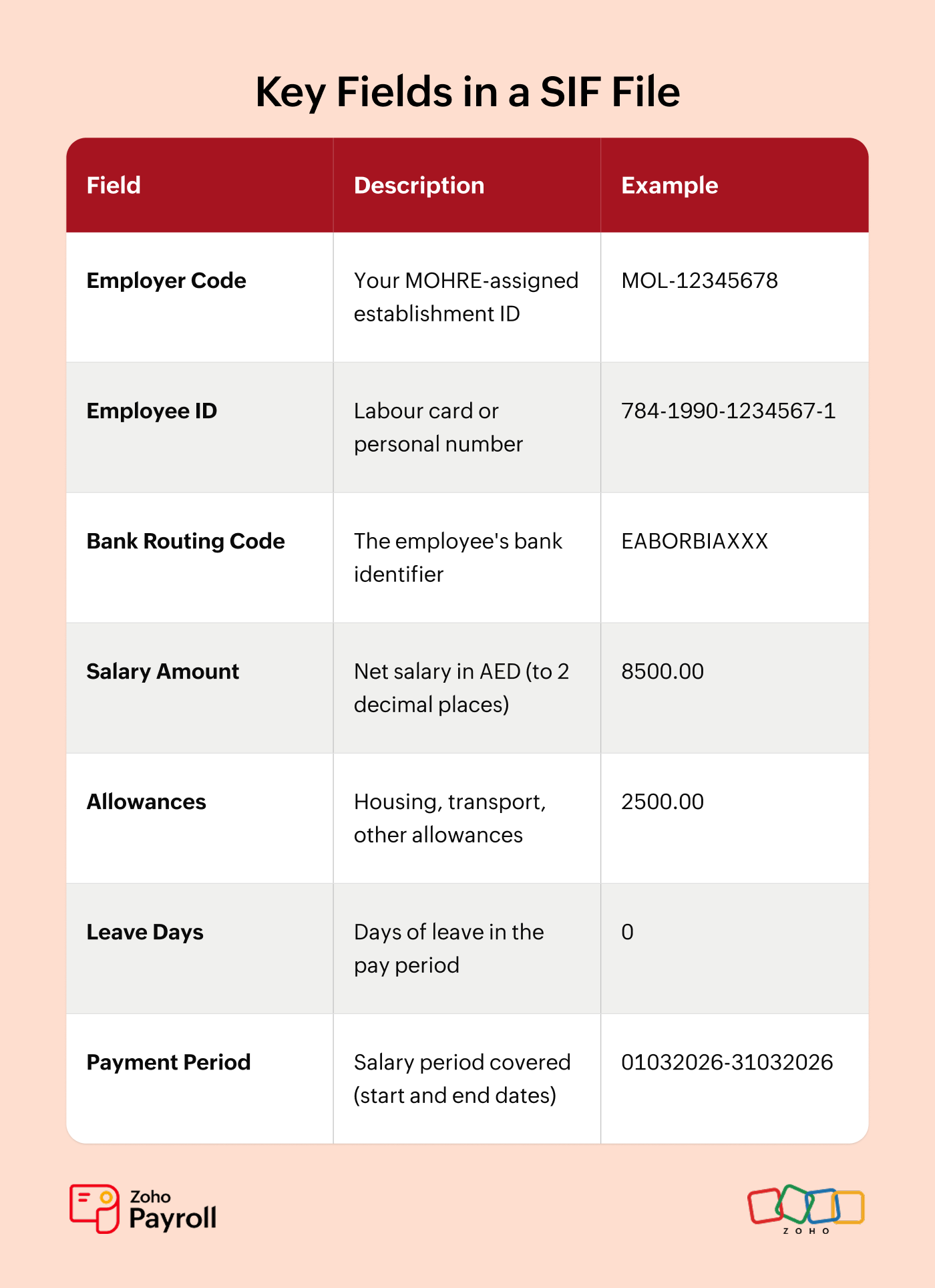
Common SIF Errors and How to Avoid Them:
• Mismatched employee IDs: The labour card number in your system doesn't match MOHRE's records. Always verify employee IDs when they join.
• Wrong bank routing codes: Especially after an employee changes banks. Update employee bank information before the pay run.
• Decimal formatting errors: AED amounts must be to exactly 2 decimal places. Amounts like 8500 (without .00) will be rejected.
• Missing fields or extra whitespace: The SIF file is fixed-width, so every character position matters. One extra space can cause the entire file to fail validation.
This is exactly where payroll software earns its keep. Zoho Payroll auto-generates SIF files directly from your payroll data. No manual formatting. No Excel templates. No field-length errors. The system validates every file before submission and flags mismatches before they reach your bank. If an employee's bank code is wrong or their labour card number doesn't match, you'll know before MOHRE does.
WPS Salary Payment Deadlines
The WPS system enforces strict timelines for salary payment. Understanding these deadlines is critical because missing them triggers automatic penalties and work permit restrictions.
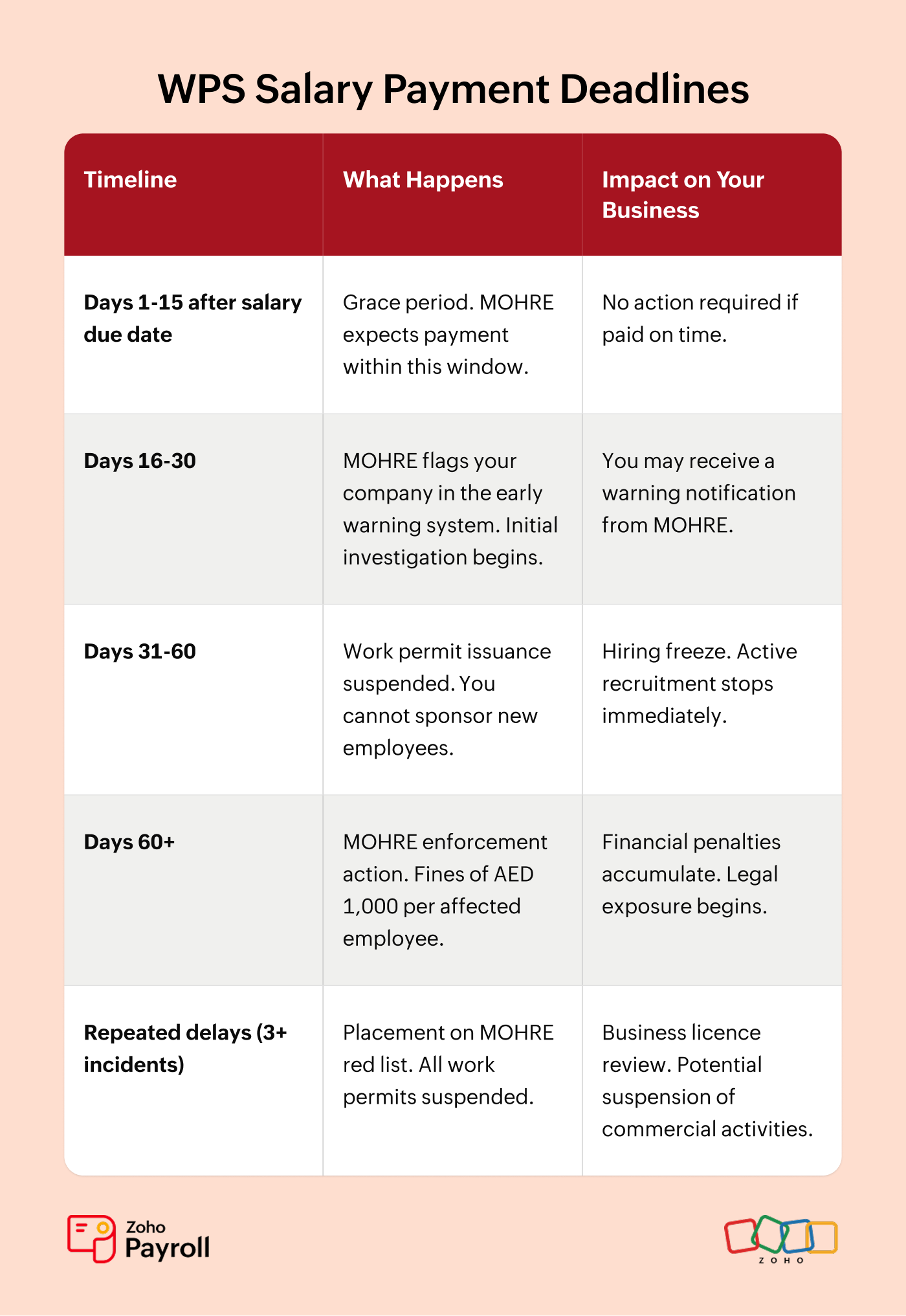
Scenario: Priya runs a hospitality staffing agency. Her March salaries were due on March 31. She processed payroll on April 10. That's 10 days after the due date. She's within the 15-day window. No compliance issue. But if she'd waited until April 20, that's 20 days late. MOHRE's system would have flagged her company immediately. By April 30 (30 days late), her ability to issue new work permits would be frozen, halting all hiring.
WPS for Biweekly and Weekly Payroll
Most UAE businesses run monthly payroll, but WPS doesn't mandate a specific pay frequency. Whether you pay monthly, biweekly, or weekly, the same rule applies: salaries must reach employee accounts within 15 days of each pay date. What changes is the number of SIF files you generate and submit.
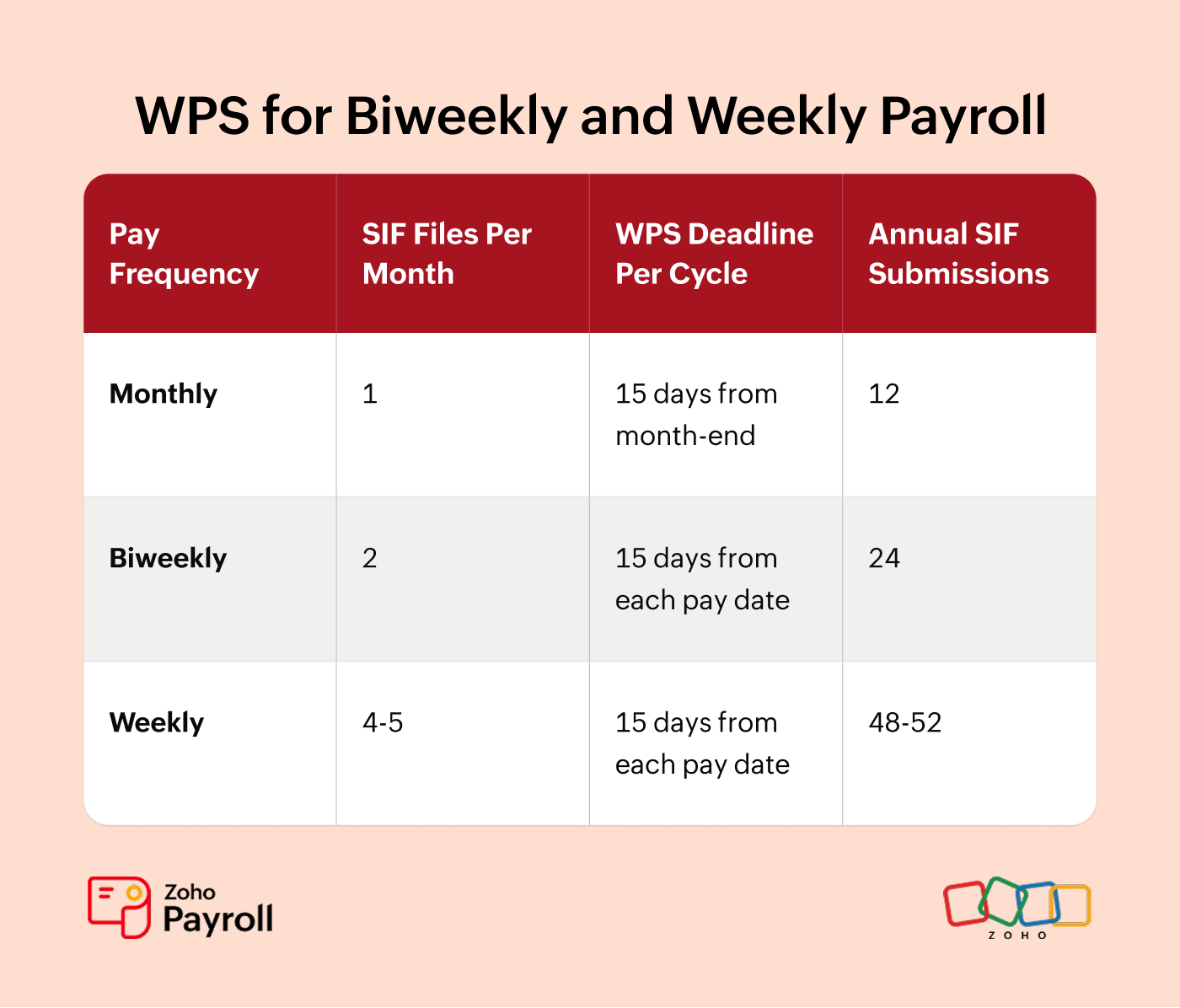
Each SIF file is a separate compliance event. MOHRE tracks every submission independently. If you run biweekly payroll and miss the deadline on one cycle, that's a violation even if the other cycle was on time.
This matters for industries with non-monthly pay cycles. Construction companies often pay weekly to comply with labour camp regulations. Hospitality and retail businesses with hourly or shift-based workers frequently run biweekly payroll. If that's you, your WPS workload doubles or quadruples compared to a monthly cycle.
Scenario: Priya's hospitality company pays kitchen staff weekly every Friday. That means her team generates a SIF file every week, four files in March alone. Each file triggers its own 15-day compliance window. Miss one Friday's submission, and MOHRE flags it independently of the other three. With 50 employees, that's 200 rows of fixed-width SIF data per month created manually. One wrong decimal place in one row on one file, and the bank rejects the submission.
This is where the automation argument goes from 'nice to have' to 'non-negotiable.' Zoho Payrollgenerates a compliant SIF file every time you run payroll, whether that's once a month or every week. The system doesn't care about frequency. You finalise the pay run, the SIF file appears, you submit. Weekly payroll with 50 employees takes the same number of clicks as monthly payroll with 5.
WPS Payment Channels
The WPS system supports multiple payment channels to accommodate different employee banking preferences and business structures.
• Bank Transfers: The most common method. Salary goes directly to the employee's UAE bank account. Most employers use this method for both UAE nationals and expat workers. It's the fastest and most secure option.
• WPS-Approved Exchange Houses: For employees who don't hold UAE bank accounts (common in blue-collar sectors or for recently arrived workers). MOHRE-approved exchange houses like Al Ansari Exchange and UAE Exchange process these payments within the same timeframe as bank transfers.
• Prepaid Salary Cards: Some banks issue WPS-compliant prepaid cards linked to the WPS system. The employee receives a card and their salary is loaded onto it each month. This is becoming increasingly popular in sectors with high workforce turnover.
Exceptions and Limits
• Salary Discrepancies: If you transfer AED 8,000 but the employee's MOHRE contract says AED 9,000, WPS flags this immediately. The system compares every SIF entry against the employment contract registered with MOHRE. Any difference must be resolved quickly.
• Allowances: Housing, transport, and other allowances should be included in the SIF file as separate fields. MOHRE tracks total compensation, not just basic salary, to ensure employees receive their contractual entitlements.
• End-of-Service Payments: Gratuity and final settlement amounts are typically processed outside the monthly WPS as one-time payments, but must still be paid through banking channels to create an audit trail.
What This Means for Employers: Your Compliance Obligations
Employer Registration
Every company registered with MOHRE must have an active WPS arrangement with an approved agent bank. This isn't something you get to eventually. It's a prerequisite for processing work permits. On day one of your business registration with MOHRE, you should immediately set up your WPS agent bank account. Delaying this setup risks your ability to hire.
Monthly SIF Submission
Every pay cycle, you must generate and submit a SIF file to your agent bank. For most businesses, this is monthly. Miss a month, and MOHRE's system notices immediately. There are no exceptions. If you had 10 employees in January and 12 in February, you still submit SIF files for both months, both covering all relevant employees.
Record Retention
Keep payroll records and WPS submission confirmations for a minimum of two years. During a MOHRE inspection, these are the first documents they ask for. Your bank's confirmation that the SIF file was received and processed is your proof of compliance.
Contract Alignment
The salary you pay through WPS must match the salary declared in the employment contract filed with MOHRE. This means if you give an employee a raise, you need to update their MOHRE contract too, or the WPS system will flag a discrepancy. Always update contracts before or concurrently with salary changes.
Payroll System Capability
Your payroll system must generate compliant SIF files. If it can only calculate salaries but can't produce SIF output, you're stuck creating files manually. That's error-prone and doesn't scale. Manual file creation works for 5-10 employees. At 50+, you're introducing serious compliance risk.
Agent Bank Relationship
You need an active account with a WPS agent bank. The UAE Central Bank maintains the list of approved institutions. Your bank relationship is critical because delays on the bank's side can impact your WPS compliance timeline.
This is why most UAE businesses that take compliance seriously use payroll software with built-in WPS support. Zoho Payroll handles SIF generation, bank submission tracking, deadline alerts, and creates an audit trail for every pay cycle. You're always MOHRE-ready. Not scrambling at inspection time.
How to Get Your Business WPS-Ready
Phase 1: Register with MOHRE
If you haven't already, register your establishment with MOHRE through the Tasheel service centre or the MOHRE online portal at https://www.mohre.gov.ae.
Documents needed: valid trade licence, company memorandum of association, and passport copies of authorised signatories.
Once registered, you receive an establishment card and employer code. This code is what identifies you in the WPS system and is critical for all future SIF submissions.
Phase 2: Set Up Your WPS Agent Bank
Choose a WPS agent bank. Major options include Emirates NBD, First Abu Dhabi Bank (FAB), Abu Dhabi Commercial Bank (ADCB), Mashreq Bank, RAKBank, and Dubai Islamic Bank.
Open (or designate) a payroll account with your chosen bank.
Complete the bank's WPS enrollment form. This links your MOHRE employer code to your bank account and enables the bank to process WPS transactions.
The bank provides you with WPS credentials and file submission instructions. Keep these secure and readily accessible.
Phase 3: Configure Your Payroll System
Enter your WPS agent bank details into your payroll software.
Map each employee's data: labour card number, personal number, bank account details, and salary components.
Generate a test SIF file and review it for accuracy. Check that employee IDs match, amounts have correct decimal places, and bank codes are valid.
Submit a test file to your bank (many banks offer a testing/sandbox environment). This ensures your file format is correct before you submit for real.
In Zoho Payroll, this takes about 15 minutes. You enter your agent bank once during setup. The system pulls employee data from their profiles. Each month, after you finalise payroll, Zoho generates the SIF file automatically. You review it, click submit, and it goes to your bank. No Excel templates. No formatting headaches. Done.
Phase 4: Ongoing Operations
Run payroll with enough buffer before each salary due date. For monthly payroll, aim for the 25th. For biweekly or weekly cycles, run payroll at least 2-3 days before the pay date.
Review the auto-generated SIF file for accuracy before submission.
Submit the file to your agent bank via bank portal or direct integration.
Confirm the bank has processed all transfers.
Save the confirmation receipt. This is your compliance proof.
If any transfers are rejected (wrong bank code, closed account), resolve within the 15-day window.
WPS Penalties for Non-Compliance
The penalty structure for WPS violations is designed to escalate based on the severity and duration of non-compliance. MOHRE doesn't start with the heaviest penalty. But the longer you wait to fix the problem, the worse it gets.
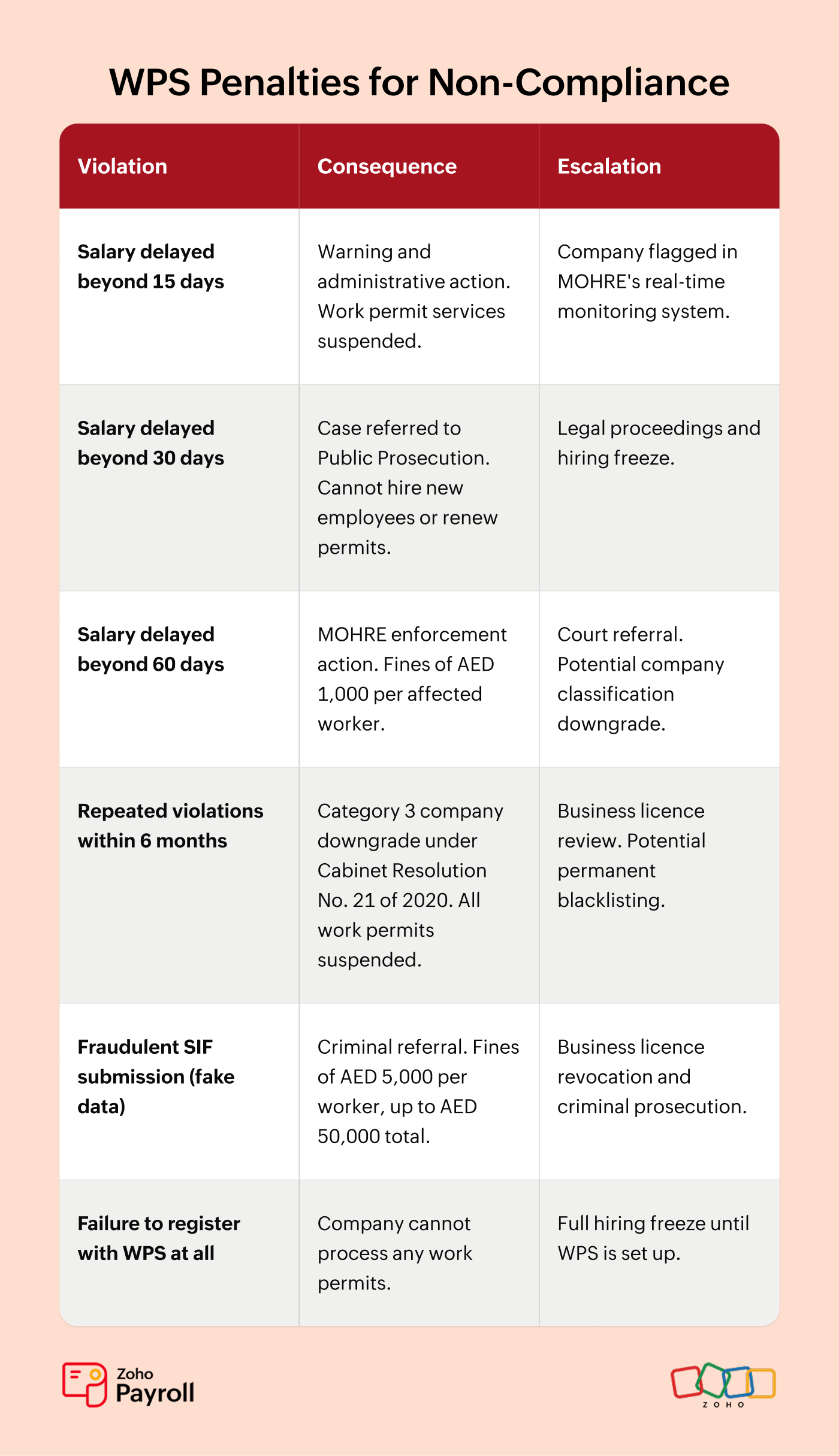
How Penalties Accumulate: If you're 60 days late on salary for 30 employees, that's AED 1,000 x 30 = AED 30,000 in fines. But it gets worse: your work permits were already suspended at the 17-day mark, and Public Prosecution was notified at 30 days. You still owe the salaries. Repeat this within six months and your company drops to Category 3 under Cabinet Resolution No. 21 of 2020. That's not a slap on the wrist. That's a business-ending situation.
Resolving Penalties: Contact MOHRE through the Tasheel service centre or the MOHRE complaint resolution service. Pay outstanding salaries first, then resolve fines through the MOHRE portal. Once cleared, work permit suspension is typically lifted within 5-10 business days.
The easiest way to avoid WPS penalties? Don't rely on manual processes. Zoho Payroll's compliance dashboard tracks your WPS submission status in real time, alerts you before deadlines, and flags discrepancies before MOHRE does. Prevention costs less than cure.
Things to Keep in Mind
These eight key reminders will help you maintain WPS compliance throughout your business operations:
WPS applies from your very first employee. Don't wait until you have a 'full team' to set it up. Set it up on day one.
Salary amounts in WPS must match what's in the employment contract filed with MOHRE. If you've given raises, update the contracts first.
The SIF file has strict formatting requirements. Manual creation in Excel works for 5 employees. At 50, it's a serious compliance risk.
The 15-day clock starts from when salaries are due, not from when you 'get around to it.' Set calendar reminders for yourself and your team.
Free zone employers: check your specific zone's WPS status. DIFC and ADGM are typically exempt. JAFZA, DAFZA, and most other zones are not.
Keep every WPS submission confirmation. During a MOHRE inspection, they'll ask for the last 12-24 months of records.
If you use multiple banks for different employee groups, each bank needs a separate SIF file. Your payroll system should handle this automatically.
Your payroll software should generate SIF files, not just calculate salaries. If it can't, you're doing double the work and doubling your error risk.
Frequently Asked Questions About WPS UAE
Q1: What is WPS in UAE?
The Wage Protection System (WPS) is an electronic salary transfer and monitoring system run by MOHRE and the Central Bank of the UAE. It requires all private-sector employers to pay salaries through approved banking channels so the government can verify that employees are paid correctly and on time.
Q2: Who is exempt from WPS in UAE?
DIFC and ADGM employers follow separate employment laws and are generally exempt from WPS. Domestic workers fall under Tadbeer regulations. Federal and local government employees are outside WPS scope. Most other free zone employers must comply with federal WPS requirements.
Q3: What happens if I don't pay salary through WPS?
Under the upgraded WPS enforcement framework, MOHRE's real-time monitoring flags delays immediately. Within 17 days of a missed salary payment, your work permit services are suspended. By 30 days, the case is referred to Public Prosecution. Fines range from AED 1,000 per worker for basic delays to AED 5,000 per worker for data falsification, with total penalties up to AED 50,000. Repeat violations within six months trigger a Category 3 company downgrade under Cabinet Resolution No. 21 of 2020, suspending all permits and potentially affecting your business licence.
Q4: What is a SIF file and how do I create one?
A Salary Information File (SIF) is a fixed-width text file containing each employee's details, salary amount, and bank routing information. You create it monthly and upload it to your WPS agent bank. Payroll software like Zoho Payroll generates SIF files automatically from your payroll data.
Q5: Which banks are WPS-compliant in UAE?
Major WPS agent banks include Emirates NBD, First Abu Dhabi Bank (FAB), Abu Dhabi Commercial Bank (ADCB), Mashreq Bank, RAKBank, and Dubai Islamic Bank. Your bank must be specifically authorised by the Central Bank of the UAE to process WPS transactions.
Q6: Does WPS apply to free zone companies?
It depends on the free zone. DIFC and ADGM have their own employment frameworks and are exempt from MOHRE WPS. Most other free zones (JAFZA, DAFZA, DMCC, etc.) must comply with federal WPS requirements. Check with your specific free zone authority.
Q7: How does payroll software help with WPS compliance?
Payroll software like Zoho Payroll automates the three biggest pain points:
(1) it generates compliant SIF files from your payroll data without manual formatting,
(2) it validates the file before submission so errors are caught early, and
(3) it tracks deadlines and submission status so you never miss a WPS window.
Automate WPS Compliance with Zoho Payroll
WPS compliance shouldn't take more time than running payroll itself. With Zoho Payroll, it doesn't. The system auto-generates SIF files from your payroll data, validates every entry before submission, tracks your deadlines, and gives you a compliance dashboard that shows exactly where you stand. No Excel templates. No manual formatting. No last-minute scrambles before MOHRE inspections.
Start your free trial today and run your first WPS-compliant payroll in under 30 minutes.