





- HOME
- Payroll compliance
- How to Register for WPS in UAE: Step-by-Step Guide
How to Register for WPS in UAE: Step-by-Step Guide
The Wage Protection System (WPS) is a mandatory registration for every private-sector employer in the UAE. It is the system through which the Ministry of Human Resources and Emiratisation (MOHRE) monitors salary payments, and your company needs an active WPS setup before you can process work permits or run payroll. The registration process involves six steps, takes 5 to 14 business days, and requires coordination between your company, MOHRE, and a WPS agent bank.
This guide covers each step in order: the documents you need upfront, how to select and set up your agent bank, how to activate WPS on the MOHRE portal, and how to submit your first Salary Information File (SIF) correctly.
Before You Start: WPS Registration Prerequisites
Five things must be in place before you can register for WPS:
1. Active UAE trade licence issued by the Department of Economic Development (DED) for mainland companies or your free zone authority.
2. MOHRE establishment registration with an active employer file and establishment card. You will receive a MOHRE employer ID, which is the code used in every WPS transaction.
3. Corporate bank account with a WPS agent bank (a financial institution authorised by the Central Bank of the UAE to process WPS salary transfers and report to MOHRE). The account must be in your company name.
4. Employee records ready: labour card numbers, Emirates ID numbers, bank IBANs or salary card details, and salary breakdowns as per employment contracts.
5. Employment contracts filed with MOHRE. Salary amounts in WPS must match exactly what is declared in MOHRE-filed contracts. Any mismatch triggers an automatic flag.
Scenario: Priya just received her trade licence for a consultancy in Dubai Silicon Oasis. She is about to hire her first two employees. Before she can register for WPS, she needs to complete MOHRE establishment registration and open a corporate account with a WPS agent bank.
If you are using Zoho Payroll, you enter these details once during setup. The system validates your data against WPS requirements before you generate your first SIF file.
Step-by-Step WPS Registration Process
Step 1: Complete MOHRE Establishment Registration
Register your establishment through the MOHRE portal at mohre.gov.ae or at a Tasheel service centre. You will need your trade licence copy, establishment card from the Federal Authority for Identity, Citizenship, Customs and Ports Security (ICP), tenancy contract (Ejari), authorised signatory details, and an active Company E-signature Card.
Once your documents are processed, MOHRE issues your employer ID. This is the unique establishment code that appears on every WPS transaction you submit. Keep it accessible because you will use it in every payroll cycle. Timeline: 2 to 3 business days if documents are complete.
Step 2: Select Your WPS Agent Bank
Your WPS agent bank processes salary transfers and reports transaction data to MOHRE. This is a long-term relationship, so consider more than fees: look at online WPS portal availability, error reporting quality, exchange house partnerships for unbanked workers, and integration with your payroll software.
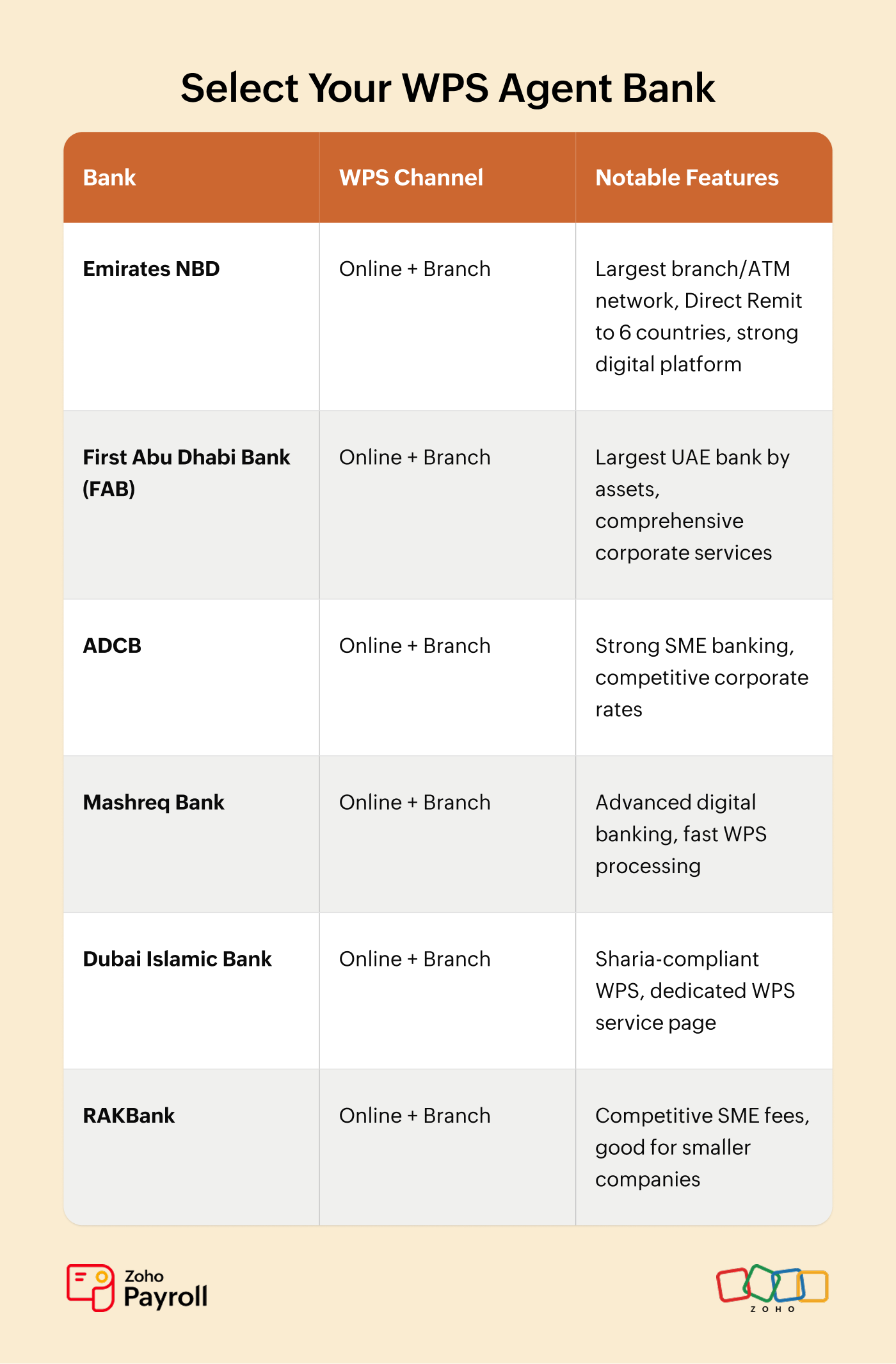
Following the December 2025 WPS upgrade, the platform now uses API-driven processing built with Al Etihad Payments, replacing the older batch model. Check with your preferred bank whether they have completed integration with the upgraded platform.
Step 3: Open or Link Your Corporate WPS Account
If you already bank with an approved agent, contact your relationship manager to link your existing corporate account to their WPS service. This is typically a same-day or next-day process. If you need to open a new account, you will need your trade licence, MOHRE establishment card, passport copies of authorised signatories, and incorporation documents such as your Memorandum of Association.
Once the account is active, you sign a WPS agent agreement. This is the formal contract authorising the bank to process salary transfers on your behalf and report transaction data to MOHRE. Read it carefully because it specifies transaction fees, processing timelines, and your obligations for file submission. Timeline: 1 to 5 business days.
Step 4: Activate WPS on the MOHRE Portal
1. Log in to the MOHRE portal at mohre.gov.ae using your establishment credentials.
2. Navigate to the WPS services section under your establishment dashboard.
3. Enter your WPS agent bank details and linked corporate account number.
4. Submit for verification. MOHRE cross-checks your details with your agent bank.
5. Once verified, your WPS status changes to "Active" in the MOHRE system.
You can also complete this through a Tasheel service centre. Make sure your Company E-signature Card is active and linked to your MOHRE profile. Timeline: 1 to 3 business days.
Step 5: Set Up Employee Records for WPS
Register each employee's details with your agent bank: full name (as on labour card), labour card number, Emirates ID, bank IBAN or salary card number, and salary as per MOHRE contract. The upgraded WPS platform validates transferred amounts against contract declarations in real time.
For employees without a UAE bank account, set up a WPS salary card through your agent bank or arrange payment through an approved exchange house. You cannot skip any employee in your SIF file.
The minimum salary for Emirati employees in the private sector is now AED 6,000 per month, effective January 1, 2026. Companies have until June 30, 2026 to adjust. After July 1, 2026, MOHRE will suspend new work permits for non-compliant establishments.
Step 6: Generate and Submit Your First SIF File
The Salary Information File (SIF) is the structured data file you upload to your agent bank each pay cycle containing every employee's details, salary amounts, and bank routing information. For a detailed breakdown of SIF format and fields, see our WPS UAE: The Complete Employer Guide. Your first submission is a validation test where your bank and MOHRE verify the data. Common first-time errors include wrong labour card formats, incorrect bank routing codes, and salary mismatches versus MOHRE contracts.
In Zoho Payroll, Steps 5 and 6 are automated. You enter employee details once during onboarding, map them to your WPS agent bank, and the system auto-generates a validated SIF file every pay cycle. Your first WPS submission takes minutes, not hours.
WPS Registration for Free Zone Companies
Whether you need WPS depends on what type of work permits your employees hold, not which free zone you operate in.
Must register: Most free zone companies (JAFZA, DAFZA, DMCC, IFZA, Dubai South, RAK free zones) whose employees hold MOHRE-issued labour cards follow the same registration process as mainland companies.
Exempt: DIFC (governed by DIFC Employment Law No. 2 of 2019) and ADGM (governed by ADGM Employment Regulations 2019) have their own salary payment frameworks separate from MOHRE WPS.
Scenario: James sets up a tech company in DMCC. His employees receive MOHRE labour cards, so he registers for WPS through the same six steps above. His friend Sarah opens a hedge fund in DIFC. Her employees are under DIFC employment law and exempt from MOHRE WPS.
Zoho Payroll lets you configure your entity type (mainland, DIFC, ADGM, or free zone) during setup. The system automatically applies the correct WPS rules for your jurisdiction.
Registration Timeline and Costs
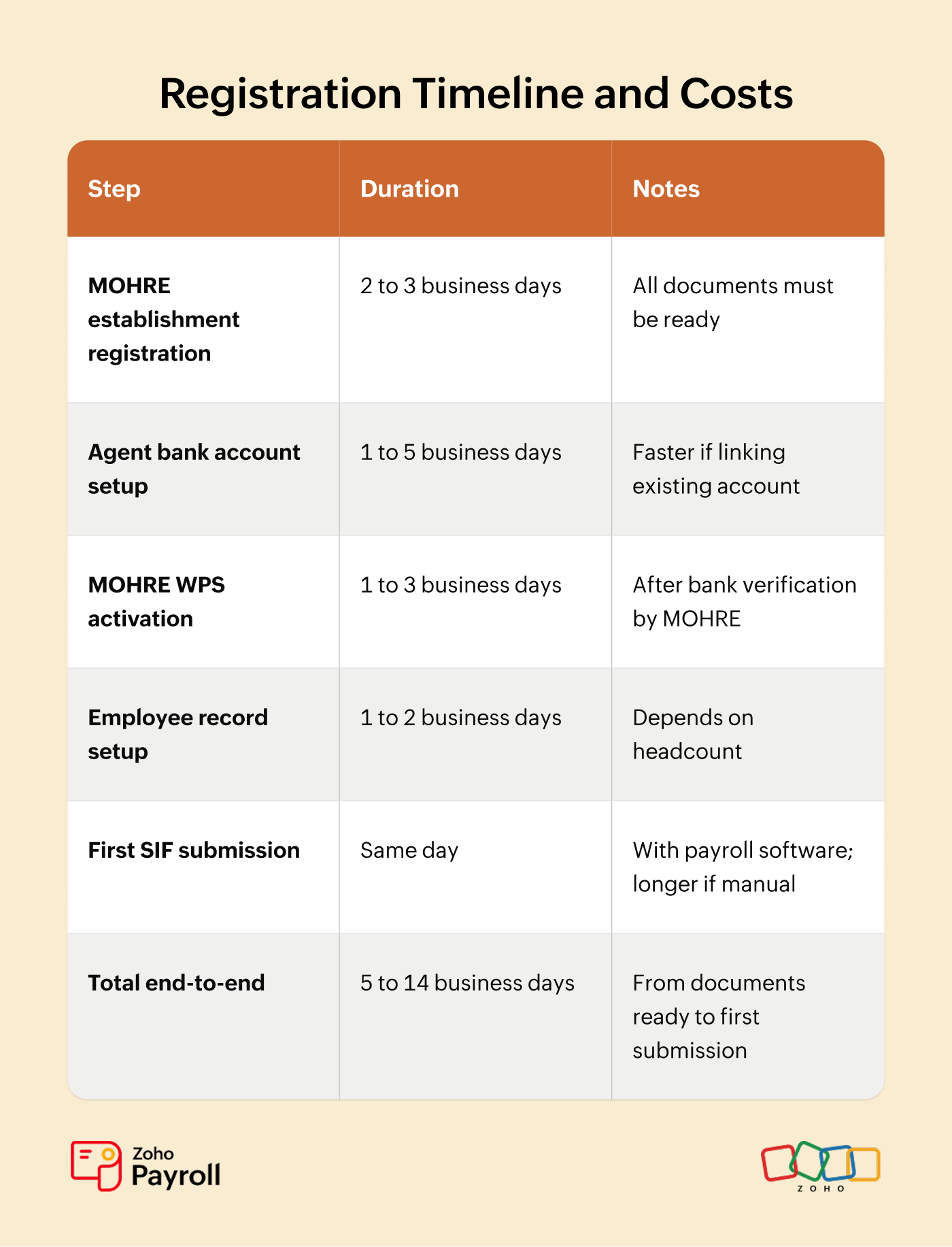
There is no separate WPS registration fee from MOHRE. Your costs are:
• MOHRE establishment fees: Standard fees for company registration and establishment card issuance. These are separate from WPS itself.
• Agent bank transaction fees: Banks charge per employee per transaction, and some charge per file upload. For example, Dubai Islamic Bank charges AED 200 per salary file plus AED 0.50 per employee record. Fees vary significantly by bank, so compare quotes.
• WPS salary cards (if needed): For employees without UAE bank accounts, card issuance fees typically run AED 25 to 100 per card depending on the bank or exchange house.
With Zoho Payroll, the payroll configuration and SIF generation steps are built into your initial setup. The total timeline shrinks to the time it takes for MOHRE and your bank to process your registration.
Common WPS Registration Mistakes
1. Delaying registration until after hiring. WPS setup must be complete before your first salary cycle. Start as soon as you have your trade licence and MOHRE establishment card.
2. Salary mismatch between contract and WPS. The salary breakdown in your MOHRE-filed contract must match WPS transfers exactly. With real-time monitoring, mismatches are now flagged instantly.
3. Wrong bank codes in SIF file. Each WPS agent bank has a specific routing code. One wrong digit means the entire file is rejected and you lose days resubmitting.
4. Skipping employees without bank accounts. Every employee must appear in your SIF file. Set up WPS salary cards or approved exchange house payments for unbanked workers.
5. Forgetting the 30-day new-hire grace period. New employees are excluded from WPS for their first 30 days. After that, they must appear in your next SIF submission.
Zoho Payroll catches mistakes 2, 3, and 4 automatically. The system validates salary amounts, pre-maps bank routing codes, and flags missing banking details before the SIF file is generated.
Things to Keep in Mind
• WPS registration is mandatory from your very first MOHRE-registered employee. There is no headcount threshold.
• The full process takes 5 to 14 business days, so start before your first salary cycle is due.
• Your WPS agent bank is a long-term choice. Switching later means updating your MOHRE registration and potentially disrupting a pay cycle.
• Salary in MOHRE contracts must match WPS transfers exactly. Under the upgraded platform, mismatches are flagged in real time.
• Keep every SIF submission confirmation. They are your proof of compliance during MOHRE inspections.
• If you employ UAE nationals, salaries must meet the AED 6,000 monthly minimum effective January 2026.
Frequently Asked Questions
Q1: How long does WPS registration take in UAE?
The full process typically takes 5 to 14 business days from MOHRE establishment registration to first SIF submission. The WPS activation step itself takes 1 to 3 business days after your agent bank is verified.
Q2: What documents do I need for WPS registration?
You need a valid UAE trade licence, MOHRE establishment card, corporate bank account with a WPS agent bank, employee labour card numbers, employee bank IBANs, and employment contracts filed with MOHRE showing declared salary amounts.
Q3: Do free zone companies need to register for WPS?
Most free zone companies whose employees hold MOHRE-issued labour cards must register. DIFC and ADGM are exempt, as they have their own employment frameworks.
Q4: What happens if I do not register for WPS?
Without an active WPS setup, you cannot process work permits through MOHRE, resulting in a complete hiring freeze. Under the 2026 enforcement framework, salary delays trigger work permit suspension within 17 days and Public Prosecution referral by day 30. Repeat violations within six months cause a Category 3 downgrade under Cabinet Resolution No. 21 of 2020.
Set Up WPS-Compliant Payroll in Minutes with Zoho Payroll
WPS registration is the compliance foundation. Zoho Payroll handles everything after. The system walks you through a guided WPS setup, auto-generates validated SIF files every cycle, pre-maps bank routing codes, and tracks your submission status with real-time compliance alerts. Configure your agent bank once and the software handles the rest.
Start your free trial today and submit your first WPS-compliant payroll in under 30 minutes.