





- HOME
- Payroll compliance
- WPS SIF File Format UAE: How to Create, Validate & Submit
WPS SIF File Format UAE: How to Create, Validate & Submit
Every month, one file carries your entire payroll from your company to the bank and into MOHRE's monitoring system. That file is the SIF (Salary Information File). If it is formatted correctly, salaries process, employees are paid, and your WPS record stays clean. If a single field is wrong (a mistyped IBAN, a date in the wrong format, a total that does not match by even one fils), the entire file is rejected and your payroll cycle is delayed.
This guide breaks down every field in the SIF file, shows you what a valid file looks like end to end, and covers the most common reasons files get rejected. If you have ever stared at a bank's cryptic rejection message wondering what went wrong, this is the reference you needed. For full WPS background, see the WPS UAE: The Complete Employer Guide.
SIF File Structure Overview
The SIF file is a comma-separated text file with no header row. It contains exactly two types of records. The first line is always the SCR (Salary Control Record), which is the cover page. It tells the bank who you are, which month you are paying for, how many employees are included, and what the total salary amount is. Every line after that is an EDR (Employee Detail Record), one per employee, containing their bank details and salary breakdown.
A SIF file paying three employees has exactly four lines: one SCR followed by three EDRs. A file paying 200 employees has 201 lines. The structure does not change regardless of how many employees you have.
File Naming Convention
The filename itself is part of the validation. It must be exactly 25 characters (plus the .sif extension) and follow this format:
13-digit MOHRE employer ID + YYMMDD (file creation date) + hhmmss (file creation time, 24-hour format)
For example, if your MOHRE ID is 1234567890123 and you generate the file on March 1, 2026 at 8:30:00 AM, the filename is 1234567890123260301083000.sif. The date and time in the filename must match the values inside the SCR record. A mismatch between the filename and the SCR data causes an immediate rejection.
If you use payroll software like Zoho Payroll, the filename, SCR data, and EDR rows are all generated from the same source, so these values stay in sync automatically. If you build the file manually, keeping the filename and SCR data aligned is one of the first things to get right.
SCR Fields: The Salary Control Record
The SCR is the first line of the file. It contains your company details and the totals that the bank validates against all the EDR rows below it. Every SCR field must match your MOHRE registration and the EDR data exactly.
Field | Format | What Gets Rejected |
Record type | "SCR" (text) | Anything other than exactly "SCR". No lowercase, no spaces, no variations. |
Employer MOHRE ID | 13-digit number | Missing, wrong length, or does not match your MOHRE registration. This is the same 13-digit ID on your company's labour card. |
Bank routing code | 9-digit code of employer's WPS agent bank | Invalid routing code or bank not registered as a WPS agent with the Central Bank of the UAE. |
File creation date | YYYY-MM-DD | Mismatch with the date portion of the filename. Future dates. Wrong format (DD/MM/YYYY or MM-DD-YYYY instead of YYYY-MM-DD). |
File creation time | HHMM (24-hour) | Mismatch with the time portion of the filename. Using 12-hour format instead of 24-hour. |
Salary month | MMYYYY | Does not match the pay period dates in the EDR records. For March 2026 salaries, this must be 032026. |
Total record count | Integer (count of EDR rows) | Mismatch with the actual number of EDR rows in the file. If you have 47 employees listed, this must be 47. |
Total salary amount | Decimal without commas (e.g., 52750.00) | Mismatch with the sum of all EDR fixed + variable amounts. Even AED 0.01 off causes rejection. Commas in the number also cause rejection. |
Currency | "AED" | Anything other than AED. WPS is a domestic system and only processes payments in UAE Dirhams. |
The two fields that cause the most SCR rejections are the total salary amount and the total record count, because both depend on the EDR rows being complete and accurate first. When you generate SIF files through Zoho Payroll, these totals are calculated directly from your payroll run data, which removes the manual addition step entirely.
EDR Fields: The Employee Detail Record
Each EDR row represents one employee's salary for the pay period. The number of EDR rows must match the total record count in the SCR, and the sum of all fixed salary + variable income fields must match the SCR total amount exactly, down to the fils.
Field | Format | What Gets Rejected |
Record type | "EDR" (text) | Anything other than exactly "EDR". Each employee row starts with this identifier. |
Employee ID | 14-digit MOHRE labour card number | Wrong length, does not match MOHRE records, or the employee's work permit has expired. This is the 14-digit number on the employee's labour card. |
Agent ID (employee's bank) | 9-digit routing code | Invalid code, bank not in the WPS agent list, or the bank is sanctioned. This is the employee's bank, not yours. |
Employee IBAN | 23 characters (UAE IBAN format, starts with "AE") | Wrong length (must be exactly 23 characters for UAE), invalid check digits, or the IBAN does not match the agent routing code in the previous field. |
Pay period start | YYYY-MM-DD | Invalid date, does not match the salary month in the SCR. For March 2026 salaries, this would typically be 2026-03-01. |
Pay period end | YYYY-MM-DD | Invalid date, end date before start date, or does not match the SCR salary month. For March 2026, this would typically be 2026-03-31. |
Days in period | Integer | Does not match the calculated difference between start and end dates plus one. For March 1-31, this must be 31. |
Fixed salary | Decimal without commas (e.g., 15000.00) | Negative amount, zero for an active employee, or commas in the number. This is the employee's base salary for the period. |
Variable income | Decimal without commas (e.g., 2500.00) | Negative amount or commas in the number. This covers allowances, overtime, commissions, and bonuses. Can be 0.00 if no variable pay applies. |
Leave / reference | Free text (optional) | No rejection. This field is for your internal reference only. You can leave it blank or add notes like "housing allowance included". |
Sample SIF File
Here is what a complete, valid SIF file looks like. This example pays three employees for March 2026. You can compare your own files against this structure field by field.
Filename: 1234567890123260301083000.sif SCR,1234567890123,123456789,2026-03-01,0830,032026,3,52750.00,AED EDR,12345678901234,987654321,AE070331234567890123456,2026-03-01,2026-03-31,31,15000.00,2500.00,Housing allowance included EDR,12345678901235,987654322,AE070331234567890123457,2026-03-01,2026-03-31,31,12000.00,1250.00, EDR,12345678901236,987654323,AE070331234567890123458,2026-03-01,2026-03-31,31,20000.00,2000.00,Transport allowance included |
What to Notice in This File
The SCR total matches exactly. The total salary amount in the SCR is 52,750.00. That is the sum of all fixed + variable amounts across the three EDR rows: (15,000 + 2,500) + (12,000 + 1,250) + (20,000 + 2,000) = 52,750.00. If any employee's amount changes, the SCR total must be recalculated. Even AED 0.01 off causes the entire file to be rejected.
The record count matches. The SCR says 3 records, and there are exactly 3 EDR rows. If you add or remove an employee, update this count.
The salary month matches the pay period. The SCR salary month is 032026 (March 2026), and all three EDR rows have pay period dates within March 2026 (2026-03-01 to 2026-03-31).
IBANs are 23 characters starting with "AE". UAE IBANs always follow this format. The check digits (the two numbers after "AE") must be valid for the IBAN to pass validation.
The reference field is optional. Employee 1 and 3 have notes ("Housing allowance included" and "Transport allowance included"). Employee 2's reference field is blank. Both are valid. The bank does not validate this field.
- The filename connects to the SCR. The filename 1234567890123260301083000.sif breaks down as: 1234567890123 (MOHRE ID) + 260301 (March 1, 2026 in YYMMDD) + 083000 (8:30:00 AM). The date and time portions must match the file creation date (2026-03-01) and time (0830) in the SCR.
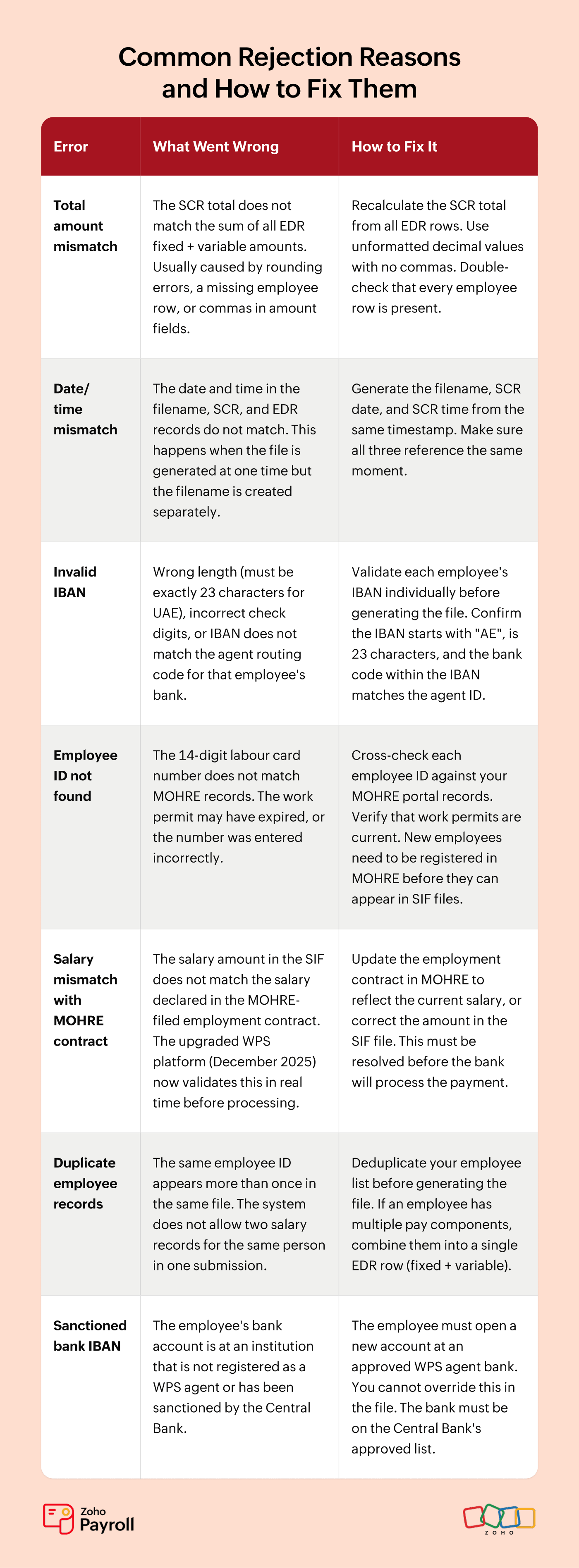
Common Rejection Reasons and How to Fix Them
SIF rejections are frustrating but almost always fixable once you know what to look for. These are the errors that cause the most files to bounce back. If your file was just rejected, start here.
How Submission Works
Once the file is ready, you upload it to your WPS agent bank through their online banking portal. Each bank has its own upload interface (CBD uses businessONLINE, ADCB uses ADCB Direct, Emirates Islamic uses their businessONLINE platform), but the process follows the same pattern regardless of which bank you use.
The bank checks the file format first. If there is a structural error (a field in the wrong position, a mismatched total, an invalid date), you get an immediate rejection with the specific reason. This is where most problems surface and where the rejection reasons table above applies.
If the format passes, the bank checks that your corporate account has enough funds to cover the total amount in the SCR. Assuming the balance is sufficient, payment orders are created and typically process within 24-48 hours. Each employee receives their salary in the bank account specified by their IBAN in the EDR.
After the December 2025 WPS upgrade (built with Al Etihad Payments), MOHRE now validates salary amounts against your filed employment contracts in real time. A salary mismatch between the SIF and the MOHRE contract is flagged before payment is processed, not after. This means discrepancies that used to slip through and cause problems later are now caught at submission.
The SIF format is standardised across all WPS agent banks. Whether you bank with CBD, ADCB, Emirates NBD, Mashreq, RAK Bank, Sharjah Islamic Bank, Al Ansari Exchange, or any other WPS agent, the file structure is the same. The only thing that varies is the upload interface and the specific error messages each bank displays when something goes wrong.
When Things Go Wrong: A Common Scenario
Consider Khalid, a payroll administrator at a trading company with 85 employees. He prepares the monthly SIF file in Excel, exporting employee data from the company's HR system and formatting it into SCR/EDR structure. Last month, the file was rejected three times before it went through.
The first rejection was a total amount mismatch. Khalid had added a new employee to the EDR rows but forgot to update the SCR total. The sum was off by AED 4,500, the new employee's full salary. He recalculated the total and resubmitted.
The second rejection was a date format error. One employee's pay period start date was entered as 01-03-2026 instead of 2026-03-01. A single row with the wrong date format rejected the entire file. He corrected the format and resubmitted.
The third rejection was an expired labour card. Employee number 43 had a work permit that expired two weeks earlier. The 14-digit employee ID was still valid, but MOHRE's system flagged it as inactive. Khalid had to coordinate with the PRO to renew the permit, which took three more days. By the time the file finally processed, salaries were six days late.
Three rejections, three different root causes, six lost days. After that month, Khalid switched to generating SIF files through Zoho Payroll. The next payroll cycle, the file went through on the first attempt. The SCR total was calculated automatically from the EDR rows, so there was no mismatch. The dates were formatted as YYYY-MM-DD by default, so there was no format error. The only thing Zoho Payroll could not have prevented was the expired labour card, because that is a data issue that requires human follow-up regardless of how the file is built.
That is the practical difference between manual and automated SIF generation. It does not eliminate every possible rejection, but it removes the formatting errors that cost Khalid two of his three failed submissions and four of his six lost days.
Each round of rejection-fix-resubmit adds days to your payroll timeline. And those days count toward the 15-day enforcement window described in the WPS Salary Transfer Deadlines guide.
What Happens If Your File Is Late
SIF file delays push back your entire salary payment timeline, and every day counts against the 15-day enforcement window. Once salaries remain unpaid 15 days past the contractual due date, MOHRE's enforcement clock begins. By Day 17, work permits are suspended automatically. By Day 30, the case is referred to Public Prosecution for companies with 50 or more employees. For the full enforcement timeline and fine schedule, see the WPS Fines & Penalties guide.
Frequently Asked Questions
Q1. What is the difference between EDR and SCR in a SIF file?
SCR (Salary Control Record) is the first line of the file. There is one SCR per file, containing your company details and the total salary amount for all employees. EDR (Employee Detail Record) is one row per employee, containing their bank details and individual salary breakdown. The SCR acts as a checksum: the total amount and record count in the SCR must match the EDR data exactly. If you think of the SIF file as a payroll cheque, the SCR is the cheque header and the EDRs are the individual line items.
Q2. Can I create a SIF file in Excel or Google Sheets?
Technically, yes. Practically, it is one of the most error-prone ways to do it. You must save the file as CSV with no header row, use the exact 25-character filename, format all dates as YYYY-MM-DD (not Excel's default DD/MM/YYYY), strip all commas from amount fields (Excel adds thousands separators automatically), and manually calculate the SCR totals. A single formatting error rejects the entire file. Payroll software like Zoho Payroll generates WPS-compliant SIF files directly from your payroll data, pulling employee IDs, IBANs, and salary amounts from the same source so there is nothing to retype or reformat.
Q3. Why does my SIF file keep getting rejected?
Start with the three most common causes: (1) the total amount in the SCR does not match the sum of all EDR fixed + variable amounts (even AED 0.01 off causes rejection), (2) the date and time values in the filename, SCR, and EDR records are not consistent, and (3) an employee IBAN is invalid or the wrong length. These three account for the majority of SIF rejections. If none of these apply, check for duplicate employee IDs, expired work permits, or salary mismatches with MOHRE-filed contracts (the December 2025 WPS upgrade now validates these in real time).
Q4. Which banks accept WPS SIF file uploads?
All banks and exchange houses registered as WPS agents with the Central Bank of the UAE accept SIF files. This includes CBD, ADCB, Emirates NBD, HSBC, Mashreq, Emirates Islamic, RAK Bank, Sharjah Islamic Bank, Al Ansari Exchange, and others. The SIF format is standardised across all agents, so you do not need a different file format for different banks. The only variation is each bank's upload interface and the level of detail in their rejection messages. Some banks provide specific field-level errors; others give a generic rejection code that you need to interpret using the field reference tables in this guide.
Generate Your SIF File with Zoho Payroll
Every rejection reason in this guide comes down to a formatting error that software should handle, not a person. Zoho Payrollgenerates WPS-compliant SIF files for multiple UAE bank formats (including CBD, ADCB, HSBC, Sharjah Islamic Bank, and Al Ansari Exchange) directly from your payroll data. Employee IDs, IBANs, salary amounts, dates, and totals are pulled from the same source, so there is nothing to retype, reformat, or manually total.
Start your free trial and generate your first SIF file in minutes.