





- HOME
- Payroll compliance
- WPS-Compliant Banks in UAE: Full Agent Bank List & How to Link
WPS-Compliant Banks in UAE: Full Agent Bank List & How to Link
Every WPS salary transfer passes through a single point: the employer's agent bank. It is the institution that receives your SIF file, debits your corporate account, distributes salaries to each employee's bank account, and reports the transaction to MOHRE. Your entire WPS compliance record is built from what your agent bank reports. Choose the wrong institution (or assume any bank will do), and your first payroll cycle stalls before it starts.
Only banks and exchange houses registered as WPS agents with the Central Bank of the UAE can process these transfers. This guide lists the major agent banks, explains how to link your company, and covers what changes if you need to switch. For full WPS background, see the WPS UAE: The Complete Employer Guide.
What Makes a Bank a WPS Agent?
Not every financial institution in the UAE can process WPS salary transfers. To qualify as a WPS agent, a bank or exchange house must be registered with the Central Bank of the UAE under the WPS framework. That registration authorises it to accept SIF file uploads from employers, validate the file contents, debit the employer's corporate account, and distribute individual salary payments to employees. The agent bank is also responsible for reporting every transaction to MOHRE, which is how the system tracks compliance.
An important distinction: your employees do not need accounts at your agent bank. They can hold accounts at any UAE bank or exchange house. The agent bank is your company's payment channel into the WPS system. It distributes salaries to each employee's individual account, regardless of which institution they bank with.
WPS Agent Banks in the UAE
The table below lists the most commonly used WPS agent banks and exchange houses. The SIF file format is standardised across all of them, so you do not need a different file for different banks. The only variation is each bank's upload portal and the specific error messages they return when a file is rejected.
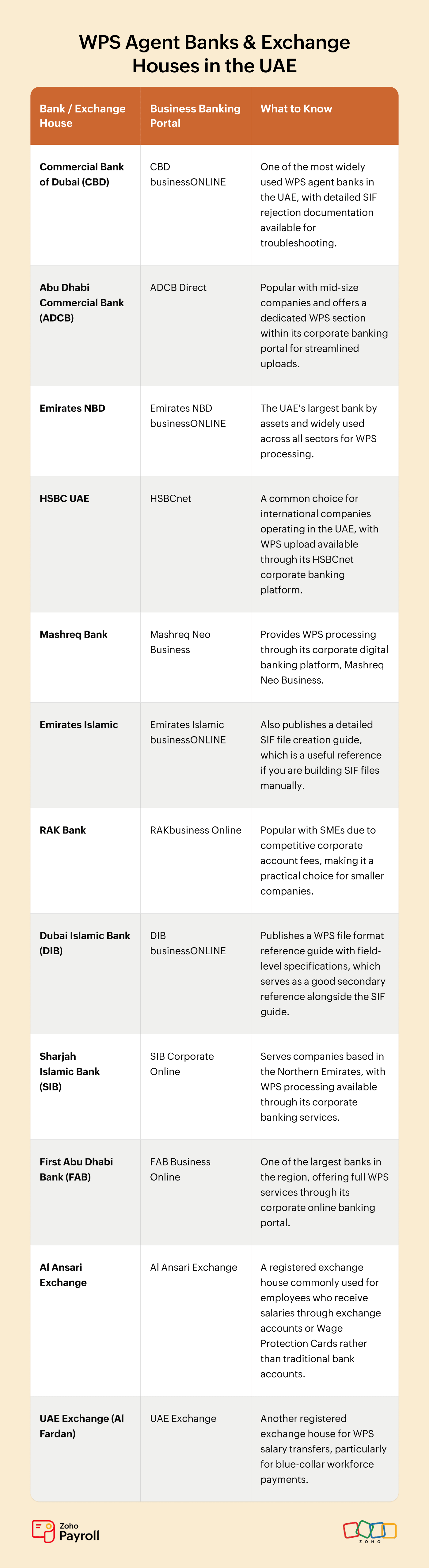
Additional banks and exchange houses beyond this list are also registered as WPS agents. The Central Bank of the UAE maintains the complete official registry. If your preferred bank is not listed here, check with them directly or verify through the Central Bank.
Zoho Payroll generates WPS-compliant SIF files formatted for multiple UAE bank formats, including CBD, ADCB, HSBC, Sharjah Islamic Bank, and Al Ansari Exchange. The file structure is standardised, but bank-specific routing codes are configured per entity in your payroll settings.
How to Link Your Company to a WPS Agent Bank
Linking your company to a WPS agent bank is an administrative process, not a technical one. You will need:
• A corporate or business bank account with the agent bank (personal accounts are not eligible)
• Your 13-digit MOHRE establishment card number
• A valid trade licence
• Authorised signatory documents
You apply for WPS services through your bank's corporate banking portal or by visiting a branch. The bank verifies your MOHRE registration, links your establishment card number to your corporate account, and enables the WPS salary upload feature in your online banking. Processing time varies by bank but typically takes 2 to 5 business days.
Once linked, you upload your SIF file through the bank's business banking portal each pay cycle. The bank validates the file format, checks that your account has sufficient funds to cover the total in the SCR (the header row of the SIF file), and processes the payments. Employee salaries are typically credited within 24 to 48 hours after a successful upload. For the full SIF file field specifications, see the WPS SIF File Format guide.
Switching or Adding a WPS Agent Bank
You can switch agent banks at any time. There is no lock-in period or penalty for changing. The process is the same as linking for the first time: open a corporate account with the new agent bank, apply for WPS services, and provide your MOHRE establishment card number.
What changes in your SIF file: only the employer's bank routing code in the SCR (the 9-digit code identifying your agent bank). Employee bank details in the EDR rows stay the same, because your employees keep their own accounts at whatever bank they use.
Some companies use multiple agent banks for different entities. For example, a mainland company might process WPS through CBD while a DMCC branch uses ADCB. Each entity submits its own SIF file through its own agent bank, but the file format is identical.
Getting Started: Tariq's Setup
Tariq registered a trading company with 15 employees and already held a business account with CBD. He applied for WPS services through CBD's businessONLINE portal, provided his MOHRE establishment card number, and WPS was activated within three days. His employees hold accounts at Emirates NBD, ADCB, Mashreq, and Al Ansari Exchange, which is fine because the agent bank distributes to any UAE bank account.
Tariq generates his SIF file through Zoho Payrollwith CBD's routing code pre-configured, uploads it through businessONLINE, and salaries are credited the next business day. When he opens a second entity and links it through ADCB, the only change is the routing code in the header row. Zoho Payrollhandles that automatically for each entity.
Frequently Asked Questions
Q1. Can I use any bank for WPS?
No. You need a corporate account with a bank or exchange house registered as a WPS agent with the Central Bank of the UAE. Most major UAE banks are WPS agents, but verify before assuming. Personal accounts and non-agent banks cannot process WPS salary uploads.
Q2. Do my employees need accounts at the same bank?
No. Your employees can hold accounts at any UAE bank or exchange house. The agent bank is where you upload the SIF file and hold the funds. It distributes payments to each employee's individual account, regardless of which institution they bank with.
Q3. Can I use an exchange house instead of a bank?
Yes. Exchange houses like Al Ansari Exchange and UAE Exchange are registered WPS agents. They are commonly used by companies with employees who receive salaries through exchange house accounts or Wage Protection Cards rather than traditional bank accounts.
Q4. What happens to my SIF file if I switch banks?
The SIF file format is the same across all agent banks. The only field that changes is the employer's bank routing code in the SCR (the header row). Employee bank details in the EDR rows stay the same. If you use payroll software like Zoho Payroll, the routing code is updated in your settings and all future SIF files reflect the new bank automatically.
Generate SIF Files for Any Agent Bank with Zoho Payroll
Once your agent bank is linked, the monthly task is generating and uploading the SIF file. The file format is the same regardless of which bank you use, but the routing codes, employee details, and salary amounts all need to be accurate every time.
Zoho Payroll generates WPS-compliant SIF files for multiple UAE bank formats directly from your payroll data. Routing codes are configured per entity, employee details and salary amounts are pulled from the same source, and the file is ready the moment payroll is approved.
Start your free trial and generate your first SIF file in minutes.