Retail POS company automates support case creation with Zia Agents
Use Case
This retail point of sale (POS) software and hardware company sells POS systems to small independent retailers. Leads come in through the website, referrals from existing customers, and a network of field agents. Sales reps contact each prospect, walk them through product demos, and put together pricing proposals. If merchants agree, they sign contracts, their hardware ships, and the system gets installed at the store. The whole process—from first contact to a live system—typically takes around three weeks. Once a merchant is live, support becomes the main relationship between the company and the customer.
The company's support process
Merchants have three ways to get help: They can call a dedicated support phone line, send an email, or submit a request directly from their point-of-sale terminal with a single button press. There's also a self-service knowledge base with guides and tutorial videos that covers the most common questions. Many merchants resolve their issues there without needing to speak to anyone.
The phone line operates seven days per week, from early morning until midnight. Agents are available in multiple languages to serve a diverse customer base.
If a merchant has a physical problem, such as a component not working or a new piece of equipment that needs setting up, the call goes to the POS team, who handles guided setups, component swaps, and warranty replacements. They work on a unique POS layout within the Cases module.
If the problem involves card transactions, such as a payment not going through, a disputed charge, or a card reader fault, it gets routed to the payments support team (also known as the Pay team), who handle both day-to-day processing questions and formal dispute processes. The Pay team works on a unique Pay layout in the Cases module.
If the merchant wants to change their plan, remove a service, or ask about their charges, the billing and account team handles it, whereas returns are handled separately by the original sales agent rather than the support line. The AR team handles billing and accounts and works in a unique AR layout in the Cases module.
Requirements
When a merchant calls in, sends an email, or submits a request directly, the first thing the internal support agent does is determine what kind of problem they're dealing with. Based on that, the ticket is directed to one of several specialist teams. The agent first has to associate the customer query with the right department in Zoho CRM's Cases module manually (where issues raised by merchants are recorded as tickets). For other customer details such as the DBA, Elmer number or contact information, the support agent has to get this from the customer and input the information in a Zoho Creator form, which is associated with their Cases module.
Oftentimes, this process leads to discrepancies in routing, which thereby increases the time it takes to resolve issues merchants raise. The time taken to fill out fields in the Cases module manually is also long, as creating records requires agents to identify the right department manually, fill in several dropdown fields, enter the customer's account details into the system before the conversation can move forward.
The process is slow and there is a lot of friction, which in some cases leads to incorrect department mapping. The goal is straightforward: A support agent should be able to type or paste a description of the issue in plain language and have a fully completed case record created in the CRM with little to no additional input from them.
To make that work, everything that agents have been doing manually has to happen automatically. This includes identifying which department own the issue, filling in the correct dropdown fields (called picklists, which are fixed lists of options tied to a specific department or issue type), pulling the customer's account details from the CRM, and validating all of it before creating the case. Because a single linear process couldn't handle this reliably, the solution required three separate agents, supervised by the orchestration agent, each responsible for one part of the job.
Solution
Features in use
The solution was built using Zia Agent Studio. Rather than one agent trying to do everything, the company built Multi-Agents and connected them to an orchestration framework—meaning they work as a team, where each agent does only its assigned job and hands off to the next in a fixed order.
Agent Overview
| Purpose | Automating support case creation |
| Products | Zoho CRM |
Best suited for | Business teams like support who receive concerns from customers regarding a wide range of topics governed by different teams and hence need routing |
| Complexity | Moderate |
Deployment | In-product |
| Tools | COQL Queries Tool |
| Knowledge Base | None |
| Model Configuration | GLM 4.7 Flash, Qwen Text 14B |
| Data sensitivity | The agents work with company's domain knowledge and customer information which may contain operational or customer information and should be accessed only by authorized users. |
| Constraints | The agent instructions that will follow may limit the agent from performing certain actions. You can read and modify them as per your business needs or personal preferences. |
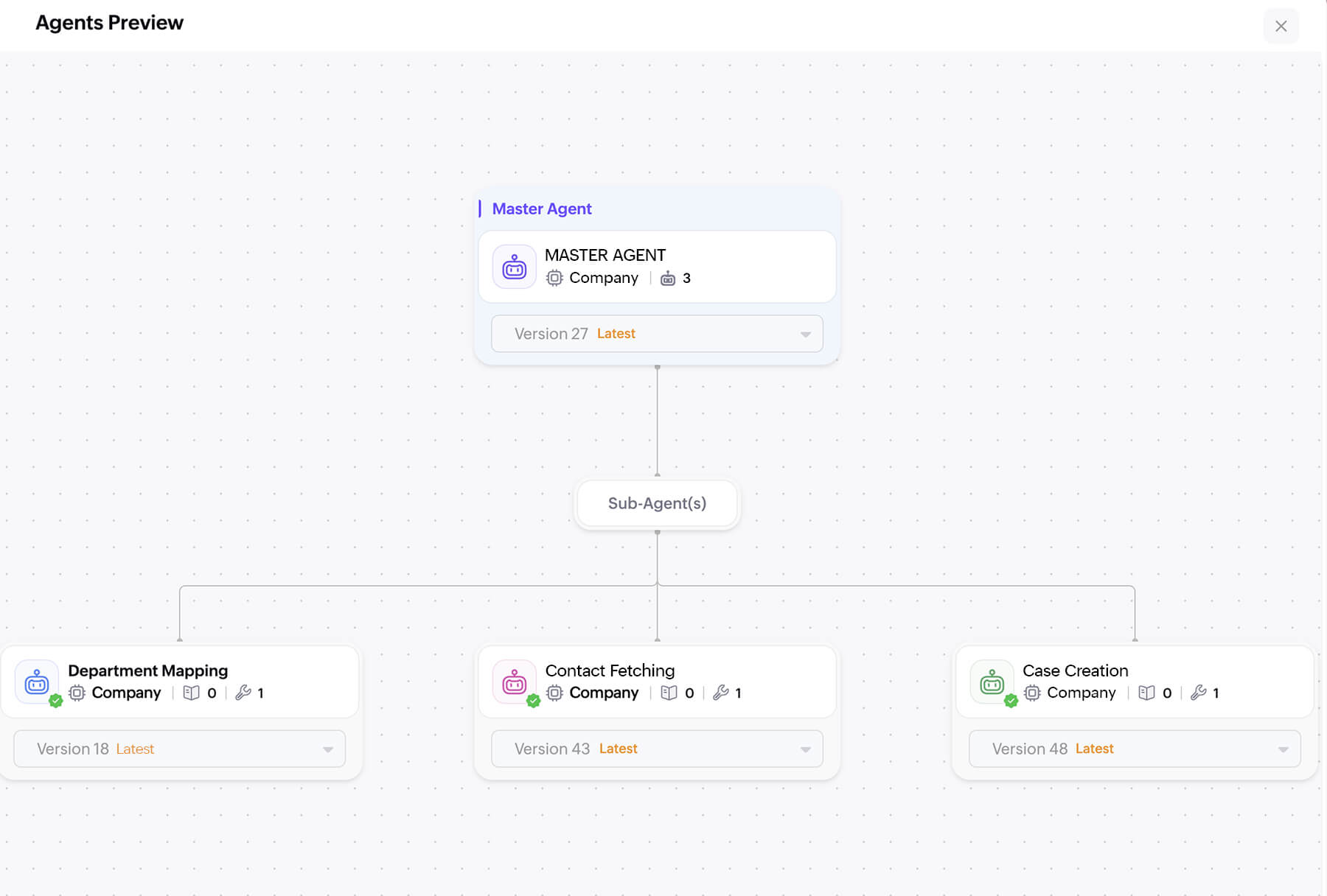
The agents
Master orchestration agent
This agent acts as the coordinator. It doesn't make any decisions about the content of a case; its only job is to manage the process: Receive the input, send it to the right agent at the right time, enforce the order of steps, and make sure no step is skipped or repeated. Think of it as a traffic controller that keeps everything moving in sequence and prevents the process from getting out of order.
Department mapping agent
This agent reads the support agent's plain-language description of the issue and works out which department should own the case. The three departments are Accounts Receivable (handling billing, refunds, and subscription matters), Point of Sale Support (covering hardware, software, installation, and third-party integrations for the checkout system used in stores), and Merchant Services (covering payment processing, transaction failures, and settlement issues).


To do this classification, the agent uses natural language understanding (NLU), which is a type of AI that interprets the meaning of free-form text rather than just scanning for specific words. Once it identifies the department, it automatically fills in all the related fields required for that department. These are conditional fields, meaning each department has its own set of required information that doesn't apply to others. Only the fields relevant to the selected department are filled in, which prevents incorrect data from being sent to the CRM.
This agent will ask a clarifying question if the description is too vague to classify confidently.
Contact fetching agent
Once the issue is classified, this agent looks up the customer's record in the CRM using a name, email address, or phone number. It runs an exact-match query using CRM Object Query Language (COQL), a search method used specifically to retrieve records in Zoho CRM (similar to how a database search works). It retrieves the customer's trading name (sometimes called "Doing Business As" (DBA), which is the name a business operates under rather than its registered legal name), along with the Merchant ID (a unique number assigned to the customer by their payment processor to identify their account) and other account details needed to complete the case.
The agent handles three situations: a clear single match (the record is retrieved directly), no match found (the agent asks for a different identifier and searches again), and multiple matches (the agent asks for a second piece of information to narrow it down). The support agent requests only fields that are genuinely missing after the lookup.
Case creation agent
This is the final step. Once the first two agents have completed their work, the orchestration agent assembles all the collected information into a structured data package in JavaScript Object Notation (JSON) format (a standard way of packaging information so that different software systems can read it reliably). The case creation agent receives this package and uses the Zoho CRM API (the connection point that allows one software system to send instructions to another) to create the case record. It returns the case ID and a direct link to the newly created case immediately.
The three-step process
Every case follows the same fixed sequence, from which it cannot deviate:
Step 1 - Department mapping
The support agent types a description of the issue. The agent reads it, identifies the department, and fills in all the required fields for that department automatically.
Step 2 - Contact resolution
The support agent provides the customer's name, email, or phone number. The agent searches the Contacts module in CRM, retrieves the full record, and flags any fields it can't find.
Step 3 - Case creation
The orchestration agent takes the output from Steps 1 and 2, packages it, and sends it to the case creation agent. The case is created in the CRM and the link is returned to the support agent.
If any step fails or produces incomplete output, the process stops and tells the support agent exactly what is missing. The next step never begins until the previous one is fully complete and validated.
Video Overview of the agent
The Result
Support agents no longer navigate multiple CRM screens or make manual classification decisions. The descriptions they type are enough to trigger the full process. Classification, contact lookup, field population, and case creation all happen in the background while the human agent stays focused on the customer.
Cases are created consistently through the Multi-Agent, since the classification logic is handled by the same AI model every time rather than varying by individual judgment. The risk of cases landing in the wrong department or being created with missing information and vague description is eliminated because the system will not proceed to case creation unless all required information is present and valid.
The Multi-Agent built in Zia Agent Studio also means that each part of the process can be updated or improved independently. Changing how contact lookups work doesn't affect the classification logic, and vice versa. The framework is designed to grow with the support operation rather than needing to be rebuilt if requirements change.
*Please note that the solution described here is developed for a real use case of a Zoho customer. All names, identifying details, and screenshots have been anonymized to retain privacy.
Contact Us
Fill out the form below and one of our product experts will call you to understand your requirements better.