Healthcare staffing provider optimizes global nurse recruitment using Zoho
Use Case This solution was developed based on a real Zoho customer use case, with all names, details, and screenshots are anonymized to protect privacy.
A global healthcare staffing solution provider dedicated to addressing critical workforce shortages in the United States by sourcing, onboarding, and supporting highly qualified international healthcare professionals—particularly nurses—optimizes their healthcare staffing operations using Zoho. The company specializes in end-to-end international recruitment, from identifying exceptional talent abroad and conducting rigorous screening to managing immigration, licensure, relocation, and employer matching processes. Through its structured and comprehensive workflow, the organization enables healthcare seekers and facilities to secure long-term, committed staff while guiding healthcare professionals through every step of their journeys toward working and thriving in the US healthcare system.
In short, the organization acts as a bridge between patient care needs and professional aspirations. Any breakdown in their process leads to serious operational, regulatory, and human consequences.
Care seekers approach the organization with their specific care requirements. The sales team first validates the authenticity of each request through document checks and field verifications. Once the requirement is confirmed as legitimate, a deal pipeline is created and a recruitment request is raised with the HR team.
HR then prepares a detailed job description, publishes it on relevant job boards, and invites applications. After receiving applications, HR conducts initial screenings, shortlists suitable candidates, and schedules online interviews. A selected candidate is issued an offer letter, and upon acceptance, the organization initiates the necessary processes to relocate the candidate to the United States. Once the candidate arrives, they report to the company for onboarding, whereupon the care provider is sent to the care seeker's location.
Requirements
Capture care seeker requests instantly through a webform.
To ensure consistent data collection and eliminate manual errors in CRM, care seeker requests must be diligently captured through a webform and automatically routed into the system.
Validate essential care seeker information before sales engagement.
To enable sales agents to engage only with legitimate care seekers, a validation mechanism is required to verify care seekers' essential information, such as phone number, email address, physical address, identification, and other data.
Guide sales teams through structured discovery, requirement capture, and document collection processes.
The organization needs to implement a guided process that captures detailed care requirements, including requirement type, medical and care information, household environment, and payment and contract details.
Mandate document submission and verification.
The organization needs to collect all required documents to verify each care seeker's requirements.
Automatically trigger the recruitment process upon request qualification.
Upon qualifying a care seeker's request, the system should automatically trigger the recruitment process without manual intervention. This includes automatically creating job openings and initiating recruitment workflows.
Automate job creation, publishing, candidate screening, interviews, and offer management.
The recruitment process must be consistent throughout, from job creation and publishing to candidate screening, interview scheduling, and offer management.
Synchronize hiring outcomes back to CRM.
To ensure sales, HR, and operations teams have real-time visibility into recruitment progress, hiring outcomes—including candidate selection and offer acceptance—must be synchronized back into the CRM automatically.
Track immigration, onboarding, and deployment milestones in a structured manner.
To ensure compliance, transparency, and timely execution, the system must track the selected care provider's immigration, onboarding, and nurse deployment milestones through structured workflows in a unified system.
Solution
Care seeker intake and review
A Zoho CRM webform was created and embedded in their website. Once a care seeker submits their details through this form, Zoho CRM automatically fetches their information in the Contacts module under the Review stage. At this point, email and phone number validations are performed, along with a review of mandatory details to ensure data legitimacy. After successful validation, the record moves into the Contacts module and is tagged as Verified to ensure sales teams work exclusively with qualified care requests.

Blueprint-powered sales engagement
Upon qualifying a care seeker's request, a blueprint is triggered to guide the sales agent through the engagement process, starting with scheduling a discovery call. The agent schedules a discovery call using a predefined transition, which automatically creates a call. When the call is completed, it's marked as such and logged under "Closed Activities". During this call, the sales agent captures detailed requirement information, including requirement type, medical and care details, household environment, and payment and contract terms, among others. Per blueprint rules, progress is restricted until all mandatory fields are completed.

Document collection and verification
After requirement details are collected, the next blueprint transition mandates document collection and upload into the record. Required documents include national identification card, relevant lab reports, medical records, and doctor summaries, to name just a few. Once the required documents are uploaded into Zoho CRM, a function is triggered to bring all documents and care seeker details into a dedicated Verification module. This module is essential in this workflow, as the verification is performed by a third-party vendor who doesn't need to be exposed to the entire module. The verification team completes the document verification and uploads the verification report, and then performs field verification, whereby on-site details are validated and a field verification report is uploaded. Both verification reports are then automatically synchronized back to the care seeker's record in the Contacts module using a function.

Requirement qualification and automatic recruitment trigger
Once the verification is complete, the sales agent reviews the reports and proceeds to qualify the request by marking it as legitimate within the blueprint. Upon this confirmation, the record exits the blueprint and triggers automation that simultaneously creates a deal in Zoho CRM and a job opening in Zoho Recruit. This ensures an immediate and seamless handoff from sales to the recruitment team without manual intervention or delays.

Job publishing
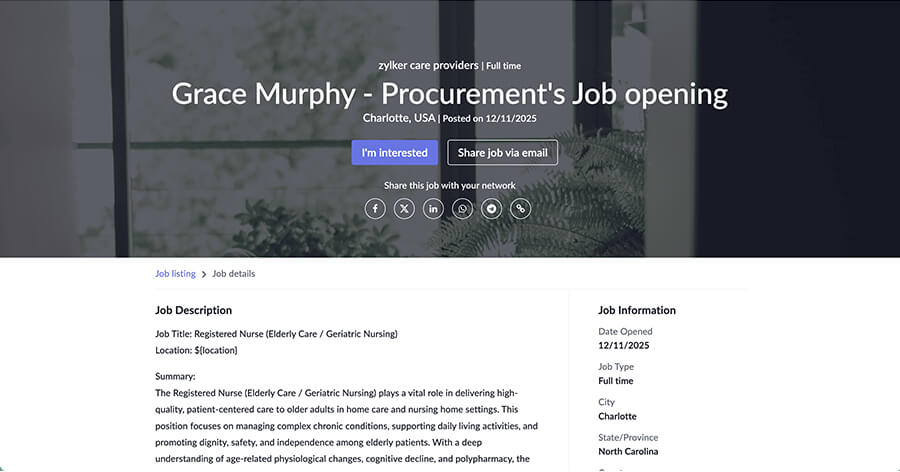
In Zoho Recruit, once the job opening is created with all required information, the organization then enhances the job description using Zia Assist and publishes the job across external job boards and the organization's career site, as needed. The published job is also listed on their website's careers page so that candidates can apply directly.
Application collection, candidate screening, and hiring
Nurses across the globe apply for this job by uploading their resumes and completing the application. Once applied, the application status is marked as "Application Received". The hiring manager screens the applications, shortlists candidates, schedules and conducts interviews, and selects a suitable candidate for the job using the hiring pipeline. Upon selection, the candidate is marked as hired, and the job opening gets locked.

Offer management and data synchronization with CRM
The HR team generates an offer letter directly from the job opening and sends it to the selected candidate to obtain their e-signature using Zoho Sign. Once the candidate signs the offer, the application status is updated to "Offer Accepted", and the job opening status is marked as "Offer Signed". This triggers an automation that creates a record in CRM's Nurses module and updates the associated deal stage accordingly. The hired nurse is then mapped to the corresponding care seeker.

Visa processing, immigration, onboarding, and deployment
After the candidate signs the offer, a blueprint in the Deals module gets triggered and prompts the sales agent to initiate the process of bringing the nurse into the United States.

The blueprint guides the next set of process steps, including acquiring the visa screen certificate, visa number, and green card, as well as filing the I-140 document, booking tickets, and assigning a final care provider. Once the care provider is deployed to the care seeker, the record exits the blueprint, which completes the lifecycle.

Result
This implementation delivers a fully automated, end-to-end healthcare staffing process with zero manual handoffs between teams. Sales agents engage only with verified care seekers, which improves productivity and data quality. Recruitment activities are triggered instantly upon qualification, reducing turnaround times and improving hiring efficiency. Immigration and deployment milestones are tracked transparently to ensure compliance and operational control. Overall, the solution provides complete visibility across sales, HR, and operations, which enables the organization to scale its healthcare staffing operations reliably and confidently.
*Please note that the solution described here is developed for a real use case of a Zoho customer. All names, identifying details, and screenshots have been anonymized to retain privacy.
Contact Us
Fill out the form below and one of our product experts will call you to understand your requirements better.