Create a Serverless Function
Take a Standalone Function, enable its serverless REST endpoint, and call it over HTTP.
Table of Contents
1. Create the Function
2. Write the Script
3. Test in the Editor
4. Enable the REST API
5. Call the Endpoint
In the previous quickstarts, you created Functions that run inside CRM and are triggered by the Run button in the editor or by a Workflow Rule. In this quickstart you'll take a Standalone Function and expose it as a REST API endpoint, making it callable by any external system, partner application, or AI agent via HTTP.
What We're Building
A simple Standalone Function that accepts a module name, looks up the record count, and returns a JSON response. Once exposed as a REST API, any HTTP client can call it to get live CRM data.
Step 1: Create the Function
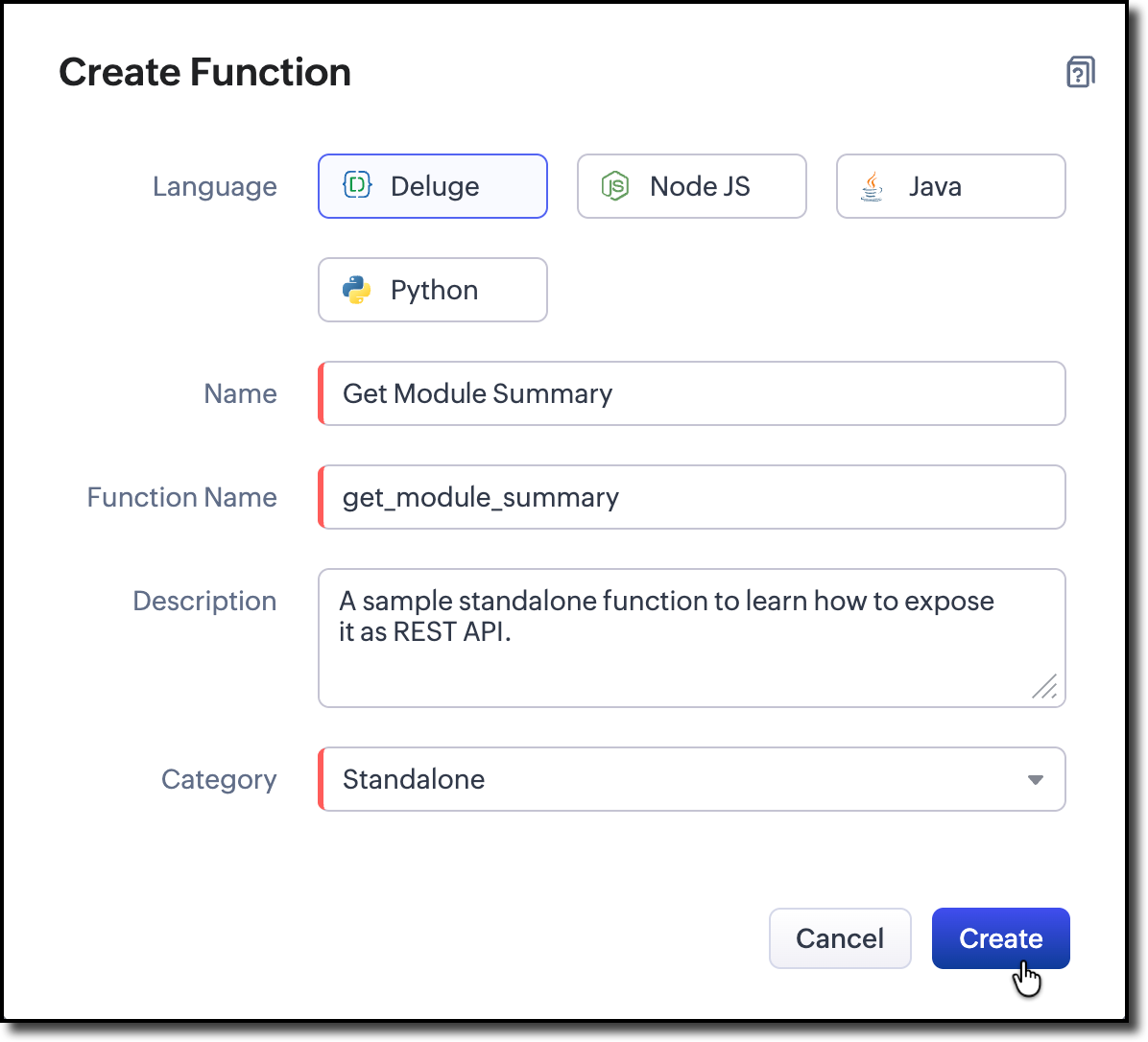
- Navigate to Setup -> Developer Hub -> Functions
- Click Create New Function
- Set:
- Function Name:get_module_summary
- Category: Standalone
- Language: Deluge
Why Standalone?
Standalone is the recommended category for REST API endpoints. It is not tied to any specific CRM event or UI element, and its return type (String) maps naturally to HTTP responses.
Step 2: Write the Script
Replace the editor contents with this:
string standalone.get_module_summary(string crmAPIRequest)
{
// To get the parameter "module" from the request
moduleName = crmAPIRequest.get("params").get("module");
result = invokeapi[
service :zohocrm
path :"crm/v8/" + moduleName + "/actions/count"
type :GET
];
body = Map();
body.put("summary","Found " + result.get("count") + " records in the " + moduleName + ".");
response = Map();
response.put("status_code",200);
response.put("body",body);
return {"crmAPIResponse":response};
}
What this does:
- crmAPIRequest reads the incoming HTTP request. In this example, the module query parameteris extracted from the request.
- zoho.crm.v8.getRecords fetches records from the specified CRM module.
- crmAPIResponse represents the outgoing HTTP response.In this example, the status code, content type, and response body are set before the response is returned.
Language note:
crmAPIRequest and crmAPIResponse work in all supported languages such as Deluge, Java, Node.js, and Python. They give you full control over the HTTP request and response (status code, headers, content type, body). There is also a simpler alternative called basicIO (available in Java, Node.js, and Python) that handles only the response body without HTTP-level control. See Exposing Functions as REST APIs for details on both approaches.
Step 3: Test in the Editor
Click Run in the editor toolbar. During an editor test, no HTTP request is sent, so crmAPIRequest does not contain request data. To verify the core logic, temporarily hardcode a value for the module parameter.
moduleName = "Deals"; // hardcode for testing
Check the Console for the info output. Once it looks correct, revert to using crmAPIRequest and save the Function.
Step 4: Enable the REST API
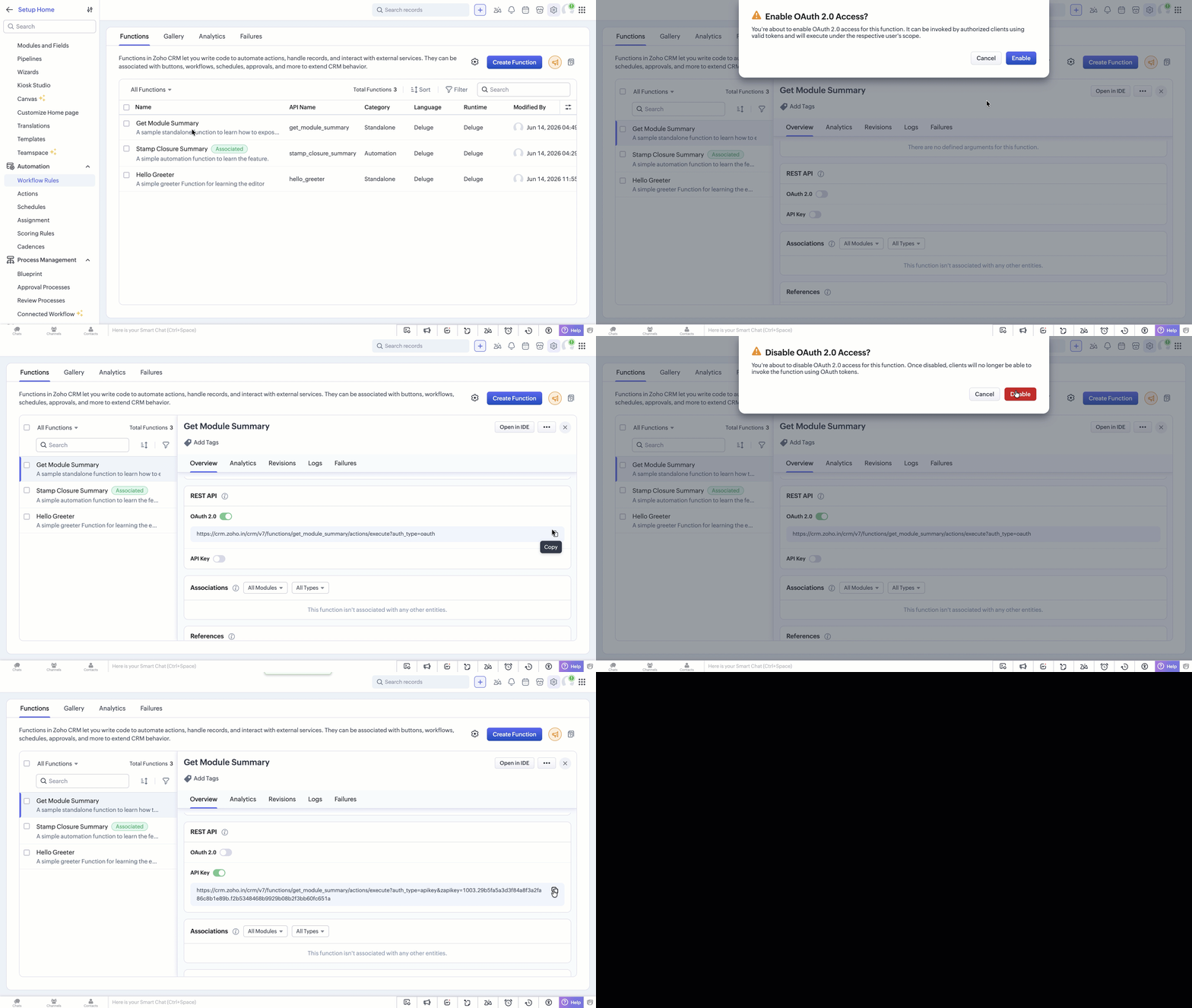
- In the glance view of the required function, go to Overview > REST API.
Choose an authentication method:
API Key (No Authentication)
- The generated endpoint URL serves as the authentication key. Anyone with the URL can invoke the Function.
- Best for: inbound webhooks, trusted internal systems, quick prototyping.
- Treat the URL as a secret; regenerate it if compromised.
OAuth 2.0 (Authenticated Access)
- Requires the caller to obtain an access token via the standard OAuth 2.0 flow.
- Register your client application in the Zoho API Console to obtain a Client ID and Client Secret.
- Pass the token as Authorization: Zoho-oauthtoken <token> in every request.
- Best for: partner integrations, user-scoped access, production APIs.
- Copy the generated endpoint URL
| Aspect | API Key | OAuth 2.0 |
|---|---|---|
| Authentication required | No | Yes |
| Best for | Webhooks, trusted internal calls | Partner integrations, user-scoped access |
| Caller identity | Anonymous | Authenticated user or app |
| Token expiry | None (URL-based) | Access token expires: Refresh the token when it expires |
Step 5: Call the Endpoint
Test the endpoint from an external HTTP client. For example, using curl with an API Key endpoint:
curl "https://www.zohoapis.com/crm/v8/functions/get_module_summary/actions/execute?auth_type=apikey&module=Deals"
You should receive a JSON response like:
{
"summary": "Found 25 records in the Contacts."
}
If using OAuth 2.0, include the access token in the header:
curl -H "Authorization: Zoho-oauthtoken <your_access_token>" \
"https://www.zohoapis.com/crm/v2/functions/get_module_summary/actions/execute?module=Deals"
What You Just Learned
- Standalone Functions are designed for REST API endpoints. They are independent of CRM events and return a String by default.
- crmAPIRequest provides access to the incoming HTTP request, including query parameters, the request body, headers, and user information. It is supported in Deluge, Java, Node.js, and Python.
- crmAPIResponse gives you full control over the outgoing HTTP response — status code, content type, headers, and body. Also available in all languages. For simpler use cases, Java, Node.js, and Python can use basicIO instead (body only, no HTTP-level control)
- API Key and OAuth 2.0 are the two authentication options. Choose the appropriate method based on whether the caller needs to be authenticated as a specific user.
- Testing externally with curl or Postman verifies the full HTTP round-trip, including authentication and request/response handling
What's Next?
- For the full reference on crmAPIRequest, crmAPIResponse, basicIO, authentication, and rate limits, refer to Exposing Functions as REST APIs.
- To understand execution limits before deploying your function to production, check out Platform Limits and Quotas.
- When external calls fail, refer to Error Handling for Deluge & NodeJS, Java and Python.