AI in Zoho CRM
Leverage Zia's robust AI capabilities in Zoho CRM, to enhance your sales operations, regardless of size, by focusing on key selling tasks and letting Zia manage the rest. With Zia, your team can focus on building relationships, closing deals, and delivering value to customers—activities that drive real business growth.
Generative AI
Module creation by Zia
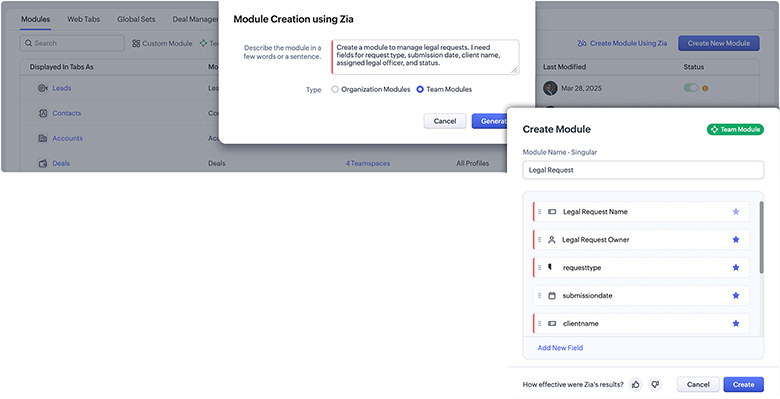
Zia can understand your natural language inputs and create modules with associated fields for you. Just describe the module you require, and Zia will handle the initial setup. This simplifies and speeds up the process of building modules that meet your business requirements without having to configure each field individually. Zia can generate modules at both the organization and team level for you.
Imagine you manage your organization's legal team, and you want a separate module exclusively for the legal requests that your team handles. Rather than manually creating a module and selecting the fields you need, you can simply ask Zia to do so and get your module generated.
Workflow creation by Zia
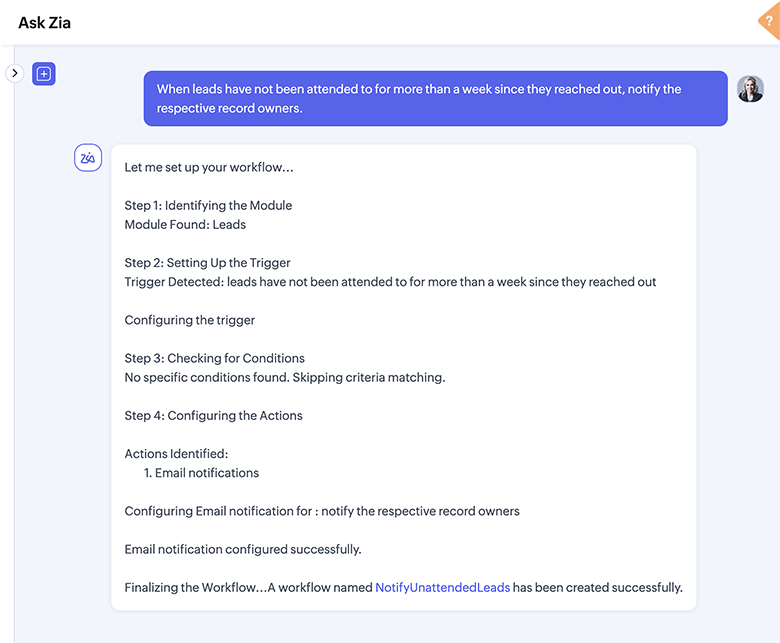
Tap into Zia's generative AI features to interpret your natural language commands and create workflows for you. Let Zia create workflows to delegate tasks, update fields, create tasks or meetings, schedule calls, add or remove tags, send email alerts, convert leads, and perform custom functions or webhooks.
You've been noticing recent leads slipping through without sufficient follow-up. A simple solution could be setting up a workflow rule to remind your reps so that they don't miss any of their follow-ups. Or, rather, you can ask Zia to set it up for you.
Report creation by Zia
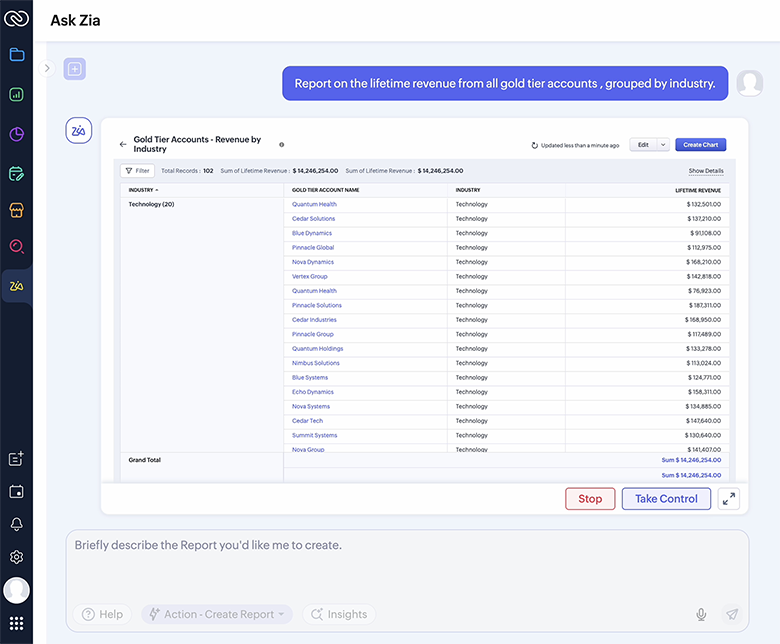
Use natural language prompts to get Zia to create quick reports for you and take care of everything you'd typically do manually, like choosing modules, selecting fields, setting filters, and defining charts. Zia's report creation offers co-creation functionality where you can take control at any point, refine configurations, and hand control back to Zia when needed.
You want to analyze revenue from your gold tier accounts across industries to plan targeted content marketing strategies. You can obtain the necessary insights through a revenue report. You can simply mention your requirements to Zia and get your report generated in seconds.
Record summary
The record summary feature provides a condensed overview of a record's information without requiring extensive navigation through the record. These summaries are created based on the record's context, ensuring that you receive the most pertinent and useful insights.
You've newly joined your organization as a business development representative and have been assigned some leads to work on. You can run through the records and get to know the leads better. But what if you need a quick overview about the lead's history with your organization so far? Zia helps you here with record summaries.

Resources
Image to Canvas template
Canvas is Zoho CRM's built-in, no-code, drag-and-drop design studio that enables you to customize the look and feel of your CRM account. You can now generate Canvas list view templates from an image with a single import and thereby maintain a polished record interface with ease. Whether it's a design mock-up, a screenshot, or a photo of a printed layout, Zia can analyze the structure and content to replicate it as a template for your CRM.
You have recently come across an image and felt its design would be apt to be incorporated into your CRM. Instead of trying to replicate the image design from scratch, you can import it into Zoho CRM and watch as Zia turns it into a Canvas template.

Prompt builder
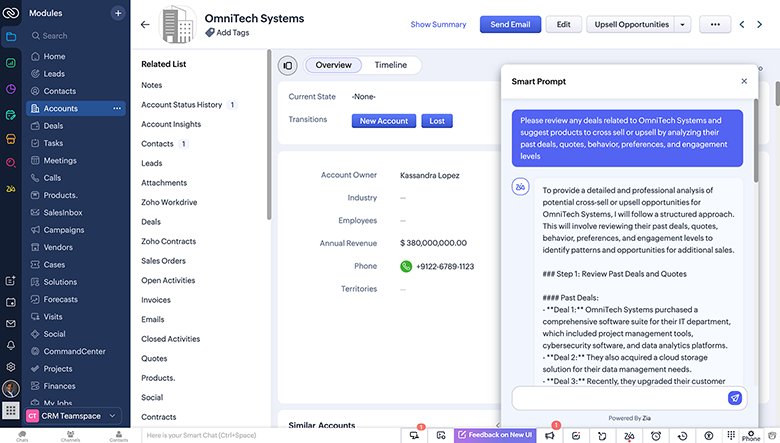
With the all-new prompt builder for custom buttons, you can create your own AI instructions to generate tailored content, suggestions, or summaries across record pages and list views. Whether it's drafting a follow-up email, summarizing a lead, or analyzing a customer account, you decide what the AI should do, and Zia delivers—instantly and contextually.
As one of the measures to enhance your revenue, you're looking into relevant upsell and cross-sell opportunities that also add value to your customers. With the sheer number of customers you have, it would be an exhausting and unproductive affair to go through every customer and analyze the best solutions for them. Instead, you can get these insights with the click of a button using your own custom prompts.
Smart prompt
Smart prompts integrate the power of Zia and your choice of LLM—Zia LLM or third-party LLMs like ChatGPT. Create new emails or improve existing ones, enhance language, and refine tone. You can also use smart prompts to generate or modify email templates, fetch valuable customer information from records, and summarize and enhance record notes.
Let's say you need to send an email about your product to a lead. You draft your content but feel that it needs a greater focus on the benefits your product offers the lead than on its features. Rather than a manual revamp, you can use smart prompts and revamp the content quickly.

Resources
Prediction
Churn prediction
Zia predicts whether a customer will churn out of your business or not and displays a churn probability score for each customer record. The higher this score is, the higher the probability of that customer churning.
Zia also indicates the product or service from which a particular customer is churning. For records that aren't subscription-based, Zia displays the churn score without any mention of a product.
Let's say you're a publishing company with various products ranging from newspapers to magazines. You have a customer who has been subscribed to your e-newspaper's premium plan for the past three years. During the past few months, this customer has been largely inactive in his business dealings with you. This might be a sign of customer dissatisfaction and a potential risk of churn. Zia will identify these trends and classify this customer as one with a high probability of churning. Based on these insights, you can take swift action to retain the customer.

Zia scores
The Zia scores feature studies a particular record and assigns it a score. To assign scores, Zia analyzes information from the record, sales signals, related data, and data through integrations with other products. These scores represent the likelihood of conversion for a particular lead or deal, making it easier for businesses to prioritize their efforts and allocate resources more efficiently.
The score is automatically recalculated when there are changes to record fields, related records, or sales signals.
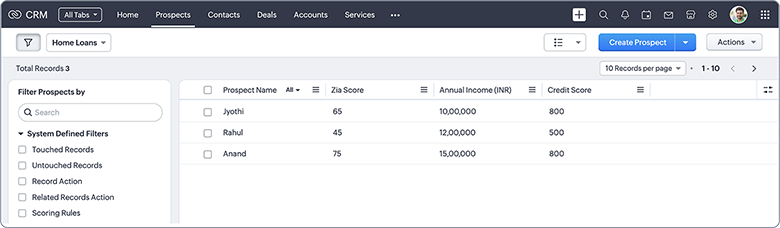
Consider that you run a bank in India. You want to identify the most eligible home loan requests. Assume you have three home loan requests and analyze all the eligibility criteria. This evaluation leads you to use income and credit scores as the differentiating factors in this case. The income and credit scores for the requests are as follows:
- Jyothi has an income of 10 lakhs per year. She has a credit score of 800.
- Rahul earns an income of 12 lakhs per year and has a credit score of 500.
- Anand makes 15 lakhs per year with a credit score of 800.
After evaluating these requests based on income and credit score, you can reach the following conclusions:
- Anand would be the most eligible customer for your home loan. Though he has the same credit score as Jyothi, he has a higher income.
- Jyothi would be the next best eligible customer. Her income is a bit lower than Rahul's but her credit score is much higher than his.
- Rahul would be the least eligible among the three, considering that his credit score is significantly lower to the other two customers, despite his decent income.
Hence Anand would be the ideal customer to consider approving a home loan, followed by Jyothi, and then Rahul. Zia studies such patterns and assigns scores to them to denote their chances of conversion.
Resources
Field prediction
Zoho CRM’s field prediction enables you to build custom predictions that align with your business requirements. This simple and intuitive builder can quickly predict values for various business metrics, such as the likelihood of winning or losing a deal, the expected revenue from it, the likelihood of a user buying a specific product as part of the deal, and more—based on a selected field.
Zia studies your data according to the conditions you specify and generates predictions. These predictions provide you with better insights to plan or modify existing sales and marketing strategies.
Let's say you run an insurance company. You've recently introduced automotive insurance to your services and want to predict the likelihood of customers buying this new service. In the Deals module, you have a field named "Insurance type" and "Automotive insurance" as one of the options under it. You can generate a prediction for this field so you can determine how your automotive insurance service would perform overall and the appropriate business strategies to achieve it.

Prediction analytics
Zia’s prediction analytics feature displays the data that was used as input to predict an outcome, such as the number of active predictions, prediction accuracy, the number of records involved in active predictions based on probability range, the number of records that uptrend or downtrend, and a time-based graphical representation of prediction accuracy over various periods of time and across various record owners. These analytics help you identify segments where the performance and quality of predictions are unsatisfactory so you can address them accordingly.
Let's say you run a real estate firm. You have your property deals listed in your Deals module and have created a prediction for the "Stage" field to determine which properties have the best chances of closing. The prediction provides you with the necessary insights for deal closure.
The prediction analytics feature states how accurate the prediction is, among various other performance insights. This helps you validate its accuracy and quality so you can decide on further courses of action as required.


AI forecasting
Using its predicted target functionality, Zia suggests optimal targets for individual users and roles in the current forecast period based on targets achieved and deal closure patterns from previous periods. For example, if the past trend suggests that a rep usually achieves more than the set target, Zia can predict an ideal target for the rep that he is likely to achieve.
As part of the predicted achievement functionality, Zia predicts how much an individual user or a team is likely to achieve in the current forecast period based on targets achieved and deal closure patterns from both previous and current forecasts.
Zia provides various analytics for your forecast, such as a forecast overview, target achievement report, user and role performance metrics, and more. Using these analytics, you can get an overview and detailed breakdown of the performance of your forecast, users, and roles.
As part of the metrics, Zia also identifies gaps in the actual and achieved forecast targets and suggests actions to bridge those gaps. You can also identify any anomalies in your forecasts and implement appropriate solutions.
Let's say you want to create a forecast to analyze your sales potential for the upcoming quarter. Imagine you have an experienced sales rep, Emma, and one with less experience, Olivia.
With her experience, Emma can bring in more sales and revenue, while Olivia might not be able to deliver as much. A high target would be overwhelming for Olivia, while a low target might be unproductive for Emma. It's important to strike an overall balance to frame a productive forecast. In this case, Zia will analyze past data and suggest targets that are relevant to Emma, Olivia, and your organization as a whole. It will also predict the achievements that Emma and Olivia are actually likely to achieve.


Resources
Recommendation
Recommendation builder
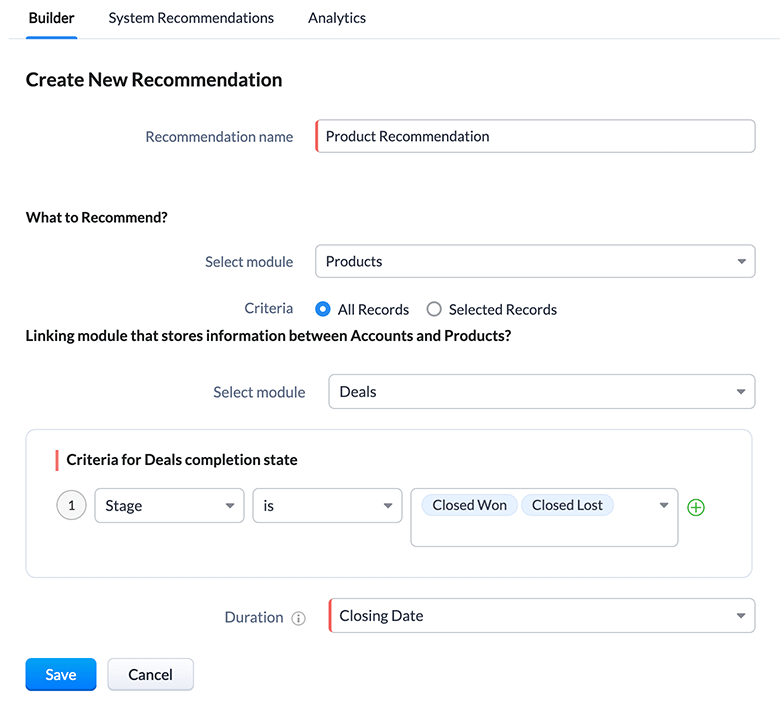
Zia identifies and analyzes customer data like purchase details, interests, requirements, and behavioral patterns in order to suggest the most relevant products and services. In formulating recommendations, the AI assistant also compares customers' behavioral patterns to those of other customers with similar attributes.
You can create your own recommendation models according to your varying business needs and set up notifications to send recommendations to your reps. They can use these recommendations to provide your customers with the right products and services and also improve cross-selling. Furthermore, notifications can be sent every day or every week and refined according to custom criteria so that notifications detail only selected products, services, deals, and so on.
You can also create workflow rules based on Zia recommendations and automate actions to be performed on the records before, after, or on the day of recommendation for a product or deal that a customer is deemed likely to purchase based on past purchases.
Let's say you're running an ecommerce business selling various television brands. One of your customers is looking to buy a television and has purchased a significant number of other electronic items from a particular brand. Zia scans through the existing customer data and recommends television models from that particular brand.
You can also provide access to this recommendation for the respective record owner, enabling the record owner to offer more meaningful solutions to the customer and improve overall engagement.

Recommendation analytics
Zia's recommendation analytics provide you with an overview of the analytics involved in generating recommendations. The analytics include the number of active recommendations, the success rate of each recommendation, recommendation trends, and more.
These analytics enable you to understand the performance and relevance of the recommendation tool and modify it as per your business requirements.
Consider the previous example, in which you recommend television models of a particular brand to a certain customer. Zia recommendation analytics detail how effective this recommendation model is. Based on that assessment, you can decide how suitable the model is for your business needs and implement necessary changes.


Next best experience
When the feature is enabled, Zia will monitor all open and active deals in your organization, analyze the deal stage, suggest the next best experience that you can provide, and prompt you to take action.
Zia does this by studying closed deals and analyzing the time taken for similar deals to progress from one stage to another. With this information, Zia correlates patterns and behaviors, such as industry, deal type, repeat customers, and more, to suggest the next best experience.
For example, needs analysis is an important stage in a sales pipeline. During this stage, the major challenge a sales rep might face is obtaining a clear and full understanding of the prospect's requirements.
When your prospects enter this stage, the feature might prompt you to schedule a meeting within the next two days to put your prospects at ease and assess their needs—all based on historical data in your CRM.

Similarity recommender
Zia's similarity recommender is a handy tool that compares one record with other records present in the module, identifies any similarities between them, and displays the five most similar records as recommendations.
The tool also indicates which factors are similar across records, such as revenue, geographical location, or industry.
Your sales reps can use this information to understand how a previous deal went through various stages and therefore to implement the appropriate measures to ensure the deal is successfully closed.
Let's say you run a real estate business. A customer has recently bought a villa from you. You have a similar villa deal around the same price range with a prospect. Zia lists your previously successful villa deal as a similarity recommendation and indicates what the similarities are. Your sales reps can leverage this similarity data to approach the new prospect with an effective sales pitch.

Best time to contact customers
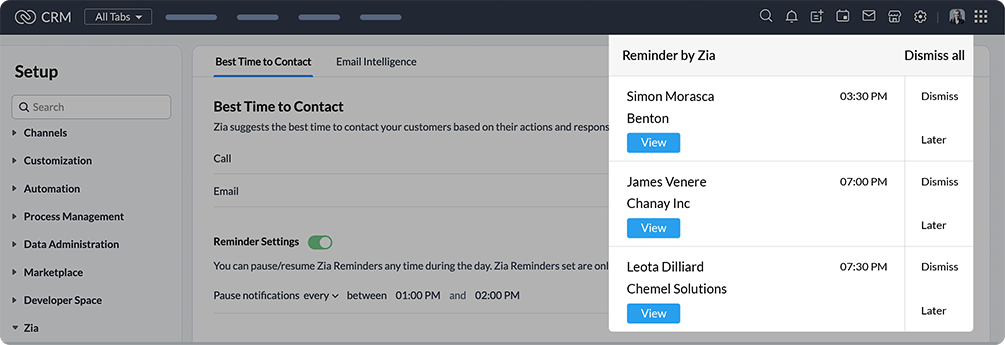
Zia identifies the best time to contact a customer based on the customer's actions, such as when the customer answers your calls, replies to your emails, how long they take to respond to emails, how soon they reply to your emails, and the time of day when they most often reply or take your calls. Based on this, Zia suggests the best time to send an email or make a call.
Let's assume you had an email conversation with a customer. Zia tracks factors like the time of the customer's replies to your emails and how long he took to respond to your emails, and then comes up with a suitable time to contact that customer.

Let’s say you have around 4 tasks to be completed today. You don’t have to set reminders for each task. Instead, you can just click on the Let Zia remind you option, and that’s it—Zia will take care of the reminders for you.


Best time to contact analytics
In Zoho CRM, Zia compares your interactions with best time to contact suggestions and provides various analytics, such as the summary of best time to contact suggestions, individual analyses of outgoing calls and emails, and how your reps use the best time to contact feature for emails and calls.
These analytics help you understand factors like why a lead failed to convert, how efficient sales reps are, and how effective your emails and calls are—all with respect to Zia's best time to contact suggestions.
Let's say you've recently lost a few leads. As part of your analysis of why, you want to check when your sales reps contacted those leads. Instead of having to manually dig through each rep's records, you can rely on Zia, which reports how reps have used the best time to contact suggestions.

Data enrichment
In Zoho CRM, Zia seeks and retrieves additional information about your records from the internet based on primary information you've provided, which enhances your CRM data quality by minimizing the possibility of incorrect or incomplete CRM data, and thereby helps your sales reps understand and serve prospects' needs better.
It also derives useful data from email signatures and captures them in your CRM account for leads, contacts, and accounts. Some of the important details that Zia can capture include email address, website, contact number, company name, social handles, designation, company location, address, and so on.
Imagine you have a lead for whom you only have basic details, like name and email address. Let’s say Zia fetches you information such as the lead’s location, phone number, and social profiles, as shown in the screenshots below. You can use these data to analyze various aspects that impact your business.
For example, using the location data, you can analyze factors such as your market presence in that region, your competitors there, your chances of beating out your competitors to capture the lead, and so on. The fields for which Zia fetches information are called the enrichment fields—in this case, the lead’s location, phone number, and social profiles. These fields provide you with a clearer picture of the various factors you might need to consider before you decide on necessary actions.

Let's say one of your customer companies has assigned a new point of contact for CRM-related communications. The new contact sends you an email informing you of this change. In the email, the new contact has also included his email signature.
Since this contact is new, you won't have his details in your CRM. You could manually collect and enter the details in your CRM, but since the contact has included his signature in the email, you can instead use Zia's email data enrichment feature to capture the contact details from his signature.

Resources
Anomaly detection
Trend analysis
Zia's trend analysis helps you track sales analytics without the need for regular manual monitoring. It details your sales trends, team performance, and charts out important sales metrics based on current and past data.
Zia also detects and notifies you of any anomalies in these patterns so you can identify problem areas and take action at the right time, or determine what's helping the growth of your business so you can invest in it more.
Imagine you haven’t been tracking the status of lead conversions in your account for a while, so you’re not up to date about the success of your lead conversions or the corresponding trends. Zia trend analysis provides you with sales metrics that help you understand your lead conversion trends.

Resources
Anomaly detector
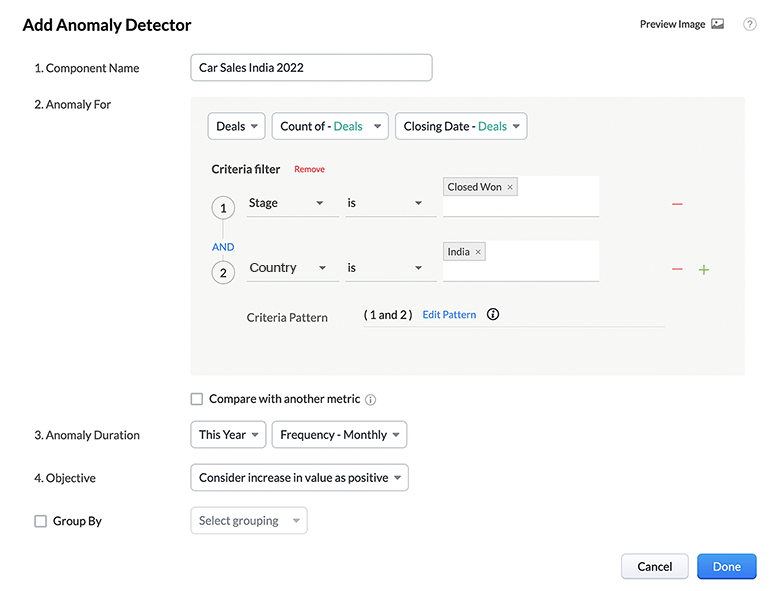
Zia helps you identify unusual or outlying events, records, or objects that represent significant deviations from your normal business activities and trends.
Zia computes the expected trend by monitoring current and past sales trends. When there are any deviations from this expected trend, they will be identified as anomalies.You can enable notifications for components that have been shared with you, which means your sales reps can also receive valuable notifications regarding anomalies without having to check those components manually on a routine basis.
Imagine your organization manufactures cars for customers across the globe. Let's say in one region, the sales of your cars see a significant decline from your usual sales pattern. Zia alerts you to this anomaly to help you understand the situation better and troubleshoot.

Workflow anomalies
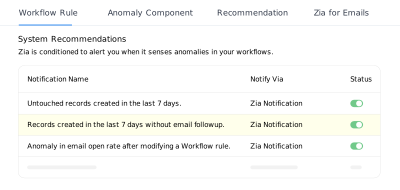
Zia detects anomalies in your workflow rules and provides relevant suggestions to enable you to identify and prevent conflicts and mistakes in them.
Zia identifies and notifies you of anomalies for the following scenarios:
- Untouched records created in the last seven days.
- Records created in the last seven days without email follow-ups.
- Anomalies in counts of records that were touched after modifying a workflow rule.
- Anomalies in email open rates after modifying a workflow rule.
- Anomalies in top-performing template open rates for workflow rules created in the last seven days.
- The same template for the same lead/contact is sent on the same day.
- The same lead/contact receives more than one template on the same day.
Let's assume you've recently added a good number of leads. Your reps haven't followed up with some of them through email since the leads were added. This could prove detrimental to your organization in converting those leads into customers. Zia notifies you of the percentage of leads that haven't been attended to in the last seven days via the Zia notification panel. This helps your organization avoid losing leads due to lack of follow-ups.

Automation
Workflow suggestions
Zia suggests workflow rules by analyzing recurring actions performed in your organization's CRM account. When multiple users in your organization perform the same specific actions, Zia suggests that you create workflow rules for these actions with relevant criteria, and notifies you each time it suggests a workflow rule for your organization. You can remove or modify suggested workflows by adding or removing criteria or actions as needed.
Let's assume that when the value of the closing date field in the Deals module is two days away from its resolution time, most of the users in your organization regularly set the priority field as urgent. Zia now identifies this trend and suggests a workflow rule to automatically set the priority field value to urgent when the closing date is two days away.

Owner assignment suggestions
Zia studies existing assignment patterns to determine which owner is most suitable for a record. The AI assistant accounts for all relevant fields to identify a pattern.
Another influential factor is the user threshold, which is the number of records a user can handle per day, week, or month. This factor helps Zia avoid overloading or under-loading a user with too many or too few records, respectively.
Let's say a rep in your organization—Robert—takes care of leads from the UK-based manufacturing industry, while another rep—Anil—handles leads from the India-based real estate vertical. Zia studies the records in your organization and understands which kinds of records are owned by which users. When a UK-based lead from the manufacturing industry reaches out to your organization, Zia suggests that the record be assigned to Robert, while also suggesting that any Indian-based leads from the real estate industry be assigned to Anil.

Macro suggestions
Similar to workflow suggestions, Zia auto-suggests macros for you to create based on your CRM activities. If you've been repeating the same set of actions over a period of time and on multiple records, Zia will automatically suggest that you create macros for these actions.
While workflow suggestions suggest you create workflow rules based on recurring actions performed by many users in your organization, Zia offers macro suggestions to individual users based on recurring actions performed by those particular users.
Let's say you perform a set of actions for leads created seven days ago and with whom you're yet to establish communication. Those actions are as follows:
- Send a follow-up email
- Update the lead status field to "Contacted"
You perform these actions on a daily basis and ensure that these leads are sent a follow-up email to improve your lead engagement and conversion. Zia will suggest that you create a macro out of these actions.

Business intelligence
Zia presentation
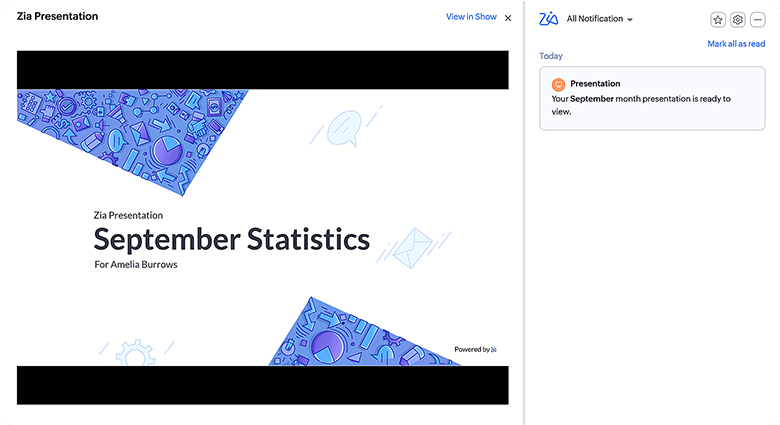
Once you enable the feature, Zia prepares a slide deck that's pushed as a notification in the Zia notifications panel each month.
You can preview the presentation in the Zia notification panel upon clicking on the respective notification. You can also view it in Zoho Show. The deck contains module-level insights, performance-related KPIs, and behavioral analytics, providing you with a holistic view of your business performance.
Some of the analytics extracted include a trend analysis for a field over a period, an evaluation of the impact one field has had on another, a quadrant analysis to identify similar/dissimilar data points, and more. You can edit the generated presentation according to your needs in Zoho Show.
The analytics Zia creates derive from the importance of various modules and fields based on user input. Based on this data, Zia creates a relevant chart.
Imagine you manage the logistics department in your organization. Every month, you need to present the performance of your department to your superiors. You can create a presentation with all the necessary details. But you can make this easier by letting Zia do this for you. Zia generates presentations every month with important metrics based on your role in your organization.
Strategy influencer
The strategy influencer feature consists of AI-driven analytics that provide predictive, prescriptive, and diagnostic insights into your organization's business trends and patterns, using Zia's AI capabilities. It provides realistic targets and ways to achieve them. These insights help you understand the different factors affecting your business—positive and negative—so you can take the necessary corrective actions.
Strategy influencer predicts an overall target for user-defined target metrics. The insights are then provided in the form of the following components:
Target Contributors: Lists the top contributing factors to achieve the overall target and specifies the target for each contributing factor, along with its actual achieved value.
Anomaly Finder: Lists anomalies based on the actual achieved value for the predicted overall target. It can be positive (what benefited) if the overall target is achieved, or negative (what went wrong) if the overall target is not achieved.
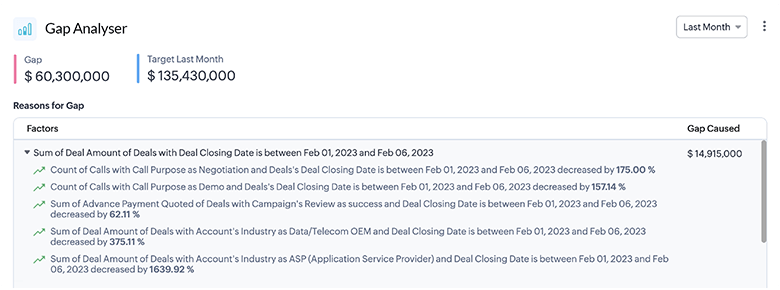
Gap Analyzer: Details major as well as minor gaps between predicted and actual values for a particular day or week, and the reasons for the gaps.
Predictor: Identifies picklist and lookup fields that contribute the most towards your goals.
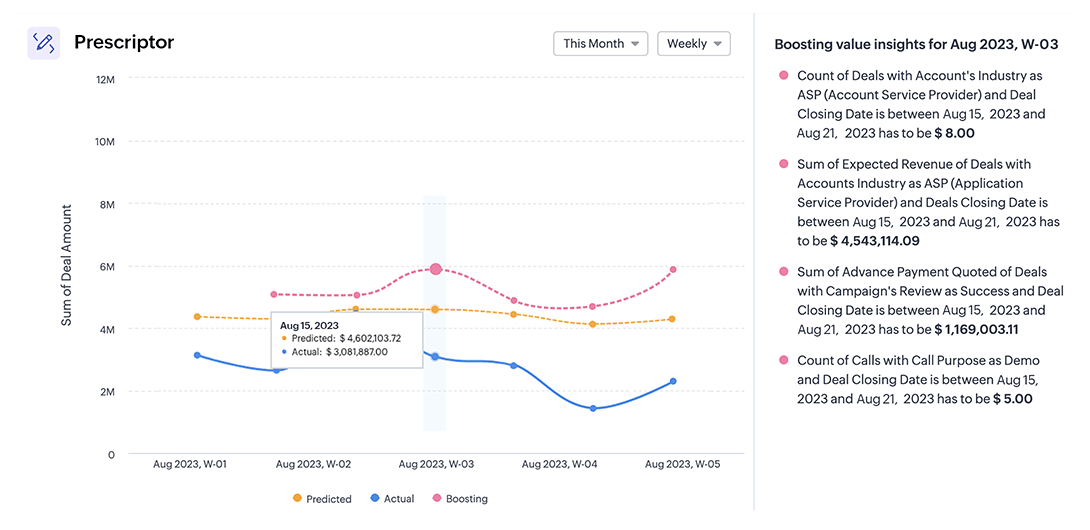
Prescriptor: Suggests actions to achieve a predicted target and rectifications to achieve a missed target, both on a granular level. This includes daily, weekly, and monthly insights.
Let's assume you run a home appliance business. You're planning targets to enhance your business output. For an effective implementation, you need relevant insights about your organization. Zia sets a realistic target and provides you with these insights through strategy influencer for your business.
You can utilize these insights to restructure your organizational strategies, improve sales, or implement retention activities accordingly.



Analytical component suggestions
Zia provides suggestions to create the most efficient analytical components that align with your organization’s needs. Zia analyzes the purpose and logic for an analytical component coupled with the data usage patterns by the users. The suggestions are generated by analyzing frequently viewed reports by users. These suggestions are user-specific based on what a user focuses on and hence not the same for all users. Based on these, Zia identifies the most helpful metrics in a module for their business and suggests the most appropriate component to them. Currently, Zia’s suggestions will be available for cohort, quadrant, and anomaly detector components.
Imagine you operate an OTT content streaming service. You decide to track and analyze the number of new subscriptions you receive for each of your plans and decide on necessary strategies. One of the most frequent fields that you use is the OTT plan field. Zia studies these patterns and recommends a cohort with a relevant configuration.


Let’s say you run a resort and have multiple branches. You regularly update the number of bookings you receive and the revenue generated through your bookings. You’d now like to compare the number of bookings and revenue across all your branches. Zia suggests quadrants that can help you measure where each of your branches stands with respect to the intended metrics.


Imagine you own a pizza restaurant. You suddenly notice that there has been a significant dip in your restaurant’s revenues for the past few days and realize you need to efficiently identify such anomalies regularly. To help you with this, Zia can suggest anomaly components to track your restaurant’s revenue and notify you automatically so that you don’t have to check for anomalies manually on a regular basis.


AI for emails
Email sentiment analysis
Zia's email sentiment analysis groups your emails into various sentiment categories: positive, negative, and neutral. Emails with a happy tone are grouped under positive, those with an unhappy tone are grouped under negative, and those with both of these traits are grouped under the neutral category.
You're also notified every time a customer sends consecutive negative emails, so you can keep an eye on these customers, take insights from your previous conversations with them, and act accordingly—which could help retain a customer who might otherwise be lost.
Let's say you've received an email from a customer saying that she had reached out for support regarding an issue in your product, but it's been a long time since she got a response from you. The sentiment of this email is negative since the customer is unhappy with your support. Hence, you should prioritize this customer and quickly attend to her queries.

Take the previous example where a customer was unsatisfied with the response time from your support. For various reasons, you haven’t been able to respond to that customer. The customer then sends three more emails at regular intervals and is on the verge of churning. You now identify this trend and quickly reach out to the customer to resolve her problem.

Email intent
Based on the content of your customers' emails, Zia will identify the intent of each email as a query, request, complaint, or other.
You receive an email from a customer who wants to upgrade his subscription plan because his company has grown significantly. In this case, he's submitting a plan upgrade request to you. Zia understands this and classifies this email as a purchase.

Resources
Email custom intent
Using custom email intent, you can train Zia and create your own custom intent suggestions to cater to your customers' exclusive business needs. This can be done in two ways: without sample data and with sample data.
Without sample data, you can create custom intent using up to five keywords that relate to the desired intent. With sample data, you can either paste email content as a sample or upload a file.
Let’s assume you receive a lot of emails from customers asking for generative AI capabilities. Since you get a lot of requests for generative AI, you can create a custom intent named “GenerativeAI” and provide the relevant keywords for Zia to categorize. This helps you quickly identify emails that contain requests for generative AI capabilities.


Imagine you run a food delivery business. Recently, you've been receiving a lot of complaints from customers regarding delays in food deliveries. To handle this issue, you can create a custom intent called "DeliveryDelays" to tackle this. You can collect content samples from emails related to delayed deliveries you've already received over time and either paste the email content or upload the sample email files to train Zia to recognize similar emails. This helps you instantly identify emails related to delivery delays and address them quickly.


Email emotion analysis
Zia is trained to categorize emails based on the emotions expressed within them, such as happy, enthusiastic, grateful, confused, frustrated, discontented, trusting, and neutral. With these classifications, you can identify emails that need your immediate attention and prioritize them.
You get an email in which a customer expresses enthusiasm about the upcoming email automation upgrades to your product. Zia identifies this emotion and classifies it accordingly. In this case, the marketing team can consider this high-priority and focus on extending this upgrade to the interested customer.

Email activity extraction
Rather than going through your customer emails manually to look for information about meetings and tasks, Zia can identify these details from your customer emails and provide you with suggestions to add these activities to your CRM.
Zia can also identify activities as and when they arise instead of you having to open emails manually. You're notified of these activities via the Zia notification panel.
You've received an email from a customer who wants to have a call with you to discuss an issue he has faced with your product. You ask him for a suitable time for the call, and he responds with one. Zia identifies this information and suggests you add it as a call activity in your CRM.

Email summary
The email summary feature automatically summarizes the content of your customer emails and gives you the gist of the email in a single line. You can therefore get an idea of what a particular email is about without opening it. This is super helpful if you're handling a large number of emails.
You receive an email from a customer with a lot of questions about your new pricing plans. In this case, Zia will summarize the content of the email for you in a single line to help you understand that the email is about queries regarding your new pricing plans.

Resources
Competitor alert
The competitor alert feature notifies your sales reps when your leads or contacts mention your competitor in their emails. Zia can also analyze an email and understand if the customer's sentiment is positive or negative towards the competitor.
Based on these insights, your sales reps can identify leads or contacts that mention your competitors and quickly provide suitable solutions to gain their confidence and avoid churn.
You receive an email from a lead who's interested in buying your product, but the lead mentions that one of your competitors is offering him a similar product with AI features in the same price range.
Though there's nothing actually negative about your product, the lead has a more positive impression on your competitor's product, which is unfavorable to you. Knowing he has this impression, you can get in touch with the lead and offer the best possible deal.

Autocomplete
Once you enable Zia and start to draft an email, you'll receive phrase suggestions as you type. You can accept these suggestions or ignore them.
You get an email from a customer in which he expresses satisfaction over an issue resolved promptly from your end. You would obviously send a response thanking him. As part of your email, you start typing "It was a". Zia suggests a phrase like, "It was a pleasure talking to you." You can choose to accept the suggestion or ignore it and continue typing your own content.

Resources
Email subject line suggestion
Zia will analyze the email content you type and suggest a suitable subject line for it in the subject box. You can click on the suggested subject line to use it, or ignore it and come up with your own.
In case you forget to add a subject line, Zia's suggestion will again appear in the "Specify email subject" pop-up, which you can again either use or ignore in favor of your own subject line.
Suppose you've recently started a non-profit organization. Apart from receiving donations, you plan on conducting a small-scale sports meet to gain more visibility and raise funds for your organization. For this, you need sponsors. You've identified a few potential sponsors for the event and plan to initiate contact with them by email. As important as your email content is, you also need a solid subject line that will convince your sponsors to open the email and read it. Zia can help you generate effective subject lines.

Email translation
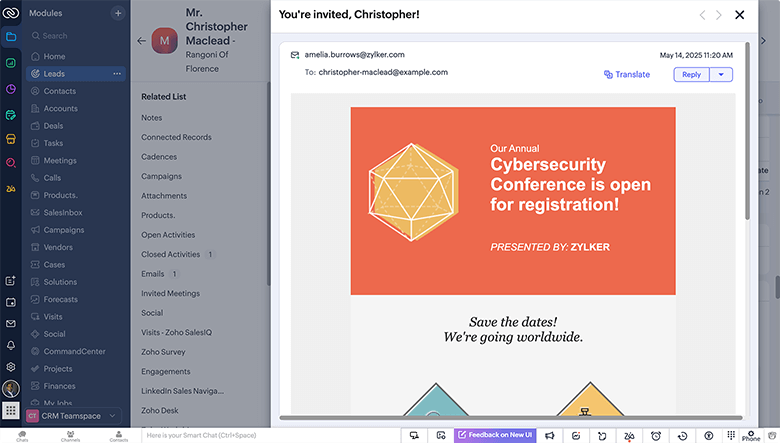
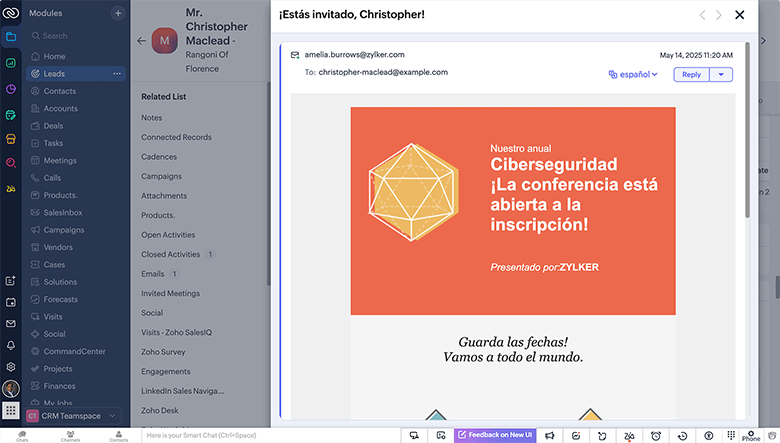
Zia offers a built-in translation feature for emails in Zoho CRM, enabling you to communicate with customers in different regions without language barriers. This feature covers composing emails and translating incoming and outgoing emails.
Imagine you're planning to hold a webinar aimed at Spanish-speaking regions as part of your lead-nurturing strategy. This webinar will not only be beneficial for your leads, but will also help establish the seriousness with which your brand approaches cybersecurity. You already have an email template ready for webinars. Instead of writing an email from scratch, you can simply translate the template with Zia and modify essential details such as the date and registration link.
Zia writing assistant
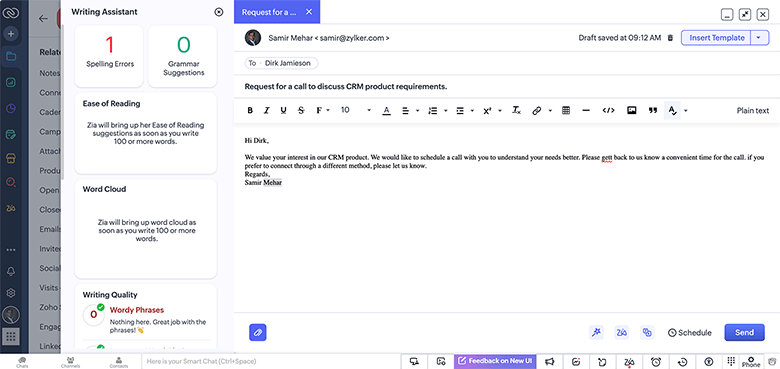
Zia integrates its Blue Pencil writing assistant from Zoho Writer into Zoho CRM to assist you in crafting clear, concise, and polished text when sending emails in CRM. Zia provides you with suggestions to enhance your grammar, punctuation, writing style, and overall readability.
A potential customer has shown interest in your CRM product. However, you require additional information to fully understand his specific needs in order to provide the best possible service. Accordingly, you decide to send an email requesting a phone call with him. While you may be careful when drafting your emails, there's always the possibility of unintended errors and opportunities for improvement in your writing. Zia can help you improve your email by providing writing suggestions.
AI for calls
Call transcription
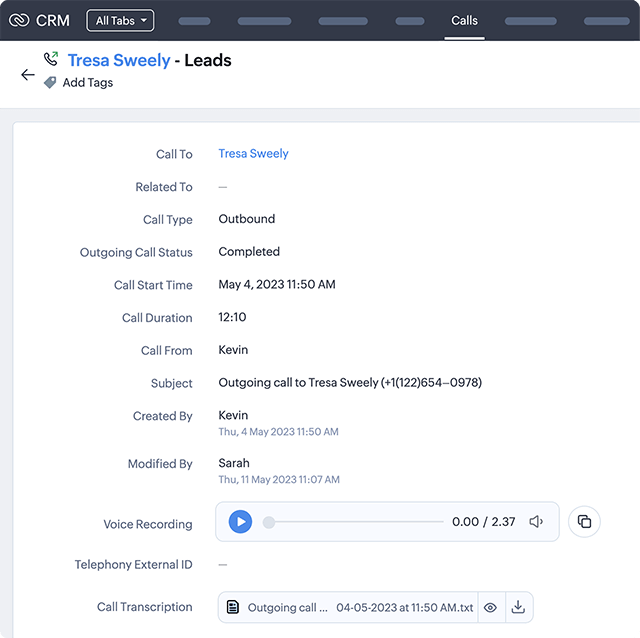
The call transcription feature in Zoho CRM automatically transcribes call audio recordings into plain text in the Call Activity module.
You also have the call transcription dashboard, where you can view information such as your minute limit for a particular month, minutes spent, minutes remaining, modules, profiles, call types, and the maximum duration of a single call in order for it to be transcribed.
From call transcriptions, you can obtain details such as the contact's sentiment, intent, and emotion, as well as a summary—thanks to Zia's call intelligence capabilities.
One of your agents, Kevin, had a call with a lead to discuss her requirements. He provides her with a couple of solutions that can help address her needs. Before making further decisions regarding your product offering, she takes some time and returns a week later to resume further discussions.
For whatever reason, Kevin has left your organization by this time, and this lead has been assigned to another agent, Sarah. Fortunately, the call transcription feature transcribed Kevin's call with the lead, which helps Sarah interact with the lead without the lead having to explain everything again from scratch.
Call intelligence
Zia analyzes and fetches important details about calls after transcribing them, such as:
Call sentiment - Identifies the overall sentiment of a call as either positive, negative, or neutral.
Call intent - Identifies the intent with which a lead or customer called you.
Call emotion - Identifies the particular emotion of a call as either happiness, enthusiasm, discontentment, frustration, gratitude, trust, confusion, or neutral emotions.
Call summary - Summarizes the call in a single line of text.
Let's say you're reviewing the calls that you had with your customers over the past week. You can go through the call transcriptions of these customers to understand their queries and concerns. This can be made simpler with Zia's call intelligence insights, which provide you with a customer overview, including their sentiments, intents, emotions, and a summary of your phone conversation with them. With these insights, you can determine which customers need immediate attention.

Vision AI
Image validation
Zia's image validation feature validates images in one of two ways: classification or detection.
For image classification, Zia considers the entire image for validation and matches it to the pattern learned through training data. For example, Zia might prevent someone from accidentally uploading a picture of a washing machine instead of a refrigerator. You can define "desired" or "undesired" images for Zia's validation based on acceptable and unacceptable images, respectively.
For image detection, instead of assessing the entire image, Zia matches a part of an image to the pattern learned from the training. For example, a car must have a number plate. If a number plate isn't detected, it's considered invalid and sent for manual approval. You can train Zia to mark an image as valid or invalid based on whether an object is detected or not detected.
Zia also calculates success rate that gives you the percentage of successful validations which helps you analyze your training data.
Let's say you run a car service company. Since you provide services related specifically to cars, you only need to maintain images of your customers' cars. You classify these cars into various segments such as SUV, MUV, hatchback, and so on. For example, you now validate SUV cars.
You can use the match validation type to train Zia to recognize SUV cars and hatchback cars. If the validation is successful for a record, the image will be updated in that record.


Let's say that you are a car reseller. You need to ensure that the cars you resell do not contain dents and paint scrapes. You upload images of the cars that you are reselling and create an approval process where only images with no dents and paint scrapes are approved. One of the cars has a dent that reflects in the uploaded image and hence the validation will fail and the image will be sent for manual approval.


Duplicate image detection
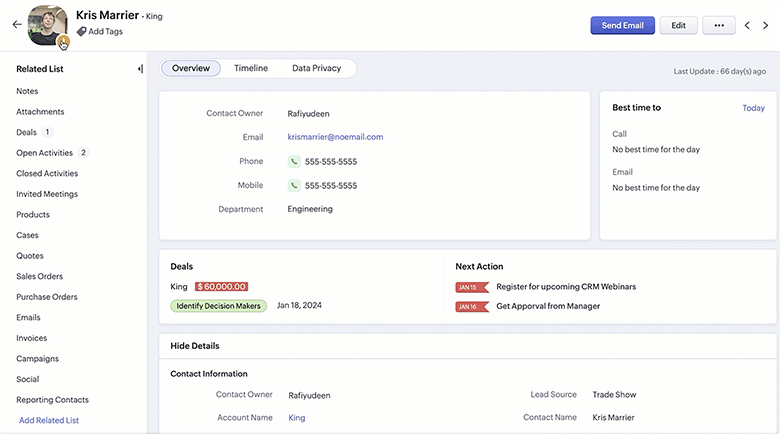
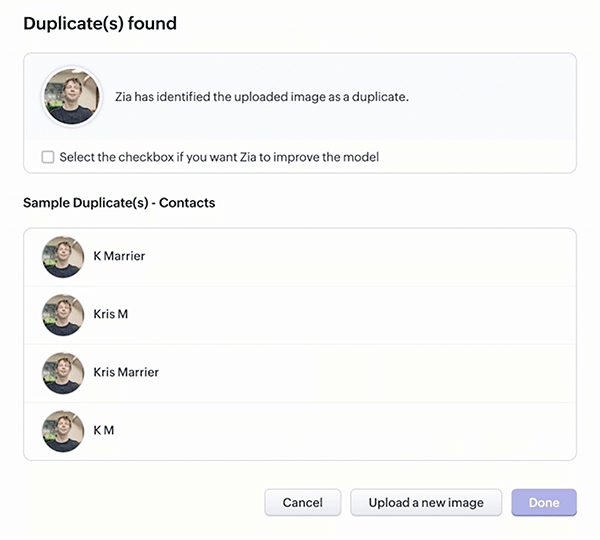
The duplicate image detection feature helps you maintain the uniqueness of each record by identifying and eliminating duplicates based on profile images, with a special emphasis on facial recognition.
You can identify potential duplicate records by uploading an image to be compared against existing records. This proactive measure ensures that during the record creation process itself, duplicates are identified and prevented, which improves data integrity from the start.
Imagine you've been observing an increase in duplicate leads recently. Some leads reach out to you using different phone numbers and emails. In cases where you have facial profile images, you can use duplicate image detection to identify and remove duplicate leads.
Intelligent character recognition (ICR)
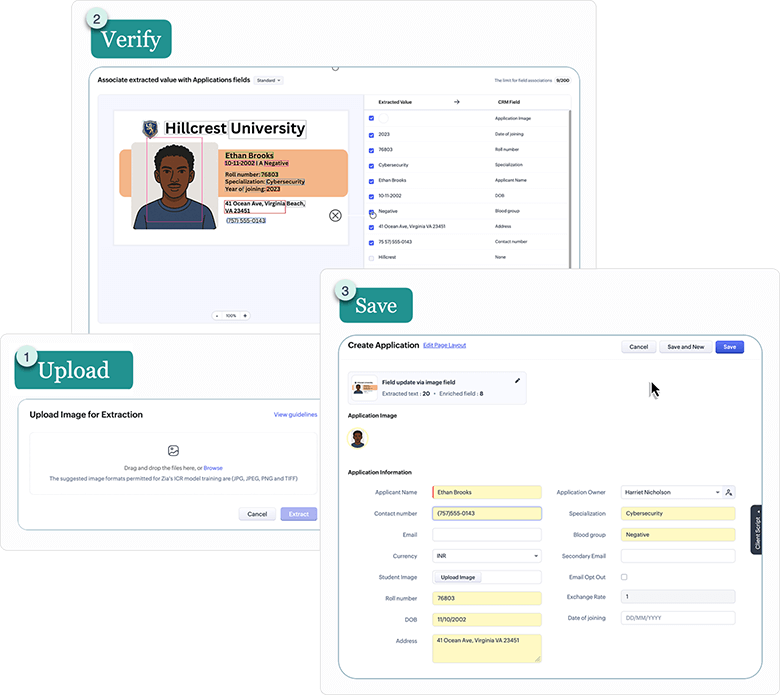
Create or modify records quickly using Zia's intelligent character recognition (ICR) functionality, which identifies important details from images and links them to appropriate record fields. You can train Zia with formats and orientations via sample images for optimal results. You can employ ICR to create records if your data is available as a non-editable image and the data source has a standard format.
You've just configured Zoho CRM for your university. You provide elective courses and have a dedicated module to manage them. When students enroll in these courses, you'll need to create a record for each application. To speed up this process, you can use the ICR feature to extract details from your students' ID cards and populate your application records.
Voice of the Customer (VoC)
Zia analyzes customer conversations and deduces what exactly the customers intend to communicate with you. Zia combines customers' feedback with their profiles to segregate them demographically. This enables you to understand which type of customers has what kind of needs. Using these insights, you can implement appropriate strategies to provide personalized solutions to your customers.
Each customer record in your CRM will have associated VoC data, that denote the feelings of a particular customer in their emails, surveys, support tickets, and so on. VoC dashboards are classified into the following categories:
Response-based sentiment analysis - Use 15+ dashboards to understand prevalent customer emotions and identify excessive negative emotions.
Sentiment-based profile analysis - Use 21 charts to analyze and categorize customers as promoters or detractors based on emotions and intent, and identify churn trends and keywords used by customers that may indicate an impending loss of business.
Competitor analysis - Gain insights into your customers' emotions about your business versus those about your competitors.
Survey comparison - Get customer response and emotion analyses of top survey keywords to discover customer delights and disappointments.
Cross-sell analytics - Peruse 25+ charts that provide suggestions about products and services based on respective customer sentiments identified through interactions and actions. Use these insights to determine upsellable prospects and products or services for cross-selling.
Segmentation analytics - Segment customers across five charts using RFM scoring labels based on their recent purchases (R), frequent purchases (F), and monetary value (M) to analyze customer behavior.
Various charts and graphs are part of the dashboards for the aforementioned categories, namely:
- Pie charts and donut charts
- Line graphs
- Bar graphs—single, multi, stacked
- Cohorts
- Quadrants
- Waterfalls
- Gauge charts/dial charts
- Anomaly dashboards
- Word clouds and tables
- Sankey charts
- Marimeko charts
Imagine you teach and manage an online course. You try to analyze the various kinds of responses you have received for your course. You can use the below charts to get an overall view of customer responses to your course.

From the above graphs, you can see that there is a significant number of negative sentiments and complaints related to your course. You can look into the complaints and resolve them accordingly.
Let's consider you sell smartwatches. You have recently launched 2 new models in the same price segment and run surveys for both the models. You want to compare customer sentiment on both your models to plan further business strategies. You can use the Sentiment in Surveys graph that derives data from the earlier surveys you had conducted.

From this chart you can see that despite the lesser number of total customers, the number of negative sentiments is more in Zylker S100 model. This way you can look into what went wrong in the S100 model compared to the S110 and incorporate necessary changes.
Custom AI - QuickML
QuickML is a no-code machine learning pipeline builder service offered by Zoho Catalyst to build, test, deploy, and monitor ML models for various business requirements. It offers you pre-built ML algorithms, operations and data pre-processing techniques which you can connect with datasets and build your own ML models. You can leverage all these functionalities with no coding involved. Zoho CRM can be used as one of the sources of data connector that can import data into QuickML for training and further processing.
After creating a pipeline flow and publishing it, you can execute it using the endpoint and the output of the pipeline will be displayed. You can also view the outcome from the QuickML model created, in widgets within Zoho CRM. The execution details will be monitored and gathered by QuickML to gauge the performance and resource usage of your pipeline. These insights will help you devise the most optimal pipelines and hence maximizing benefits for your business.