


Tax Reports

The Taxes section in Reports gives you a consolidated view of the taxes collected and paid across your business transactions.
Tax Summary
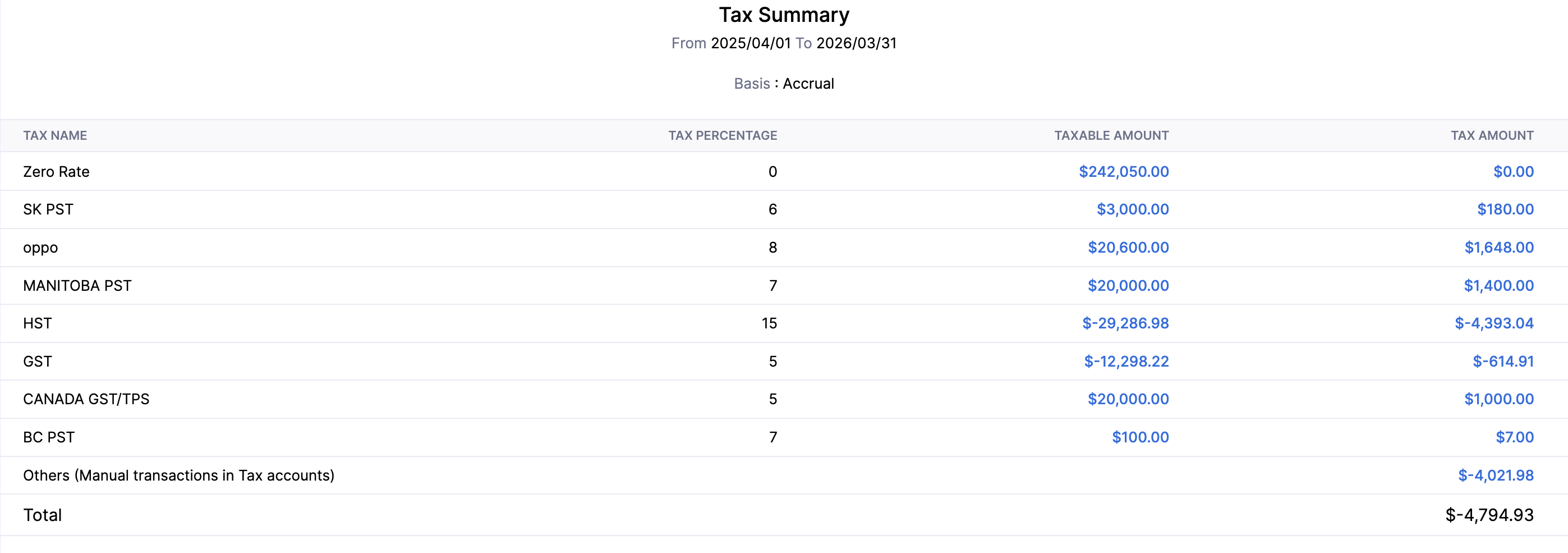
The Tax Summary report summarises the taxes collected and paid across all your transactions for a selected period.
To view the Tax Summary report:
- Go to Reports on the left sidebar.
- Select Tax Summary under Taxes.
Customize Report
To customize this report:
- Click the Customize icon.
You can customize the report using the General and Show / Hide Columns tabs.
General
Under General, you can customize the report based on the following filters:
| Filters | Description |
|---|---|
| Date Range | Select the time period for generating the report. |
| Report Basis | Accrual: Values are generated based on the invoice date. Cash: Values are generated when payment is received or made. |
| Group By | Group the report by a specific field. |
| Include Manual Postings to Tax Payable | Check this option to include manual journal entries posted to the Tax Payable account in the report. |
| Entities | Select the transaction types to include in the report: Sales, Purchases, or Others. |
| Advanced Filters | Apply custom filters based on report fields, locations, contacts, or reporting tags. |
- Click Run Report to apply the filters.
Show / Hide Columns
In this section, you can choose which columns to display in the report.
- In the Available Columns section, hover over the column you want to add.
- Click the + icon next to it to add it to the report.
- In the Selected Columns section, drag and drop a column to reorder it.
- Click Run Report to apply the customization and view the report.
 Yes
Yes