Home services scheduling software for on-demand professionals
Whether it's leaky faucets or pesky termites, clients frantically call pros like you to resolve household crises. But if you're constantly going back and forth on availability, it only fuels their frustration—and eats into your revenue.
With Zoho Bookings, let clients self-schedule appointments, automate payments, and eliminate last minute-cancelations–even when you're in the middle of a job.
TRY BOOKINGS FOR FREE

Why Zoho Bookings for home service providers?
With Zoho Bookings, you can showcase your availability, collect payments, get booked, or send automated notifications–even when you're in the middle of a gig. Clients can self-schedule appointments, and you can track them on the mobile app if you're away from your desk. A win for everyone!
Getting booked–without the endless back-and-forth
Whether you're an HVAC technician, a post-renovation cleaner, or a mover, Zoho Bookings helps you get booked faster, cut last-minute cancellations, and automate scheduling without jumping between apps.
Handyperson business
Managing a busy team that's always out in the field? With Zoho Bookings, each staff member can manage their schedule, get reminders, or mark time off, all through the app.
READ MOREHVAC technicians
Tackle multiple jobs in the same neighborhood and reduce commute times by assigning techs to specific workspaces in Bookings. With a HVAC appointment scheduling software, you can offer a wide variety of services like thermostat installation, or filter replacement, and charge differently for each of them.
Cleaning companies
From a simple carpet cleaning to pressure washing walls, you take care of it all. Customize availability for each of your jobs, spot highly sought services, and offer more of what clients want without second-guessing yourself.
READ MOREPackers and movers
The last thing you want is a scheduling scramble when you're lifting a heavy couch through a tight doorway. With Bookings, charge for your appointments, coordinate with your team better, without awkwardly pivoting your schedule mid-day.
READ MOREZoho Bookings: A scheduling tool that understands home services pros
Showcase your real-time availability
Tired of dealing with late-night appointment requests from clients? With Zoho Bookings' AI-powered setup, you can get started with your booking system in no time. Share your availability on your booking page and let clients self-schedule appointments–no more back-and-forth or wasted time.


Minimize cancellations and last-minute bailouts
Keep your clients in the loop with automated notifications. Protect your schedule with a cancellation window to avoid last-minute changes. Alternatively, you can filter serious clients with a non-refundable booking fee.
Free up your schedule
Limit the number of appointments you collect in a day to ensure sufficient time for rest, travel, and serving your customers. You can also avoid spam bookings by preventing customers from booking multiple slots.


Ensure timely payments without chasing clients
Improve cash flow by integrating with your payment provider (such as Stripe, PayPal, and other supported platforms), and get paid on time. You can also choose between a small deposit or the entire fee for your jobs based on your preferences.
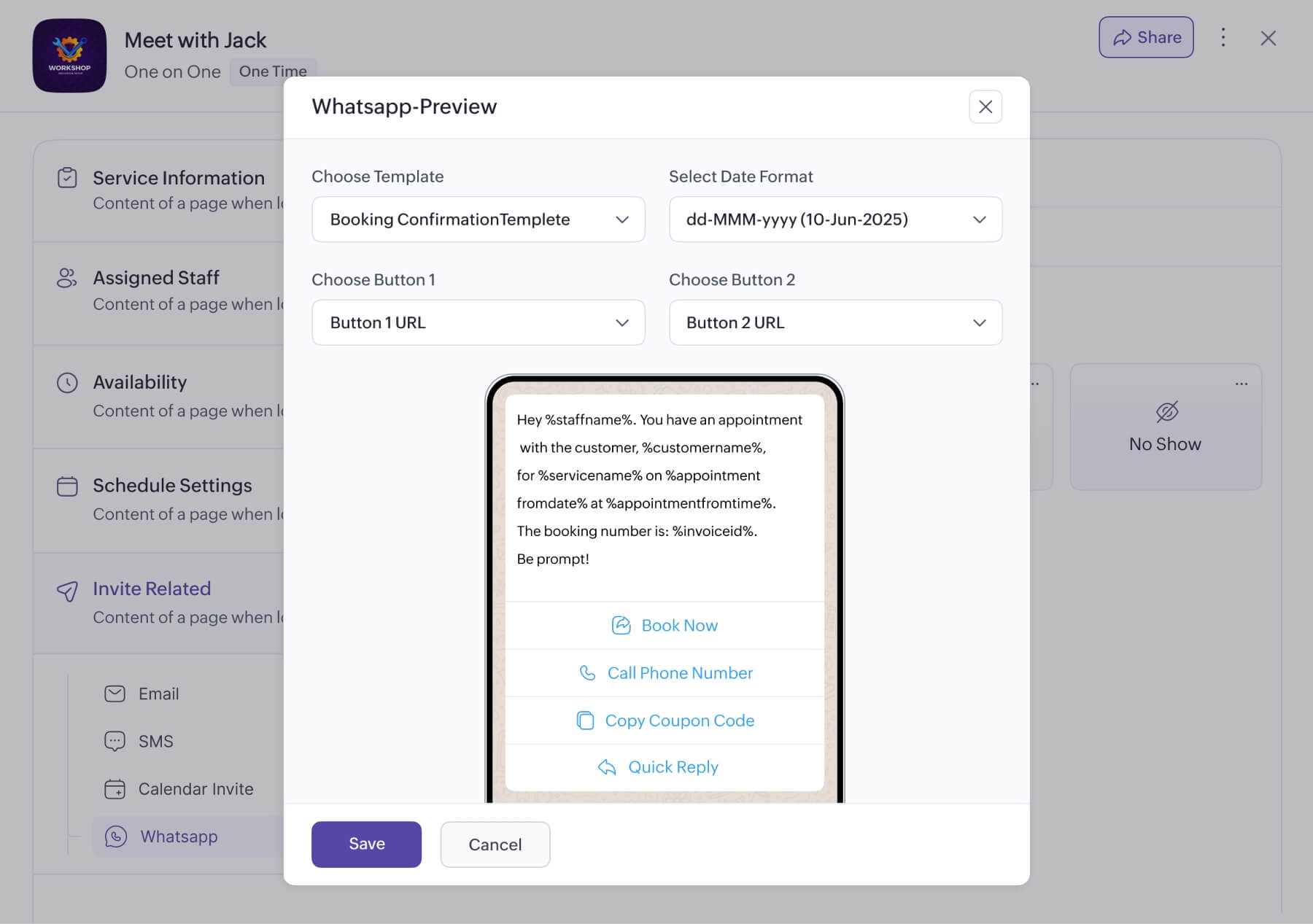
Send WhatsApp notifications
Send booking notifications to customers via WhatsApp messages from your business number. You can allow customers to book, cancel, and reschedule appointments from the notifications that you send.

Stay in control with the mobile app
In the middle of a gig? No problem! Manage your schedule and get notified of upcoming appointments with our app for iOS and Android. Increase bookings with special working hours, or mark unavailability during emergencies, all from your mobile device.
Walk in well prepared
Use the booking form to understand client issues ahead of your arrival. Reorder form fields, ask the right questions, and get the details you need before they book an appointment.

A word from our customers

Mathew Shaffner, 3 Palms Zoo
“We believe that Zoho Bookings will help you improve your operations and enhance your customers’ experience. We would also like to highlight Zoho Bookings’ excellent customer service. They have provided us with personalized support responses and have been willing to go above and beyond to ensure that we are satisfied with their product.”

Senthazal Ravi, The South Indian Restaurant Group
“Zoho Bookings is a no-brainer pick for an appointment booking solution, with all the required features to improve sales and smoothen your operations. Now, we manage to increase our sales by 200%”
Sign up for a 15-day free trial and see how much time you save in a week!
Continue using the free plan after the trial, or upgrade to a paid plan.
TRY ZOHO BOOKINGS NOWFrequently Asked Questions
1. Is it possible to avoid back-to-back job bookings?
Absolutely! With Zoho Bookings, you can add pre- and post-service buffers to factor in breaks or travel time.
2. Do I need technical expertise to get started?
Not at all. Zoho Bookings' intuitive interface makes it easy to get started. But if you'd like to fast-track onboarding or get a tailored walkthrough, we're happy to help. You name the time.
Can I book appointments on behalf of my clients?
Yes, Zoho Bookings offers you the flexibility to schedule sessions on behalf of your clients—ideal for those who are less comfortable with technology.
How do I prevent clients from booking multiple jobs?
To protect your availability, share a one-time booking URL with clients. It preserves all the event configurations (such as availability and assigned staff) while restricting them from booking more than one appointment.
5. Can I track my earnings based on a job or time period?
Yes, Zoho Bookings' customizable revenue reports help you identify revenue-driving gigs and optimize your business. You can generate reports based on appointment types, assigned staff, or a specific date range.
6. Does Zoho Bookings allow home service providers to offer flexible scheduling options?
You can cater to a wide variety of scheduling needs with Zoho Bookings. For example, offer single-person jobs like plumbing or mounting TVs using the one-on-one event type.
Alternatively, you can help customers book a team of professionals using collective bookings. This comes in handy for crew-based services like moving, renovation, or AC installation.
Say hello to smart scheduling
