8 hybrid event engagement best practices that actually work
Hybrid events fail without intentional engagement design. Use these 8 actionable hybrid event best practices to connect both audiences and run an enjoyable experience.
Hybrid events are now fast becoming the standard for event planners looking to improve reach. But the part that still falls apart, over and over, is audience engagement. Some moments land, most don't, and everyone in the control room can feel it.
The in-person crowd moves one way, the virtual audience drifts another, and the "hybrid" part ends up being more wishful thinking than real connection.
71.1% of organizers say their biggest challenge is connecting in-person and virtual audiences.
46% say speakers struggle to hold both audiences at once.
39% of virtual attendees felt left out entirely.
None of this is surprising if you've ever watched a virtual audience fade into silence while the in-person crowd moves on without them. But it is a reminder: hybrid engagement doesn't happen by accident. It happens because someone designed it—deliberately.
That's why this conversation matters. If hybrid events are here to stay, the bar for engagement has to rise with it. And it can. The next sections walk through eight hybrid event best practices that actually make audiences feel connected—not just coexisting.
Must-try hybrid event engagement ideas for organizers
But first, what do attendees expect from hybrid events?
Before talking about best practices, it helps to remember what people actually expect when they show up at your hybrid event—physically or through a screen. And the expectations on each side couldn't be more different:
In-person attendees want what a room naturally gives them: real conversations, chance encounters that turn into full-blown networking opportunities, the energy that comes from being surrounded by other like-minded humans. They expect moments they couldn't get from their desk or homes—an environment that feels alive.
Virtual attendees come for a different value proposition. They want ease and convenience. They want access and opportunity to experience through their screens. They want to jump in without travel, watch sessions on their own time, and still feel like they're part of the event rather than watching it from the outside.
A true hybrid event experience is where those expectations meet instead of competing. That means
Content that reaches everyone the way they want it
Participation that isn't location-dependent
An event flow that makes both audiences feel equally considered.
8 best practices for hybrid attendee engagement
From the way you design the event plan to how you brief your speakers and measure what happens after the livestream ends, every detail shapes your audience's experience of your event.
Here are the best practices that consistently make hybrid event participation intentional, connected, and genuinely worth showing up for.
1. Plan your hybrid event structure early
A 2024 Livestorm study found attendees remain actively engaged for only about 23 minutes on average — roughly 36% of a typical hour-long session. . Smooth, organized setups tell them their time is valued—before a single session starts.
Begin by mapping the entire experience from both viewpoints: what the in-person audience sees, hears, and touches, and what the virtual audience sees on their screen at the same moment. This becomes your "event architecture plan," and it should dictate everything from camera placement to when moderators switch between in-person and remote questions.
Once that foundation is mapped, bring in the people who can break it—or strengthen it:
Loop in speakers early so they know how to play the room and the lens.
Pull sponsors in before booth layouts or deliverables are locked, and ensure both types of audiences know what value they are getting from them.
Sync with tech and accessibility teams to confirm captioning, backup internet, and compliance needs.
Finally, budget your event with eyes wide open. Cameras, captioners, streaming encoders, crew hours, and venue adjustments all scale differently from traditional events. When you price these at the design stage—not the week before—you avoid the last-minute cuts that directly impact audience experience.
‼️Remember, hybrid isn't double the work—it's different work, and it requires more precision upfront than single-format events ever demand.
2. Build a hybrid event tech setup that can handle glitches
Virtual event attendees disappear the moment the stream falters. A tech glitch may not have caused much impact to the in-person audience that might still be settling down, but the online audience would feel ignored and move on to something else on their tabs. One interruption can undo hours of planning—and you rarely get a second chance with them.
A reliable hybrid setup isn't about chasing the most advanced tools. It's about removing the weak points that cause sudden failures. The goal is simple: if something breaks, the audience shouldn't feel it. Here's how you build that kind of stability:
Choose a platform that supports real participation: Ideally, one offering co-hosting and strong attendee management. Two-way audio, clean speaker transitions, and the ability to bring virtual attendees on screen matter far more than flashy interface features. These are the tools that make remote participants feel present.
Use a primary and backup encoder: When an encoder fails, the stream stops immediately—no fade-out, no warning. A backup encoder lets your team switch feeds in seconds so the audience never experiences a blackout.
Secure two separate internet connections: With 32.9% of hybrid events reporting connectivity issues and only 12% planning backups, the risk is obvious. A second internet service provider isn't "extra"; it's what keeps the stream alive when the unexpected hits.
Dial in camera placement for a natural viewpoint: Eye-level framing (around 48–52 inches) with a slight 5–10° downward tilt creates a more lifelike view for virtual attendees. Small adjustments change how connected the stream feels.
And this is where tools like Zoho Backstage become practical rather than a nice-to-have. Backstage OnAir's built-in webcasting keeps your stream steady, and its Zoom integrations give you flexible fallback options. The kind of infrastructure that helps hybrid events stay stable instead of scrambling when something fails.
3. Use balanced moderation to keep both audiences equally involved
92% of webinar attendees expect a live Q&A session at the end of an event. When virtual attendees see their questions addressed as often as in-room ones, they stop watching and start participating. That shift changes everything.
Hybrid Q&A breaks down the moment one audience becomes the default. And for this, you need disciplined moderation that treats both groups as part of the same conversation. A few practices make this work:
Assign someone to watch the virtual room—full-time: Not "check the chat when you can." A dedicated facilitator who scans questions, cues speakers, and keeps remote attendees visible in the flow.
Rotate questions between audiences: In-person, then virtual, then back again. A simple rhythm signals that both sides have equal access to the conversation.
Bridge both audiences verbally: Small cues matter: "We've got a question coming in from the virtual side" or "Let's bring in a perspective from online," ties the room and the stream together.
Show virtual attendees on in-room screens: When the room sees real people asking questions—and virtual attendees see themselves represented—the engagement gap closes fast.
Zoho Backstage makes this easier to execute with tools built precisely for this moment—panellist-only chat for behind-the-scenes coordination, the ability to bring virtual attendees on-screen during Q&A, and a mobile organizer view that lets moderators track both sides without missing a beat.
4. Use interactive tools to keep attention active
Every time attendees click, vote, react, or ask a question, they recommit to the session. For example, polls every 15–20 minutes are mini-resets that pull attention back from email and other distractions.
The goal is to use these tools to support the conversation, not interrupt it. And most importantly, these only work when both audiences see them at the exact moment, and the results appear immediately.
Similarly, for live chat, be sure to assign a "virtual moderator" who actively pulls questions from your remote audiences into the discussion. Even better if you can flash virtual comments—and questions—on screen. This shows remote attendees that their input actually reaches the room—and shows the room that the virtual audience is participating alongside them, not in a separate lane.
This is where the right platform helps. When you use Zoho Backstage's built-in attendee engagement tools like polls, moderated chat, emoji reactions, and on-screen comment display, you get to create small, continuous moments that keep both audiences engaged without forcing it.
5. Coach speakers to deliver to both audiences
When a speaker looks into the camera, says a virtual attendee's name, or responds directly to an online question, the remote audience stops feeling like viewers and starts feeling like participants.
Most presenters default to the room—that's where the energy is, the nods are, the laughter is. But hybrid presenters need to build a second instinct: treat the camera as another front-row attendee, not an afterthought perched at the back of the venue.
Once speakers understand how to split their attention between the room and the lens, the next step is making the rest of their delivery hybrid-ready. Here are a few practical tips that consistently make a difference:
Rehearse dual-audience Q&A: Speakers should practice taking questions from the room and the virtual queue in a steady rhythm so neither audience becomes the default.
Test camera eyeline and presence: Brief pauses to look directly into the lens help virtual attendees feel acknowledged rather than incidental.
Design slides for both formats: What's crisp on a 20-foot screen can be unreadable on a laptop. Always test slides in both environments before show day.
Practice pacing with the stream in mind: Slight pauses between sections help reduce audio cut-offs and keep transitions clean for remote viewers.
Keep handouts and links synced across audiences: Everyone should receive materials at the exact moment, regardless of where they're joining from.
Your hybrid event management software can help here as well. With Zoho Backstage, for instance, you can upload handouts and supporting materials before the event even starts. That means both in-person and virtual attendees have access simultaneously. Plus, virtual attendees can review slides or documents in advance, which often leads to better questions and smoother discussions.
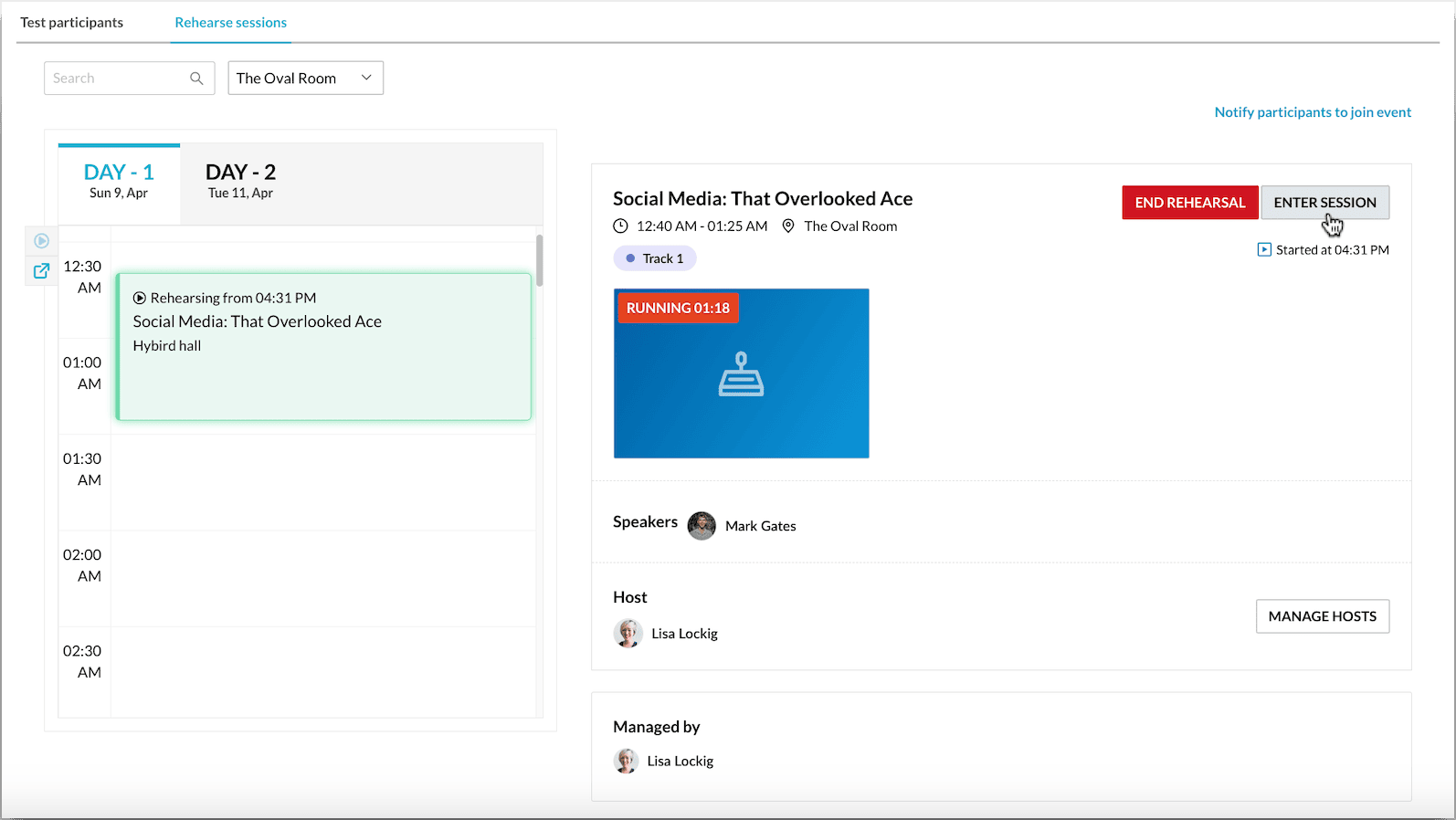
Rehearsal mode supports the other half of speaker prep. Speakers can practice with test participants, check their camera eyeline, walk through slide transitions, and get comfortable addressing both audiences before they ever go live.
6. Design breakouts and networking that work for both audiences
When people know precisely how to join a conversation—and that they won't be interrupting anyone, they participate more. Structured networking also removes the hesitation that stops both in-room and virtual attendees from connecting.
Breakouts are where hybrid events usually show their seams. The room naturally fills with side conversations, while the virtual audience is left staring at a "we'll be back soon" slide. The fix is designing the interaction points intentionally instead of assuming they'll happen on their own.
Start by creating breakout groups that mix virtual and in-person attendees through video, not text. Seeing faces—even briefly—gives both audiences a reason to lean in. AI matchmaking tools help here, especially when they pair people based on shared interests rather than proximity or random chance.
Timing also matters. Breakouts work best right after a keynote, when energy is high and both audiences have something fresh to react to. Schedule them too late in the day and you'll lose the virtual crowd to fatigue and the in-person crowd to dinner plans.
Pro tip: Keep virtual lounges open with rotating hosts so the conversation doesn't end for remote attendees the moment the livestream does. That's usually when in-person networking is just getting started, and without an intentional space to stay connected, virtual participants lose access entirely.
Here's how you can design intentional networking experiences with Zoho Backstage:
AI-powered matchmaking connects in-person and virtual attendees based on shared interests, not random pairing
Networking rooms can be private or public spaces where both audiences can talk using the same interaction tools
One-on-one chat lets attendees start direct conversations without switching platforms
Built-in meeting scheduling makes it easy to book quick 1:1 sessions across formats
Finally, there's event gamification. Use reward points to nudge in-person attendees to reach out to virtual participants. This is just enough incentive to close the gap that naturally forms between both groups and turns cross-format interaction from a "nice to have" into something people actually do.
7. Optimize content pacing and timing
Strategic pauses in the program give people the headspace to absorb what they just heard. Without that space, virtual attendees, especially, can mentally—and physically—check out.
Hybrid sessions need to be structured around how people actually watch. Shorter segments work better because they give both audiences a clear arc: learn something, interact briefly, then move on. We suggest you cap sessions at around 45 minutes. This is usually when virtual attendees start tabbing out, and in-person attendees shift from listening to "when is this session going to end?"
Visual variety also helps. Switching speakers, changing camera angles, or introducing a short demo or visual moment every 10–15 minutes helps prevent the "one voice for an hour" fatigue that hits hardest for virtual attendees.
Also, plan breaks that work for both in-person and virtual attendees:
In-person attendees need time to transition between rooms
Virtual attendees need a screen break before they drift away
If you want breaks to spark more connection, give both groups a simple cross-audience prompt before they step out. For example: "Find someone from the other side—in-person attendees connect with someone virtual and vice versa—and compare takeaways."
You can even add it as a leaderboard challenge if you're using gamification. It turns the break into a quick networking moment and keeps virtual attendees in the mix instead of waiting out the pause.
💡Pro tip: If your event platform allows, turn on session registration
This helps you see which sessions will be popular, which rooms need more space, and where virtual attendance will be highest. With this data, you can plan pacing, staffing, and content flow more accurately.
8. Don't forget to design for sponsor and exhibitor engagement
Booths are where a lot of real conversations happen. Engagement here means attendees get more chances to ask questions, see demos, and discover solutions—and sponsors get the interactions they need to justify showing up.
Exhibitor engagement is one of the most overlooked parts of hybrid events, yet it shapes the attendee experience more than most organizers realize. When exhibitors feel ignored—low foot traffic, weak analytics, no virtual visibility—they scale back participation.
That means fewer activations, fewer demos, and ultimately fewer touchpoints for attendees to explore.
A hybrid booth should function like two connected spaces: the in-person booth with staffed demos and the virtual booth with videos, collateral, and live reps available on chat or video. When these two experiences run in parallel, attendees can drop in from anywhere, and exhibitors don't have to guess where their leads are coming from.
Hybrid swag also needs intent behind it. Digital-only gifts for virtual attendees and pick-up items for in-person attendees will prevent preference hierarchies and ensure a more equal experience.
Pro tip: Choose hybrid event software that actually supports hybrid booths. Look for:
Dedicated virtual booth spaces for exhibitors
Lead-capture tools that sync in-person and online visitor data
Options for virtual attendees to book 1:1 meetings with booth staff
Analytics that track booth traffic across both formats
Easy ways to upload demos, videos, and collateral for remote access
This is one area where Zoho Backstage stands out. Exhibitors get a physical lead-capture app and a fully equipped virtual booth that feeds into the same dashboard, so they can see exactly who visited, where they engaged, and follow up without stitching data together.
Design hybrid event engagement that actually works with Zoho Backstage
Hybrid engagement comes together when every part of the event—content, pacing, moderation, networking, and exhibitor touchpoints—is designed with both audiences in mind. Do that well, and the experience feels connected instead of divided.
And Zoho Backstage gives you the infrastructure to pull this off: shared engagement tools, hybrid-ready speaker prep, integrated booth management, and analytics that track how both audiences participate.
It's everything you need to make hybrid events function the way they're supposed to.
The minimum viable tech stack for a hybrid event includes a stable streaming platform, a primary and backup encoder, two independent internet connections, and at least one eye-level camera with clean audio. This setup removes the single points of failure that typically cause mid-session drop-offs.
The accessibility features that are non-negotiable for hybrid events include accurate live captioning (human-assisted whenever possible), screen-reader–friendly event pages, clear color contrast in slides, and on-demand recordings. These elements ensure everyone can participate regardless of device, ability, or bandwidth.
The optimal frequency for interactive elements in hybrid sessions is a poll or prompt every 15–20 minutes, with Q&A blocks built into the agenda instead of squeezed in at the end. This rhythm resets attention for virtual attendees and keeps both audiences actively involved.
Hybrid event sessions maintain engagement best when they run 30–45 minutes. After the 40-minute mark, virtual attendees start tabbing out and in-person attendees lose focus, so shorter, denser segments consistently perform better.