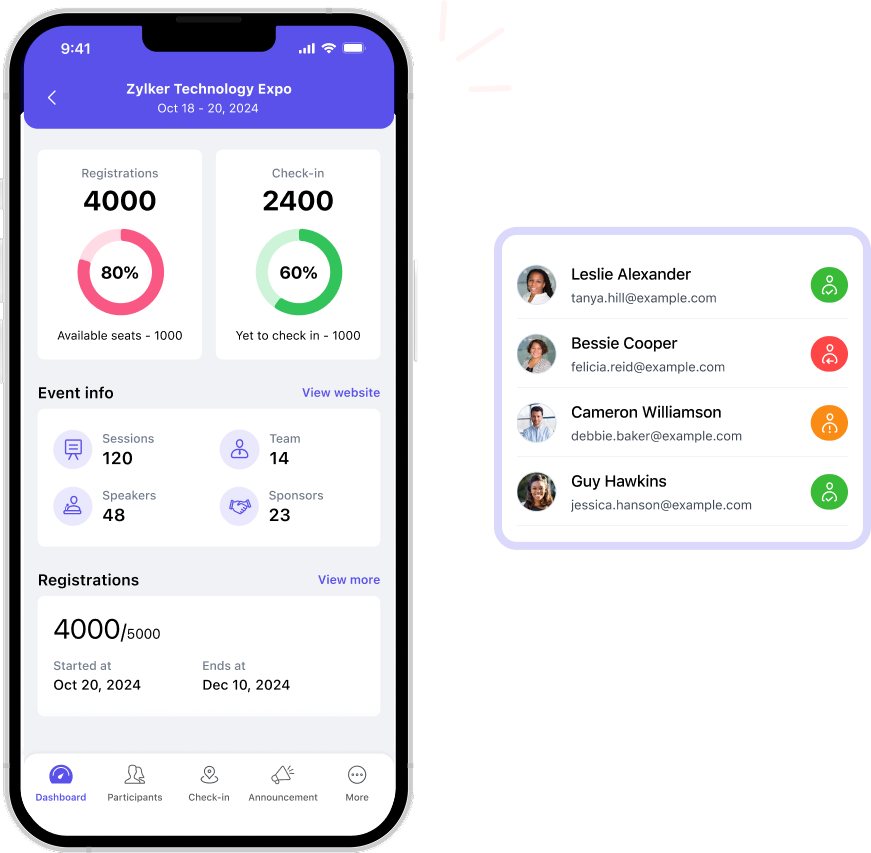
Event apps have become a defining layer of the modern event experience. Recent industry studies show that over 90% of event organizers now consider mobile event apps essential, and more than three-quarters report measurable improvements in event ROI when apps are used effectively. Coinciding with these trends is the shift in attendee expectations toward mobile-first access, with the majority preferring to engage with schedules, networking, polls, and content through a dedicated app rather than static or manual channels.
This emphasis on apps is closely tied to engagement. In EEX 2025, 46% of marketers identified attendee engagement as the most crucial factor in determining event success across both B2B and B2C formats. Digital interactions are playing a growing role here, primarily because they enable real-time feedback, personalized touchpoints, and actionable data that organizers can use during and after the event.
Here's where event apps play a big role. They turn passive attendance into active participation.
Also, event apps streamline the work behind the scenes. Organizers get real-time insight across sessions, faster check-ins, and instant communication. Exhibitors can scan badges, qualify leads, and book meetings on the spot.
With every new business cycle, the question always remains the same- whether you need an event app, but more importantly, what your app needs to do well. Expectations are rising, technology is evolving, and organizers need features that go beyond basics to support more intelligent planning, deeper engagement, and long-term value. That's exactly what this list explores: the 15 event app features that will matter most in the coming year and beyond.
Top event app features you should consider in 2026
But first, what is an event app?
An event app is a mobile hub that brings everything attendees, organizers, and exhibitors need, into one place; before, during, and after an event. It replaces printed programs, paper badges, and scattered communication with a single, always-updated source of truth.
Today, event apps are a baseline requirement for effective event planning. They address core operational needs, including communication, schedule management, and attendee engagement, at scale. At a minimum, an event app should include essentials like a live agenda, speaker and exhibitor listings, real-time updates, and attendee messaging to keep participants informed and connected throughout the event.
In fact, at ActionCoach UK's flagship BizX event, 78% of attendees (860 of 1,100+) downloaded Zoho Backstage's event app.
Different event planning software handle this differently. Some bundle everything into one app where organizers, attendees, and exhibitors all log in with different permissions. Others split functionality across multiple apps.
Zoho Backstage, for example, uses two: one for organizers to manage check-ins and real-time updates, and another for attendees and exhibitors to view agendas, network, and capture leads. This keeps each interface focused—no extra clutter or irrelevant tools.
‼️What you should pay attention to is how this structure affects costs. Platforms that split organizer, attendee, and exhibitor functions into separate apps may price them differently. As you review the features below and start comparing platforms, look closely at how each provider packages—and prices—its app components.
Must-have event app features for organizers
Event organizers need features that provide real-time control, clear communication, and the ability to react fast when things change. Here are some to look out for:
1. Mobile check-in and badging
Check-in is the first operational pressure point of any event. If lines back up, everything else starts behind schedule. Organizers need tools that quickly verify attendees, support walk-ins without slowing the flow, and automate in-event badge printing.. Efficient check-in doesn't just save time—it sets the rhythm for the rest of the event and frees staff to focus on higher-value tasks instead of paperwork.
Zoho Backstage supports this with mobile QR/barcode scanning, self-service kiosks for hands-off check-in, walk-in registration for last-minute arrivals, and on-demand badge printing from tablets.
2. Team coordination and messaging
Behind the scenes, dozens of micro-decisions are happening at once. You have room resets, vendor questions, volunteer rotations, and last-minute speaker needs. Without a central system, these updates get buried in group chats, radios, and hallway conversations.
What you need, instead, is an in-app communication system—such as DMs and channels—that keeps every team member aligned and helps staff respond quickly and without confusion. This is particularly useful when hiring part-timers or volunteers—you don't have to add them to your paid team messaging platforms like Zoho Cliq or Slack for just a day or two.
Zoho Backstage supports this with private and public discussion channels and role-based access. That way, your event team can communicate from a single app, and volunteers and vendors have limited access to the entire platform.
3. Instant event updates and alerts
Schedules shift. Speakers run late. Rooms hit capacity. None of it is avoidable, but confusion is. Without a direct line to attendees, organizers end up dealing with the fallout:
Attendees showing up to the wrong room or missing rescheduled sessions
Crowds forming at sessions that are already at capacity
Staff spending their time answering the same questions over and over
What helps here is in-the-moment alerts. Not an email that sits unread in someone's inbox or an announcement board that people walk past. But instead, an instant notification that reaches attendees wherever they are—whether they're in a session, at lunch, or still in their hotel room.
Zoho Backstage supports this with real-time announcements, mobile push notifications, and WhatsApp integration to ensure updates reach attendees no matter which platform they're on.
4. Real-time event analytics
Planning an event starts with educated guesses—how many people will attend, which sessions will draw interest, and whether your room layouts can handle demand. Pre-event analytics turn those assumptions into something usable. Event metrics like sales trends, registration surges, and demographic patterns help you size rooms correctly, assign staff where they're needed most, and adjust your outreach when sign-ups slow.
Once the event begins, the focus shifts to what's happening right now. You need to know when a room is approaching capacity, when foot traffic is building in one area, or when engagement spikes in a particular session. This level of visibility helps you prevent bottlenecks and smooth out the flow before minor issues reach attendees.
Zoho Backstage provides real-time ticketing and registration data, live attendance tracking at the event and across sessions, engagement metrics as they happen, and even exportable reports for post-event analysis and sponsor reporting.
Must-have event app features for attendee engagement
Just like how event organizers want more control and visibility in 2026 and beyond, attendees wish for relevance and connection. Basically, an easy way to find the sessions that matter, meet the right people, and capture useful takeaways. These attendee engagement app features reduce friction, improve engagement, and turn passive attendees into active contributors.
5. Personalized agendas
The average event agenda can be overwhelming at first glance. Multiple tracks, dozens of sessions, overlapping time slots, side events—attendees are left flipping through options, trying to figure out what's worth their time and what they can realistically attend.
A personalized schedule cuts through that noise. Attendees can bookmark the sessions that matter to them, see conflicts before they happen, and build a day that actually aligns with their goals. Instead of carrying around a printed program and guessing, they have a clear plan on their phone.
💡This also helps organizers. When attendees build their schedules in advance, you get early signals about which sessions are in high demand and which might need more marketing. You can adjust room sizes, add overflow sessions, or shift timings before the event even starts.
With Zoho Backstage, you can let attendees bookmark sessions, build their own itinerary, and sync everything to their personal calendar, so they're not juggling screenshots or program PDFs.
6. Live session participation tools
Most attendees don't want to walk up to a mic during Q&A. They do want to participate—just without the spotlight. Real-time digital tools give everyone a voice. Attendees can ask questions from their seats, upvote the ones they care about most, and respond to polls without feeling singled out. Introverted attendees contribute without the pressure. Popular questions rise to the top, so speakers address what the room actually wants to know.
This is particularly useful for sponsored sessions. You can give sponsors engagement data that proves their session worked. That's tangible ROI they can take back to their teams, making it easier to secure sponsorships for next year.
In Zoho Backstage, you get live Q&A with upvoting, polls, surveys, and emoji reactions, so participation feels natural and not intimidating.
7. Session materials and note-taking
Attendees take in a massive amount of information in a short window. Without a way to capture it, most of it disappears by the next morning.
They scribble notes on napkins, take photos of slides with their phones, or tell themselves they'll remember the key points later. They don't. By the time they're back at their desks, the details are gone, and the momentum is lost.
Session materials and built-in note-taking solve this. Attendees can download handouts directly from the app, take notes tied to specific sessions, and revisit recordings after the event. Everything stays organized in one place instead of scattered across devices and notebooks.
Zoho Backstage, for example, supports downloadable handouts, note-taking tied to specific sessions, and post-event access to recordings so the value lasts long after the event ends.
8. AI-powered matchmaking
Networking often feels like guesswork. Who should I talk to? Who shares my interests? Who's worth approaching? Attendees end up scanning name badges, making small talk, and hoping they stumble into the right conversations.
An attendee directory removes the awkwardness by giving attendees context before they even start a conversation. They can see job roles, interests, goals, and who's attending the same sessions. Instead of cold introductions, they can reach out to people they actually want to meet with something relevant to say.
AI-powered matchmaking takes it further. The app suggests connections based on shared interests, similar roles, or complementary goals. Attendees don't have to scroll through hundreds of profiles hoping to find the right people—the app does the work for them. This is particularly useful for engaging hybrid attendees where one half of your audience is pretty much invisible to the other.
Some features you'd find in Zoho Backstage are searchable profiles, filters by role and interest, and AI-powered matchmaking based on shared attributes—so attendees can prioritize meaningful connections.
9. In-app messaging and meeting management
Making a connection is easy. Turning it into an actual meeting is where most attendees get stuck. Without a system, people exchange contact info, promise to follow up, and then spend the next day bouncing between email, DMs, and calendar links trying to find a time that works.
A built-in scheduler removes that friction completely. Attendees can check each other's availability, choose a time, and confirm a meeting on the spot—without leaving the app. It's especially valuable during busy events when everyone's schedule is packed. Instead of hoping to bump into someone again, attendees can book time while they're thinking about it and move on knowing it's handled.
Discussion channels add depth beyond one-on-one meetings. Topic-based spaces—industry trends, session themes, product use cases, regional groups—let attendees join ongoing conversations, discover new perspectives, and connect with multiple people at once.
Zoho Backstage includes private messaging, public and private discussion channels, shared availability windows with manual or automatic meeting acceptance, booking for in-person or virtual meetings, and digital business card exchange.
10. Social walls and event galleries
Events are at their best when they feel communal—when attendees see what others are excited about, share their own moments, and feel the pulse of the event in real time. Without it, attendees experience the event in isolation. They attend their sessions, grab lunch, and leave—never quite feeling part of something larger.
A social wall completely changes that dynamic. It aggregates posts, photos, reactions, and highlights into one live stream visible to everyone. Attendees can share photos from sessions, post quick reactions to what they're learning, and see what's generating buzz across the venue.
Another related—but more private—option is event galleries. You can add photos and videos from the event and ask attendees to share their own. Some event management platforms also come with liking and commenting features—making this your own private Instagram or TikTok.
Zoho Backstage provides event galleries with AI-powered face search so attendees can easily find, share, and celebrate their event moments.
11. Gamification options
Even when content is strong, events have natural lulls—post-lunch slowdowns, quiet corners, sessions that appeal to niche audiences. Gamification keeps energy steady. It gives attendees a reason to explore parts of the event they might otherwise skip:
Visit a sponsor booth? Earn points.
Complete a poll during a session? More points.
Share a photo on the social wall? Points again.
Small actions add up, and suddenly attendees are engaging with content, sponsors, and each other in ways they wouldn't have organically.
💡For organizers, event gamification becomes a behavior-shaping tool. Need more foot traffic in the expo hall? Attach points to booth visits. Want more session feedback? Reward it. Hoping to spark networking? Make connections count.
Zoho Backstage gives you event gamification with point-based challenges, real-time leaderboards, and reward management. You can keep attendees engaged and reward curiosity throughout the event.
12. Virtual event access for hybrid events
If you're hosting hybrid events, this isn't optional—it's a must. Remote attendees often feel like second-class participants. They're watching streams without the ability to engage or influence the conversation.
Seamless virtual access changes that. When remote attendees can join sessions, ask questions, vote in real time, browse the attendee directory, book meetings, and interact with sponsors just like in-person attendees, the hybrid format feels intentional—not like an afterthought or a compromise.
Zoho Backstage integrates with streaming platforms and supports full virtual participation. This includes live Q&A, polls, breakout room access, networking directory browsing, meeting scheduling, and sponsor engagement—so remote attendees feel like participants, and not spectators.
Must-have event app features for exhibitors
Exhibitors and sponsors invest heavily to be at an event—booth builds, travel, staffing, collateral, and the opportunity cost of time. What they need most is a steady flow of qualified conversations and a reliable way to turn those interactions into follow-up.
13. Booth and team management
Exhibitor booths don't run on autopilot. Multiple team members need to scan leads, schedule meetings, and answer questions—often all at once. Without proper coordination, things fall apart fast: someone can't access the lead scanner, materials are buried in email threads, or half the team doesn't have the login credentials they need.
Booth management tools fix this. Exhibitors can add team members directly in the app and ensure everyone has what they need before the show floor opens.
Zoho Backstage comes with in-app access controls and a centralized materials library, so exhibitor teams stay organized, aligned, and ready to convert visitors into leads from day one.
14. Fast lead capture
Booth conversations happen fast. Exhibitors don't have time to type names, dig through business cards, or wait for Wi-Fi to cooperate. They need to capture leads in the moment, with zero friction so that they can stay focused on the attendee—not the device.
A badge scanner solves this instantly. One quick scan and the attendee's information is saved. If scanning isn't possible, manual entry is there as a backup.
Zoho Backstage's lead capture app supports QR code and barcode scanning, as well as manual entry, to keep lead collection reliable in any environment.
15. Lead qualification and note-taking
Not all leads are equal. A booth might collect a hundred scans, but only a fraction will be ready for sales follow-up. Exhibitors need a way to separate high-value prospects from casual drop-ins—and capture context while the conversation is fresh.
Custom qualifying questions help exhibitors gather the details they actually need. Hot/warm/cold scoring makes prioritization immediate. Quick notes—typed or recorded by voice—capture details that make follow-up meaningful.
Zoho Backstage offers custom qualification fields, priority scoring, and attached text notes so exhibitors can act on leads the same day.
16. Meeting scheduler
Some attendees want more than a quick booth chat—they want a real conversation. But without a scheduling tool, exhibitors end up juggling business cards, guessing availability, or trying to lock down a meeting while the expo floor buzzes around them.
With a built-in meeting scheduler, exhibitors can offer available time slots, book appointments on the spot, and send confirmations instantly. No back-and-forth, no lost opportunities.
Zoho Backstage provides attendee-facing booking and calendar integration, allowing attendees to book meetings at their convenience.
17. Booth analytics
Exhibitors rarely know how their booth actually performed beyond a gut feeling. They need real numbers to justify investment: When was traffic highest? Which reps captured the most leads? How did engagement vary throughout the day?
Booth analytics answer those questions. Traffic patterns help exhibitors adjust staffing, scan counts show momentum, and quality breakdowns reveal whether they're attracting the right audience—not just high foot traffic.
Zoho Backstage provides total visit counts, lead-quality breakdowns, and engagement metrics to help exhibitors measure ROI and refine their strategy. Exhibitors can also export lead data and add it to their CRM for deeper analytics.
What else should you consider when evaluating event apps?
Features matter, but the overall experience—how the app feels, how it reflects your brand, and how it protects attendee data—will determine whether people actually use it. These elements often make the difference between a smooth event and one full of support requests and frustration.
User experience (UX): Look for intuitive navigation, a clean interface, and a minimal learning curve so attendees don't waste time figuring out basic actions. Accessibility features should be built in, and the design should feel consistent across iOS and Android.
White-label customization: Your event app should look like your event. Custom branding (logo, colors, fonts), tailored content, and sponsor visibility options help reinforce your identity and provide partners with greater value.
Security & privacy: Data protection is non-negotiable. You need encryption, secure authentication, and support for GDPR or regional compliance. Zoho Backstage, for example, has built-in options for attendee data access/deletion requests, as well as customizable cookie banners—helping organizers stay compliant without relying on external systems.
Beyond these, think about the pricing structure and how features are packaged. Some platforms charge per attendee, others per event. Some lock key features behind enterprise tiers. The best mobile event app is the one that solves your problems without forcing you to upgrade just to access essentials.
Build better experiences with Zoho Backstage's event apps
The right event app isn't about having the most features—it's about having the features that solve real problems. Organizers need operational control and real-time visibility. Attendees need seamless navigation, meaningful connections, and tools that reduce friction. Exhibitors need fast lead capture, qualification workflows, and data that proves ROI.
Zoho Backstage delivers all of this in a focused, well-structured platform. Two apps—one for organizers, one for attendees and exhibitors—keep interfaces clean and purposeful. Mobile check-in, AI-powered matchmaking, live analytics, discussion channels, booth management, and hybrid event support all work together without the bloat or confusion that comes with platforms trying to do too much at once.
A custom event app can cost $60,000–$250,000+ to design, build, and maintain annually. White-label event apps typically cost $5,000–$40,000 per event or per year, depending on features and scale. Unless you need proprietary functionality, white-label solutions deliver far better ROI.
For large, multi-track conferences, platforms like Zoho Backstage perform best because they support high attendee volume, advanced scheduling, real-time analytics, and robust exhibitor tools. It can also be white-labeled to showcase your brand.
Yes. Most event apps—including Zoho Backstage—use badge scanning, so exhibitors can collect leads even if attendees never install the app.
Launch your event app at least 2–3 weeks before the event. This gives attendees enough time to build their agendas, bookmark sessions, and schedule meetings—while still close enough for information to stay current.
Yes—if your venue supports it. Digital badges with QR codes can handle check-in, session scanning, and lead capture, eliminating the need for printed badges. Many organizers still keep physical badges for networking visibility, but the tech can fully replace them if desired.