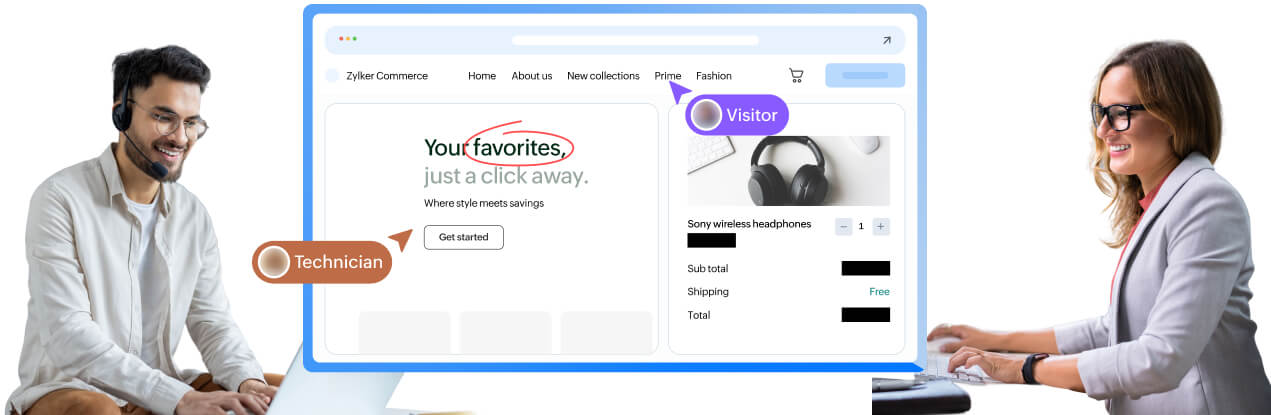
What is browser remote control?
Browser remote control is a cobrowsing capability that enables support agents to interact directly with the customer’s active browser tab. With the customer’s approval, agents can click, type, scroll, navigate, and complete actions just as the user would. The session is limited strictly to the current tab to ensure privacy and a focused support experience.
Key capabilities of browser remote control
Direct browser interaction
Technicians can click buttons, enter text, select options, and navigate within the active tab to guide customers through complex tasks.
Restricted to the active tab
Agents cannot view or access other browser tabs, apps, or system information, preserving customer privacy.
Field-level privacy protection
Sensitive fields such as passwords, card numbers, or personal information, can be securely masked during a remote control session.
Consent-driven access
Customers must explicitly grant control, which ensures transparency and trust throughout the session.
Works without downloads
Browser remote control works directly through the customer’s browser. No installations, plugins, or add-ons required.
Real-time collaboration tools
Technicians can combine browser control with visual cues and annotations to guide customers more clearly and efficiently during complex interactions.
Use cases of browser remote control
Browser remote control is designed for real-world support scenarios where customers need hands-on guidance within web applications.

Customer onboarding and product walkthroughs
Help new users navigate dashboards, complete setup steps, and understand features by guiding them directly within your web application.
Form filling and application assistance
Assist users in completing complex forms such as insurance applications, loan forms, or registrations with real-time guidance and error correction.

Checkout and payment support
Reduce cart abandonment by helping customers complete purchases, apply coupons, or resolve payment issues during checkout.

Internal IT and employee support
Support employees in using internal portals, HR systems, or enterprise tools by guiding them directly within the browser.

SaaS customer support and training
Provide contextual support for SaaS platforms by guiding users through workflows, configurations, and feature usage.

Account recovery and login assistance
Help users reset passwords, recover accounts, and resolve login issues securely without exposing sensitive data.
Benefits of browser remote control
Faster resolution times
By directly taking actions within the browser tab, technicians eliminate miscommunication and reduce unnecessary back-and-forth troubleshooting
Better customer experience
Customers receive clear, guided assistance without the stress of navigating complex workflows on their own.
Higher conversion and completion rates
With real-time guidance, users can complete onboarding, checkout, or submission processes successfully.
Reduces abandonment and frustration
Customers are less likely to drop off when they can rely on guided support at critical moments.
Consistent support across browsers and devices
The feature works across desktops, laptops, and mobile browsers, ensuring flexible and accessible support.

Frequently Asked Questions
The technician can interact with buttons, fields, and navigation elements within the active browser tab. They can type, click, scroll, and submit forms, based on the user’s consent.
No. Zoho Assist Cobrowse restricts access strictly to the active tab. Other tabs, windows, apps, or desktop content remain inaccessible.
No. Sensitive fields such as passwords, credit card details, and personal data can be masked for both the user and the technician.
The customer can revoke control at any time. The technician will immediately lose input access.
The feature works directly in the browser without any installations or plugins for the customer.