Predefined and Custom Ticket List Views
List Views are used to group records based on a defined set of criteria. For example, you can view a list of Open tickets that are unassigned, a view for tickets that are overdue, or a view for tickets that are created in the last week. This way agents can set their priorities and stay customer-centric. Besides these, agents can use the List Views for changing ticket owners, deleting tickets in bulk or export the ticket list to a CSV file.
Zoho Desk provides you with a list of pre-defined ticket views that can be used by agents out of the box. They can also create their custom ticket views according to their requirements. Likewise, administrators can create shared ticket views that can be accessed by all of the agents in your help desk.
Accessing Ticket List Views
Ticket list views can be accessed from the home screen when you click on the List View icon (  ) from the upper-right area. You can select from the left panel, the predefined list views to display their tickets. The 'All Tickets' view will be displayed during your first access. The system will then remember your last seen view, and will list the same during successive access.
The following predefined ticket list views are available in Zoho Desk:
- All Tickets
- Open Tickets
- My Open Tickets
- Unassigned Open Tickets
- Overdue Tickets
- My Overdue Tickets
- Response Overdue Tickets
- My Response Overdue Tickets
- On Hold Tickets
- My On Hold Tickets
- My Team Open Tickets
- Shared Tickets
- Shared Open Tickets
- Spam Tickets
- SLA Violated Tickets
- My Tickets
- Missed Chats
- Closed Tickets
- Tickets for Review
- Customer Responded Tickets
- Archived Tickets
Viewing a Ticket in List View
You must click the subject of a ticket to open its content. When you open a ticket, the other tickets that are part of the View can be viewed (click,  ) on the left panel. This helps you to manoeuvre between the tickets within a List View quickly.
While viewing a ticket, you can switch between the views using the drop-down list in the upper section of the left panel. To return to the ticket list view click the Back button located at the upper-left corner of the ticket.
Creating Custom Ticket List Views
You can create custom list views by defining criteria as per your requirement. The custom views created by an agent will be listed over the left panel, under All Views.
To create a custom list view-
- Click the plus sign located next to Views.
- In the Create New View page, enter the View Name.
- Specify the criteria to filter the tickets
- Set the visibility for the custom view. You can choose between Only Me, All Agents and Specific Agents.
- Click Save.

The custom view is not available in the "All departments" view. If you require this feature, you can activate it on request by emailing us at support@zohodesk.com.
List View Criteria
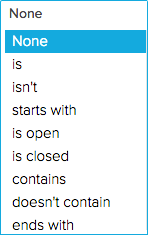
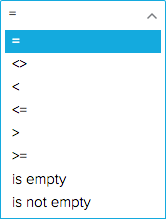
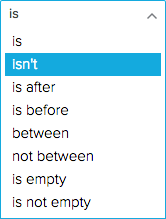
In the Filter Criteria section, you must specify the criteria based on which the tickets will be filtered under the view. The following table lists the criteria options for particular types of fields:
| Field Type | Criteria Options |
String Fields like:
|  |
Numeric Fields like:
|  |
Date & Time Fields like:
|  |
Boolean Fields like:
|  |
Here are some Tips to get you started:
- Age in Days option is very useful for the Date and DateTime fields. It can be used to filter tickets that were created within the last 7 days, tickets that breached the SLA in the past 30 days, or tickets that were closed in the last 5 days.
- A view for Happiness Ratings will help you to track those irate customers who weren't satisfied with the support they received. It will also prove handy to track the tickets that didn't ask for a rating.
- You cannot edit the predefined ticket views that are by default provided in Zoho Desk. You may add a custom view to address any specific requirements.
Editing Custom Ticket Views
You can edit the custom ticket views that were added in Zoho Desk.
To edit a custom ticket view-
- Right-click on a custom ticket view.
- Click Edit from the menu.
- Make the necessary changes and click Save.
Deleting Custom Ticket Views
You can delete a custom ticket view that you think will no longer be required for your agents.
To delete a custom ticket view-
- Right-click on a custom ticket view.
- Click Delete from the menu
- In the confirmation dialog box, click Ok.
Sort, Filter and Set Display Preferences for Views
You can sort, filter and set the display preferences for tickets in the List View. To perform these actions click the More Actions icon (  ) from the upper-right area of the list view.
I. Tickets in the list view can be sorted as per your needs. Here are the five ways you could sort the tickets:
- Ticket Id
- Due Date
- Customer Responded Time
- Created Time
- Latest to Oldest and vice versa (when you click
)
II. You can view the tickets that were received during specific time periods. You can set to view the tickets received in:
- Last 15 days
- Last 30 days
- Last 3 months and
- All days
The first time you access ticket views, the system will display tickets that were received during the last 30 days.
III. You can click the Filter icon (  ) under the More Actions menu to filter the tickets based on following parameters:
- Agent
- Status
- Priority
- Channel and
- Due Date
These filters will be useful when you've chosen some of the generic views like All Tickets, Unassigned Open Tickets, Overdue Tickets etc.,
IV. By default, Zoho Desk will display only ten records (tickets) per page. However, you can choose the number of records to be displayed on a single page. A maximum of 50 tickets can be viewed per page. The system will remember your selection, the next time you access ticket views.
Mass Actions in Ticket Views
Views allow you to perform certain updates to many tickets at once. This way, you need not fiddle with each of your tickets and can save a lot of your time. You can perform the following mass actions on tickets:
- Update Tickets
- Close Tickets
- Delete Tickets
- Assign Ownership
- Merge Tickets
- Mark Tickets as Spam and
- Apply Macro
Except for the merge function, which requires you to choose at least two tickets, you can perform the above said actions even on a single ticket.
I. To update one or more ticket(s)-
- Select the ticket(s).
- Click Update from the mass actions list.
- Select the field to be updated and specify the new values for it.
- Click Save.
II. To close one or more ticket(s)-
- Select the ticket(s).
- Click Close from the mass actions list.
- In the confirmation dialog box, click Ok.
Follow the above-mentioned steps to delete or mark tickets as spam.
III. To assign one or more ticket(s)-
- Select the ticket(s).
- Click Assign To from the mass actions list.
- Select an agent to assign ownership for the tickets.
You can use the search bar to quickly find an agent by their name.
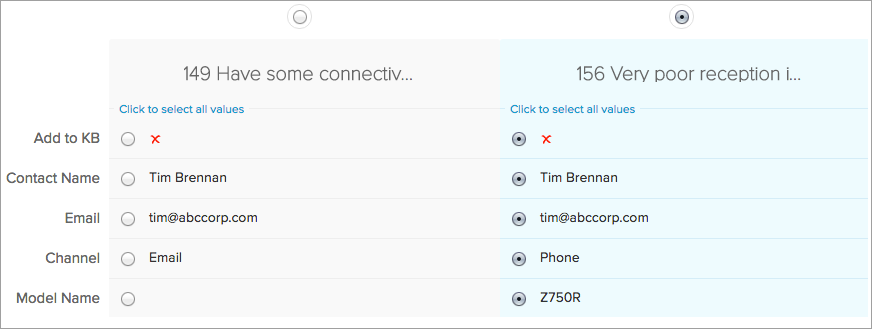
IV. To merge two or more tickets-
- Select the tickets.
- Click Merge from the mass actions list.
- Select the fields from the tickets, for its data to be retained in the Master Ticket.
- Click Merge.
IV. To apply macro to one or more tickets-
- Select the tickets.
- Click Macro from the mass actions list.
If you are in the Work Mode, click the Macros icon () at the top of the column.
- Select a macro you want to apply from the list.
The macro will be applied to the chosen tickets.
Here are some Tips to help you merge tickets:
- You cannot merge more than three tickets at an instance.
- The ticket that was first created in your help desk, will by default be considered as the master ticket. You can also specify the master ticket(by their Ticket Id) to be created.
- The master ticket will keep the date and time of its creation besides other read-only or hidden field values.
- The values that were selected amongst the tickets will be merged into the master ticket.
- All the records including attachments, activities, products etc., from the other tickets will be added to the master ticket.
- Please exercise caution as you cannot undo or revert a ticket merge.
Zoho CRM Training Programs
Learn how to use the best tools for sales force automation and better customer engagement from Zoho's implementation specialists.
Zoho DataPrep Personalized Demo
If you'd like a personalized walk-through of our data preparation tool, please request a demo and we'll be happy to show you how to get the best out of Zoho DataPrep.
- Zoho Workerly Home
- Forums
- Connect With Us:


- Zoho Recruit Home
- Forums
- Connect With Us:
You are currently viewing the help pages of Qntrl’s earlier version. Click here to view our latest version—Qntrl 3.0's help articles.
New to Zoho Survey?





Zoho Sheet Resources
Zoho Forms Resources
New to Zoho Sign?
Zoho Sign Resources
Sign, Paperless!
New to Zoho TeamInbox?
Zoho TeamInbox Resources
New to Zoho ZeptoMail?
Zoho DataPrep Resources
Design. Discuss. Deliver.
New to Zoho Workerly?
New to Zoho Recruit?
New to Zoho CRM?
New to Zoho Projects?
New to Zoho Sprints?
New to Zoho Assist?
New to Bigin?
Related Articles
Predefined and Custom Event Views
Time-bound activities like meetups, demonstrations, and customer onboarding frequently happen as part of sales activities. It's easier to find events that have similar attributes with list views. For example, you can view meetings that are scheduled ...Creating Custom Ticket List Views for Ratings
Custom ticket views help you to organize and view tickets based on the criteria specific to happiness ratings. For example, you can create a view for; closed tickets that had received a negative feedback, tickets that didn't receive a rating or ...Star Ticket List Views
Stars are a way to mark ticket list views, as important. When you star a list view, it stays at the top of your left menu so you can access them later. You can star up to 15 pre-defined or custom list views in Zoho Desk. Note: The ticket list views ...Predefined and Custom Call Views
Call List Views are used to group your calls based on a defined set of criteria. For example, you can see a list of the calls that were missed, completed or are due today. Besides these, you can use the call list views to change a call's owner, ...Predefined and Custom Activity Views
The Activities module is where you can create and keep track of all the tasks, meetings, demos, calls, and events. Each activity has vital information on the start time, duration, priority level, status, and other parameters that can be accessed from ...
New to Zoho LandingPage?
Zoho LandingPage Resources