>>Moving Data from in-house database/applications
You must be having in-house or hosted (on the Web) applications and databases which are used actively for your critical business needs. Based on the business data collected by these systems, Zoho Reports can function as your business intelligence tool for on-demand data analytics and reporting.
Zoho Reports lets you analyze the current and latest data collected by your applications/databases, providing you with real-time reporting & analysis. For this, you need to push the data from your applications or databases into Zoho Reports. Zoho Reports offers some easy ways for doing this :
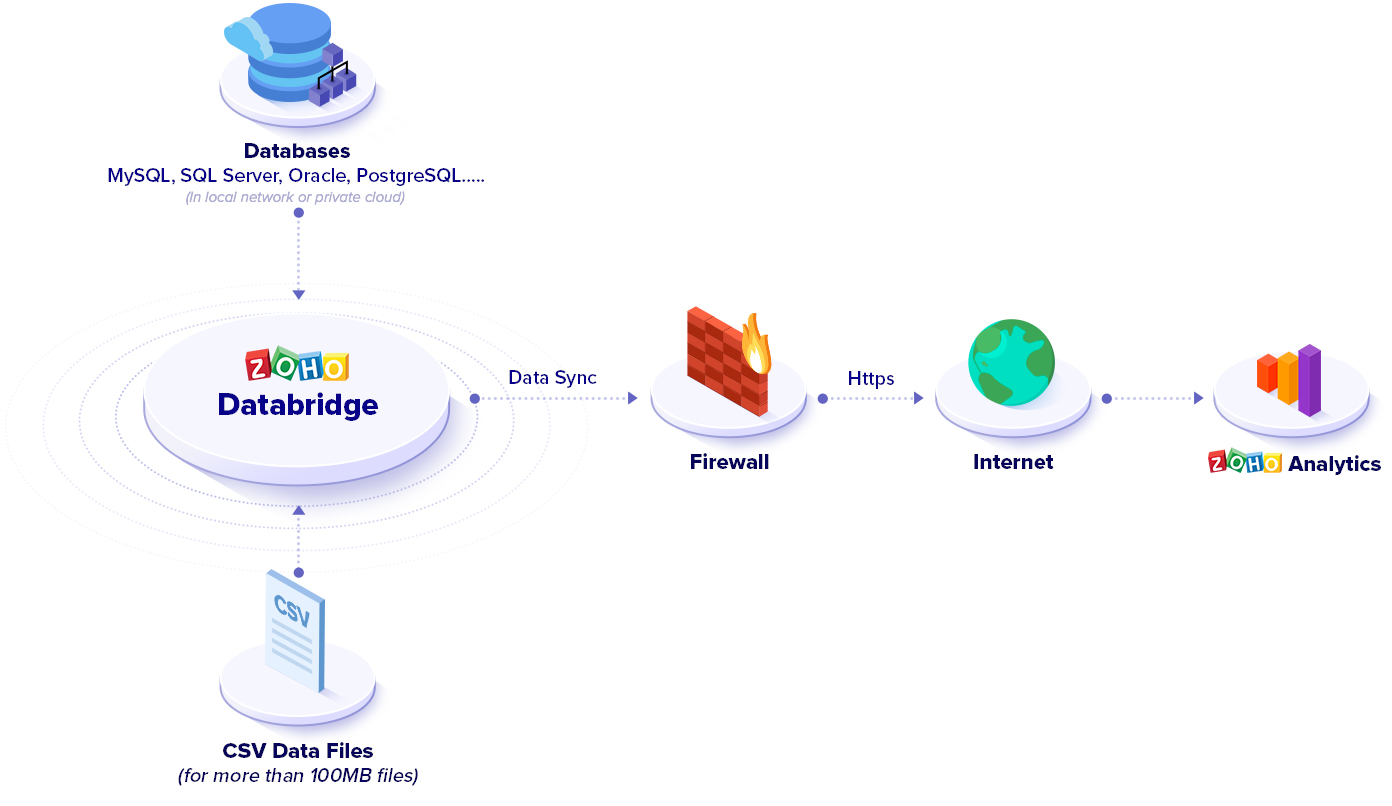
Zoho Reports allows you to easily fetch data from your in-house databases, located behind your company firewall, and push the same into Zoho Reports for reporting and analysis. To achieve this, Zoho Reports provides you with an Upload Tool. You can install this tool in your local environment, make it pull data directly from your database and upload the same into Zoho Reports, without accessing Zoho Reports website via the browser.
Refer to Figure below to see how the Upload Tool functions.
For more detail about how to set up this tool for pushing data directly from your database, check out this help page.
You can setup the Upload tool to be executed periodically for automatic upload of data into Zoho Reports. As latest data gets uploaded/synchronized from your databases or applications into Zoho Reports, you can achieve near real-time reporting and analysis.
Upload Tool supports a command line (console) execution mode. This enables to schedule periodic execution of data upload using any of Windows or Linux operating system schedulers, like Windows Scheduler for Windows and JCron in Linux. This enables you to keep the data in Zoho Reports always synchronized with your database for reporting and analysis.
Click here for more details on how to do this.
The Upload Tool, described above, also enables you to upload data in CSV (Comma Separated Value) file format into Zoho Reports (refer Figure above). In case if you don't want to pull & push data directly from your database or you have an application that doesn't have a database backend (or have a database not supported by us) but provides you with data output in a CSV file, then you can use the Upload Tool provided by Zoho Reports for batch uploading of data from the CSV file.
For more details about how to set up this tool for batch upload of CSV data, check out this help page.
Since the Upload Tool supports command line (console) mode, you can also schedule periodic upload of data by using any of Windows or Linux operating system schedulers. You can use Windows Scheduler for Windows and JCron in Linux. Click here for more details on how to do this.
For more information on using this tool, refer the help documentation.
You might need to push data in real-time (as it happens!!) from your application or database into Zoho Reports for your analysis and reporting need. Pushing data this way would enable you to use Zoho Reports for real-time reporting and data analysis complimenting your business application or database (where your data is collected/aggregated).
Zoho Reports offers a pure HTTP based Web API (Application Programming interface) which enables you to do insert, update, delete and fetch (select) data either as single records or in bulk. With these operations you can push real-time changes into Zoho Reports from your application or database, as it happens.
With Zoho Reports API, you can
For more information on the Zoho Reports API, check out the Help documentation.
Typically in your application, there would be some business logic (programming logic) that handles inserts, updates and deletion of records into the application database. In those points of the application, you can also include logic to correspondingly update the data in Zoho Reports database using the appropriate methods for Insert, Update and Delete in Zoho Reports Web API.
By doing this, as and when the data gets generated or updated in your application or database, it also synchronizes the data in Zoho Reports, ensuring the data in your application as well as in Zoho Reports are the same at any given time. This enables you to do real-time reporting and business analysis on your data.
Zoho Reports supports executing SQL SELECT queries over the Web using the Zoho CloudSQL technology. This enables users who already know SQL (Structured Query Language), not to worry about learning HTTP Web APIs, thus making you jump start into using Zoho Reports as your reporting database. It also supports a JDBC (Java Database Connectivity) driver for executing your SQL SELECT queries, on the Zoho Reports database, easily from within your Java applications.
In the future we also plan to support SQL INSERT, UPDATE and DELETE statements, thus ensuring the coverage of all the data manipulation operations in SQL. This would completely do away the need for learning HTTP Web API syntax to interact with Zoho Reports, if you know SQL. We also plan to support ODBC (Open Database Connectivity) driver for connecting to Zoho Reports easily from ODBC supported programming languages.
There can be scenarios where pushing or uploading data from your applications or database in real-time or batched mode are not addressed with the above said methods. If so, get in touch with us with your requirements at support@zohoreports.com. We would be very happy to work with you to address your needs.
The charting ability is awesome! I love the product- Stephen Crescenti (Account Executive)
EmailCleaners.com
More ››
Toll Free: 1 888 900 9646
You can mail us at support@zohoreports.com