Adding Flags
Flags
Flags are tools that come in handy to manage your emails and organize them for easier identification at a later time. Zoho Mail provides three types of flags that can be applied to emails.
- Important (Red)
- Info (Blue)
- Follow-up (Green)
Flag Single Email
If you want to mark an email with an important flag (red flag), you can simply click on the grayed out flag icon to the left of your email.
To add any of the three flags to an email, follow the steps below:
- Locate the email that you would like to add the flag to, in the email listing pane.
- Right click the grayed out flag icon to the left of the email.
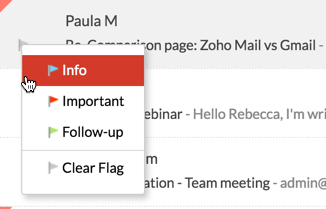
- Choose the relevant flag from the listing.

You can also add flags to emails from the email viewing pane.
- Open the email that you'd like to view.
- Locate the flag icon below the sender's email address.
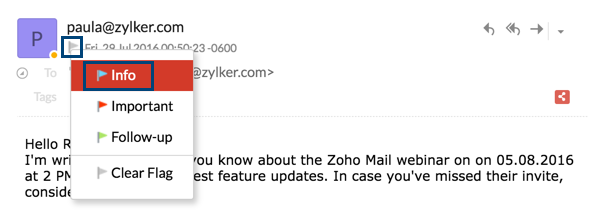
- Right click on the flag icon, and choose the relevant flag from the listing.

After you add the Follow-Up flag for emails that need to be followed up with, you can also associate Tasks and reminders with these emails.
Flag Multiple Emails
To flag multiple emails, follow these steps:
- Select the emails to which you would like to add a flag in the email listing pane.
- Click the More Actions icon and choose the Flag As option from the listing.
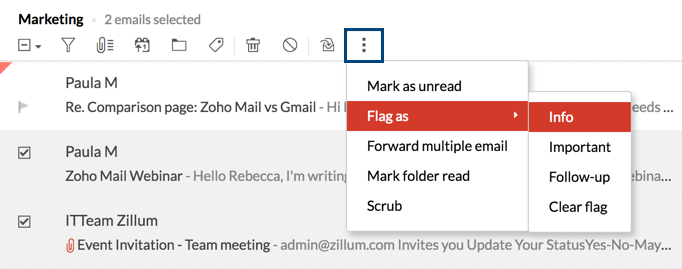
- Choose the flag that you like to add to these emails.

Flagged View
Zoho Mail provides options to view all emails containing flags in a single view.
- In your mailbox, go to the Views option in the top menubar.
- Choose the Flagged option from the listing, and select the relevant flag.
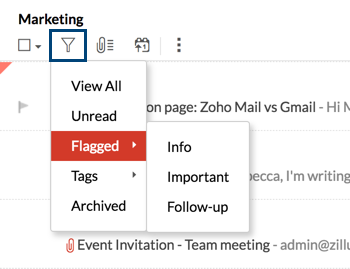
- All the emails containing this flag will be listed.

Flagging Emails using Filters
You can also automatically add flags to incoming emails using Filters. To add a specific flag to emails falling under certain criteria, you can select the Flag As filter action. All emails falling under the defined category will be flagged.
Clear Flag
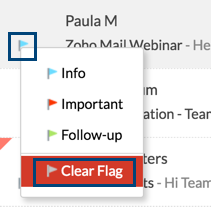
To remove the flag that you've added to an email, simply click on the flag icon to the left of the email. You can also right click the flag icon and choose the Clear Flag option.
Related Topics
Filters in Zoho Mail | Email Reminders | Tasks in Zoho Mail | Applying Tags