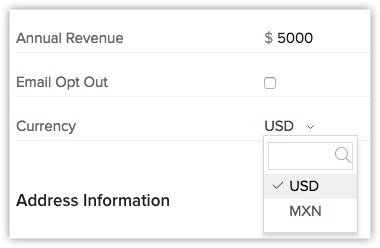
The multi-currency support in Zoho CRM helps you to handle business transactions in the global marketplace easily. If you regularly deal with international clients and vendors, then Multi-Currency will facilitate international buying and selling. With Multi-Currency support in Zoho CRM, you can:
- Estimate the value of an opportunity using the currency you deal in and also in the customer's local currency.
- Generate and view reports in your organization's currency.
- Import a single file that contains data with values in multiple currencies.
Availability
Permission Required
Users with the admin-level permissions can set up this feature.

Points to Remember
- When a user transitions from a paid edition to a trial edition, they can utilize currencies up to the limits of their original paid edition without disabling any added currencies. However, upon moving to an edition with lower limits, the constraints of the lower edition will apply, potentially preventing the addition or activation of currencies if the limit is exceeded.
- The free edition does not support multiple currencies. Downgrading to the free edition results in the deactivation of all previously added currencies. Upon upgrading to a higher edition, users must manually activate currencies to resume their use.
Overall benefits of using multi-currencies
- Improved customer experience: Customers can make payments in their preferred currency, which enhances their experience and boosts customer satisfaction.
- Increased sales: By enabling customers to make purchases in their local currency, businesses can expand their reach and gain new customers, resulting in increased sales and revenue.
- Global reach: Businesses can expand their operations globally, allowing them to sell products or services to customers in different currencies. Accepting payments in multiple currencies removes barriers to entry and enables businesses to tap into new markets.
- Accurate pricing: Ensures that pricing is accurate and consistent across different currencies, preventing confusion and errors in pricing that can negatively impact sales.
- Currency conversion: Automatically converts currencies, making it easy for businesses to manage payments without having to convert currencies manually or use a third-party tool.
Terminologies in currencies feature
Home Currency
It is the primary currency that your organization uses for its business. Often this is the currency used to generate annual reports and calculate the company's income. The Home Currency is most relevant for multinational companies that do business in multiple currencies. For example, a company has offices in Japan, India, and Spain, but its headquarters are in the US. So, the financial figures of this company are expressed in terms of US Dollars. In the example, the Home Currency is US dollars.
Active Currency
These are the currencies in which your organization does business. Only active currencies can be entered in deals and other fields.
Inactive Currency
These are the currencies that your organization no longer uses. Once deactivated, these currencies will not be deleted. They will still be listed under Currencies.
Exchange Rates
It is the rate at which one currency can be exchanged for another. In your CRM account the exchange rate is used to convert an amount in one currency to the home currency used by your organization.
Record Currency
This is the currency for each record. All the currency values for a record will be based on the selected record currency.
Now that we are familiar with the terminologies of currencies management in Zoho CRM, let us look at how to use it.
Profile-based permissions
The permission setting required to access the Currencies tab is available in the admin-level permissions settings. Users with this permission can add, edit, activate, and deactivate currencies.
Choose Home Currency and Add Multiple Currencies
You can select your home currency through the currencies tab, and we'll recommend a value based on your choice in the currency locale option during signup.
The suggested home currency will be based on the chosen option, and users can either confirm it or make changes as needed using the Currencies tab. Users with manage currencies permission can access the currencies tab. The permission setting required to access the Currencies tab has been added to admin-level permissions settings.
To set home currency
- Go to Setup > General > Company Settings.
- In the Company Settings page, go to the Currencies tab.
Note: This Home Currency value is the option you choose in "Currency locale" during the initial CRM setup. - Do one of the following:
- Click Change Home Currency if you want to change the currency which you had initially set during CRM setup.
- Change the currency and its format.
Note: Once you change the home currency by choosing a currency from the dropdown, an alert message will appear to remind you that the home currency cannot be changed further, and the currency code will be applied to all existing records and the values will remain unchanged. - Click Yes, Confirm Home Currency to proceed with the change.
- Click Confirm Home Currency if you want to continue using the same home currency.
Note: Based on the currency that you select, the currency Format will be populated. - If required, click Edit to change the following:
- Select the Code/Symbol from the drop-down list.
- Select the Digit Separator from the drop-down list.\
- Select the Decimal Places from the drop-down list.
- Click Save.
Add Multiple Currencies
After choosing the home currency, users with permission to access the currencies tab can add other currencies that company uses for business. Other users will then be able to select these currencies to use them as a record's currency while creating leads, contacts, deals, etc.

Note
- The Currency field will be available in the records only if a currency is added.
- The system-defined fields - Currency and Exchange rate can be removed from the layout if there are no Currency type fields in the layout. At any point if a Currency type field is added to the layout, automatically the system-defined fields - Currency and Exchange rate will be added.
To add multiple currencies
- Go to Setup > General > Company Settings > Currencies.
- Click the Add Currency button.
Note:
On adding a new currency:
- You cannot delete the currency; you can only deactivate the currency.
- The Currency and Exchange Rate fields will be added to the module.
- Reports may not work properly if currency fields from different modules are used to compare values in filters. - In the Add Currency pop-up box, do the following:
- Select a Currency from the drop-down list that will be the newly added currency.
- Click Yes, Continue to continue adding the currency.
- Select the Symbol, Digit Separator, and Decimal Places from the respective drop-downs.
- Enter the Exchange Rate for the currency that you are adding and click Save.
On activation:
- You cannot deactivate this multi-currency feature.
- All the users with administrator profile will receive an email, informing them that the multi-currency feature is activated in the organization's CRM account.
- The exchange rates for the existing records will be set as 1.
Active and Inactive currencies
Once you add multiple currencies, you can set them as active or inactive currencies.
You also have the option to filter them out.
Currency details and logs
When you click a currency—which is displayed as a hyperlink—the details of the currency will displayed with two tabs: Info and Logs.
Info: Displays the currency's details.
Logs: Captures any changes made to the currency, such as the following:
- Home currency confirmation
- Symbol changes
- Digit separator changes
- Decimal places changes
- Exchange rate changes
- Currency activation and deactivation
Note: The history will be accessible for changes made within the past six months.
Edit the Exchange Rate
The exchange rate is specified while adding multiple currencies. Each record will have the Zoho defined field named Exchange Rate with the conversion value based on the record currency. This is added to keep a note of the rate of conversion at the time of record creation. When the other currencies are added, the home currency will be set as the record currency for all the existing records. As a result, the exchange rates for the existing records will be set as 1.
Note: Changing the exchange rates will not affect the existing records.
To change exchange rate
- Go to Setup > General > Company Settings > Currencies.
- Click on the currency for which you want to change the exchange rate.
- In the Edit <<Currency>> pop-up, modify the Exchange Rate for the currency.
- Click Save.
Deactivate Currency
When your organization no longer uses a currency for business, then you can deactivate it from your CRM account. On deactivating a currency:
- The currency will not be deleted as you can only deactivate them.
- New records cannot be created using the deactivated currency. However, you may be having existing records that use the deactivated currency.
- The deactivated currency will be available under the list of currencies you have added.
To deactivate currencies
- Go to Setup > General > Company Settings > Currencies.
- Toggle the Status button to inactive state on the currency that the organization no longer uses.
- Click Yes, Deactivate.
- A notification confirming successful deactivation is displayed.
Activate Currency
Activate the inactive currencies added in your CRM account whenever you want.
To activate currencies
- Go to Setup > Organization Settings > Company Settings > Currencies.
- Toggle the Status button on the currency that you want to activate.
The following table shows the outcome of deactivating a currency at different action points.
| Impact Areas | When a currency is deactivated |
| New record creation | Displays a validation error requesting the user to choose an active currency. |
| User preferred currency | Reverts to the home currency |
| Portal-user preferred currency | Reverts to the home currency |
| Create record actions in Workflow Rules and CommandCenter | Reverts to the home currency and the currency field values are also converted. |
| Record conversion | Records that are converted with inactive currencies will be replaced with the home currency and the currency field values will also be converted based on the exchange rate. During deal creation, a validation error will be shown requesting the user to choose an active currency if the currency field is present in the form; otherwise, the deal will be created with the home currency. |