Manage Company Settings
There are certain organization specific details, which help differentiate one organization from another. Zoho CRM recommends Users with Administrator's privilege to customize these company specific details, so that all users under an organization-specific account will have these common features.
Edit Company Settings
To change company settings
- Log in to Zoho CRM with Administrator privileges.
- Go to Setup > General > Company Settings.
- Under Company Settings tab, click Edit icon.
- In the Company Settings pop-up, add the necessary details of your company.
- Click Save.
Set Currency
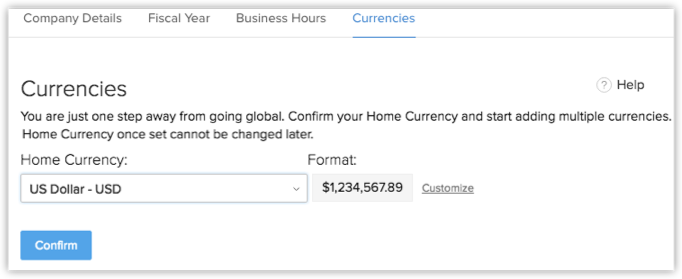
Setting currency is an organization specific feature. By default, the currency is set to US dollars ($). However, user(s) with Administrator privilege can change the currency settings depending on the organization's requirement. Based on the country locale you choose, the currency value will be updated for Quotes, Invoices, Campaigns and other billing related fields.
To select currency
- Log in to Zoho CRM with Administrator privileges.
- Go to Setup > General > Company Settings.
- Under Currencies tab, choose Home Currency from the drop-down.
- Click Confirm.
Personalize Logo
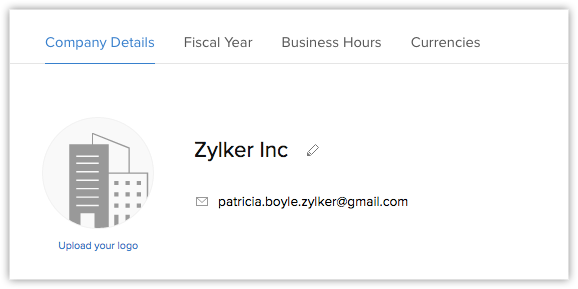
In order to give a personalized look to your account, Zoho CRM allows organizations to change the default logo to your company logo. The customized company logo will appear for all users within your CRM account.
- The image file size should not exceed 20 KB.
- For best results, the logo dimension should be 190 (width) by 65 (height) pixels.
- The logo file format should be .jpg / .png / .gif.
To personalize logo
- Log in to Zoho CRM with Administrator/Super Administrator privileges.
- Go to Setup > General > Company Settings.
- In the Company Settings page, click Upload your logo link.
- Browse and upload the logo. The logo file should be .jpg / .png / .gif format.
Set Organization Time Zone
You can define a common time zone for your organization's Zoho CRM account. For Workflow Rules, a day will be calculated based on this time zone.
To set the organization's time zone
- Log in to Zoho CRM with Administrator privileges.
- Go to Setup > General > Company Settings.
- In the Company Settings page, under Locale Information click Edit icon.
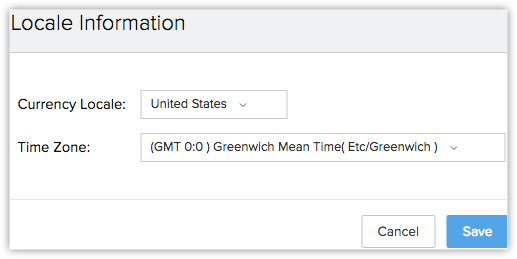
- In the Locale Information pop-up, select the Country Locale and Time Zone from the drop-down list.
- Click Save.
Assign Super Administrator
The Super Administrator is the single point of contact for all communications regarding the transactions and bills from Zoho CRM. Also, only the Super Administrator of the organization's will hold the privilege to change an Admin to Super administrator.
To select super administrator
- Log in to Zoho CRM with Administrator privileges.
- Go to Setup > General > Company Settings.
- In the Company Settings page, click Edit icon.
- In the Company Settings pop-up window, select the Super Admin from the list.
- Click Save.

- Only the active users with the default Administrator profile in Zoho CRM can be selected as the Super Administrator in an organization.
- Only the Super Administrator can delete users in CRM.
Zoho CRM Training Programs
Learn how to use the best tools for sales force automation and better customer engagement from Zoho's implementation specialists.
Zoho DataPrep Personalized Demo
If you'd like a personalized walk-through of our data preparation tool, please request a demo and we'll be happy to show you how to get the best out of Zoho DataPrep.
- Zoho Workerly Home
- Forums
- Connect With Us:


- Zoho Recruit Home
- Forums
- Connect With Us:
You are currently viewing the help pages of Qntrl’s earlier version. Click here to view our latest version—Qntrl 3.0's help articles.





Zoho Sheet Resources
Zoho Forms Resources
Zoho Sign Resources
Sign, Paperless!
Zoho TeamInbox Resources
Zoho DataPrep Resources
Design. Discuss. Deliver.
Related Articles
Set up Fiscal Year
A fiscal year is a period of one year that a business uses to plan, align, track, and analyze its activities, including sales. Fiscal years of organizations may not coincide with the Gregorian calendar (spanning from January 1 to December 31). There ...Setting up organization details
Feature: Organization Settings | Edition: All Scenario A car dealership company subscribes to Zoho CRM's Enterprise edition to scale their customer service operation and increase sales across the US. To begin using Zoho CRM, they must first set up ...Set up your Organization Account
As an administrator your first step towards implementing Zoho CRM for your organization will involve entering details in the personal settings and defining the organization details, which will be visible to all users across the departments. You will ...Zone Analysis
A company's CRM account includes a huge amount of business-related information, including customers' interests and buying patterns, sales cycle duration, rate of completion of sales activities, and sales velocity. A thorough exploration of this data ...Managing CRM Account Settings
Once you sign up for Zoho CRM and have your own account, you can personalize your CRM account. By default, the mandatory information provided by you at the time of sign up, is automatically updated. After logging in, you can change these details ...