Deliver better customer satisfaction with Zoho CRM for your help desk.
Zoho CRM integrates with your help desk software to let sales managers keep in touch with their customers, work together with support teams to close tickets, and add more value throughout the customer journey.

Share in delivering customer satisfaction
Securing a sale is a milestone, but not the end goal of your business. The ideal goal for any business should be to convert their customers into loyal brand advocates. This can only happen if your customer-facing teams can work together to impress the customer.
Your sales account managers need to keep a pulse on their customers even after the sale is over, and ensure that their support tickets are given the right priority.
Your support team interacts directly with their clients and understands their needs on a close level. They need to be able to pass this information to the sales team so that they can continue to offer value to the customer through cross-selling and up-selling.
What are the current problems of your customer-facing teams?
Creating the right environment for customer happiness is the basis of providing an incredible customer experience. To accomplish this, your sales and support teams need to be able to work together naturally. This is easier said than done. Your sales and support teams use distinct software to automate sales processes and provide multi-channel customer support. Unless your CRM can sync with your help desk and pull contextual customer data, your teams end up working in silos.
Sales team
Sales teams can run into trouble personalizing the right pitch to the right customer. If a customer has a lot of issues waiting to be resolved and a sales rep contacts them on the pretext of cross-selling, it could end up being a disaster and end up losing the customer for all future business.
Support team
Support teams have trouble prioritizing their tickets for what needs the most attention. Let's say that there's a lead with a high deal-size who is on the verge of conversion, but they need a few questions cleared up before they make the purchase. If the support agent isn't aware of this, the ticket could fall through the cracks, resulting in frustration, and losing the deal.

Zoho CRM can bridge the gap between your sales and support teams
Zoho CRM is built from the ground up to work seamlessly with the most popular help desk software in the market – Zendesk, Salesforce Desk, and Zoho Desk. With the two-way help desk CRM integration, all your customer tickets are now synced with relevant sales data and made accessible to your customer facing teams, allowing them to provide a consistent customer experience.
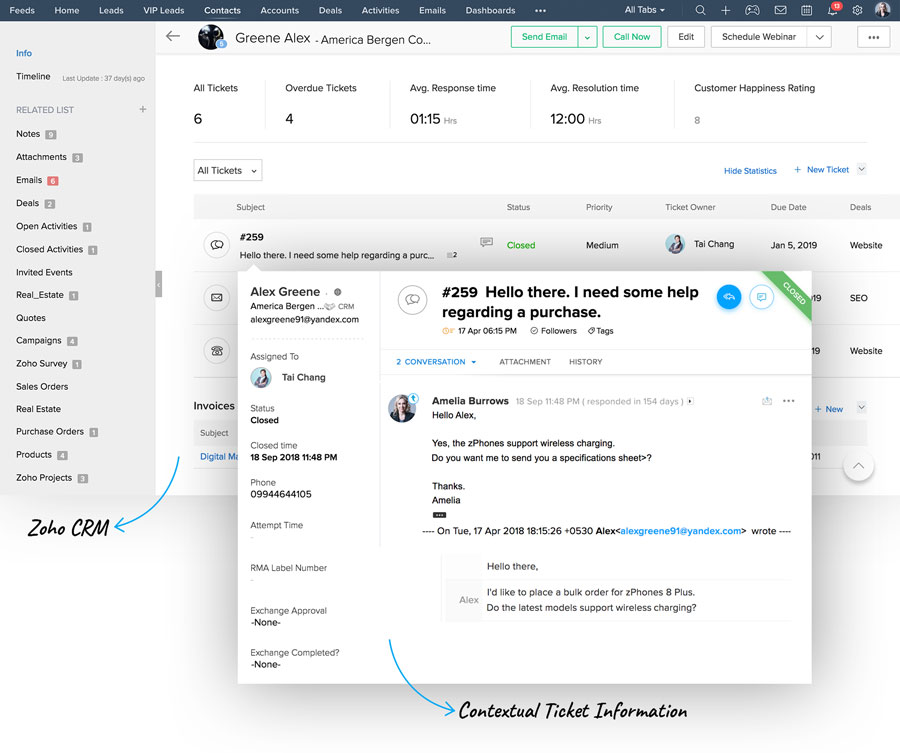
Benefits of Zoho CRM Integration
Here's how your teams can make the most out of this integration
Two-way
synchronization
Two-way synchronization
Relevant tickets are pulled from help desk and displayed contextually under each lead and contact. Similarly, contact information from Zoho CRM information is displayed contextually in each ticket in your help desk.
Contextual CRM
information
Contextual CRM information
Your support teams get contextual access to sales data from Zoho CRM for every recorded ticket. This includes information like potentials, activities, lead scores and lead sources.
Real-time
notifications
Real-time notifications
Your teams can get real-time alerts every time a contact raises a support ticket, responds to a ticket, or leaves a happiness rating.
Still not convinced?
Here's what industry analysts say
of the consumers are willing to pay more for upgraded experience.
of the SMBs say that more than half of their revenue comes from repeat customers, rather than new business.
of increase in customer retention rates increases profits anywhere from 25% to 95%.
Zoho CRM integrates with all popular help desk tools
Zendesk